Toast Payroll: Get Help With Tax Accounts
Last updated: Oct 9, 2026, 11:32 AM
| For immediate updates, particularly those needed before the end of a quarter or for last-minute requests, contact Customer Care. Additionally, keep in mind that some information will reflect in Toast Payroll once your payroll has been successfully processed. |
- Tax Accounts Basics
- Update a State Withholding Tax Account
- Update a State Unemployment Tax Account
- Update a State Paid Family Medical Leave Account
- Additional Resources
Tax Account Basics for Toast Payroll
| Toast Payroll is not notified of withholding frequency changes or unemployment insurance (UI) rate updates. State agencies will determine if your withholding frequency or UI rate will be updated for the new calendar year and will notify you as the tax account owner. When you receive a tax account update notification, follow the steps below to update your tax account settings in Toast Payroll. |
HR+ users can view the Tax Accounts page by navigating to Settings > Payroll > Tax Accounts. (Learn how the new Toast Payroll navigation works by visiting Navigate Toast Payroll Within Toast Web.) Select an FEIN from the drop-down menu at the top, if applicable. This page contains your company's state and local (if applicable) tax account numbers and related information for any state in which you operate.
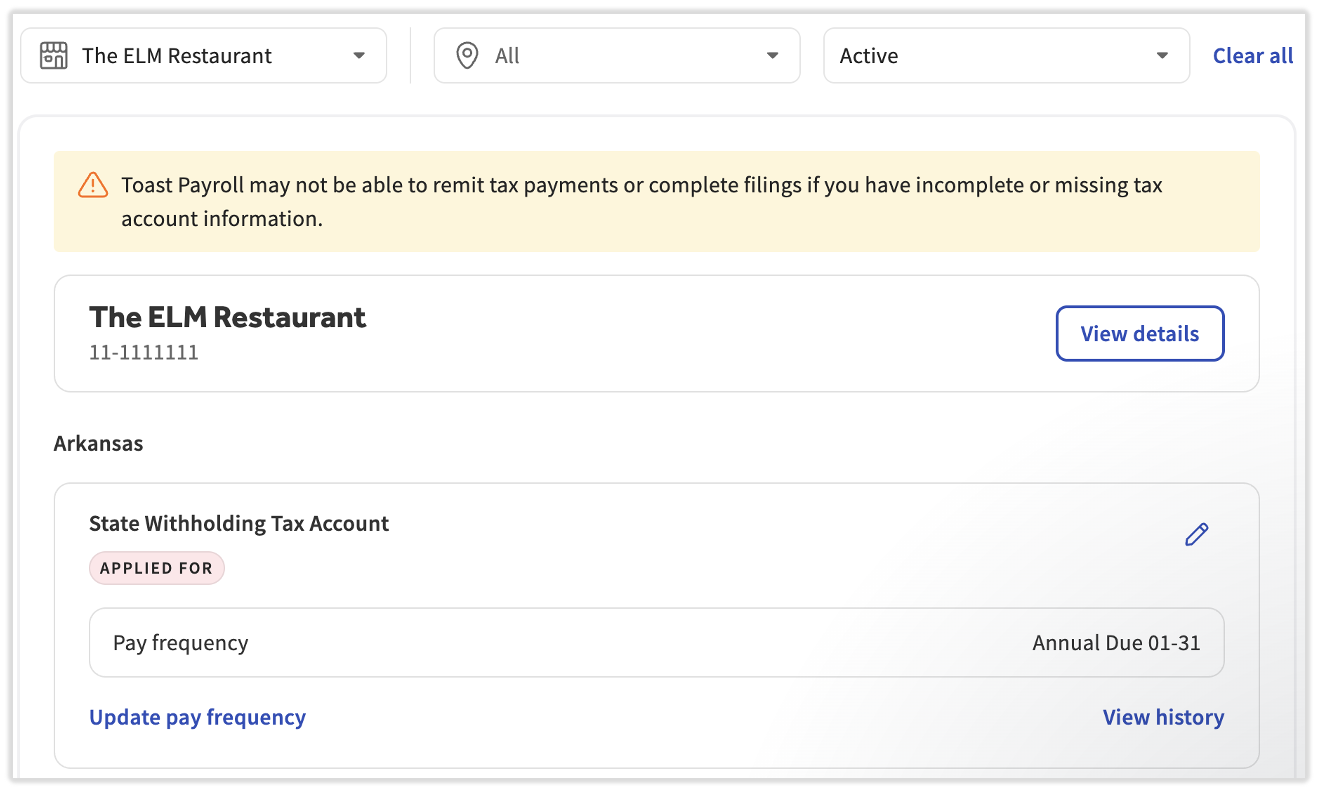
Use this page to update your tax account information. In many cases, restaurants will receive tax notices via paper mail or email. Check these carefully. If you receive a new tax account number, update the Applied for field on this page and add the account number and effective date. Additionally, update any payment frequency, unemployment rate changes, and/or other effective dates that the tax agency notifies you of. You will receive a notification on your dashboard and in the Tax Center if this information is missing prior to quarter-end tax filings.
If you think the page is missing payroll tax accounts that should be filed by Toast Payroll, contact us via the blue chat dot in the lower-right corner of any Toast Payroll page.
Most states will have two tiles: one for withholding and one for unemployment, but keep in mind that some states do not require a withholding account (indicated by an "N/A" in the first column of the first chart on Toast Payroll: Register for State Tax Accounts) since they do not levy income tax. Some states may also have additional tiles for items like local taxes and/or Paid Family Medical Leave (PFML) tax accounts.
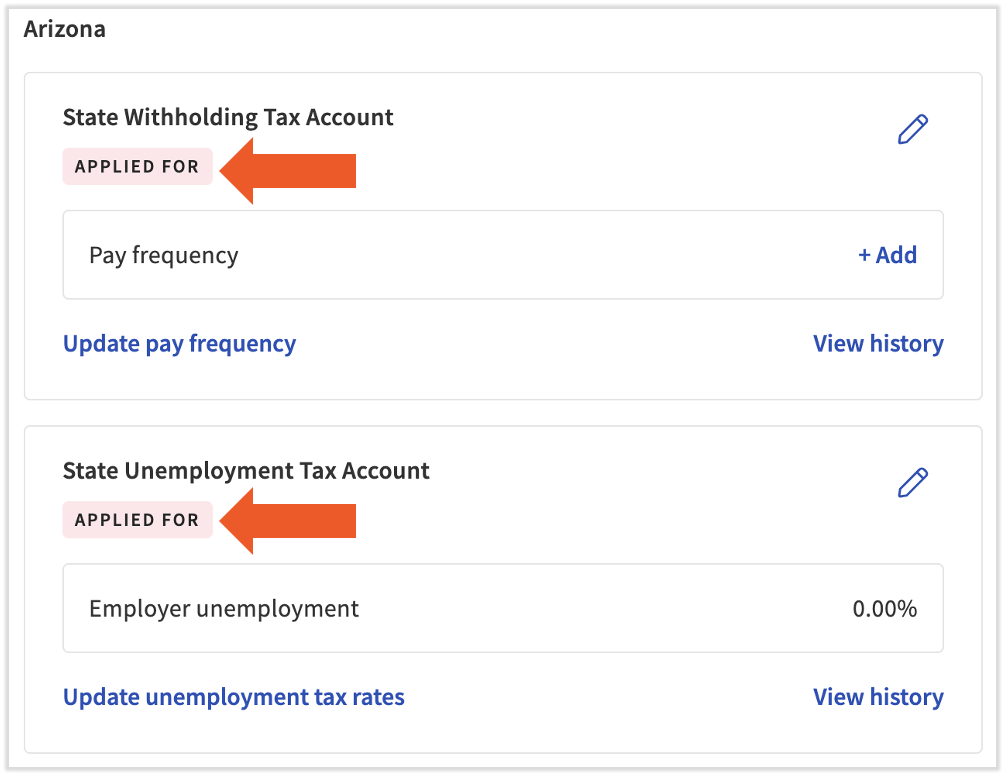
Note: If you see a pink Applied For marker on any tax accounts, this is an important notification to retrieve the missing information. Many jurisdictions no longer accept electronic filings/deposits with Tax EIN in an Applied For status and/or with missing social security numbers. If not remedied, companies may be assessed penalties, interest fees, and/or additional repercussions by governing agencies. Toast Payroll is not liable for incomplete or inaccurate information.
Local Tax Accounts
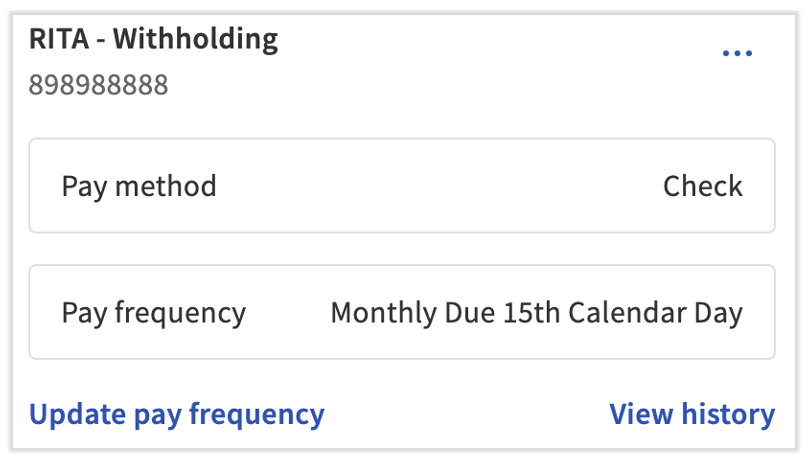
Toast Payroll also contains each jurisdiction's local taxes on the Tax Accounts page. You're able to manage your local tax accounts per state, including adding local tax account numbers and updating payment frequencies. This can come in handy when you receive an email or paper mail tax notice from your local tax authority. Use the same concepts listed below to help you manage these local tax accounts.
Not all Toast Payroll customers are subject to local taxes. Talk to your local tax authorities, a CPA, or a tax professional to confirm your status. Toast Payroll: Get Help With Local Taxes may help you learn more.
Update a State Withholding Tax Account for Toast Payroll
Toast Payroll needs two key pieces of information on your state withholding tax accounts:
- Account number
- Pay frequency
If you're in an Applied For status and need to add your state withholding account number you were issued by the state withholding tax agency:

- In Toast Payroll, navigate to Settings > Payroll > Tax Accounts.
- If you do not see Settings on the left side of the screen, select Payroll from the Toast Web navigation rail on the left to make the Toast Payroll navigation rail appear.
- Select an FEIN from the drop-down menu at the top, if applicable.
- Select the pencil icon in the upper-right corner of the tax account that you wish to edit.
- Edit the Status field to Registered.
- Now add the Account Number you received and add an Effective Date.
- Select Save.
To update your payment frequency to what is issued by the state withholding tax agency:
- Select Update pay frequency to quickly edit just the Pay frequency (how often Toast Payroll should remit state withholding taxes) if you receive an updated payment frequency from the state and Effective date.
- In rare cases, there may be a discrepancy between your actual deposit schedule and what is displayed in Toast. This is a display issue on the Tax Account page rather than a true error. Don't hesitate to contact us if you need more confirmation.
- Select View history to display an audit of the changes made to this data.
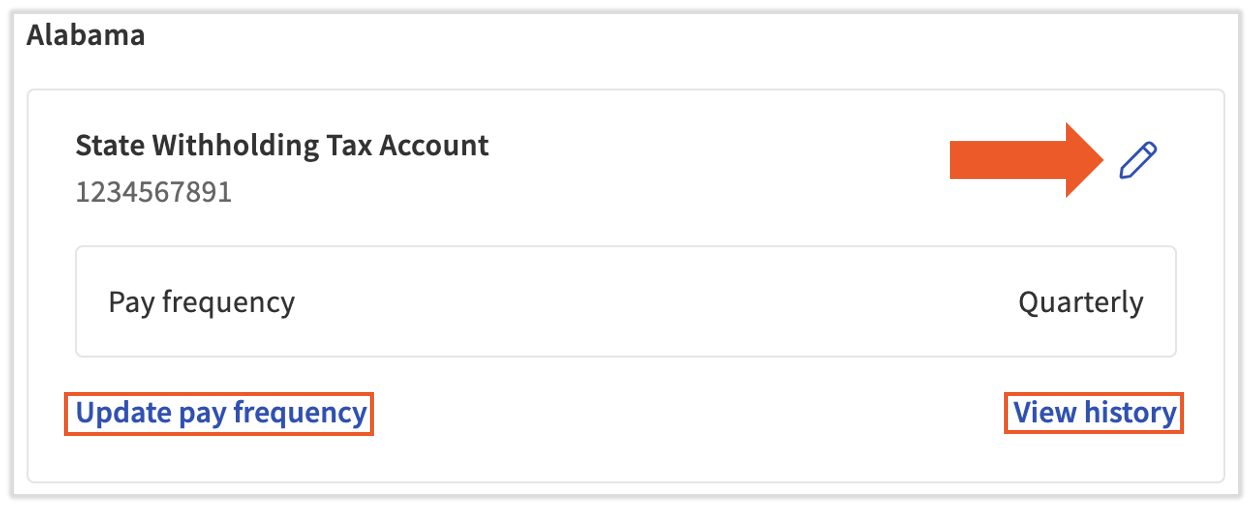
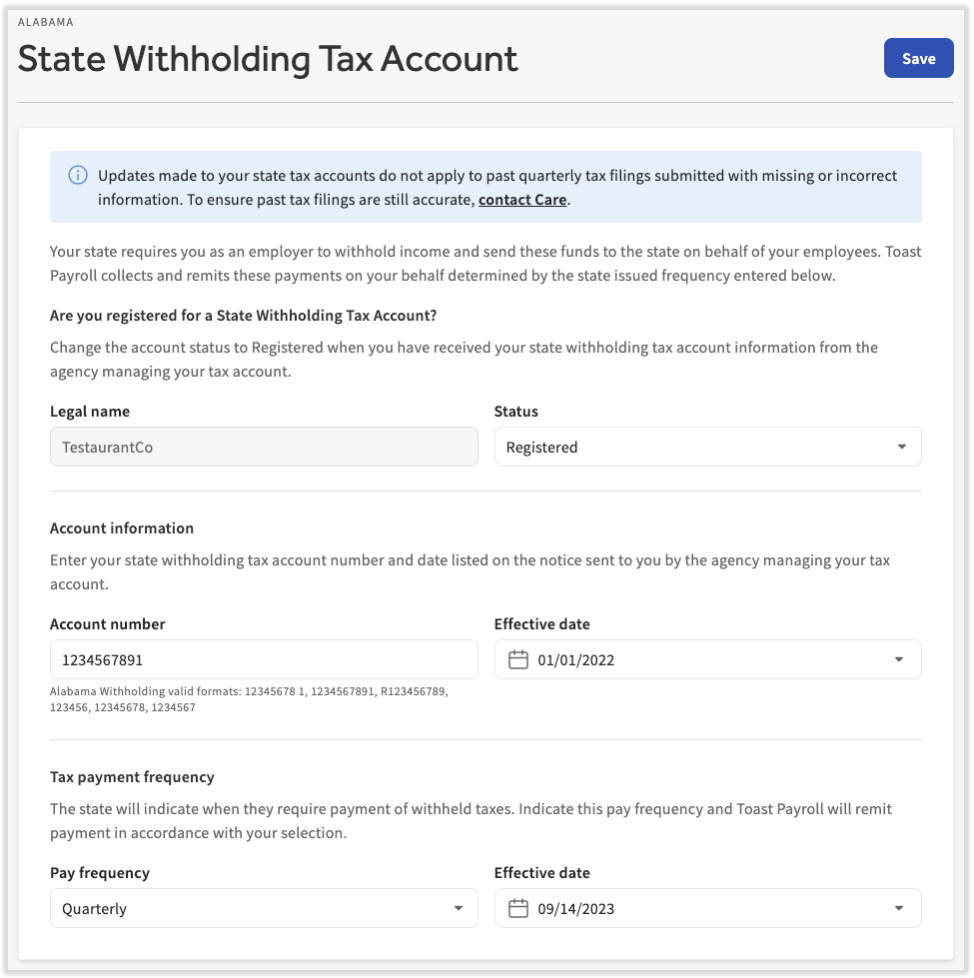
Selecting the pencil icon will open a larger list of items to verify or edit:
- Legal name: Cannot be edited.
- Status: Should be changed from Applied For to Registered once a tax account number is assigned to the business.
- Account number: If you just received an account number you applied for, enter it here, update the Effective date, and change the Status to Registered. If you are changing the number that already exists here, it is vital that you contact us to ensure past tax filings are still accurate. Select the blue chat dot in the lower-right corner of any Toast Payroll page to contact us.
- Effective date: Update this date anytime the adjacent info is edited. The effective date should match the effective date of the information you received from the agency.
- Pay frequency: States will assign a pay frequency to the businesses that operate there to indicate how often withheld taxes need to be sent to the agency. If a state contacts you with a new pay frequency, update this field and the Effective date accordingly.
Update a State Unemployment Tax Account for Toast Payroll
Toast Payroll needs two key pieces of information on your state withholding tax accounts:
- Account number
- Unemployment rate(s)
If you're in an Applied For status and need to add your state unemployment account number you were issued by the state unemployment tax agency:

- In Toast Payroll, navigate to Settings > Payroll > Tax Accounts.
- If you do not see Settings on the left side of the screen, select Payroll from the Toast Web navigation rail on the left to make the Toast Payroll navigation rail appear.
- Select an FEIN from the drop-down menu at the top, if applicable.
- Select the pencil icon in the upper-right corner of the tax account that you wish to edit.
- Edit the Status field to Registered.
- Now add the Account Number you received and add an Effective Date.
- Select Save.
To update your unemployment tax rate(s):
- You may instead select Update employment tax rates to quickly update the Employer unemployment (SUTA) rate and Effective year that Toast Payroll should use when filing taxes.
- Select View history to display an audit of the changes made to this data.
- Note: Double-check the tax notice to see if the rate is listed as a percentage. If not, it's important to correctly convert this rate into a percentage. As an example, if the agency lists a rate of 0.027, you can covert this into a percentage of 2.7%.
- Note: If your SUTA rate has been incorrect for an extended period of time, contact Toast Payroll so we can determine whether voids and re-records can solve this or if you should correct this with the state.
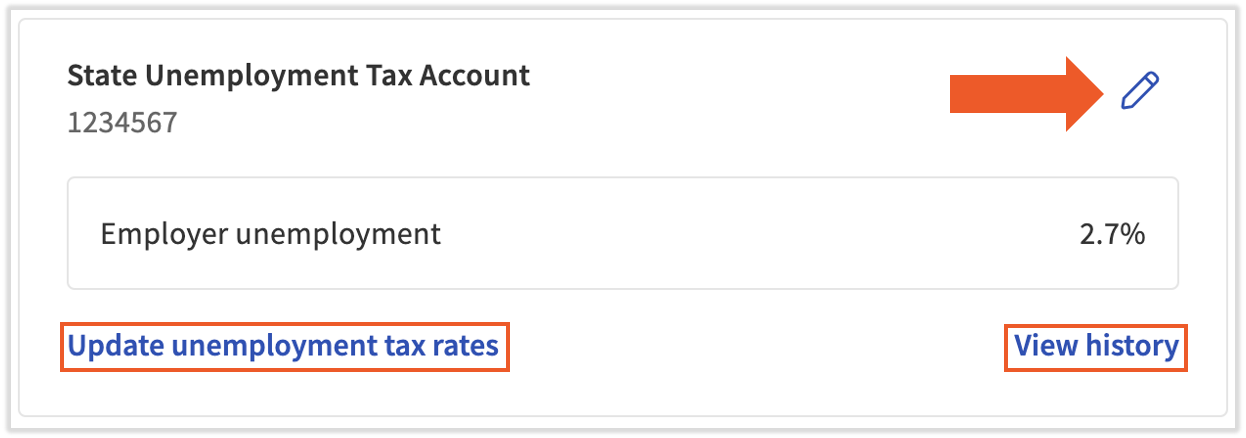
Unemployment rates are generally issued annually by the agency. it is vital that Toast Payroll has your accurate rate for accurate payroll calculations and tax filings.
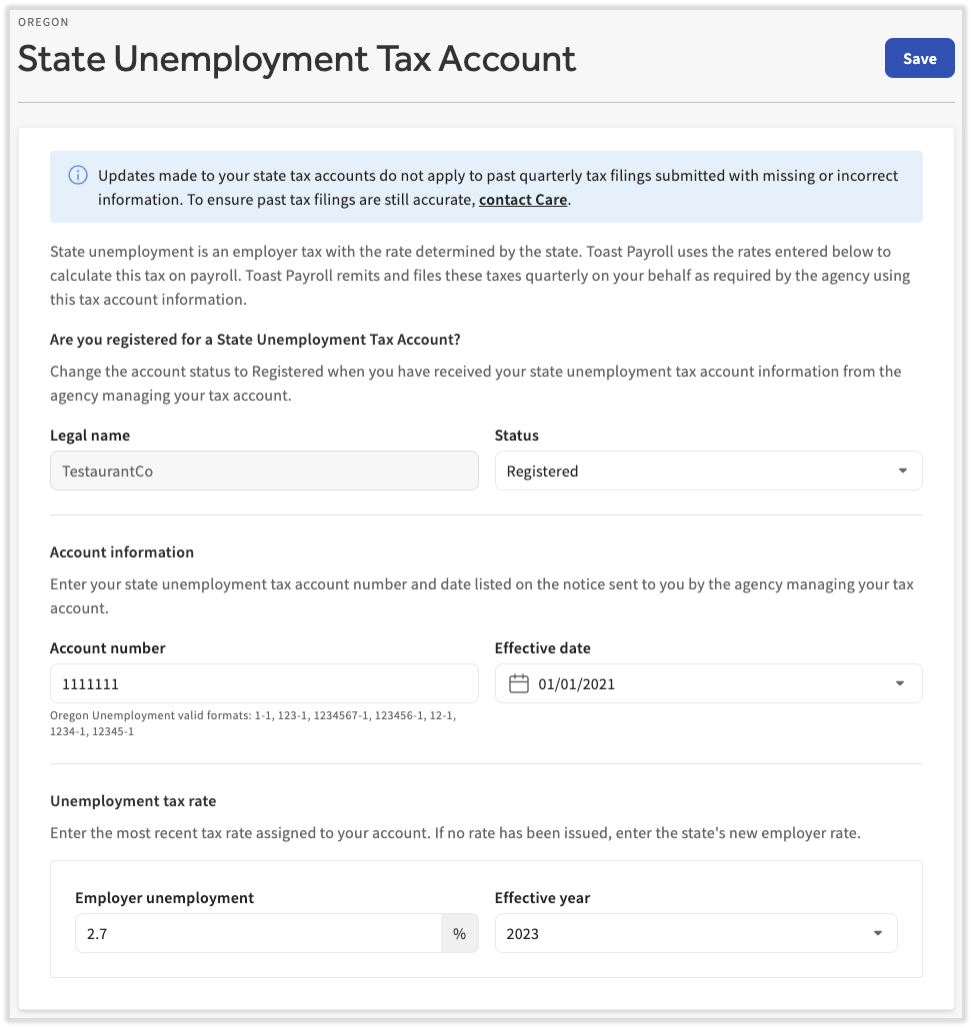
Selecting the pencil icon will open a larger list of items to verify or edit:
- Business legal name: Cannot be edited.
- Status: Should be changed from Applied For to Registered once a tax account number is assigned to the business.
- Account number (only seen when status is Registered): If you just received an account number you applied for, enter it here, update the Effective date, and change the Status to Registered. If you are changing the number that already exists here, it is vital that you contact us to ensure past tax filings are still accurate. Select the blue chat dot in the lower-right corner of any Toast Payroll page to contact us.
- Effective date (only seen when status is Registered): Update this date anytime the adjacent info is edited.
- Employer unemployment: States will assign an unemployment tax (SUTA) rate to the businesses that operate there. If a state contacts you with a new rate, update that field and the Effective date accordingly.
- You may see other fields here for certain states, such as Colorado.
Update a State Paid Family Medical Leave Account for Toast Payroll
Some states have paid family medical leave programs, also known as PFML and sometimes FLI. Per the Department of Labor, paid family medical leave refers to policies that enable workers to receive wage replacement when they take extended time off from work for qualifying reasons, such as bonding with a new child, recovering from their own serious health condition, or caring for a loved one with a serious health condition. Check with your state agencies, an accountant, or a tax professional for more information on your state's paid family medical leave program. You can also use the Toast HR Toolkit to get assistance with state paid leave programs.
Toast Payroll needs two key pieces of information for your state PFML tax accounts:
- Account number
- Any exemptions you might qualify for
If you're in an Applied For status and need to add your state PFML account number issued by the state agency:

- In Toast Payroll, navigate to Settings > Payroll > Tax Accounts.
- If you do not see Settings on the left side of the screen, select Payroll from the Toast Web navigation rail on the left to make the Toast Payroll navigation rail appear.
- Select an FEIN from the drop-down menu at the top, if applicable.
- Select the pencil icon in the upper-right corner of the tax account that you wish to edit.
- Edit the Status field to Registered.
- Now add the Account Number you received and add an Effective Date.
- Select Save.
PMFL tax account settings will include a list of exemptions you may qualify for. These come in the form of checkboxes at the bottom of a PMFL tax account.
- In Toast Payroll, n
- avigate to Settings > Payroll > Tax Accounts.
- If you do not see Settings on the left side of the screen, select Payroll from the Toast Web navigation rail on the left to make the Toast Payroll navigation rail appear.
- Select an FEIN from the drop-down menu at the top, if applicable.
- Select the pencil icon in the upper-right corner of the tax account that you wish to edit.
- Scroll to the bottom to locate the applicable exemptions for this state's PFML program. Select a checkbox if you wish to activate an exemption.
- Select Save.
Additional Resources
- Toast Payroll: Registration Chart by State
- Toast Payroll: State Tax Account Number FAQ
- Toast Payroll: Manage Payroll Taxes
This content is for informational purposes and is not intended as legal, tax, HR, or any other professional advice. Please contact an attorney or other professional for advice.