Set Up Tax Rates on Modifiers (Australia, Canada, Ireland and U.K.)
Last updated: Apr 8, 2026, 10:20 AM
Toast POS lets you configure how taxes apply to order modifiers, including setting unique rates, overriding defaults, and customizing receipt displays.
| This content is applicable to Toast customers in Australia, Canada, Ireland and the U.K.
Further, this content is for informational purposes and is not intended as legal, tax, HR, or any other professional advice. Please contact a tax professional or other professional for specific advice based on your unique circumstances. Per the terms of the Merchant Agreement between you and Toast, you acknowledge and agree that Toast has no obligation to determine whether taxes apply to your business or transactions, or to calculate, collect, report, or remit any taxes to any tax authority arising from any payment, unless required by law. |
- Modifiers & Tax Rates Overview
- Configure Unique Tax Rates on Modifiers
- Configure Override Tax Rates on Modifiers
- Configure Inherited Tax Rates on Modifiers
- Update Receipt Configuration for Tax Rates
Modifiers and Tax Rates Overview
Modifiers are optional additions or alterations to a menu item. Think of them as customizations that your guests can request, such as upgrading from a water bottle in a combo meal to a large-sized fountain soda beverage. To learn more, check out Create and Manage Modifier Groups and Modifier Options.
Taxes can be applied to modifiers in several ways in the Toast platform. This is controlled by the modifier tax behavior setting, which offers three distinct options:
- Inherit Item Tax Rate: This is the default setting. The modifier will automatically inherit the same tax rate as its parent menu item. Imagine you sell a sandwich that is taxed at a certain rate, say 4%. You offer customers the option to add extra fillings to their sandwich, like cheese, avocado, or bacon. These extra fillings are considered modifiers. Because these modifiers are simply additions to the sandwich and don't change its basic nature as a food item, they may also be taxed at the same 4% rate. This Inherit item tax rate setting allows add-ons to a food item to be taxed consistently with the main item itself.
- Unique Tax Rate Applied to Modifiers: This option allows you to assign a specific tax rate to a modifier that differs from the parent item's tax rate. This is particularly useful when modifiers fall into different tax categories. For example, a combo meal that includes a pizza and a two-liter bottle of cola. In your region, prepared food items like pizza might be taxed at a standard rate, let's say 5%. However, there might be a different tax rate that applies specifically to certain beverages, like a 7% rate for the cola. Using this unique tax rate setting, you can ensure that the cola in your combo meal is taxed at the correct 7% rate, while the pizza itself remains taxed at the 5% rate for prepared food. This allows you to accurately apply the different tax rates to each component of your combo meal, even though they are sold together as a single package.
- Modifier Tax Rate Overrides Item Tax Rate: This setting allows the modifier's tax rate to override the tax rate of the parent menu item. Both the modifier and the parent item will be taxed at the modifier's specified rate. This is helpful when a modifier changes the tax category of the entire item. For example, a cold sandwich might be taxed at 5%, but if a customer requests it heated, the "hot" modifier could trigger a higher tax rate of 7% for the whole sandwich.
| The Modifier Tax Rate Overrides Item Tax Rate functionality is in limited release with select customers in B.C. Canada at this time. Check back soon for updates! |
Important Considerations for Modifier Tax Rates:
- Multiple Override Modifiers: If you have multiple modifiers that are set to override the parent item's tax rate, and more than one is applied to the item, the system will default to the parent item's tax rate.
- Mixed Modifier Settings: If there are multiple modifiers applied to an item, one set to override and another set to inherit tax rate, the parent item and both modifiers will use the modifier override tax rate.
- Nested Modifiers: When dealing with nested modifiers (e.g., a dressing on a side salad that is itself a modifier for a sandwich), the override tax behavior only affects the immediate parent. In this example, the dressing's tax rate would only override the side salad's tax rate, not the sandwich's.
- Tax Inclusion Setting: Modifiers always inherit the tax inclusion setting (inclusive or exclusive) from their parent menu item. This provides consistency in how taxes are displayed and calculated.
- Unassigned Tax Rates: If a modifier is configured with a unique tax rate or set to override the parent item's tax rate but doesn't have a tax rate assigned, the modifier option will not be taxed. Likewise, if a modifier option overrides the tax of its parent item but is not assigned a tax rate, both the modifier option and its parent item are not taxed.
The Modifier Tax Behavior feature interacts with other tax functionality as follows:
- Tax Inclusion: Modifiers inherit their tax inclusion setting from the parent item. This setting is not affected by the Modifier Tax Behavior.
- Take Out Tax: If a specific "Take Out" tax rate is configured, it will apply to the modifier when the parent item is ordered for takeout.
- Smart Tax: Modifiers inherit any changes to the parent item's tax inclusion setting due to Smart Tax rules.
- Size Pricing: If a menu item uses size pricing and a size modifier has a unique tax rate or overrides the parent item's tax rate, the modifier's tax rate will apply to the entire item.
- Tax Exemption: If an order is marked as tax-exempt on the POS, the Modifier Tax Behavior is ignored, and no tax is applied to the modifier.
- Toast Multilocation Management: You can change the Modifier Tax Behavior for specific versions of a modifier within Toast Multilocation Management without affecting other versions.
Configuring Unique Tax Rates on Modifiers:
You can configure a tax rate for a modifier option that is different from the tax configured for its parent menu item. The modifier option's unique tax rate is applied separately from the menu item tax rate.
To configure a unique tax rate for a modifier:
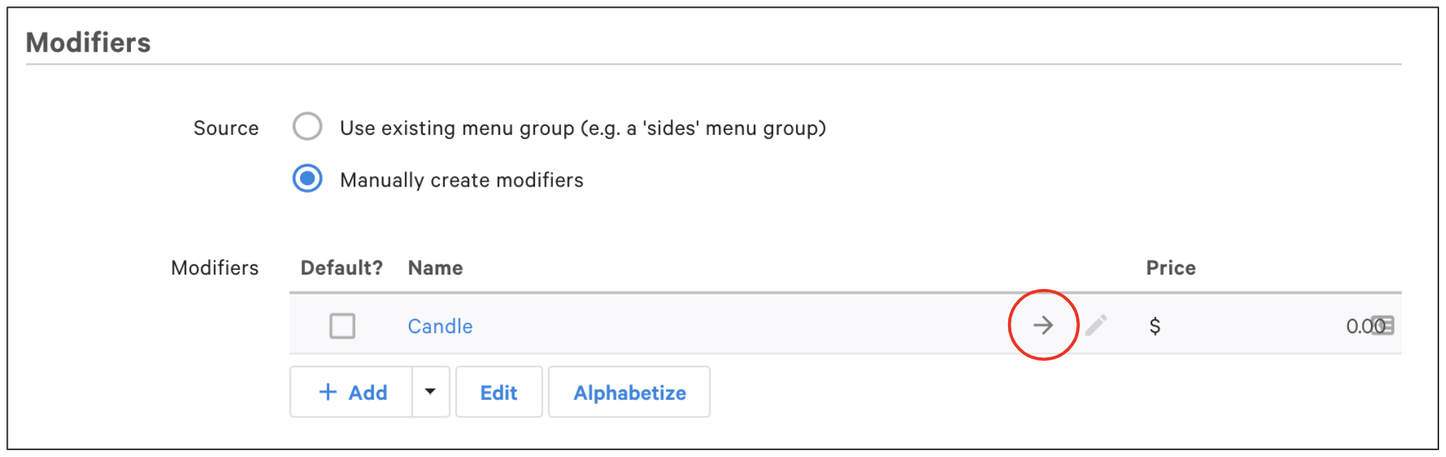
- Locate the modifier you want to configure.
- Select the arrow on the modifier to access its menu item reference.
- Scroll to the bottom of the menu item page to the Taxes section. In the Inherit Tax Rates from Menu Group option, select No, specify tax rates here.
- Select a tax rate from the Applicable taxes section.
- For the Modifier Tax Behavior option, select Unique tax rate applied to modifiers.
- Save and publish your changes.
Configure Override Tax Rates on Modifiers
You can configure a tax rate for a modifier option that is different from the tax configured for its parent menu item and which overrides the parent item's tax rate. In this case, both the modifier option and its parent item are taxed using the rate configured for the modifier option.
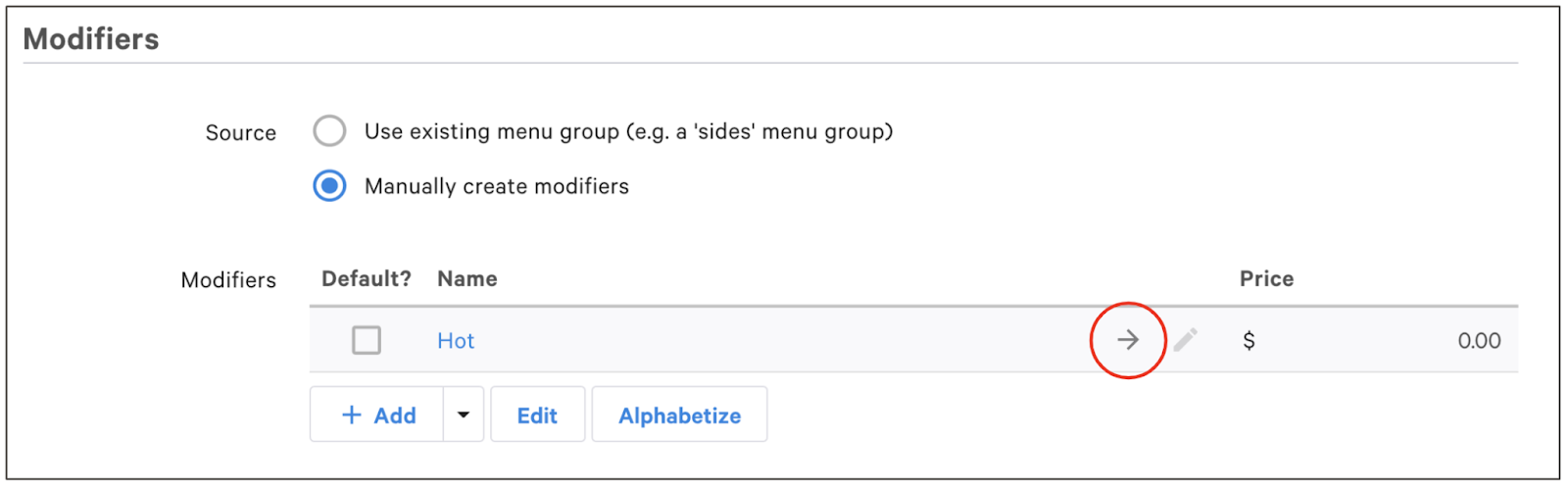
- Locate the modifier you want to configure.
- Select the arrow on the modifier to access its menu item reference.
- Scroll to the bottom of the menu item page to the Taxes section. In the Inherit Tax Rates from Menu Group option, select No, specify tax rates here.
- Select a tax rate from the Applicable taxes section.
- For the Modifier Tax Behavior option, select Modifier tax rate overrides item tax rate.
- Save and publish your changes.
Configure Inherited Tax Rates on Modifiers
If you've previously set a unique tax rate or configured a modifier to override its parent item's tax rate, but now want the modifier to inherit the parent's tax rate, you can easily revert to the default setting.
To configure a modifier to inherit its tax rate from its parent menu item:
- Locate the modifier you want to configure.
- Select the arrow on the modifier to access its menu item reference.
- Scroll to the bottom of the menu item page to the Taxes section. For the Modifier Tax Behavior option, select Inherit item tax rate. In this example, the modifier will ignore the Retail Tax that is selected in the Applicable taxes section and instead use the tax rate configured for the parent menu item.
- Save and publish your changes.
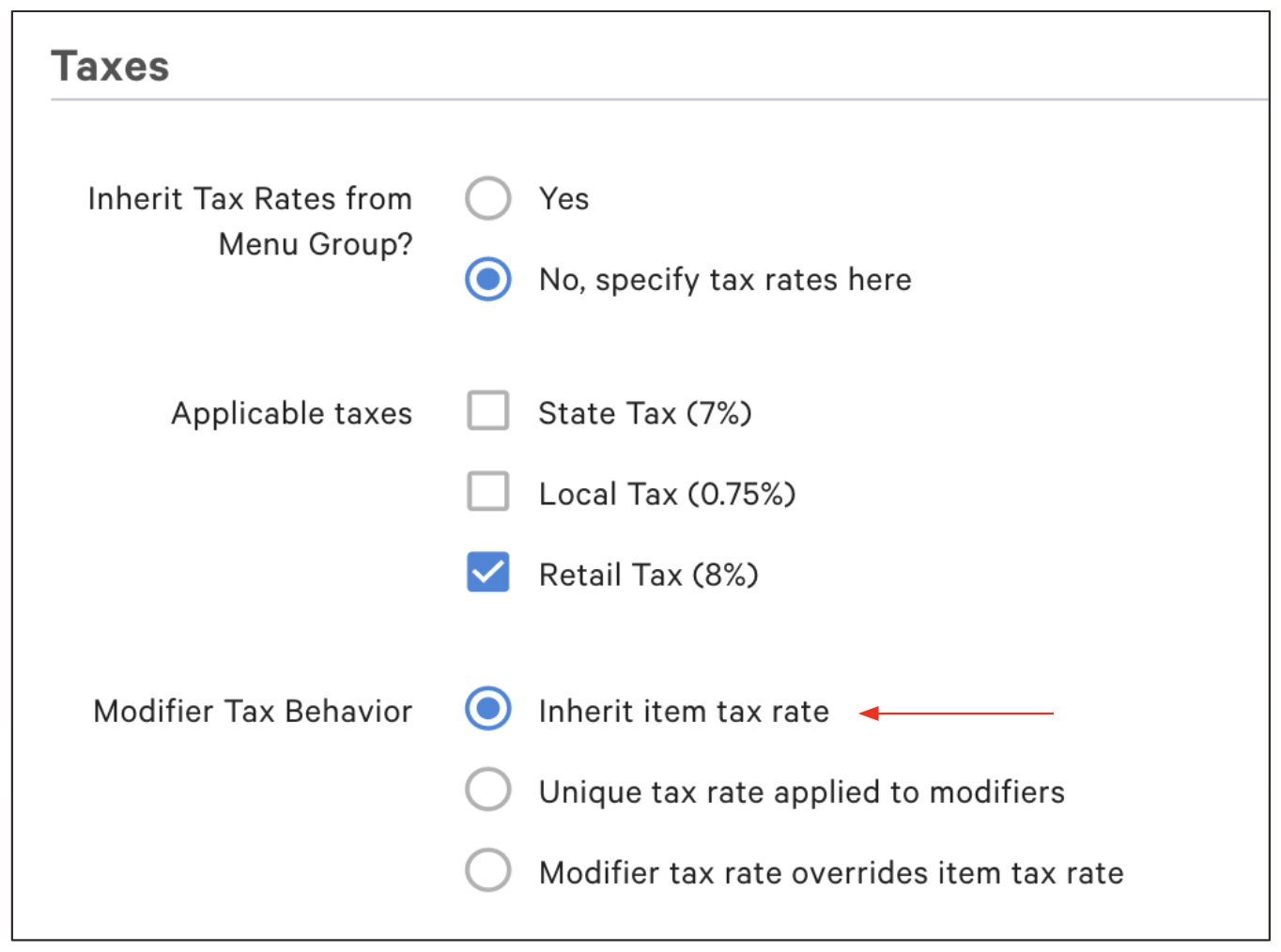
Note: When you select Inherit item tax rate, any tax rates you previously selected in the Applicable taxes section for this modifier will be ignored. The modifier will now automatically use the tax rate assigned to its parent menu item.
Update Receipt Configuration for Tax Rates
To ensure your guests can see the detailed breakdown of taxes on their receipts, you'll need to adjust your Toast settings.
To configure the setting, follow the steps below:
- In Toast Web, navigate to Front of house > Order screen setup > UI options.
- Scroll down to the Tax Options section and select the following option for the Receipt Tax Options setting: Display each tax rate as a separate line. This will itemize each rate on the receipt.
- Save and publish your changes.
By clearly itemizing each tax rate applied to the order, you'll provide additional transparency and clarity to guests on their receipt.
The modifier tax behavior in Toast gives you flexibility to customize your menu items. For more information, read the platform guide Taxes on Modifiers.