Set Up Your BYO Bowl or Taco Menu
Last updated: Sep 17, 2026, 8:14 PM
BYO Bowl or Taco Menu Overview
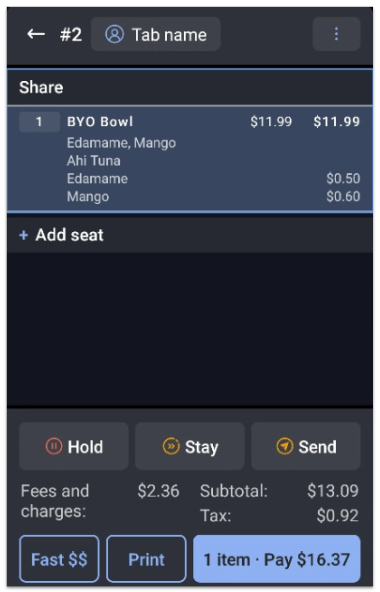
With the multi-select and duplicate modifiers features, you can easily configure modifiers for items such as BYO bowls, tacos, and salads. With these features set up, your guests will be able to choose the same modifier multiple times, choose a variety of toppings, and even add a modifier as an up-charge.
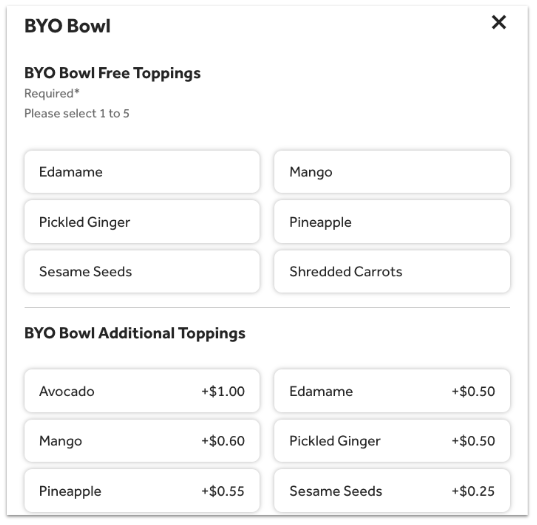
For example, a poke bowl might have five toppings included in the price of the bowl, but if a guest would like to add more, they would be paying an up-charge for each additional topping.
Check out the steps below and learn how to set this up in Toast Web.
Set Up Your Menu for a BYO Bowl or Taco
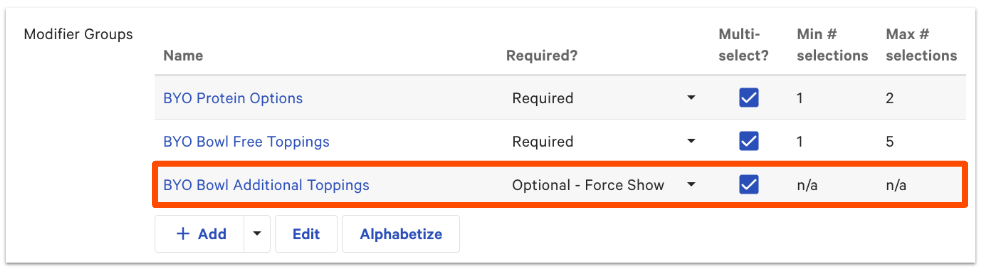
For a BYO bowl, taco, or salad, we will want to set up two modifier groups -- one for the free modifiers and one for the modifiers that will have an up-charge attached to them. We also recommend setting up a separate modifier group for the protein options or the base of the BYO item.
Free/Included Items for a BYO Item
Set up modifiers for your free and included items by following these steps:
- Create a multi-select modifier group and set it as Required. This will ensure that guests and/or staff members need to select the toppings from this group. For instructions, you can see these Support Center articles:
- Save your modifier group, and then select its name to open the modifier group details page.
- Use the drop-downs to enter a value for Min # selections and Max # selections.
- If you'd like to allow guests to choose the same modifier multiple times, make sure to select By default, the same modifier can be added more than once in this group for the Duplicate Modifiers setting. Learn more about duplicate modifiers in this Support Center article, Set Up and Use Duplicate Modifier Selections.
- Scroll down to the Modifier Pricing Method section and select No additional charge for the Select where pricing is set setting. If certain toppings, such as avocado, have an additional charge, select Additional charge - price is set on individual modifiers and keep all toppings set to $0 except for the avocado line item.
- Scroll down to the Modifiers section and add your individual modifiers.
- Save and publish your changes.
Congratulations! You've officially created a modifier group for the free modifiers.
Up-Charge Add Ons for a BYO Item
Next, we'll create another modifier group for the additional toppings for an up-charge:
- Navigate back to the item or menu group details page.
- Create a new modifier group and name it differently than the other one you created (e.g. Additional Toppings). Make sure it's set as Optional or Optional - Force Show since adding additional toppings is not required from your guest. Also, make sure that Multi-select? is enabled.
Note: Optional - Force Show will show the modifier group when the item is added to the check while Optional will not automatically show when item is added and the staff member will need to select the modifier group to add the toppings.
- Save your modifier group, and then select its name to open the modifier group details page.
- Since we set up the group as Optional - Force Show or Optional, you'll notice that the Min # selections setting isn't available. Select a number for the Max # selections setting or leave it as n/a if there is no limit.
- If you'd like to allow guests to choose the same modifier multiple times, make sure to select By default, the same modifier can be added more than once in this group for the Duplicate Modifiers setting.
- Scroll down to the Modifier Pricing Method section and for the Select where pricing is set setting, select Additional charge - price set by modifier group or Additional charge - price set on individual modifiers. Set the modifier price for each additional topping for the group or individually.
- Scroll down to the Modifiers section and add your modifiers. Since the modifiers in this case are the same as they were in the other group you previously created, select Add Existing Modifiers under the drop-down menu next to the + Add button. This will ensure that you don't have duplicate modifiers and as a result, your reporting will look cleaner.
- Save and publish your changes.