Set Up Your Toast Go® 2 Handheld
Last updated: Sep 17, 2026, 6:28 PM
- Toast Go® 2 Handheld Overview
- Before You Begin
- Set Up Your Toast Go® 2
- Accept Payments on Your Toast Go® 2
- Related Articles
Toast Go® 2 Handheld Overview
The Toast Go® 2 is a handheld point of sale device that lets you fire orders and accept payments from anywhere in your restaurant, no matter your service model. This article walks you through first-time setup, from powering on the device to accepting your first payment.
Notes:
- The Toast Go® 2 is available only to customers in the US.
- Setting up a Toast Go® 3 instead? See Set Up Your Toast Go® 3 Handheld.
Before You Begin
Applies to: Toast Go® 2, Toast POS
Permissions needed:
- A Toast account email and password
- A POS passcode and PIN with access to device setup
What you'll accomplish: Your Toast Go® 2 will be powered on, connected to your Toast network, logged in, and enabled to accept dip, tap, and swipe payments.
Set Up Your Toast Go® 2
Follow these steps to get your device ready for service. You can also download a printable version of this guide from the Toast Go® 2 setup guide PDF.
- Charge the device fully before first use.
- Press and hold the power button to power on the device.
- Connect the device to your YOUR_RESTAURANT_NAME_SECURE Wi-Fi network. After you passcode into the app, the device automatically migrates to the YOUR_RESTAURANT_NAME_TOAST network.
- Log in to Toast using the email and password associated with your Toast account.
- Enable EMV so the device can accept dip and tap (contactless) payments:
- On the lower left corner of the passcode screen, select the credit card icon.
- Enter your PIN to log in.
- From the main menu, navigate to Setup > Device Setup.
- Scroll down and select EMV Enabled.
- Select Yes. You may be prompted to update the card reader during this step.
Note: To find your Wi-Fi password, see Locate Your Toast Wi-Fi Password.
Note: If EMV Enabled is grayed out or can't be selected, do the steps from the "use the card reader test app" section of Get Help With Your Toast Go® 2 Handheld.
Expected outcome: Your Toast Go® 2 is connected, logged in, and ready to accept dip, tap, and swipe payments.
Accept Payments on Your Toast Go® 2
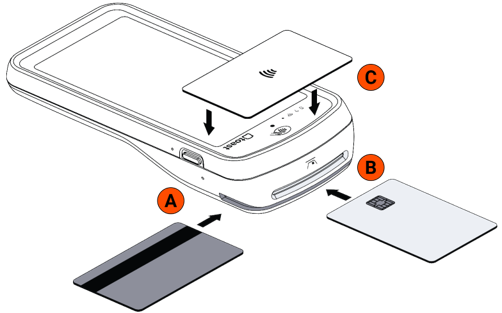
Your Toast Go® 2 accepts Apple Pay, Samsung Pay, and Google Pay, along with swipe, dip, and tap credit cards. Tap is also known as contactless payment.
Use the payment method that matches the card or device:
- Chip or tap-enabled cards: To dip, insert the card chip-first into the EMV card slot at the top of the device (B). To tap, horizontally align and tap the card on the contactless reader (C).
- NFC-enabled devices: Tap the device on the contactless reader (C) to pay with Apple Pay, Samsung Pay, or Google Pay.
- Magnetic stripe cards: Swipe the card in the magnetic stripe slot (A).
- Gift cards: Select Pay > Gift card, then Key In, Scan or Swipe.
To take a payment on your handheld:
- From the payment screen, select Card.
- On the Itemized Receipt Preview screen, have your guest review their order and select Confirm & Pay.
- Have your guest complete the payment by tapping, inserting, or swiping their card.
- To enter the card details manually, select Key in card number.
- To make changes or cancel the order, select Cancel payment.
Expected outcome: The payment processes and a confirmation appears on the device.
Related Articles
- Get Help With Your Toast Go® 2 Handheld
- Toast Go® 2 Card Reader Not Working
- Locate Your Toast Wi-Fi Password
- Set Up Your Toast Go® 3 Handheld
- POS Device Setup Overview