Toast IQ AI Assistant Overview
Last updated: Oct 6, 2026, 4:14 PM
Learn how to use Toast IQ AI assistant to gain insights about your business and complete tasks in seconds, directly from the chat.
- Toast IQ AI Assistant Overview
- How to Use the Toast IQ AI Assistant
- Frequently Asked Questions
- Who in my restaurant has access to Toast IQ?
- How does Toast IQ keep my business information secure?
- What if I don’t want Toast IQ to have access to my data?
- I'd like to download the information table Toast IQ provided. How do I do that?
- Can I talk to Toast IQ in Chinese, Spanish, or other languages?
| If you are a Mid-Market or Enterprise customer and would like to utilize Toast IQ, please work with your Customer Success Manager (CSM) to gain access. |
Toast IQ AI Assistant Overview
The Toast IQ conversational AI assistant (or simply Toast IQ) is part of the Toast IQ intelligence ecosystem, a set of smart features built natively into Toast’s end-to-end platform:
- Toast IQ finds what's important to your business and can proactively surface key insights about your business and the local market to help you get ahead of performance.
- You can ask questions about your business data in simple language, just like you're texting a friend.
- It gives you quick, accurate answers and provides strategies to help you reach your goals.
- It lets you make changes directly within the chat, so you can solve problems and get things done fast.
- Toast Delivery Services (TDS) updates are now in Toast IQ for customers located in the U.S.! Ask your assistant for real-time order status, driver tracking, and refund information. Try asking: "Where is the driver for order #1234?" or "Did I get a refund from Uber Eats for this morning?"
- Toast IQ can help you with Tips Manager. Ask it to explain a tip pooling or tip sharing setting, describe how a tip distribution was calculated, or help you troubleshoot a policy that isn't paying out the way you expected.
- Draft marketing campaigns right from Toast IQ! Ask your assistant to create a draft email campaign (available in the U.S., U.K., Ireland, and Canada) or SMS campaign (U.S. only), review your upcoming, running, or past campaigns, or compare past campaign engagement and sales data. Try asking: "Draft an email campaign for our summer sale" or "How did our last SMS campaign perform?" Toast IQ creates a draft only — it won't send or schedule a campaign on its own. You'll be linked to the campaign to review, adjust, and send or schedule it yourself.
- View and update your Front of House configuration settings for Table Service and Quick Order right from Toast IQ, instead of logging into Toast Web's Front of House settings. Ask about settings like individual hold and send, consolidated discounts, the POS menu search bar, tab name requirements, and more. Try asking: "Turn on the search bar for our Orders Screen" or "Is individual hold and send enabled for Table Service?"
- Toast IQ can now help you view and update kitchen-related settings for your menus, menu groups, and menu items — including prep station, assembly line, sort order, prep time, and course. Try asking: "What's the prep time on the Caesar salad?" or "Move the Cheeseburger to Prep Station 2."
- Toast IQ can also help you troubleshoot your kitchen and KDS setup — it can look up your prep stations, item routing rules, KDS devices, coursing, and autofire settings, explain why tickets or items aren't showing where you expect, and make routing and prep station changes for you right in the chat. Try asking: "Why aren't tickets showing up on my grill KDS?" or "Route all salad items to the cold line prep station."
- Toast IQ now supports modifier-level reporting. Ask your assistant how modifiers — like sizes, add-ons, and substitutions — relate to your menu items. Try asking: "How many large drinks did we sell this week?" or "Which add-ons are most popular with the Cheeseburger?"
- Set up Toast Catering & Events with Toast IQ. On the Catering & Events Settings page, Toast IQ asks about how you run catering and events and creates your order types, lead time, hours, fulfillment method, and notification recipients for you, plus a shareable lead form link for guest inquiries. Try asking: "Help me set up Catering & Events" or "Update who gets notified when a new catering lead comes in." This is currently available to new Catering & Events customers; it isn't yet available to Multi-Location Management (MLM) accounts.
*Toast Benchmarking is currently available in the U.S. only.
Toast IQ’s capabilities are expanding all the time—from multi-location insights and catering data to scheduling, payroll, and more. You can always ask Toast IQ what it can help with to discover the latest features available to you.
To access Toast IQ, you’ll either need the 4.1 Sales Reports or 4.3 Labor Reports permission. The data and actions available to you are also based on your Toast Web permissions. For example, if you want to use Toast IQ to make a change to your menus — including kitchen-related fields like prep station, sort order, or prep time — you'll need the required menu editing permissions as well.
Toast IQ accesses your Toast data to provide insights and answer your questions. When you ask a question, Toast IQ retrieves the relevant data, securely sends it to our large language model (LLM) provider for analysis, and then delivers a response back to you. Toast IQ also proactively identifies trends and insights, such as those displayed in your For You feed, by analyzing your Toast data to identify things like changes in item sales or local events that may impact your business.
Your data is not used by third parties for general training. Toast IQ as a tool will not mix your data with the data of other customers.
How to Use the Toast IQ AI Assistant
Toast IQ can be accessed from the top left corner of the navigation menu in Toast Web, or from the bottom of the Toast Now app.
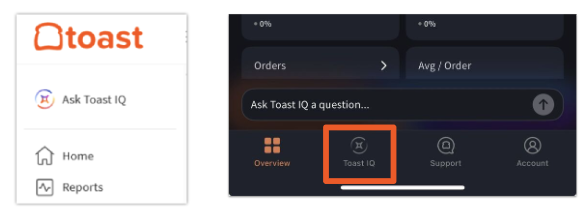
When you start a new chat, you can ask Toast IQ a question in natural language – the same way you’d ask your bookkeeper, your general manager, or your marketing team. For example, you might say:
- How many burgers did we sell last week?
- Adjust Jane’s shift end time since she auto-clocked out.
- Explain how my tip pooling policy works.
- How do you think I could grow my online ordering business?
- Help me create a marketing plan.
- Draft an email campaign for our summer sale.
- What's the prep time on the Caesar salad?
- Why did this employee get this tip amount?
- Turn off manual entry when using a scale.
- Which add-ons are most popular with the Cheeseburger?
Toast IQ will give you a personalized answer based on your own business data. If you ask for help with marketing, Toast IQ can draft an email or SMS campaign for you based on your goal or occasion. After the draft is created, you'll be linked to the campaign to review, tweak, and send or schedule it — Toast IQ won't send or schedule a campaign on its own. If you’re asking Toast IQ to complete a task for you, you’ll be prompted to confirm your changes before they’re published (and you’ll be limited by your Toast Web account permissions).
Toast IQ stores your previous chat sessions so you can easily review the conversations again.
You can rate each Toast IQ response using the feedback icons, and include any comments to help us improve the experience.
Note: Unfortunately, AI tools can make mistakes. Always check your important information. You can report errors directly within Toast IQ by providing feedback on the response.
Frequently Asked Questions About the Toast IQ AI Assistant
Who in my restaurant has access to the Toast IQ AI assistant?
The data and actions available to individual users in Toast IQ are based on their Toast Web permissions. For example, some users at a particular location may have the ability to edit menus while others may not. If you want access to different Toast IQ abilities, talk to your Toast Web administrator (internal to your business - not someone from Toast) about having your Toast Web permissions updated. You’ll specifically need access to least one of the following permissions to see Toast IQ and ask questions related to data: 4.1 Sales Reports, 4.3 Labor Reports.
How does Toast IQ keep my business information secure? Is my data shared with third parties?
When you use Toast IQ, the requested Toast data used to answer your question is shared with a third-party large language model (LLM) through a dedicated, enterprise-only instance. Your data is not used by the LLM provider for general training, and never mixes with data from other customers.
What if I don’t want Toast IQ to have access to my data?
We hear you. Toast IQ is designed only to surface information and will never take action or make changes to your account without your explicit confirmation — using it is optional, and you can keep managing your restaurant the way you always have. At this time, Toast IQ cannot be fully disabled or hidden account-wide.
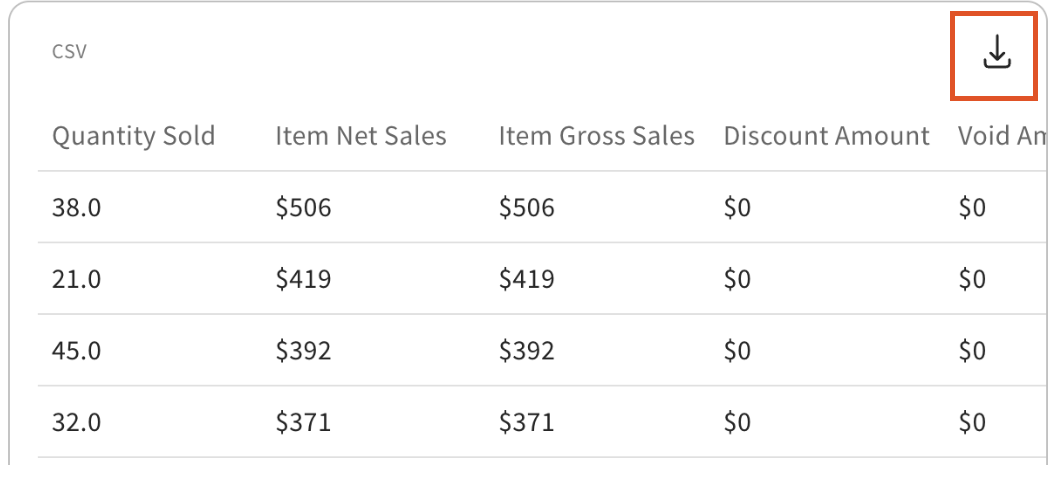
I'd like to download the information table Toast IQ provided. How do I do that?
To download a table in a Toast IQ response, select the download icon as seen in the image below.
Can I talk to Toast IQ in Chinese, Spanish, or other languages?
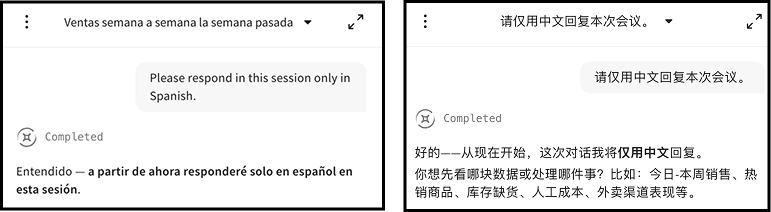
Yes, Toast IQ adjusts to your preferred language. Whether you’re asking questions in Spanish, Chinese, Korean, or another language, Toast IQ can reply back to you in that language for clear, confident answers. It also offers follow-up questions in your language as it learns your preferences, helping you uncover deeper insights and take action.
To have Toast IQ respond in your preferred language:
-
- Option 1: When you open Toast IQ, tell it "Please respond in this session only in [desired language]"
- Option 2: If you begin prompting in another language, Toast IQ will adjust through the session to reply in your language
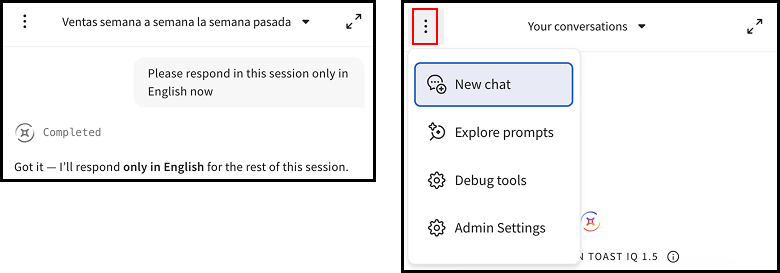
To reset Toast IQ response language to English:
-
- Option 1: Prompt it with "Please respond in this session only in English now."
- Option 2: Start a new session by selecting the overflow menu ( ⋮ ) and select New chat
The language is not stored between sessions, unless you are revisiting a previous chat where you specified your preferred language. Toast IQ's buttons, titles, and headers can now display in any language. Starter prompts and your For You insights will continue to appear in English for now.