Get Help With Toast Local
Last updated: Oct 28, 2026, 1:53 PM
This document shares details about Toast Local, built to increase your restaurant's exposure.
| Are you a guest with a question about loyalty points, a linked card, or your Toast account? This page is for restaurants. If points from a purchase didn't show up, you may have paid with a card that isn't linked to your loyalty account. See Link a Credit Card to an Existing Loyalty Account. To review the cards linked to your account, see Manage Linked Credit Cards on a Loyalty Account. If you still don't see your points, contact the restaurant where you made the purchase, or visit guesthelp.toasttab.com. |
| This product is currently in Open Beta testing for customers is the United States. Because Toast Local is a new product, features are subject to potential frequent changes. Visit www.toasttab.com/local to see the product. |
Toast Local FAQ
What is Toast Local?
Toast Local is a free product that restaurants can use to drive restaurant exposure. It is a guest-facing website that showcases the restaurant's best-selling items. These pages rank well on Google and other search engines, making it a growing restaurant discovery engine like Google Maps, DoorDash search, and Uber Eats search. Customers are opted in by default but can opt out if they wish.
Is Toast Local available in Australia, Canada, Ireland, or the United Kingdom?
No. Toast Local is currently in Open Beta testing and is exclusively available to customers within the United States.
Where does the information on Toast Local come from?
Note: At this time, all data on Toast Local is three days behind the rest of Toast. If you change one of the following data sources, it will take three days to see the change on the restaurant's local site.
- Restaurant Name
- We will use the Restaurant List Display name on the Toast Local page. If this section is empty, it will use the Restaurant and Location Name found in the Restaurant Info Page (controlled by the Restaurant Location Info page)
- Address and Phone Number
- On the Toast account page, select Toast account > Business and location management > Location information.
- Photos - Sources from three places:
- Toast Local page, sourcing the Restaurant List Image (Takeout & Delivery > Toast order sources > Toast Local App (formerly Toast Takeout). Refer to the Restaurant List Display Name field.)
- If a restaurant is not using the Toast Local app, Toast Local will source the Restaurant name and Location listed on the Restaurant Info page (Takeout & Delivery > Restaurant Info).
- The Restaurant Info page, using Restaurant Logo, Banner Image, Background image (Takeout & Delivery > Restaurant Info)
- Images applied to Menu Items (To preview the menu item images, access the Online Ordering site by selecting the link under the Share Your Public Links section under the Restaurant Info page.
- Toast Local page, sourcing the Restaurant List Image (Takeout & Delivery > Toast order sources > Toast Local App (formerly Toast Takeout). Refer to the Restaurant List Display Name field.)
- Open Hours
- Sourced from the information found on the Restaurant Hours/Services page. Reports > Settings > Hours/Services
- Menu Data
- All menu information is sourced from what is built in Toast Web. However, there is a three-day lag in updating information on Toast Local. The New Ventures team is aware of this issue and is working hard to get this fixed.
- Toast Local will show the best-selling items from the last three months. Therefore, many customers might find that they have missing items. These items cannot be added manually at this time
- Toast Local does not recognize Subgroups. It will list items within the larger Menu Group
How long does it take for changes made in Toast Admin to show in Toast Local?
It takes three days for changes in Toast Admin to appear in Toast Local. The most commonly incorrect information and how to fix it can be found below.
- Incorrect Open Hours
- Modify a restaurant's service hours by following Reports > Settings > Hours/Services.
- Incorrect Name
- If the Restaurant has opted into the Toast Local app, Toast Local will display the Restaurant's Restaurant List Display Name. If the restaurant is not using the Toast Local app, Toast Local will source the Restaurant name and Location listed on the Restaurant Info Page.
- Incorrect Address or Phone Number
- Note: 4.8 Marketing info permission is needed to access and update this information.
- Change the Address or Phone Number via Toast account > Business and location management > Location information. For more information, see Update Restaurant Phone Number or Address
How do I add or remove my restaurant from Toast Local?
Restaurants are added automatically to Toast Local three days after signing with Toast. Note: For new Toast customers, it can take 7-14 business days for your locations to be visible on Toast Local.
To add or remove a restaurant from Toast Local:
-
-
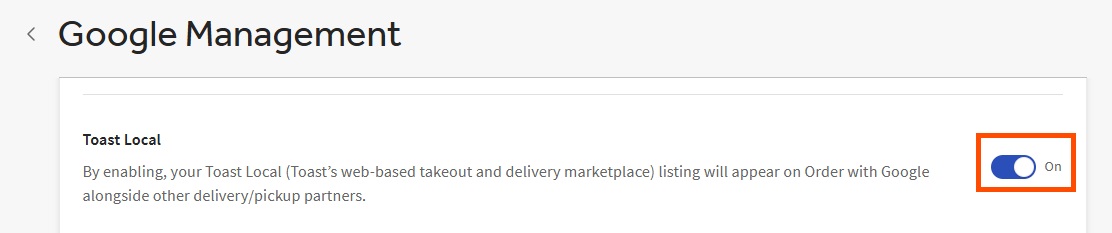
- In Toast Web, navigate to Takeout & delivery > Google Management > Google Listings.
- Toggle List my restaurant on Toast Local On or Off.
- Note: For existing customers, it can take up to 24 hours for any changes to visibility on the Toast Local site.
- Note: For existing customers, it can take up to 24 hours for any changes to visibility on the Toast Local site.
- Save and publish changes.
-