Toast Payroll: Get Help With System Arrearages
Last updated: Oct 19, 2026, 11:43 AM
- Arrears in Toast Payroll
- Insufficient Income for Withholding
- Insufficient Income for Deductions
- Find Arrears in Toast Payroll
Arrears in Toast Payroll
In Toast Payroll, when an employee owes more in taxes (or particular deductions) than they are being paid through payroll, they go into arrears. This is the system tracking how much the employee still owes. It will attempt to take these additional funds each time the employee is paid until the arrears have zeroed out. An asterisk will display to the left of the tax on the pay stub to indicate when additional taxes are being withheld to pay off arrears.
It is common for insufficient earnings to cover withholding obligations when a business pays cash tips to an employee rather than including the tips when initiating a payroll cycle. To avoid having insufficient earnings to cover taxes and/or deductions, an employer may hold back a portion of tips to be paid out on the regular payroll (known as tips owed in Toast). Some agencies, such as Philadelphia, may heavily penalize businesses for not collecting and paying all employee taxes.
If you moved to Toast from a different payroll company, unless you asked us prior to completing your onboarding with Toast, we will not capture any arrears from your prior payroll provider.
Insufficient Income for Withholding
Taxes are withheld in this order:
- Social Security (FICA)
- Medicare
- Federal Income Tax (FIT) Withholding
- State Income Tax (SIT) Withholding
- Local Taxes
However, arrears are withheld in a different order. From an employee’s next paycheck, we first pay back (catch up) any unpaid federal taxes. This starts with Social Security, Medicare, then federal income tax. Next, we look at state arrears and finally any local arrears. Each balance is paid in full before we move to the next one, as far as the paycheck allows. Anything still unpaid carries to the following paycheck. However, this only happens if you are set up to hold back arrears.
The Toast Payroll system is configured to systematically calculate how much withholding an employee may be responsible for based on the employment data a user adds to it. If an employee's earnings are not enough to cover their tax withholding obligations, the insufficient withholding amounts due will go into system arrearages within Toast Payroll. The Toast Payroll system will then attempt to recover these uncollected funds each time an employee is paid until the system's arrears have zeroed-out.
Catch up only covers the current calendar year. If an employee does not earn enough wages in a calendar year to cover Social Security and Medicare withholding amounts due, the uncollected system arrears will be recorded in Box 12 on an employee's Form W-2. Such reporting may result in an employee's liability for outstanding Social Security (FICA) taxes following the submission of a personal tax return.
Select this link to discover more information on how the IRS calculates federal tax obligations.
Insufficient Income for Deductions
You can set up certain deductions in the Toast Payroll system to "allow arrears." When this feature is enabled, if an employee doesn't have enough earnings in a paycheck to cover the full deduction amount after taxes are withheld, the system will automatically keep track of this unpaid amount. This outstanding balance (or 'arrears') will then be deducted from a future paycheck when enough funds are available. This collection occurs after all current taxes and other regular deductions for that pay period have been paid, and the system will continue to manage these arrearages with each payroll cycle until the owed amount is fully paid off and zeroes out.
Find Arrears in Toast Payroll
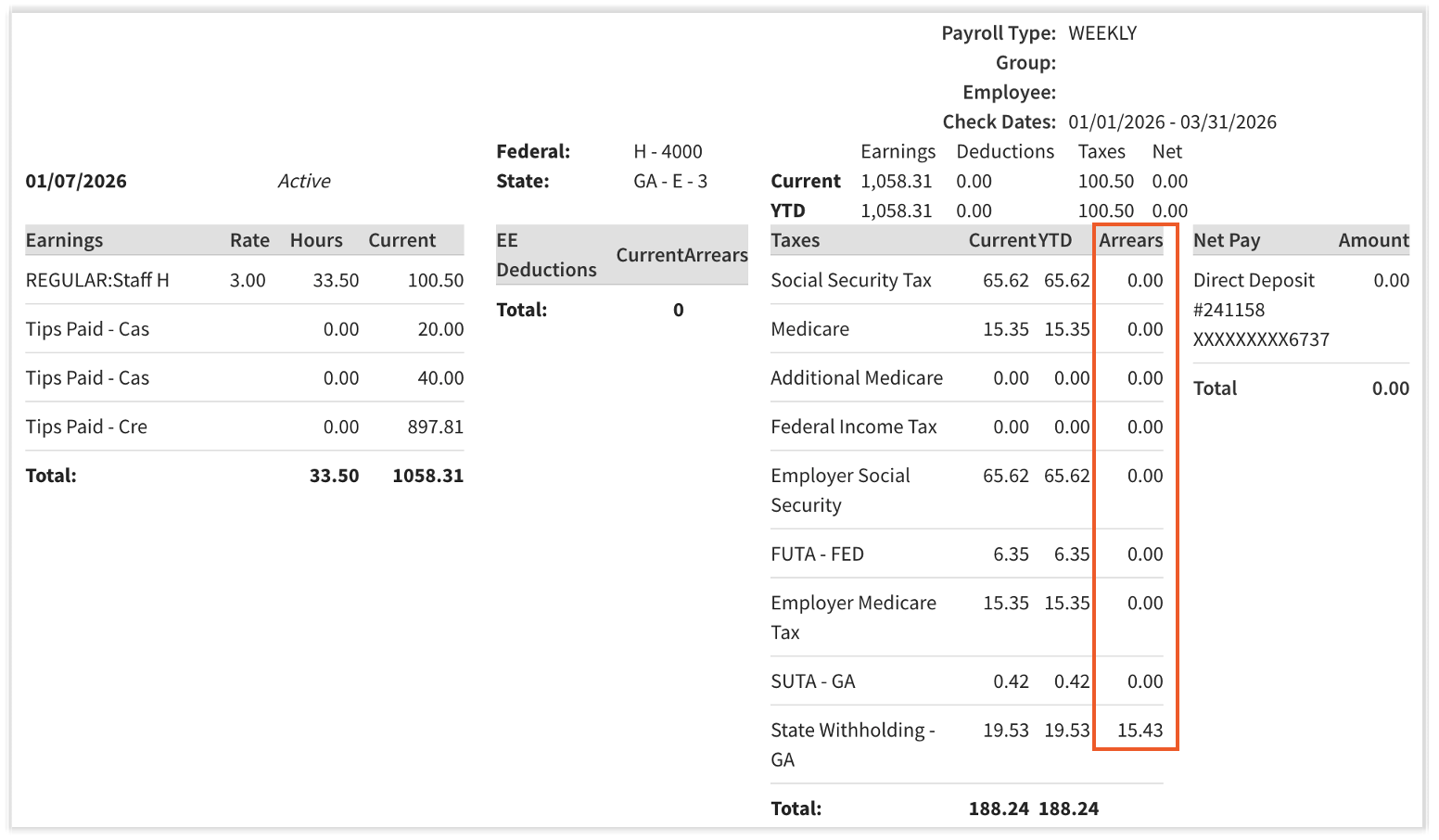
- The Employee Detail report displays all arrears for that payroll.
- An employee's Pay History report displays arrears per payroll for that employee.
To view the Employee Detail report:
- Navigate to Payroll > Past Payrolls > View.
- When the Toast Web and Toast Payroll navigation menus are both visible, select Payroll from the Toast Payroll navigation sub-menu. If you don't see the Toast Payroll sub-menu, selecting Payroll from the Toast Web navigation menu will expand it.
- Scroll down to the Reports tile and select Employee detail.
- Search for any non-zero figures in the Arrears column.

To view an employee's Pay History report:
- Navigate to their Toast Payroll profile and select Pay History.
- Learn how the new Toast Payroll navigation works by visiting Navigate Toast Payroll Within Toast Web.
- Select the Run report link on the right side of the page.
- For the Date range field, you might wish to select a year-to-date (YTD) or quarter-to-date (QTD) range.
- Leave the Report type as Detail and select View report.
- Search for any non-zero figures in the Arrears column(s).
This content is for informational purposes and is not intended as legal, tax, HR or any other professional advice. Please contact an attorney or other professional for advice.