Toast Payroll: Paycheck Delivery FAQ
Last updated: Oct 15, 2026, 11:54 AM
How employees choose pay methods and how employers deliver, ship, track, and reissue paper checks in Toast Payroll.
- How Employees Choose a Payment Method
- How Employers Deliver Paper Checks
- Toast-Printed Check Shipping and Tracking
- Direct Deposit, Vendor Checks, and Pay Timing
- Missing, Lost, or Undeliverable Checks
- Frequently Asked Questions
- Related Articles
How Employees Choose a Payment Method
How does an employee choose their payment method?
An employee chooses their payment method in Toast Payroll under their own profile. In Toast Payroll, navigate to My Profile > Employment > Payment Method, then select paper check, direct deposit, or the Toast Pay Card (if the employer offers it). If you do not see My Profile on the left side of the screen, select Payroll from the Toast Web navigation rail on the left to make the Toast Payroll navigation rail appear.
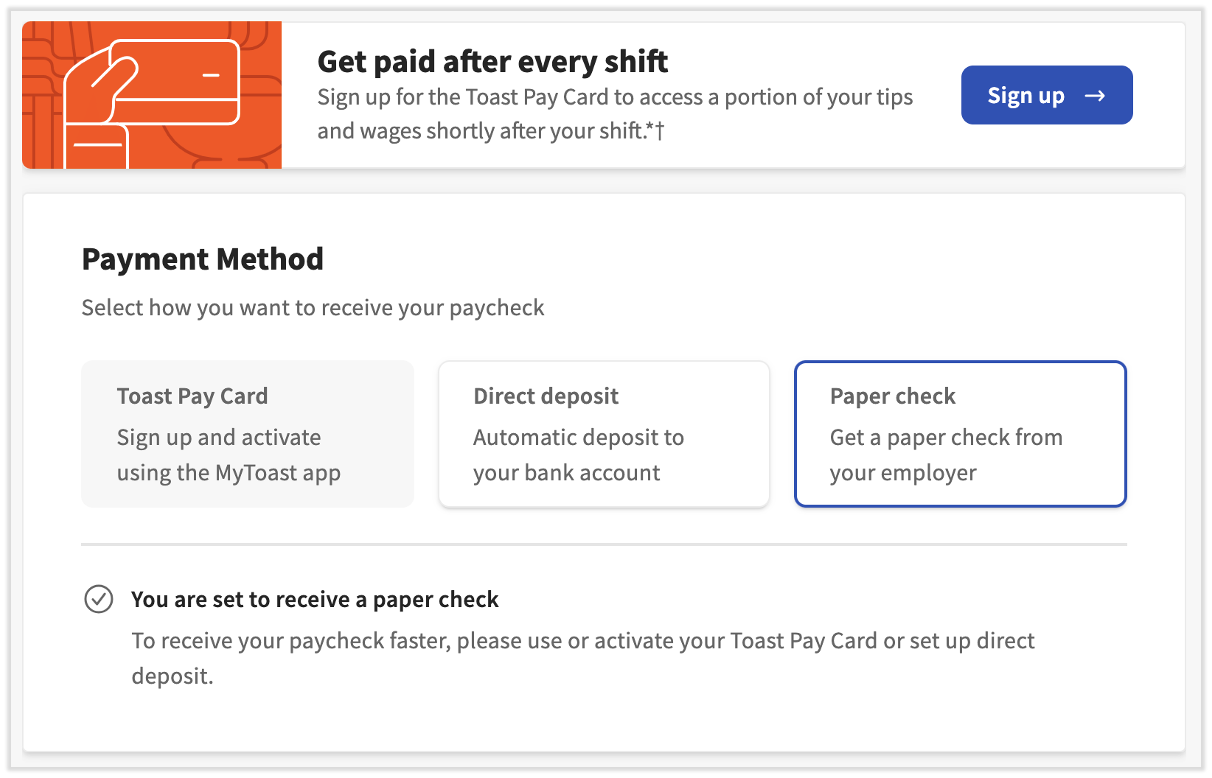
Any change to a payment method triggers identity verification. Toast texts a six-digit code to the phone number on file with the Toast account, and the employee enters that code into the pop-up in Toast Payroll to confirm the change.
Note: Toast representatives will never ask for the six-digit verification code. Employees should not share it with anyone, even someone claiming to be from Toast.
For full steps on each method, including direct deposit through Plaid, split deposits, and the Toast Pay Card, see Toast Payroll: Set a Payment Method.
What ways can employees receive their pay?
Employees can receive their pay three ways in Toast Payroll: direct deposit, a paper check, or the Toast Pay Card.
Direct deposit is the most commonly used method and sends wages directly to a bank account on payday. To view or update direct deposit information, see Toast Payroll: Get Help With Direct Deposit Accounts.
A paper check (also called a live check) is the default if an employee does not select another method. How the check is produced depends on the delivery option the employer has set up.
The Toast Pay Card works like a prepaid debit card and supports same-day payouts. To learn how to use and access funds on the card, see Toast Pay Card: Employee FAQ.
How Employers Deliver Paper Checks
What paycheck delivery options can employers choose for paper checks?
Employers choose how paper checks are produced on the Paycheck Delivery page in Toast Payroll. In Toast Payroll, navigate to Settings > Payroll > Paycheck Delivery to make a selection. (If you do not see Settings on the left side of the screen, select Payroll from the Toast Web navigation rail on the left to make the Toast Payroll navigation rail appear.) The options are self-written, self-printed, and Toast-printed. These options apply only to employees who receive a paper check; employees signed up for direct deposit or the Toast Pay Card are paid electronically regardless of the option selected.
-
- Self-written: Pay employees with a company check, cash, a payment app, or a combination of methods. See Toast Payroll: Manage Self-Written Paycheck Delivery.
- Self-printed: Print checks at your restaurant on your own printer and check stock. See Toast Payroll: Use Self-Printed Paycheck Delivery.
- Toast-printed: Toast prints checks with employee net amounts and ships them via UPS for an additional charge. See Toast Payroll: Manage Toast-Printed Paycheck Delivery.
Which paycheck delivery option is right for my business?
The right paycheck delivery option depends on cost, speed, and how many employees receive paper checks. The table below compares the three options.
| Option | Pros | Cons |
| Self-written | Pay your preferred way (company check, cash, or payment app); zero cost; can be the fastest method; no shipping delays; great for a small staff | Checks may need to be hand-written; allows for error that other methods avoid |
| Self-printed | Instantly access PDFs to print and keep on file; reprinting a lost or damaged check is self-serving; checks can be printed before the check date; no shipping delays | Requires a printer and acceptable check stock; ink and check stock cost money |
| Toast-printed | Once payroll is posted, simply wait for checks to arrive; Toast generates and ships the checks; checks ship overnight when posting guidelines are met; ships to any non-P.O. Box address | Shipping delays can occur; typically the slowest method; per-package shipping fee |
For the posting guidelines that keep Toast-printed checks on schedule, see Toast Payroll: Payroll Posting Guidelines.
Toast-Printed Check Shipping and Tracking
How does shipping work for Toast-printed live checks?
Shipping for Toast-printed live checks starts as soon as payroll is processed. The timeline below explains each step.
-
- Post payroll by 5:00 p.m. ET (4:00 p.m. CT) three days before the check date. Posting after this deadline delays check delivery — checks are printed and sorted the following day for overnight delivery instead.
- Toast prints and sorts the checks on the same day payroll is processed.
- Toast provides a tracking number on the Review and Submit step of your payroll.
- Checks ship for next-day delivery, or the specific delivery schedule set up during onboarding.
Expected outcome: Your checks are printed, sorted, and shipped with a tracking number you can use to follow the package.
Note: Live checks are shipped to business addresses only. Toast does not ship checks to individual employee addresses.
If a package will arrive after the check date because of a UPS delay, you have options to pay employees on time. See Toast Payroll: Paycheck Package Delivery Delays.
How do I track my UPS check package?
You can track your UPS check package two ways: through the UPS confirmation email or on the Review and Submit step of your payroll.
UPS sends a confirmation email containing a tracking number. If you are not receiving shipping confirmation emails, contact Toast Customer Care to confirm the correct email address is on file.
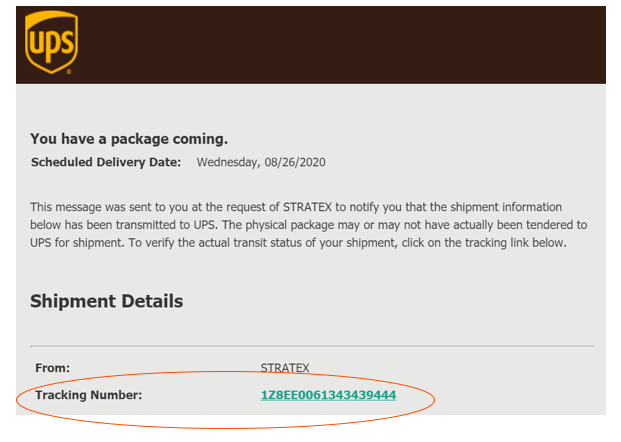
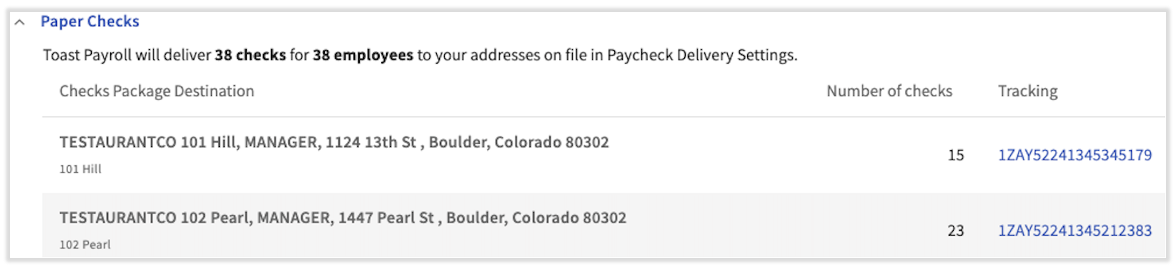
Tracking numbers also appear on the Review and Submit step. They become available at 8:00 p.m. ET (7:00 p.m. CT) on the day payroll was posted, or the next day if payroll was posted after the deadline. To return to this step, navigate to Payroll > Past Payrolls > View for the appropriate payroll, then select a tracking number to view details. (When the Toast Web and Toast Payroll navigation menus are both visible, select Payroll from the Toast Payroll navigation sub-menu. If you don't see the Toast Payroll sub-menu, selecting Payroll from the Toast Web navigation menu will expand it.)
Direct Deposit, Vendor Checks, and Pay Timing
How do I make sure direct deposit amounts hit employee accounts on payday?
To make sure direct deposit amounts hit employee accounts on payday, post payroll three days before the check date by 5:00 p.m. ET (4:00 p.m. CT). Posting after this time can prevent funds from arriving in time. For how submission timing maps to pay dates, see Toast Payroll: Get Help With When Employees Are Paid.
Does Toast print and ship vendor checks for garnishments?
Toast does print and ship vendor checks for items such as garnishments. A vendor check can be sent directly to the vendor or included in your payroll package, depending on your setup. To set up a vendor, contact Toast Customer Care.
Missing, Lost, or Undeliverable Checks
What do I do if an employee lost or damaged their paycheck?
If an employee lost or damaged their paycheck, you have a few ways to reissue the funds, and the right path depends on whose account the check is written from.
If you write checks out of your own account, contact your bank to request a stop payment on the check before reissuing.
To reissue the funds, you can:
-
- Write a manual check in-house for the net pay amount. Locate this amount on the employee's Pay History page.
- Add the paycheck amount as a one-time earning on the next pay cycle. See Toast Payroll: Add or Edit Earnings & Deductions.
- Contact Toast Customer Care to request a reissued check with a new check number for self-printed or Toast-printed delivery.
Note: If you reissue funds by adding the amount to the next pay cycle, contact Toast Customer Care to request that the original check is voided. A void must be done within the same quarter the original payroll ran to avoid amendments.
What do I do if an employee did not receive their check?
What to do when an employee did not receive their check depends on the paycheck delivery option your restaurant uses. This assumes the employee has selected the paper check payment method.
-
- Self-written: Employees are paid through an alternate form of payment, such as cash or a payment app. Because Toast only provides the net pay amount, Toast cannot assist with a missing paycheck in this case.
- Self-printed: Toast provides a PDF of employee paychecks and paystubs. Reprint and distribute the check using the steps in Toast Payroll: Use Self-Printed Paycheck Delivery.
- Toast-printed: Toast mails a package of paychecks to the employer's business address and does not mail checks to employees. If the package has not arrived, use the tracking number on the confirmation page of payroll (Payroll > Past Payrolls > View). If tracking shows the package was delivered but it is lost or missing, contact Toast Customer Care.
Why won't a bank let an employee cash a check?
When a bank won't let an employee cash a check, the most common reason is that the bank will not process the check before the date printed on it. Contact your bank first to confirm the specific reason.
If your bank says there is an issue with the printing of the check itself, contact Toast Customer Care so the issue can be investigated further. For how to reach Customer Care, see Contact Customer Support.
Can Toast mail paychecks directly to employees?
Toast cannot mail paychecks directly to employees. Toast ships Toast-printed check packages to the employer's business address only, and the employer distributes the checks to employees.
Frequently Asked Questions
How do I switch from a paper check to direct deposit?
To switch from a paper check to direct deposit, the employee updates their own payment method in Toast Payroll under My Profile > Employment > Payment Method by selecting the direct deposit tile and adding a bank account. (If you do not see My Profile on the left side of the screen, select Payroll from the Toast Web navigation rail on the left to make the Toast Payroll navigation rail appear.) Each change requires the six-digit verification code Toast texts to the phone number on file. For full steps, see Toast Payroll: Set a Payment Method.
Also asked as:
-
- How do I switch from direct deposit to a paper check?
- How do I change my payment method?
- I want my pay direct deposited instead of a check
Why hasn't my direct deposit hit my account on payday?
If your direct deposit has not hit your account on payday, the most common cause is that payroll was posted after the deadline for that pay run. To arrive on time, payroll must be posted three days before the check date by 5:00 p.m. ET (4:00 p.m. CT). If a direct deposit account was added or changed after a payroll was already started, the employee is paid by paper check for that one pay run. For how submission timing maps to pay dates, see Toast Payroll: Get Help With When Employees Are Paid.
Also asked as:
-
- My paycheck still hasn't been deposited even though it says it was posted
- What time will my paycheck be deposited?
- How long until I get my direct deposit?
How do I change the address a paper check is mailed to?
Toast-printed check packages are shipped to your business address, not to individual employee addresses, so a check package cannot be redirected to a home address. Live checks are shipped to business addresses only. If your business address is incorrect or needs updating, contact Toast Customer Care.
Also asked as:
-
- Can a check be mailed to an employee's home?
- How do I update the address on a paycheck?
Can I change an employee to direct deposit after I already submitted payroll?
You cannot change an employee to direct deposit for a payroll that has already been submitted. If a direct deposit account is added or changed after a payroll has started, the system does not see the new account for that pay run, and the employee is paid by paper check for that run. The new direct deposit account applies to the next payroll. For help with a payment that already went out, contact Toast Customer Care.
Also asked as:
-
- I added banking info after submitting payroll, will it apply?
- Can I redirect a submitted check to direct deposit?
What is a vendor check on the payroll summary report?
A vendor check on the payroll summary report is a check Toast issues to an agency — the vendor — for items such as a wage garnishment or child support. A vendor check can be sent directly to the vendor or included in your payroll package. To set up a vendor, contact Toast Customer Care.
Also asked as:
-
- What does vendor check mean on my report?
- Is Toast sending the garnishment payment or do I?
Related Articles
- Toast Payroll: Set a Payment Method
- Toast Payroll: Manage Toast-Printed Paycheck Delivery
- Toast Payroll: Use Self-Printed Paycheck Delivery
- Toast Payroll: Manage Self-Written Paycheck Delivery
- Toast Payroll: Paycheck Package Delivery Delays
This content is for informational purposes and is not intended as legal, tax, HR, or any other professional advice. Please contact an attorney or other professional for advice.