Toast Payroll: Request a Void
Last updated: Oct 7, 2026, 2:04 PM
Decide whether to void a Toast Payroll record, recover net pay from the employee, request the void, and learn when it posts and how tax credits return.
- Before You Begin
- Quick Fix: Match Your Situation to the Next Step
- Is This the Right Article for My Problem?
- When to Void a Payroll Record
- Recover the Net Funds From the Employee
- Request the Payroll Void
- What Happens After You Request a Void
- How Tax Credits Are Returned
- Before You Contact Customer Care
- Frequently Asked Questions
- Related Articles
Before You Begin
Applies to: Toast Payroll
Permissions needed:
- HR+ or Payroll Admin required to request a void and to ask Customer Care for a stop payment or ACH reversal
What you'll accomplish: Determine whether a payroll record should be voided, recover the net pay from the employee, request the void through Toast Payroll, and understand when the void posts and how any tax credit is returned.
Quick Fix: Match Your Situation to the Next Step
Use this table to find your situation and the next step. Each situation is explained in detail in the sections below.
| Symptom | Most Common Cause | Quick Fix |
|---|---|---|
| You need to void a paycheck or payroll record and have it removed | The wrong hours, job, tax, or deduction were recorded, or a payment went to the wrong employee | Recover the net funds from the employee, then request the void through the blue chat button in Toast Payroll |
| A paper check was issued, and you want to cancel it | The check has not been cashed and needs to be stopped | Have the employee return the check marked VOID, or place a stop payment with the bank, then request the void |
| A direct deposit went out, and you want the money back | Payment was sent, and net funds must be recovered before a void | Contact Customer Care about an ACH reversal, then request the void once funds are recovered |
| You want to void a check and reissue the pay | The original record was wrong, and the employee still needs to be paid correctly | Request the void, then record the correct payment on the same or a future payroll |
| A void was requested or processed in error | The wrong record was voided, or the void is no longer wanted | Contact Toast Customer Care to review the void before the attached payroll is submitted |
| You cannot run the void in the same quarter | No remaining pay cycle exists in the original quarter | Set up an off-cycle payroll, or contact Toast Payroll about an amendment |
Is This the Right Article for My Problem?
These situations sound similar but are handled differently. Confirm which one matches before continuing.
- Use this article when: A payroll record is wrong and cannot be corrected on a future payroll, so the record needs to be voided and the net funds recovered from the employee.
- Use Toast Payroll: Missed Employee or Missed Pay on Payroll when: An employee or some hours, tips, or earnings were left off a payroll and you need to pay the missed amount. That is an addition, not a void.
- Use Toast Payroll: Unsuccessful Direct Deposits when: A direct deposit failed or was returned. A returned deposit does not require a void — the original record stays correct.
When to Void a Payroll Record
A void in Toast Payroll cancels a payroll record and reverses the payroll data of the original transaction from the employee, decreasing the associated earnings, taxes, and deductions. A voided transaction also prevents this record from being included on the employee's Form W-2.
Use a void only when correcting the record on a future payroll is not an option. Possible errors include:
- The wrong amount of hours were paid
- The pay was recorded for the wrong job
- The employee was taxed incorrectly, in the wrong amount or the wrong state
- The employee's deduction amount was wrong
- A payment was made to the wrong employee
A void can generally be processed only if the net amount paid to the employee is recovered from the employee. If those funds cannot be recovered, the record must be kept intact to record the correct payment of taxes. This is especially important when voiding amounts from terminated employees.
Note: Because a void impacts taxes, which are filed quarterly, a void must be recorded on a pay cycle that runs in the same quarter as the original transaction. When this is not possible, an amendment is necessary. Contact Toast Payroll in either case to begin the process.
Recover the Net Funds From the Employee
Before a void can be requested, recover the net amount that was paid to the employee. How you recover the funds depends on how the employee was paid.
If the employee was paid by paper check that has not been cashed:
- Ask the employee to return the check to the employer with VOID written across it.
- If the employee will not or cannot return the check and it has not been cashed, place a stop payment with the bank so the check cannot be cashed. Stop payments are handled outside of Toast Payroll between the employer and the bank or financial institution.
If the employee was paid by direct deposit, an ACH reversal can sometimes return the funds to the payer. An ACH reversal can only be requested for a short window after payment and is not always successful. For details, see Toast Payroll: Unsuccessful Direct Deposits.
Note: If you need help with a stop payment or an ACH reversal, a Customer Care team member can assist you. Contact Toast Customer Care through the blue chat button in the lower-right corner of any Toast Payroll page.
Expected outcome: The net pay is recovered from the employee, and you are ready to request the void.
Request the Payroll Void
Once the net funds are recovered from the employee, request the void in Toast Payroll by selecting the blue chat button in the lower-right corner of any Toast Payroll page. Provide the following details:
- Employee name and employee number
- Check date of the record you want to void
- Check amount
- Reason for the void
- How the funds were recovered from the employee
- How or whether the item is being re-recorded, if needed
Expected outcome: Toast Payroll receives your void request. Voided checks are processed within one business day but are not finalized until the payroll or off-cycle payroll they are attached to is submitted.
What Happens After You Request a Void
The void is approved by Toast Payroll and attached to a future payroll or off-cycle payroll for processing. The voided check appears on that payroll.
A void must be recorded on a pay cycle that has a check date in the same quarter as the original transaction in order to maintain compliance. For example, if the check date of the record being voided is November 12th, then the void must be recorded on a check date in Q4. If you do not have a future pay cycle in that quarter, set up an off-cycle payroll to accommodate the void. For steps, see Toast Payroll: Set Up and Configure Off-Cycle Payrolls.
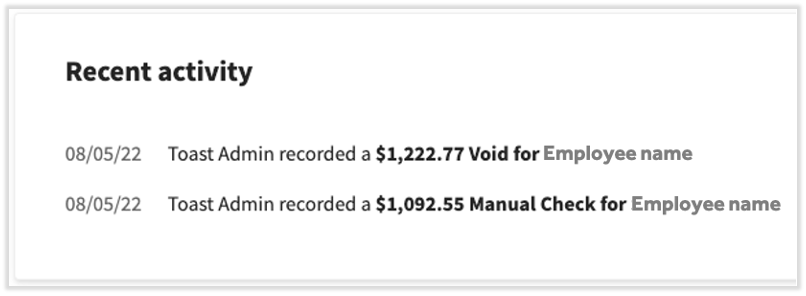
On the Preview Payroll step of payroll, the void appears on the Recent Activity tile.
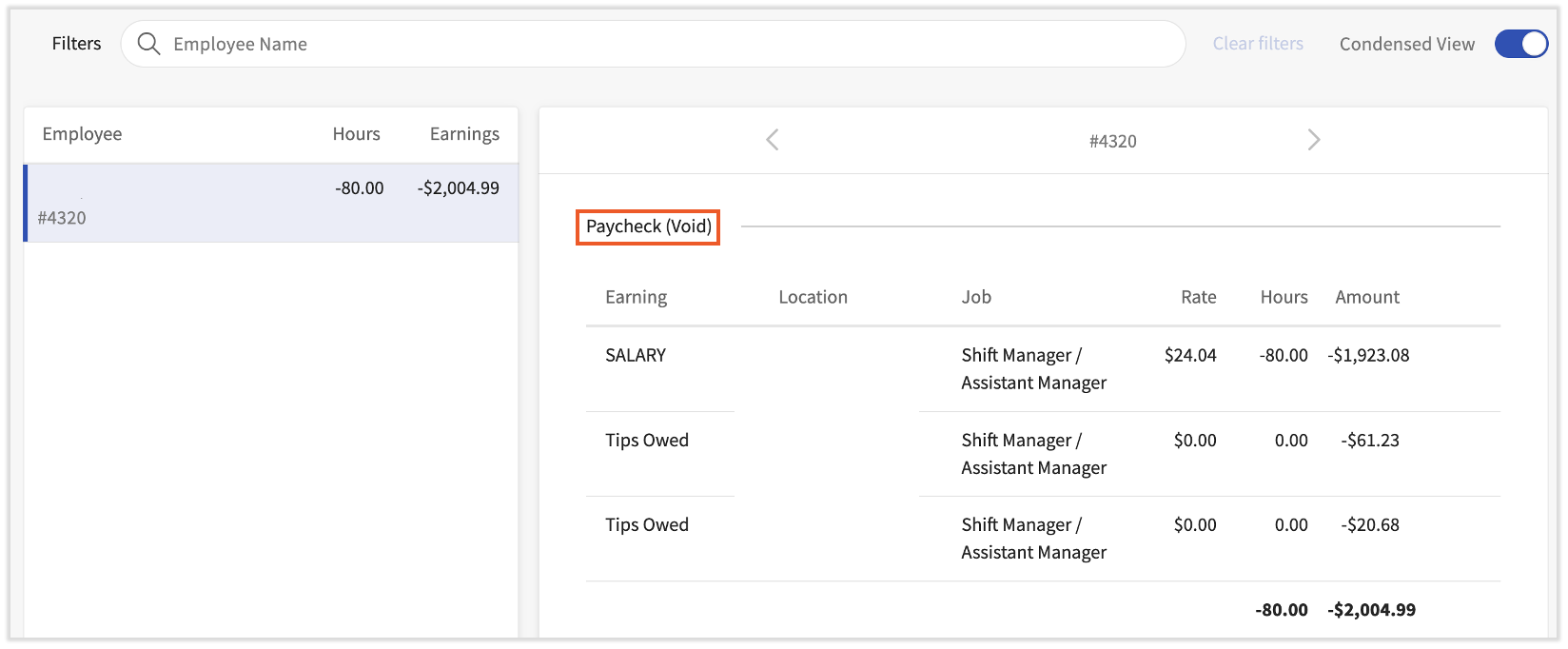
On the Employee Earnings step of payroll, the voided item appears as a negative amount. This is expected. The negative amount does not involve fund transfers and is not a deduction — it only removes the previous record the void is based on. Voided payroll records are reflected in the Employee Detail report, which can be accessed on the Review and Submit step immediately before submitting a payroll.
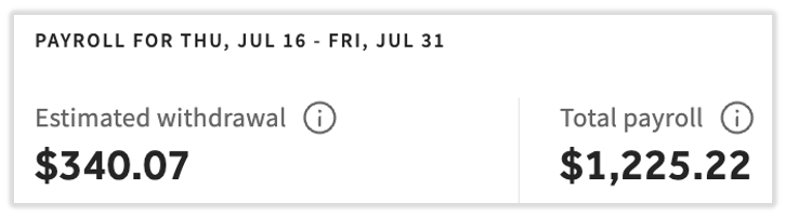
On the Review and Submit step, the numbers at the top may appear to be confusing if you have voids and earnings on the same payroll. They are showing the discrepancy between the voided and correct amounts, so they will typically not equal each other. Remember, voids are negative and do not necessarily represent transactions. The estimated withdrawal still correctly reflects the amount we will debit your bank account on file once this payroll has been submitted.
Note: If a void was requested or processed in error, contact Toast Customer Care before the payroll it is attached to is submitted. The void is not finalized until that payroll posts.
How Tax Credits Are Returned
When a voided payroll involves taxes that were already collected, how and when the credit is returned depends on how and when the corrected payroll is submitted. Toast Payroll cannot guarantee these timelines or results, because each jurisdiction has different regulations on remitted taxes.
- Same payroll: The credit is applied right away on the same payroll. If a credit remains, it is refunded to the customer.
- One to six business days after: Customers typically see a credit from Toast Payroll in their bank account within 5 to 10 business days of submitting the corrected payroll.
- Seven or more business days after: The credit will likely come from the tax agency, because taxes were already remitted to the agency. The longer the time between submitting the voided payroll and the corrected payroll, the more likely any refund comes from a tax agency. Once the quarter ends and Toast files on the payroll data, the agency reaches out with a credit or a request for how the credit should be handled.
If you do not see the tax credit in your bank account within 5 to 10 business days, the tax has most likely already been remitted to the agency, and you will most likely see it at quarter-end as an overpayment directly from the agency.
Before You Contact Customer Care
Requesting a void, placing a stop payment, and requesting an ACH reversal all require Customer Care to act on your behalf. To make the chat faster, gather this information before you contact Customer Care through the chat button in the lower-right corner of any Toast Payroll page:
- Employee name and employee number
- Check date and check amount of the record you want to void
- Reason for the void
- How the net funds were recovered from the employee, or whether you need help with a stop payment or ACH reversal
- How or whether the item is being re-recorded, if needed
Expected outcome: Customer Care receives your request with the details needed to begin processing the void.
Frequently Asked Questions
How do I void a paycheck in Toast Payroll?
To void a paycheck in Toast Payroll, first recover the net funds from the employee, then request the void through the blue chat button in the lower-right corner of any Toast Payroll page. Provide the employee name and number, the check date and amount, the reason for the void, and how the funds were recovered. Toast Payroll approves the void and attaches it to a future or off-cycle payroll, where it is finalized when that payroll is submitted.
Also asked as:
-
- How do I void a payroll check for one employee?
- I need to void a check from a payroll that was just completed.
- How do I void and recut a payroll check?
Can I stop a payroll check that has already been issued?
You can stop a payroll check that has already been issued if it has not been cashed. Ask the employee to return the check marked VOID, or place a stop payment with your bank so the check cannot be cashed. Stop payments happen outside of Toast Payroll between the employer and the bank. After the check is stopped, request the void through the blue chat button in Toast Payroll. If you need help, a Customer Care team member can assist you.
Also asked as:
-
- How do I do a stop check on a payroll check that was issued?
- I need to verify if a check has been cashed and then stop payment and void.
How do I check whether a paycheck has been cashed before voiding it?
To check whether a paycheck has been cashed before voiding it, contact Toast Customer Care through the chat button in Toast Payroll. Whether a check can be voided or stopped depends on whether it has been cashed, and confirming the cashed status requires Toast Payroll to look into the check. Have the employee name, check date, and check amount ready.
Also asked as:
-
- I never got my mailed checks and want to make sure they haven't been cashed.
- Can the checks be voided and the money sent by direct deposit instead?
Can I void a check and reissue the pay by direct deposit?
You can void a check and reissue the pay another way, including by direct deposit. After the void is requested and the net funds are recovered, record the correct payment on the same or a future payroll. When you request the void, tell Customer Care how the item is being re-recorded so the corrected payment is set up the way you need.
Also asked as:
-
- I want to void the checks and reissue the payments through direct deposit.
- Void and reissue a paycheck.
What does a void that is net zero to the employee mean?
A void that is net zero to the employee means the void removes the previous record without moving any funds. On the Employee Earnings step, the voided item appears as a negative amount. This negative amount is expected — it does not involve fund transfers and is not a deduction. It only reverses the original record so it is no longer included on the employee's Form W-2.
Also asked as:
-
- There is a voided check showing net zero on my payroll — what is it?
- Can I delete a voided check I did not want?
How do I undo or cancel a void I did not want?
To undo or cancel a void you did not want, contact Toast Customer Care through the blue chat button in Toast Payroll. A void is not finalized until the payroll or off-cycle payroll it is attached to is submitted, so reach out before that payroll posts. Provide the employee name, the check date, and the reason the void should be canceled.
Also asked as:
-
- A void was done incorrectly — how do I fix it?
- I have a question about a void I processed and want to undo it.
How long does a payroll void take?
A payroll void is processed within one business day of the request, but it is not finalized until the payroll or off-cycle payroll it is attached to is submitted. The voided check appears on that payroll. Because a void must be recorded in the same quarter as the original transaction, the timing also depends on when your next pay cycle or off-cycle payroll runs.
Also asked as:
-
- When does my void go through?
- How soon is a voided check processed?
What if I cannot run a void in the same quarter as the original check?
If you cannot run a void in the same quarter as the original check, an off-cycle payroll or an amendment is needed. A void must be recorded on a pay cycle with a check date in the same quarter to stay compliant. If no future pay cycle exists in that quarter, set up an off-cycle payroll to carry the void. If the quarter has closed, contact Toast Payroll about an amendment.
Also asked as:
-
- Can I still void a check from last quarter?
- There is no payroll left this quarter to attach the void to.
Related Articles
- Toast Payroll: Missed Employee or Missed Pay on Payroll
- Toast Payroll: Unsuccessful Direct Deposits
- Toast Payroll: Set Up and Configure Off-Cycle Payrolls
- Toast Payroll: Get Help With Form W-2 Amendments
- Toast Payroll: Issue Manual Checks (Quick Calcs)
This content is for informational purposes and is not intended as legal, tax, HR, or any other professional advice. Please contact an attorney or other professional for advice.