Toast Payroll: Review Missing Data
Last updated: Oct 8, 2026, 4:24 PM
| Missing data in your system may result in incomplete and/or inaccurate tax filings and new hire reporting and can also cause tax notices resulting in penalties/interest fees being assessed. Toast Payroll highly recommends that businesses enter any and all missing data before each quarter ends to avoid complications. |
Missing Data Summary
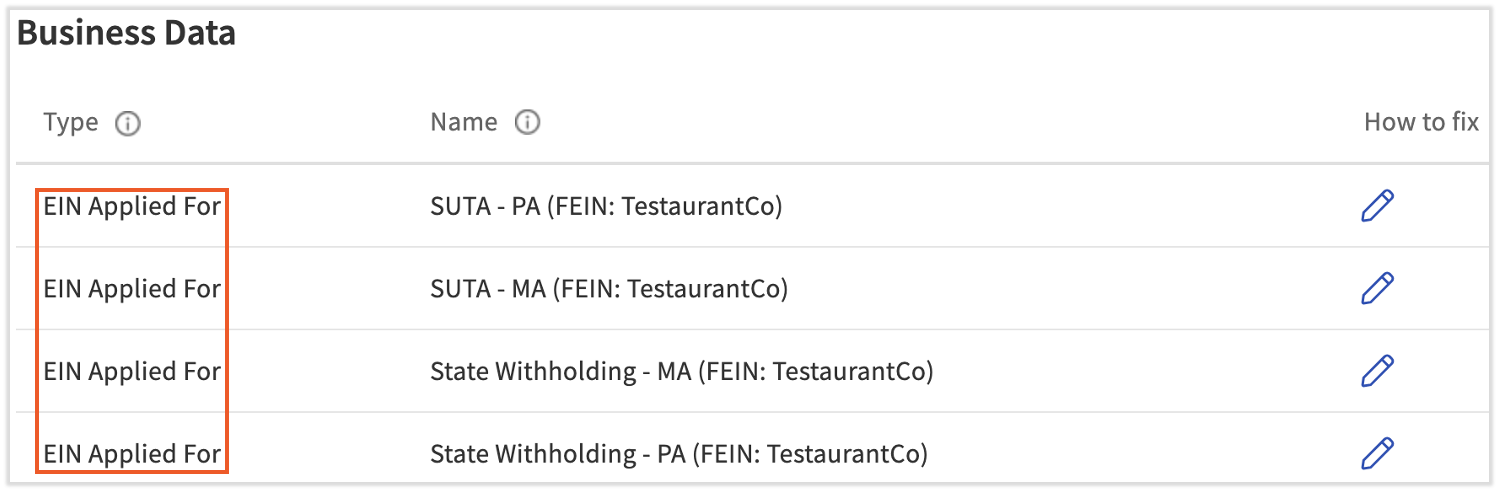
The Missing Data page is available for employers to review critical tax information that has not yet been inputted in Toast Payroll. When data is missing, it could result in incomplete or rejected tax filings. Locate this page by logging into payroll.toasttab.com and navigating to Settings > Payroll.
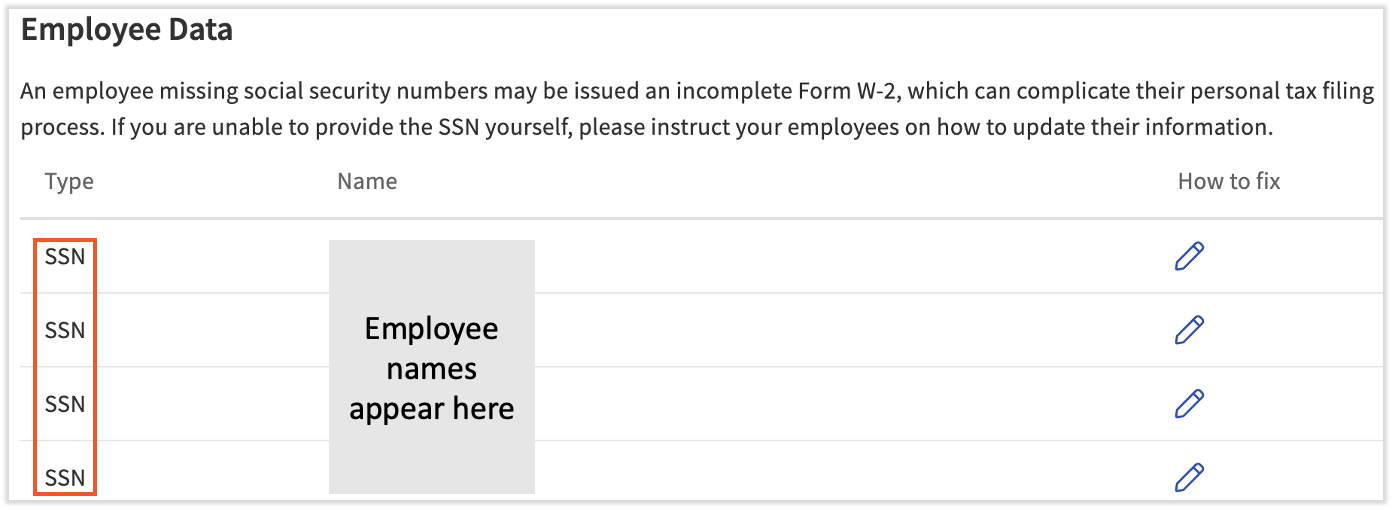
This page displays both missing information on the employer and employee level. Missing business data can now be entered into Toast Payroll on the new Tax Accounts page. Work with your employees to input employee-related information, such as social security numbers, directly in their profiles.
Additionally, HR+ users will see a tax alert to update their missing federal, state, or employee tax info before upcoming quarterly tax filings. This banner only appears when you have outstanding tasks in the Tax Center.

Types of Missing Data
The Missing Data page provides insight into various types of missing information:
- Employer
- EINs (Employer Identification Numbers)
- An EIN is an account number provided by a state which allows you to withhold, remit, and file taxes. EIN's are provided by a state's taxing authority after you register for a tax account.
- In general, you will receive separate EIN's for state withholding (if applicable) and state unemployment.
- An EIN can be different from your FEIN (Federal Employer Identification Number assigned by the IRS).
- EINs (Employer Identification Numbers)
- Employees
- SSNs (Social Security Numbers)
- An SSN is assigned by the Social Security Administration as a means of identification and wage recording to ensure employees can receive social security benefits.
- State tax agencies are continuing to implement strict rules surrounding missing SSNs. Many agencies assess penalties and interest for missing SSNs on tax filings.
- PSD Codes (Political Subdivision Codes)
- PSD Codes are only applicable to employees who live or work in Pennsylvania.
- Pennsylvania assesses local taxes which are determined based on the PSD code of the employee's resident address and the employer's work tax location.
- SSNs (Social Security Numbers)
Missing Data Instructions
Missing Business Data
- Once you receive your business's EINs from the state, select the matching pencil icon on the Missing Data page (the account will be in an Applied For state). You will be directed to the Tax Accounts page to enter the information into Toast Payroll.
- If you don't have your EIN on hand, find state and local tax agency websites on Toast Payroll: Register for State Tax Accounts. They can help you locate your EIN, possibly even on the website. Additionally, you may call the IRS at 800-829-4933 to gather your EIN.
- If a missing EIN is not received by January 5th of the following year, Toast Payroll may not have the information necessary to successfully file with various agencies for quarterly and/or annual taxes for the current year. Many jurisdictions no longer accept electronic filings with the tax EIN in an Applied For state and/or with missing or invalid SSNs and thus filings with this status may be rejected.
- Companies may be assessed penalties, interest fees, and/or additional repercussions by governing agencies. Toast Payroll is not liable for incomplete or inaccurate information, or for the contents therein. Provide EIN information by January 5th to avoid such consequences and have a smooth tax filing experience.
Missing Employee Data
- Work directly with your employees to update any missing information in their profiles.
- From the Missing Data page, select the pencil icon to the right of the missing data row to be redirected to the employee's profile where you can update the information.
- SSNs are captured on an employee's profile by selecting the pencil icon next to Basic on the Profile tab.
- PSD Codes (Pennsylvania only) are captured on the Residency Certification Form on the Taxes & Documents > Tax Form page. Your employee should fill out this form with their appropriate personal information.
Missing Data Charges
When customers have a state tax account ID in an Applied For state for longer than 30 days after that EIN's first check date, they will be assessed a $100 monthly fee per company code until Toast Payroll receives the missing state tax account ID. The Applied For status indicates that Toast Payroll does not have this number. This charge can apply to new customers and existing customers who are adding a new location and/or FEIN. Review the Missing Data page under Settings > Payroll to locate the missing tax account information.
Customers are notified when this charge is upcoming via regularly scheduled emails and in-product messages. $100 is debited from the account on file on the Monday following the 30 day mark and it will appear on a bank statement as MissEIN. Debits will continue each month until Toast Payroll receives this information.
Troubleshooting/FAQ
I'm unable to find my EIN. What should I do?
- Try to locate any received documentation from your state tax agency; it may have the EIN on it.
- Otherwise, get in contact with the tax agency to obtain your EIN. Toast Payroll: Register for State Tax Accounts can help in locating those agencies. Most tax agencies will provide a business owner or control person the account number directly via phone. The agency might also send out a tax notice to the employer with the EIN.
- Another option is to contact the IRS's Business and Specialty Tax line at 800-829-4922 from 7 am - 7 pm local time, Monday through Friday.
The employee who has missing data no longer works for me. How can I obtain this information?
Reach out to your former employee to have their information inputted in Toast. If the former employee is unresponsive, document your efforts in an attempt to retrieve the missing information.
I was unable to get my missing data into the system before the quarter/annual deadline. What should I do now?
Speak with a CPA or tax advisor to realize the implications specific to your business and how to make this decision. Toast cannot provide advice or recommendations in this situation. If you decide you want to make amendments to Form W-2s, see Toast Payroll: Get Help With Form W-2 Amendments with details on how Toast can assist with that, if you choose to utilize Toast Payroll's services in this manner. If you've already received notice of a rejected tax filing, this article may help you take next steps.
This content is for informational purposes and is not intended as legal, tax, HR, or any other professional advice. Please contact an attorney or other professional for advice.