Toast Pay Card: Employee FAQ
Last updated: Jul 7, 2026, 4:12 PM
Answers about your Toast Pay Card and Toast PayOuts — features, daily pay, transfers, delivery, errors, and leaving the program.
| Before using this article, make sure you have ordered and activated your Toast Pay Card. For setup steps, see The MyToast App: Pay. For help downloading or logging into the MyToast app, see The MyToast App: Account.
The contents of this article are not applicable to Toast customers outside the United States. |
- About Toast Pay Card and Eligibility
- Your Toast Pay Card Features
- Toast PayOuts (Daily Pay)
- Transferring Funds to Your Bank Account
- Card Delivery and Activation
- Transaction History and Errors
- Leaving the Toast Pay Card Program
- Related Articles
About Toast Pay Card and Eligibility
What is Toast Pay Card?
Toast Pay Card is a free prepaid debit card issued to eligible restaurant employees that you can use anywhere Mastercard® is accepted.1 Your wages and tips are loaded directly onto the card on payday. If your employer offers Toast PayOuts (also called daily pay), you can also access a portion of your earned tips and wages before payday directly from the MyToast app.
The Toast Pay Card is an alternative to paper checks or direct deposit. Signing up does not require a bank account, a social security number, or a credit check.
Note: Toast Pay Card and Toast PayOuts are available to Toast Payroll customers only and are not available in all states. Visit the Toast Pay Card and PayOut availability page to check your state.
Also asked as:
-
- What is a paycard?
- What is Toast paycard?
- What is daily pay?
Who qualifies for Toast Pay Card?
You qualify for Toast Pay Card and PayOut if all of the following apply 2,3:
-
- You are a non-salaried (hourly) employee at a restaurant that offers Toast Pay Card and PayOut
- You are 18 years of age or older
- You are located in an eligible state
- You have a smartphone and an email address
Your employer must have enrolled in the Toast Pay Card program. Check with your manager to confirm that the program is available at your location.
Your Toast Pay Card Features
What can I do with my Toast Pay Card?
Your Toast Pay Card has the following features:
-
- Spend anywhere: Use it anywhere Mastercard® is accepted.
- ATM withdrawals: Withdraw cash at no cost from over 37,000 ATMs in the MoneyPass® Network.4 Third-party ATM operators outside the MoneyPass network may charge a fee. Find MoneyPass ATM locations in the MyToast app or at moneypass.com.
- Over-the-counter withdrawals: Withdraw cash at bank teller windows. Banks that are not Mastercard member banks may charge a fee.
- Bank transfers: Transfer funds from your Toast Pay Card to an external bank account. You receive two free ACH transfers per calendar month. It is not possible to exceed this limit, even for a fee.5
- Bill pay: Provide your Toast Pay Card routing and account numbers to third parties (for example, your cell phone provider) to pay bills.
- Digital wallets: Use Apple Pay, Google Pay, Venmo, and Cash App.
- Contactless payments: Tap your card at checkout for faster payments.
- Card benefits: Your card includes Mastercard ID Theft Protection, Extended Warranty, Price Protection, and Mastercard Airport Concierge™. See the Mastercard Guide to Benefits for full details.
Note: Toast Pay Cards are issued by Sutton Bank, Member FDIC, pursuant to license by Mastercard®.
Where do I find my routing and account numbers?
To find your Toast Pay Card routing and account numbers, open the MyToast app and navigate to the Account tab, then select Manage Card. Your routing and account numbers are displayed there. You can use these numbers to set up bill pay with third parties.
Also asked as:
-
- Where is the routing number on my paycard?
- How do I find my account number on my Toast paycard?
What are the ATM withdrawal limits?
The following ATM withdrawal limits apply to your Toast Pay Card:
-
- Per-transaction limit: $1,000
- Daily limit: $1,000
- Monthly limit: $5,500
For the most current limits, review your cardholder agreement.
Also asked as:
-
- How much cash can I withdraw from an ATM with my paycard?
What are the fund transfer limits?
The following limits apply when transferring funds from your Toast Pay Card to a bank account:
-
- Per-transaction limit: $2,500
- Daily limit: $5,000
- Monthly limit: $5,500
- Free transfers: Two per calendar month. It is not possible to exceed this limit, even for a fee.
- Transfers cannot be scheduled for future dates.
Fees charged by the receiving financial institution are uncommon but may apply. For the most current limits, review your cardholder agreement.
Also asked as:
-
- How much can I transfer from my paycard to my bank?
- How many transfers can I do per month?
Toast PayOuts (Daily Pay)
What is a Toast PayOut?
A Toast PayOut3 is a feature that may be offered by your employer that gives you instant6 access to a portion of your earned tips and wages before payday. Toast PayOuts are available in the MyToast app.
Toast PayOuts are loaded directly onto your Toast Pay Card, where you can spend, withdraw, or transfer the funds. Any remaining portion of your paycheck that you did not receive via Toast PayOuts will generally be deposited to your Toast Pay Card on payday.
Note: Availability of Toast PayOuts varies by employer. Check with your manager to confirm whether your restaurant offers Toast PayOuts, and whether PayOuts apply to tips, wages, or both.
Also asked as:
-
- What is daily pay?
- What is Toast early pay?
- How do I get paid before payday?
- What is Toast payout?
How quickly can I access my pay after my shift?
Toast PayOuts are typically available after you finish your shift.6 Once you request a Toast PayOut in the MyToast app, funds are generally loaded to your Toast Pay Card within seconds.
If your restaurant uses tip pooling with Toast Tips Manager, tip PayOuts become available after your manager has approved and sent the tip pool — typically the next calendar day.
If you work multiple days in a row, your available PayOut amount accumulates throughout the pay period. Your Toast PayOut amount resets to $0 when a new pay period begins.
Also asked as:
-
- When do I get my tips?
- How long after my shift until I can take a payout?
- When is daily pay available?
Why don't I see the Toast PayOut I expected?
There are several reasons your Toast PayOut offer may be missing or lower than expected. Check each of the following:
-
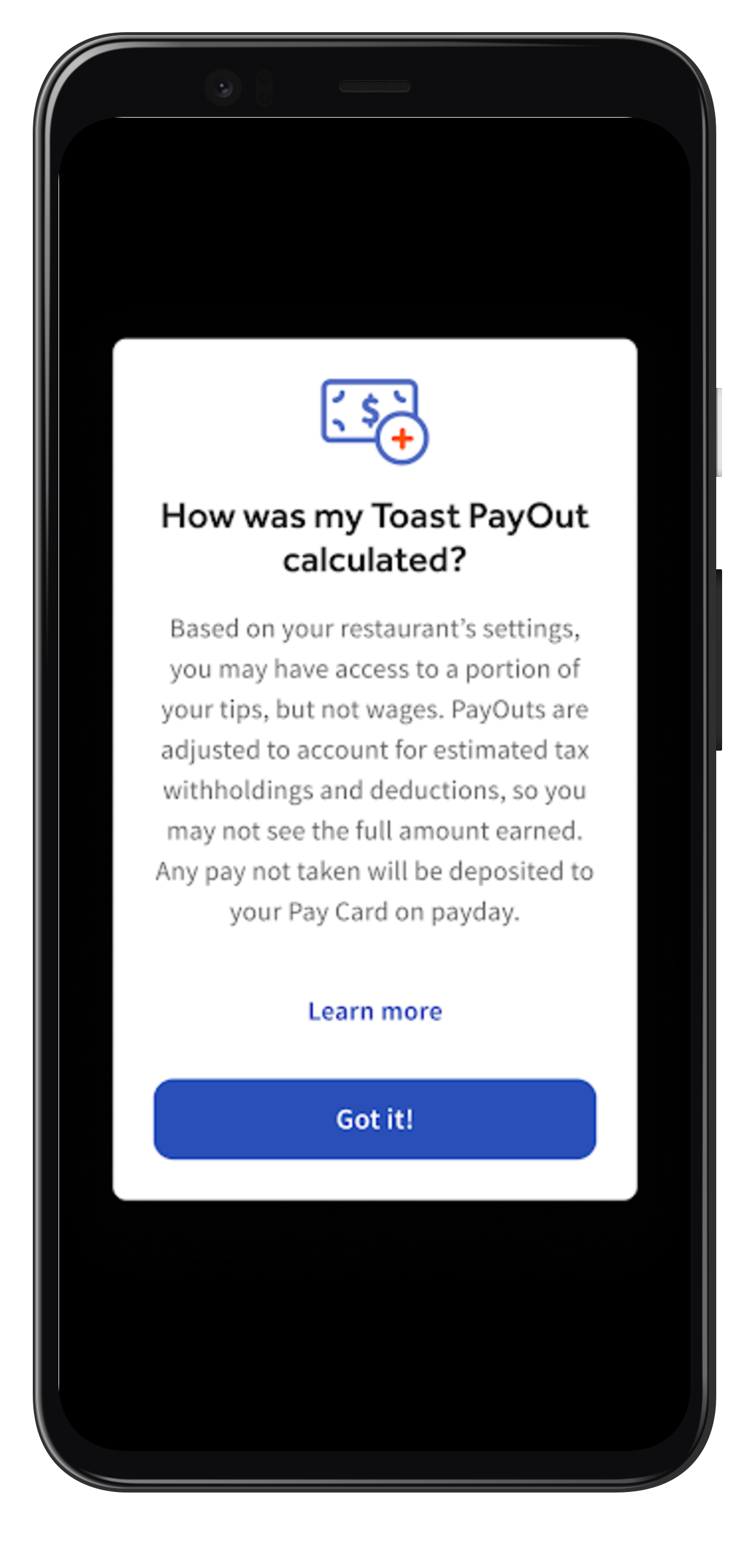
- Your employer may have limited Toast PayOut access. Open the MyToast app and navigate to Card > Get Paid. Select the ? icon next to Available Toast Payout and read the details. This screen shows whether your employer has limited PayOut access for tips, wages, or both.
- Your employer may have applied tax adjustments to tip PayOuts. Your employer may have elected to adjust tip PayOuts for estimated tax withholdings and deductions. The ? icon next to Available Toast Payout in the MyToast app will confirm this setting.
- Your time entries or tip amounts may not have been entered yet. Verify with your manager that your clock-in and clock-out times and tip amounts are correctly entered in Toast Payroll. Toast PayOuts require a completed timesheet entry to generate an offer.
- Your restaurant tip pools. If your restaurant tip pools, your PayOut for tips becomes available after your manager approves the tip pool and sends it to payroll — typically the next calendar day. Confirm with your manager that the tip pool has been approved and sent.
- A time entry or tip was adjusted by your employer. If your employer corrected a time entry or tip amount attributed to you, subsequent PayOut offers will reflect the updated amounts.
- You may be at the start of a new pay period. Toast PayOut offers are available within a pay period. If a pay period just ended and you have not worked yet in the new one, you will not see a PayOut offer. Keep in mind this refers to the pay period — not your payday.
- You may have reached the daily or pay period limits. Toast PayOuts for tips are capped at $500 per day. Toast PayOuts for wages are capped at $500 per pay period.
Also asked as:
-
- Why is my payout amount zero?
- Why can't I see my daily pay?
- Why is the payout button greyed out?
- Why is my Toast PayOut less than I expected?
Do Toast PayOuts include my tips?
Whether Toast PayOuts include your tips depends on the settings your employer has chosen. There are four possible options your employer may have configured: tips only, wages only, both tips and wages, or neither. To view your employer's Toast PayOut settings, open the MyToast app and navigate to Card > Get Paid. Select the ? icon next to Available Toast Payout. You will see an information screen that explains exactly how Toast PayOuts are configured at your restaurant.
Also asked as:
-
- Are my tips included in my daily pay?
- Will I get my tips early?
Where are my gratuities and service charges?
Gratuities and service charges are treated as wages for Toast PayOut purposes. They will appear as part of your wage PayOut offer, not your tip PayOut offer.
Also asked as:
-
- Where do my service charges go?
- Do my gratuities count as tips for PayOuts?
How are my wage PayOut amounts calculated?
If your employer offers Toast PayOuts for wages, the available amount is calculated as follows:
-
- Take 50% of your cumulative wages earned to date in the pay period.
- Subtract any recurring deductions.
- Subtract 30% of your cumulative tips earned to date in the pay period as estimated tax withholdings.
- Subtract any previous Toast PayOuts for wages taken during the pay period.
- The remaining amount — if greater than $0 and less than the $500 pay period cap — is your available Toast PayOut for wages.
If the result is $0 or less, your wages alone are not sufficient to cover estimated tax withholdings and recurring deductions. In this case, you will not see a wage PayOut offer at that time.
Also asked as:
-
- How is my early wage access calculated?
- Why is my wage payout lower than I expected?
How are my tip PayOut amounts calculated?
Tip PayOut calculations depend on your employer's settings:
If your employer has the All Tips setting enabled: Your cumulative tip PayOut for the pay period equals your earned tips to date. Tax withholdings and deductions are applied on payday instead.
If your employer has the All Tips setting disabled: Your tip PayOut is reduced by an estimated amount to cover tax withholdings and recurring deductions — specifically, any negative amount that resulted from the wage calculation. If the wage calculation did not produce a negative balance, your tip PayOut equals your earned tips to date. Any overestimated tax amounts not needed when payroll runs will be paid out on payday.
In both cases, tip PayOuts are capped at $500 per day.
Also asked as:
-
- How is my tip payout calculated?
- Why is my tip payout different from what I earned?
How does a Toast PayOut affect my paycheck?
On payday, your pay statement reflects your total net pay including total wages and tips earned for the pay period. Any Toast PayOuts you took are displayed on the statement alongside any applicable taxes, withholdings, and deductions.
-
- Toast PayOut: Tips Taken — This line item is not a wage deduction. It reflects tips you already received via Toast PayOut, as though you had been paid them in cash.
- Toast PayOut: Early Wages Access — This line item is structured as a wage advance and appears as a wage deduction on your paystub. Because your employer paid these wages to you early, they are deducted from your payday total.
Also asked as:
-
- Will my paycheck be smaller if I take a payout?
- How does daily pay show on my pay stub?
Transferring Funds to Your Bank Account
How do I transfer money from my Toast Pay Card to my bank?
You can transfer funds from your Toast Pay Card to an external bank account from the MyToast app. Funds are generally available in your bank account within 2–3 business days after the transfer is initiated.
Before you transfer:
-
- You must have a verified phone number on your Toast Web employee profile. If you do not have one, ask your manager to add it, or log into Toast Web, navigate to your profile, and select Add phone number.
- You must have an available balance on your Toast Pay Card (for example, from a Toast PayOut you have already accepted).
- Transfers cannot be scheduled for future dates.
- You have two free transfers per calendar month. It is not possible to exceed this limit, even for a fee.
For the complete step-by-step transfer process, including how to add your bank account, complete phone verification, and confirm the transfer amount, see The MyToast App: Pay — navigate to the Transfer Funds From the Toast Pay Card to a Bank Account section.
If you receive an error during transfer: Review the limits in your cardholder agreement or call (866) 218-6688 for assistance.
Also asked as:
-
- How do I transfer my tips to my bank account?
- How do I move money off my paycard?
- How long does a paycard transfer take?
Card Delivery and Activation
How long does my Toast Pay Card take to arrive?
After you request a Toast Pay Card through the MyToast app, it typically takes 8–10 business days to arrive at the address you provided during sign-up. Shipping delays can occasionally occur.
If your card is taking longer than expected, call Toast at (312) 252-7341 for more details on the status of your shipment.
Once you receive your physical card, select the Activate button in the MyToast app to activate it through an interactive phone system. After activation, you will be prompted to connect your card to Toast Payroll — select Set up now to complete this step. Connecting your card to Toast Payroll is required before you can receive pay or access Toast PayOuts.
Also asked as:
-
- When will my paycard arrive?
- How long does the paycard take to ship?
- I think my Toast Pay Card should have arrived already.
What if my Toast Pay Card is lost, stolen, or damaged?
If you believe your Toast Pay Card is lost or stolen, call (866) 218-6688 as soon as possible. Reporting promptly helps limit your liability for unauthorized charges. Toast does not have a way to track or locate a lost Toast Pay Card.
Replacement cards are free. While you wait for your replacement card, Toast recommends changing your payment method in Toast Payroll to direct deposit or paper check so you continue to receive your pay on time. Once your replacement card arrives, activate it and update your payment method back to Toast Pay Card. If your restaurant allows transfers, you can then transfer any wages or tips to your bank account on file.
To update your payment method, visit Toast Payroll: Set a Payment Method.
Also asked as:
-
- I lost my paycard — what do I do?
- My Toast Pay Card is stolen — what should I do?
- How do I get a replacement paycard?
Transaction History and Errors
How do I view my Toast Pay Card transaction history?
To view your Toast Pay Card transaction history, open the MyToast app and select the Card tab, then select See All Transactions. This view shows all card transactions.
To download your transaction history, select Export as PDF from the upper-right corner of the transaction history screen.
Also asked as:
-
- How do I see my paycard transactions?
- Where is my transaction history on the MyToast app?
What do I do if I see an error or unauthorized transaction?
If you notice an error or unauthorized transaction on your Toast Pay Card, you can find information on reporting in your cardholder agreement and within the MyToast app transaction history. You must report errors within 60 days of the date of the first statement on which the error appeared.
To report an error or unauthorized transaction, contact Galileo using any of the following:
-
- Phone: (866) 218-6688
- Mail: Processing Center, P.O. Box 71337, Salt Lake City, UT 84171-0337
- Email: issuing@toasttab.com
When you reach out, provide:
-
- Your name and account number
- The dollar amount of the suspected error or transaction
- A clear explanation of why you believe there is an error or why you need more information
Galileo will investigate your concern and correct any errors promptly. If it takes more than 10 business days to investigate, you will be credited on your account for the disputed amount so you can access those funds while the investigation is ongoing — provided you have submitted written confirmation of your dispute.
Also asked as:
-
- I don't recognize a charge on my paycard — what do I do?
- There's an incorrect transaction on my Toast Pay Card.
Who do I contact for help with my Toast Pay Card?
For questions about your pay (wages, tips, payroll), contact your employer. Toast is generally not able to assist with pay questions that involve your employer's settings or payroll decisions.
For help with your Toast Pay Card account — including card balance, transaction history, fund transfers, withdrawals, and lost or stolen cards — contact Galileo, the card issuer at (866) 218-6688
The following scenarios are handled by Galileo, not Toast Customer Care:
-
- Funds transfers
- Toast Pay Card transaction questions
- Withdrawal issues
- Lost, stolen, damaged, or broken Toast Pay Cards
- Transaction history
- Card balance questions (current amounts and last paid amounts)
Note: The MyToast app is compatible with iPhone and Android devices. Apple devices must have iOS 16.0 or later installed, and Android devices must have Android 11 or later. Use the links below to check your smartphone's OS version:
Also asked as:
-
- Who do I call about my paycard?
- How do I get help with my paycard balance?
- Who handles paycard issues?
Leaving the Toast Pay Card Program
How do I cancel my Toast Pay Card?
To cancel your Toast Pay Card:
-
- Call (866) 218-6688 and request that your card be canceled or deactivated.
- Log into Toast Payroll and update your payment method to direct deposit or paper check. If you do not update your payment method, it will default to a paper check.
Expected outcome: After successfully canceling your card, you will see a confirmation message on your MyToast app screen indicating that the card has been disconnected from Toast Payroll.
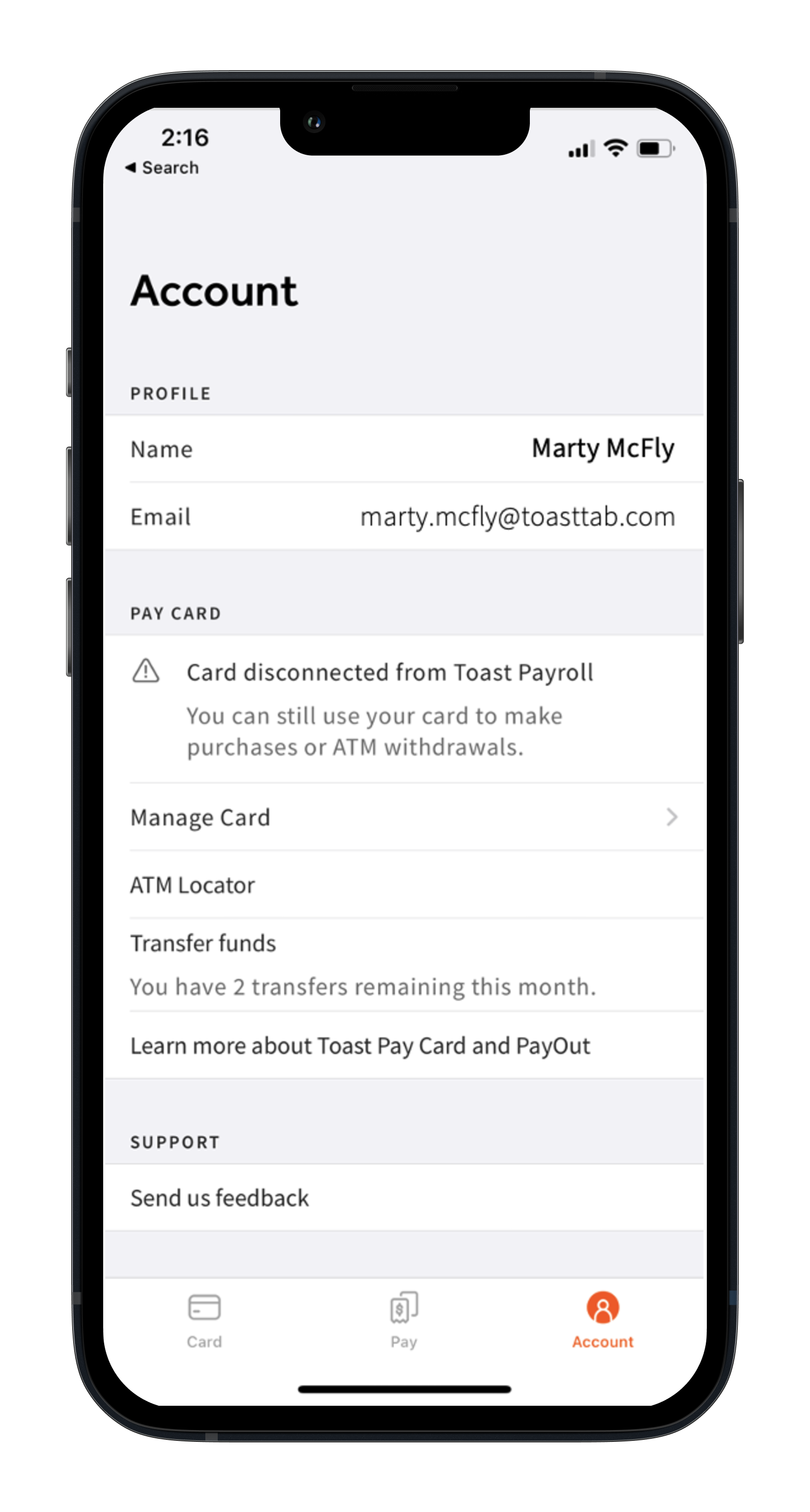
You can continue to access your remaining card balance by spending, transferring to your external bank account, making over-the-counter bank withdrawals, or withdrawing from ATMs until your balance reaches $0.
Also asked as:
-
- How do I stop using my paycard?
- How do I deactivate my Toast Pay Card?
- How do I get off paycard?
What happens to my card if I leave my job?
If you leave your job, you retain access to the MyToast app and any remaining balance on your Toast Pay Card. You can continue to spend, withdraw from ATMs, or make over-the-counter withdrawals until your balance is depleted.7
Toast PayOuts will be disabled once you are no longer employed. Your employer is responsible for delivering any final wages earned that had not been loaded to your Toast Pay Card before your termination.
If you prefer to receive your remaining balance as a check rather than spending it down, request a paper check from your employer.
Note: Third-party financial institutions may charge a fee for over-the-counter withdrawals unless the institution is a Mastercard member bank.
Also asked as:
-
- What happens to my paycard when I quit?
- Can I still use my Toast Pay Card after leaving my job?
What happens if my employer discontinues the Toast Pay Card program?
If your employer discontinues the Toast Pay Card program, your employer should inform you of this decision. The MyToast app will reflect that your card has been disconnected from Toast Payroll, and the Toast PayOut feature will no longer be available.
Your existing card balance will still be accessible — you can continue to spend, withdraw, or transfer funds until the balance is fully depleted.
Important: Update your payment method in Toast Payroll before your next pay period so your wages are deposited correctly. If you do not update your payment method, it will default to a paper check. To update your payment method, visit Toast Payroll: Set a Payment Method.
Also asked as:
-
- My employer is stopping paycard — what do I do?
- What happens when the restaurant stops using Toast Pay Card?
Related Articles
- The MyToast App: Pay
- The MyToast App: Account
- Toast Payroll: Use the Toast Pay Card - Employer Guide
- Toast Payroll: Unauthorized Toast Pay Card Transaction
- Employee Has Not Received Their Tips From Toast Pay Card
1 Toast Pay Cards do not have any associated ATM withdrawal or other fees; however, third-party ATM operators may charge a fee unless the cardholder uses an ATM within the MoneyPass® Network, and third-party financial institutions may charge a fee for over-the-counter withdrawals unless the institution is a Mastercard member bank. MoneyPass is a registered trademark of Fiserv, Inc.
2 Toast Pay Cards are issued by Sutton Bank, Member FDIC, pursuant to license by Mastercard®. Mastercard and the circles design are registered trademarks of Mastercard International Incorporated. Toast PayOuts are funded by a 0% line of credit issued to employers by Toast, Inc., as set forth in the employer's Credit Agreement. Toast reserves the right to change or discontinue this program at any time. Toast Pay Card and PayOut is not available in all jurisdictions and is available to Toast Payroll customers only.
3 Availability of Toast PayOuts varies by employer. Visit the MyToast app to see if your employer offers Toast PayOuts. Tip PayOuts may be limited to a portion of pay to help account for estimated taxes, withholdings, and deductions. Tip PayOuts are not available at restaurants that tip pool without using Toast Tips Manager. Employees must receive wages via the Toast Pay Card in order to access Toast PayOuts. Tips will be paid to employees on their Toast Pay Card as though you were receiving them in cash. Wages will be advanced by employers during the pay period and deducted from your total wages paid to you on payday.
4 MoneyPass is a registered trademark of Fiserv, Inc.
5 Fees charged by the receiving financial institution are uncommon but may apply. Employees will receive two (2) free ACH transfers per calendar month. It is not possible to exceed that limit, even for a fee. Employees cannot schedule transfers for future dates. There is a limit of $2500 per transaction, $5000 per day, and $5500 per month. Limits are subject to change. Employees should see their Cardholder Agreement for details.
6 Access is typically available instantly after the employee's shift; however, if restaurants tip pool using Toast Tips Manager, Toast PayOuts of tips are available after the tip pool is approved and sent to Toast Payroll, typically the next calendar day.
7 Third party financial institutions may charge a fee for over-the-counter withdrawals unless the institution is a Mastercard® member bank.
This content is for informational purposes and is not intended as legal, tax, HR, or any other professional advice. Please contact an attorney or other professional for advice. The content of this article are not applicable to Toast customers outside the United States.