Toast Reviews Agent Overview
Last updated: Oct 6, 2026, 2:38 PM
Learn what Reviews Agent does, what you need to use it, and how to read and respond to your Google reviews in Toast Web.
- Toast Reviews Agent Overview
- What You Need
- Who Can Use Reviews Agent
- How Review Collection Works
- How Review Management Works
- Review Alerts
- What Reviews Agent Does Not Cover
- Related Articles
Toast Reviews Agent Overview
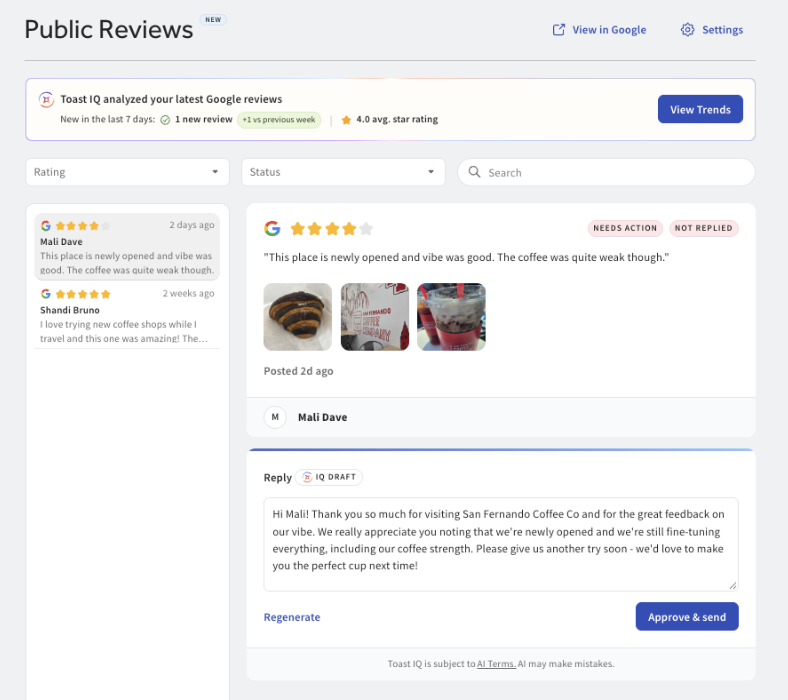
Reviews Agent helps you build your public reputation on Google. It invites your guests to leave a Google review using the receipts and confirmations you already send, brings your Google reviews into Toast Web so you can read them in one place, and drafts a response for each review that you can review and publish.
In Toast Web, Reviews Agent appears as the Public reviews page. Navigate to Toast Web > Guests > Public reviews.
What You Need
- A connected Google Business Profile for each location. Without it, guests do not see the Google review option, and your real reviews cannot be pulled into Toast.
- The Toast IQ Grow package. Head to Toast Shop for more information and product availability.
- Permissions 4.13 Customer Credits & Reports and 6.6 Restaurant Operations Setup.
Who Can Use Reviews Agent
Full access to Reviews Agent is included with Toast IQ Grow. With Toast IQ Grow, you get the complete Public reviews page: every Google review from the last 30 days, AI-drafted responses, filters, keyword search, trend summaries, and alerts.
Without Toast IQ Grow, the Public reviews page shows three of your most recent Google reviews as a preview. You can see them, but responding, filtering, and searching are locked, and upgrade options appear on the page. If Toast cannot match your location to a Google Business location, the preview shows three sample reviews instead of your own.
How Review Collection Works
When a guest leaves feedback, a Google option appears so the guest can go straight to your location's Google review page instead of searching for your business.
Guests see this option in three places:
- A star rating selected from an Online Ordering order confirmation email
- A star rating selected from a digital receipt, by text or email, on an on-premise order
- The Feedback QR code on a printed receipt
Note: Google’s review policies state that businesses may not discourage or prohibit negative reviews or selectively solicit positive reviews from customers (See here - external link). Toast's Reviews Agent is built to show the Google review option to guests at every star rating, consistent with that policy. See the Reviews Agent FAQ.
Google review collection is enabled by default once your Google Business Profile is connected.
To change it, see Manage Google Review Collection on Guest Receipts.
How Review Management Works
The Public reviews page shows every Google review your location received in the last 30 days. New reviews pull into Toast every 60 minutes.
Each review displays:
- The star rating
- The reviewer's name, or Anonymous
- The review content, including text and images
- Any response already posted, regardless of where it's posted
For a review with no response yet, Toast drafts a reply for you. You can regenerate the draft, edit it, or accept it as written, then select Approve & send to post it to Google. For a review that already has a response, you get Edit and Delete options.
You can also filter your reviews by star rating or by whether they have been responded to, search by keyword, and read quantitative and qualitative trend summaries at the top of the page.
Review Alerts
| Review alerts are currently in limited release with select customers. Check back soon for updates! |
You can enable a Negative Review alert that checks for new one- and two-star Google reviews every hour and notifies you, plus anyone else you add as a recipient, by email or Toast Now push notification. Each alert includes a suggested reply so you can respond directly from the notification.
See Enable Google Review Alerts.
What Reviews Agent Does Not Cover
- Google only. Reviews from other platforms, such as Yelp or TripAdvisor, are not pulled into Toast.
- The last 30 days. Older reviews stay on your Google Business Profile and are not shown in Toast.
- No automatic posting. Toast drafts every response, but nothing posts to Google until you select Approve & send.
- No brand voice settings. You cannot set tone, brand voice, or blocked terms for the drafts. You can edit any draft before you send it.
Related Articles
- Connect a Google Business Profile to Toast
- Manage Google Reviews in Toast Web
- Toast Reviews Agent FAQ
- Get Help With Toast Reviews Agent