Mounting Options for Toast Hardware
Last updated: Sep 15, 2026, 4:18 PM
Note: Toast doesn't provide wall mounting services during installation. Mounts are required to be ready to go for our equipment on your installation day. Use the following information for reference on wall mount details. Your contractor may need dimensions before drilling holes -- keep that in mind while preparing for installation!
Toast Wall Mounts
Mounts shipped from Toast have both a VESA 75mm pattern and a VESA 100mm pattern. The swing arm is compatible with all Elo versions. The Flex is currently using the 75x75 holes.
Note: Toast Flex 22" devices only have a VESA 100mm pattern.
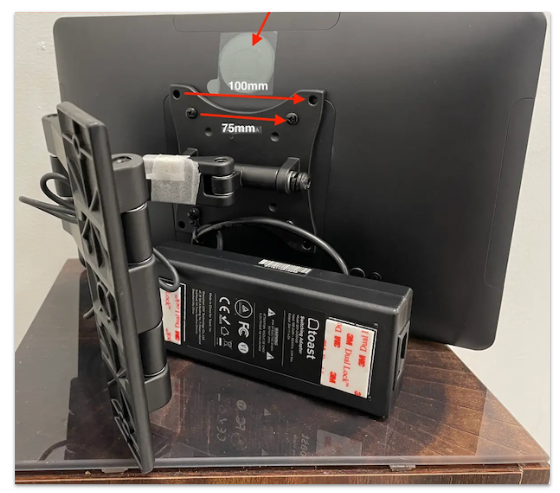
There are 6 inches between both screws of the wall mount.
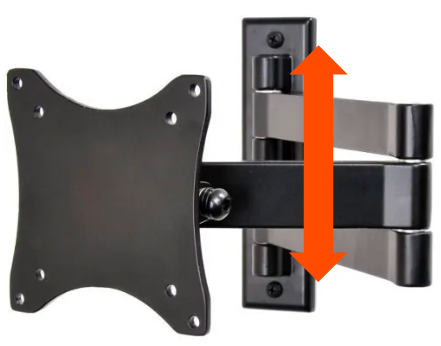
Flex 3 Wall-Mount Compatibility
| Flex Model | VESA Pattern | 3rd-Party Mount | Notes |
| Any Flex sold as a Wall-Mounted version | Yes | Works | Compatible with any 3rd-party VESA mount, no caveats |
| 14" Flex, Wall-Mount version | VESA75 | Works | 75mm pattern |
| 22" Flex, Gen 2 module | Yes | Works | Only module available for Flex 22; works with VESA regardless |
| 14" Flex, Gen 2 (counter-stand origin) | Not native | Works with kit | Needs the KDS conversion kit to enable VESA/3rd-party mounting |
| 14" Flex, Gen 3 (counter-stand origin) | No | No solution | No conversion kit exists; cannot use a 3rd-party/VESA mount |
Note: The existing Toast Wall Mounts section above reflects Gen 2 Flex hardware, and that Flex 3 terminals follow the compatibility rules in this table instead.
Floor Stands and Pole Mount Floor Stands
Toast does not sell floor stands or pole mount floor stands for monitors, such as self-ordering kiosks. However, we recommend those from Touch Screens Inc., as shared on Toast Shop, as these stands are designed with Toast hardware in mind.
Additionally, you should be able to mount any Toast Flex or Flex 3 terminal to a floor stand as long as the mounting mechanism is compatible with a 75x75mm VESA pattern.
Frequently Asked Questions
What Toast hardware can be mounted?
Our VESA75/VESA 100 pattern is compatible with both Elo and Toast Flex devices, regardless if these are being used as a terminal, kitchen display screen, or a kiosk.
A few things to note:
- Elos are mountable out of the box. You can use a Toast-provided mount or you can purchase a third-party mount that has a VESA100 pattern.
- Toast Flexes that are shipped with a wall mount, like Toast Flex for Kitchen (Wall-Mounted), already have a VESA75 backplate affixed to their Toast-provided wall mount. If you want to switch to a third-party mount, it will need a VESA75 pattern to mount Flex or GFD Wedge
- Toast Flexes that are shipped without a wall mount will need a conversion kit backplate. The conversion kit backplate will replace the Flex counter stand with a VESA75 mounting bracket, which will work with either a Toast-provided mount or a third-party mount with a VESA75 pattern.
Not sure what hardware you have? Check out this Support Center article, Identify Your Toast Hardware.
What kind of wall mount do I need if I am purchasing this from a third party?
You can purchase any wall mount that meets the VESA, or Video Electronics Standards Association, standards. The VESA standards use the distance in millimeters between the 4 mounting holes on the back of your equipment. You can easily find a wall mount that meets your specifications. To learn more, check out this website (external link).
Additional mounts supporting the Flex 22 can be found in Toast Flex 22 Installation Guide. If you are purchasing a third-party mount, make sure it can support the weight of the Flex 22, which is about 10 pounds.
Will Toast install my mount?
Toast doesn't provide wall mounting services during installation. We require mounts to be ready to go for our equipment on your installation day. Use the following information for reference on wall mount details. Your contractor may need dimensions before drilling holes. Keep that in mind while preparing for installation!
You are responsible for installing your mount in your restaurant. Check out the Product Spec Guide (English or French) for more information on technical specifications.
Note: The KDS should be mounted at eye level, away from heating elements, and within 2 feet of the wall jack of a dedicated source for power and Ethernet connection.
We purchased a kitchen monitor, but the wall mount is missing. What do I do?
When you purchase a Toast Flex for your kitchen on Toast Shop, you have the option to choose between On-Counter and Wall Mount. The On-Counter product does not come with an included wall mount.
Confirm which product you ordered by reviewing your order in Toast Shop.
- If you ordered an On-Counter Toast Flex but you realize you need a wall mount, you can purchase a compatible third-party wall mount or you can submit a return request and then purchase your desired hardware bundle.
- If you ordered a Wall Mount Toast Flex but your wall mount was missing, please contact Customer Care.