Customize Menu Item and Modifier Names for POS and KDS
Last updated: Sep 17, 2026, 4:13 PM
Question
What's the difference between Name, POS Name, and Kitchen Name for menu items and modifiers?
Answer
You may find it helpful to change the way menu item and modifier names appear on in-store POS devices or kitchen tickets to improve clarity and efficiency for your staff. These changes will all be made on your Item Details page. To learn more, see Create and Manage Menu Items. Below is a description of how the different name fields function and where they are reflected in Toast:
Name: the "official" name of the menu component that will be used throughout back-end reporting. If no other name fields are populated, this is also the name that will appear on the POS, kitchen tickets, and guest receipts. However, this is the name that always appears in your Online Ordering menus, on Toast Kiosk, and in Toast Mobile Order & Pay and QR ordering, even when a POS Nickname is set.
POS Nickname: a shortened/abbreviated name that will appear when using a front-of-house POS device and can act as a visual aid to increase speed when placing orders. For example, if the actual menu item name is "California Chicken Sandwich," a POS name of "CHX SAND" could be entered to minimize the amount of text that appears on the POS menu button. The POS Nickname applies only to front-of-house POS devices, such as terminals and handhelds. Self-ordering surfaces, including Toast Kiosk, Toast Mobile Order & Pay, and QR ordering, display the Name instead.
Kitchen Nickname: the name as it will appear to kitchen staff on printed kitchen tickets and/or kitchen display screens. Similar to POS Name, this field can be used to abbreviate or change the way the name appears to your kitchen staff for improved clarity/efficiency.
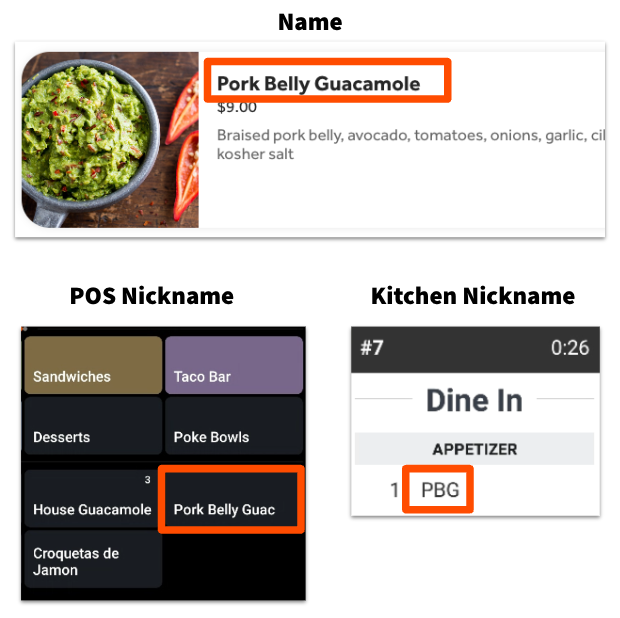
Which menu item name appears where
The name your guests and staff see depends on where the order is placed. This table applies to menu items.
| Where the name appears | Name field used |
| Front-of-house POS terminals and handhelds | POS Nickname |
| Toast Kiosk | Name |
| Toast Mobile Order & Pay and QR ordering | Name |
| Toast Online Ordering | Name |
| Kitchen display screens and printed kitchen tickets | Kitchen Nickname |
| Guest receipts | Name |
Note: A POS Nickname you set for a menu item will not appear on Toast Kiosk, Toast Mobile Order & Pay, or QR ordering. If you want a shortened name in front of house but the full name in front of guests, this is expected behavior.
Note: If a menu item or modifier appears differently when printed on a ticket compared to what appears on your POS, it may be because it's referencing another menu item with a different name. Open up the menu item or modifier details page. If you see an item reference with a different name, you'll either need to change the name of the item reference to match, or create a new item/modifier that doesn't have the item reference.
Additional Information
Menu items with Roman and Chinese characters (traditional or simplified) will automatically separate on the KDS screen and printed tickets, so Roman characters appear on one line and Chinese characters appear on another. For the best results, group Roman and Chinese characters together, and don't add any special characters.
Good examples:
- Shrimp Dumplings 水晶虾饺
- 水晶虾饺 Shrimp Dumplings
Bad examples:
- 水晶虾饺 Shrimp Dumplings 水晶虾饺
- Shrimp Dumplings / 水晶虾饺
- Shrimp Dumplings (水晶虾饺)