xtraCHEF: Bulk Delete Invoices
Last updated: Apr 22, 2026, 6:32 PM
Learn how to delete multiple invoices at once using the Invoice Dashboard in xtraCHEF
Bulk deletion allows users to select and remove several invoices at the same time instead of deleting them individually, helping streamline invoice management.
- Bulk Delete Invoices Overview
- Delete Invoices from the Invoice Dashboard
- Notes for Bulk Deletion
- Additional Resources
Bulk Delete Invoices Overview
- xtraCHEF allows users to delete invoices directly from the Invoice Dashboard. This feature helps streamline invoice management by allowing multiple invoices to be removed at once instead of deleting them individually.
- Users can filter invoices by location and date range, making it easier to locate invoices and perform bulk deletions efficiently.
- This feature is especially useful when managing large numbers of invoices or cleaning up invoices from a specific time period.
Delete Invoices from the Invoice Dashboard
Follow the steps below to delete invoices in bulk.
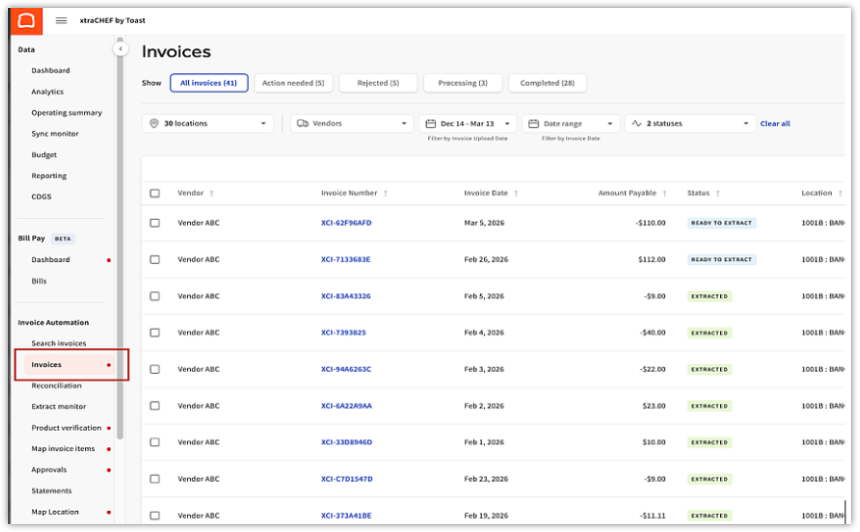
- Go to the Invoices Section
- From the left navigation panel, select Invoices under Invoice Automation.
- From the left navigation panel, select Invoices under Invoice Automation.
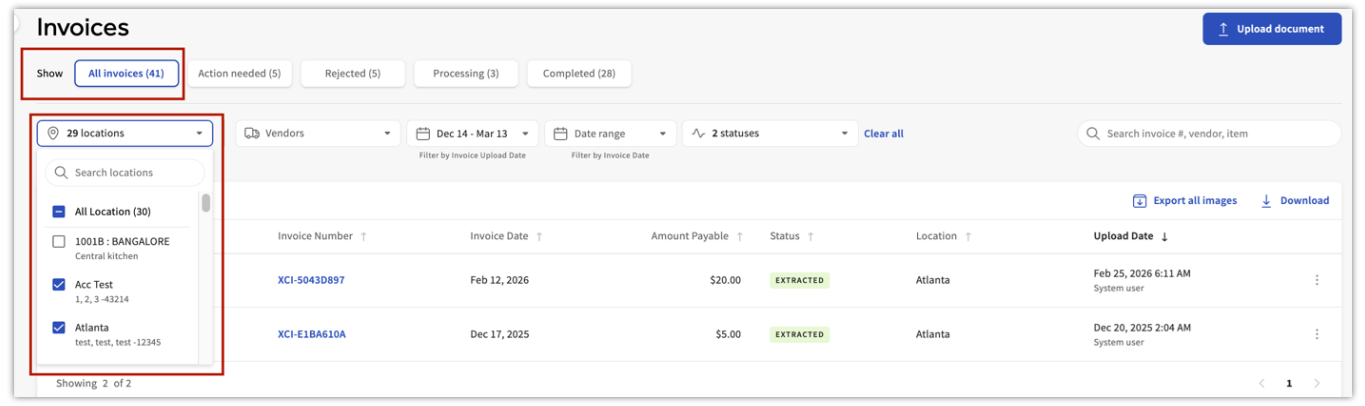
- Select the Location
- Choose the location associated with the invoices you want to delete. Note: If your account only has one location, this step can be skipped.
- Choose the location associated with the invoices you want to delete. Note: If your account only has one location, this step can be skipped.
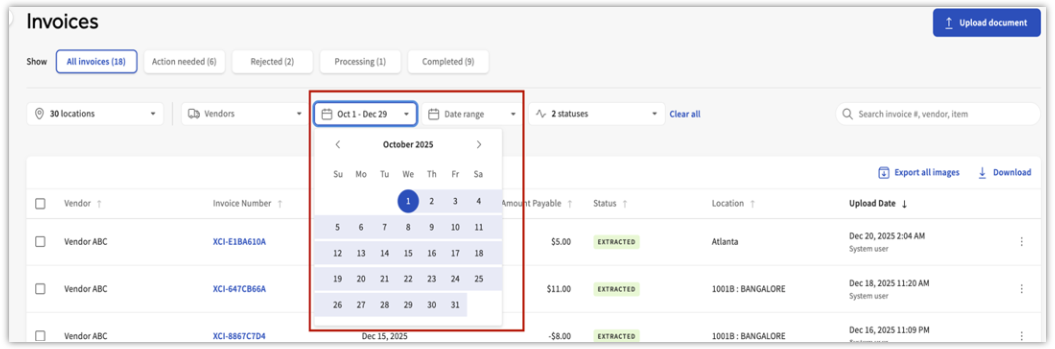
- Choose the Date Range
- Select the calendar icon and select the date range for the invoices you want to delete.
- Filtering by date makes it easier to locate invoices, especially when performing bulk deletions. Note: Invoices can be deleted one quarter at a time to make large deletions easier to manage.
- Adjust the Number of Invoices Displayed
- You can increase the number of invoices displayed per page to make selecting invoices easier.
- Typical display options include:
- 10
- 25
- 50
- 100
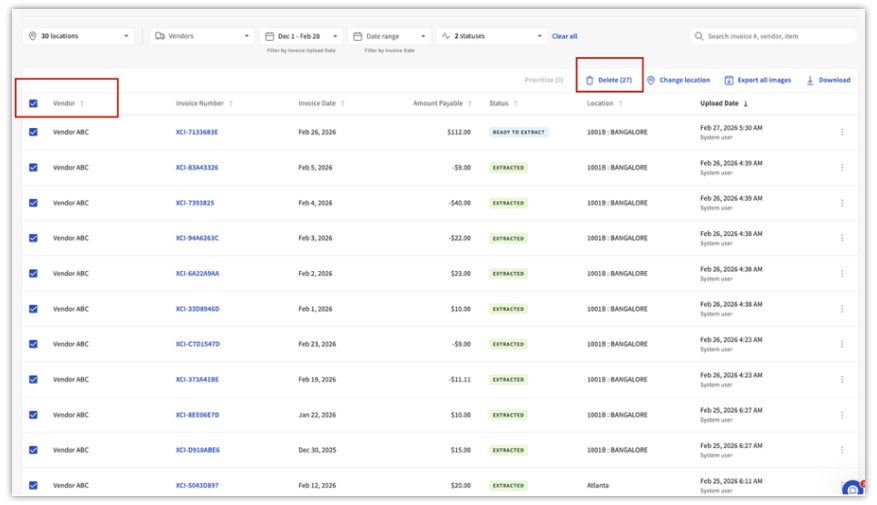
- Select the Invoices and Delete
- Use the checkbox next to each invoice to select the invoices you want to delete.
- After selecting the invoices:
- Select Delete at the top of the page.
- Confirm the deletion.
- The selected invoices will then be permanently removed from the system.
- Example:
- If a single invoice:
- If multiple invoices need to be deleted:
- If a single invoice:
- Confirm the Deletion
- A confirmation window will appear asking if you want to remove the selected invoice(s).
- Review the message and select Yes, remove to permanently delete the invoice(s).


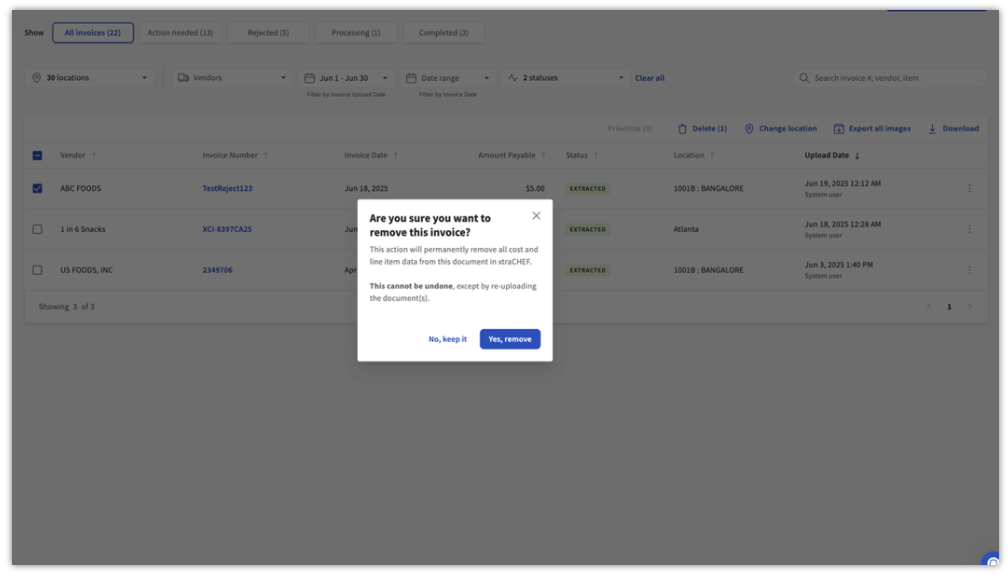
Note: This action permanently removes all cost and line item data from the invoice in xtraCHEF and cannot be undone. The invoice can only be restored by re-uploading the document.
Notes for Bulk Deletion
- Deleted invoices are permanently removed from the system.
- Always review selected invoices carefully before confirming deletion.
- Using filters such as location and date range can help manage large invoice sets more efficiently.
- To simplify large deletions, invoices can be deleted one quarter at a time using the date filter.
- Once invoices are deleted, the catalog will automatically update to reflect only items from the remaining processed invoices.
If you need help with other invoice management tasks, refer to related xtraCHEF help articles or contact Toast Support.
Additional Resources
- xtraCHEF: Invoice Rejections
- xtraCHEF: Upload Invoices and Receipts (Desktop)
- xtraCHEF: Invoices and Invoice Status