xtraCHEF: Get Started With Actual vs. Theoretical Analysis Reports
Last updated: Aug 25, 2026, 12:53 PM
- Actual vs. Theoretical (AVT) Analysis
- View AVT Analysis
- Understand Food Costs
- Leverage This Analysis
- Troubleshoot AVT Analysis
- Additional Resources
Actual vs. Theoretical (AVT) Analysis
This video dives into your Actual vs. Theoretical Analysis and your Depleting Inventory reports in xtraCHEF.
To define Actual vs. Theoretical (AVT) usage, it is the amount of product that has actually been used versus what your Toast POS claims to have used. It is useful to track AVT usage because you can keep a close watch on what inventory is going unaccounted for and adjust accordingly.
xtraCHEF's Manage Waste feature gives you the actual dollar impact of these events, so you can pivot as necessary to keep things on track and ensure your AVT Analysis reflects a true variance even during months where inventory is in flux.
Inventory Analytics in xtraCHEF allows you to track and compare your actual and theoretical inventory consumption, monitor inventory depletion, identify waste, and control your restaurant costs for maximum profitability. This feature consists of two reports: Actual vs. Theoretical (AVT) Analysis and Depleting Inventory. While both of these reports build off your physical inventory counts and factor in your menu item sales and consumption, they have different value adds and use cases for your restaurant. The AVT Analysis compares your physical inventory counts to theoretical inventory consumption, highlighting waste, theft, shrinkage, and more.
In order to view this report, you should have first completed at least two physical inventory counts and completed your Product Mix Mapping.
View AVT Analysis
- To view AvT analysis in xtraCHEF, select Reporting and scroll down to Inventory to choose Actual vs theoretical.
- On this page, select a start and ending inventory date.
- Only dates where an inventory count has been submitted are available for selection. Your opening inventory is taken from the submitted inventory values of the From date. Similarly, your closing inventory is taken from the submitted inventory values To date.
- Upon selecting your date range, you'll see a prompt asking, 'How would you prefer to handle purchases and sales in this report?' To proceed, select either Include purchases and sales numbers from x start date or Include purchases and sales numbers from x end date.
- When finished, select Submit. This will set the parameters for your chosen report and populate relevant information.
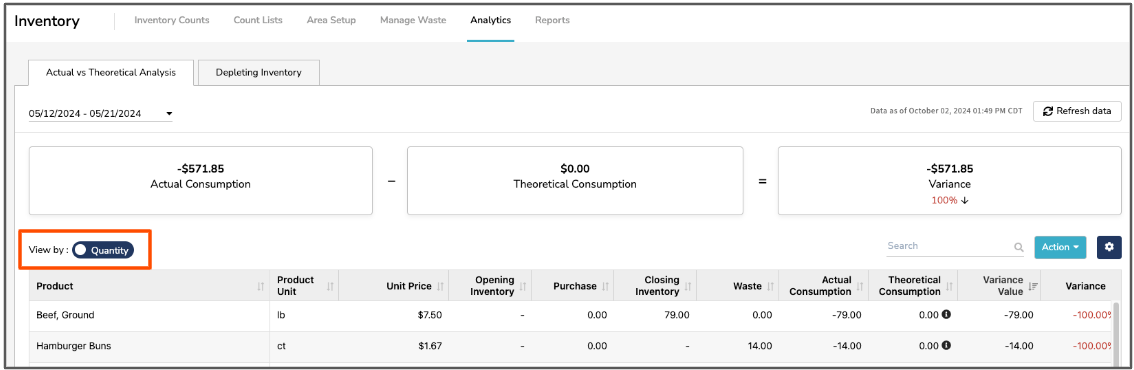
- Once this report loads, you have the option to have data presented to you either by cost or quantity. To toggle between the two, use the Cost or Quantity slider.
- You can select a couple different items in each row of data here. This information give you more transparency into how your totals are calculated and can help troubleshoot potential discrepancies.
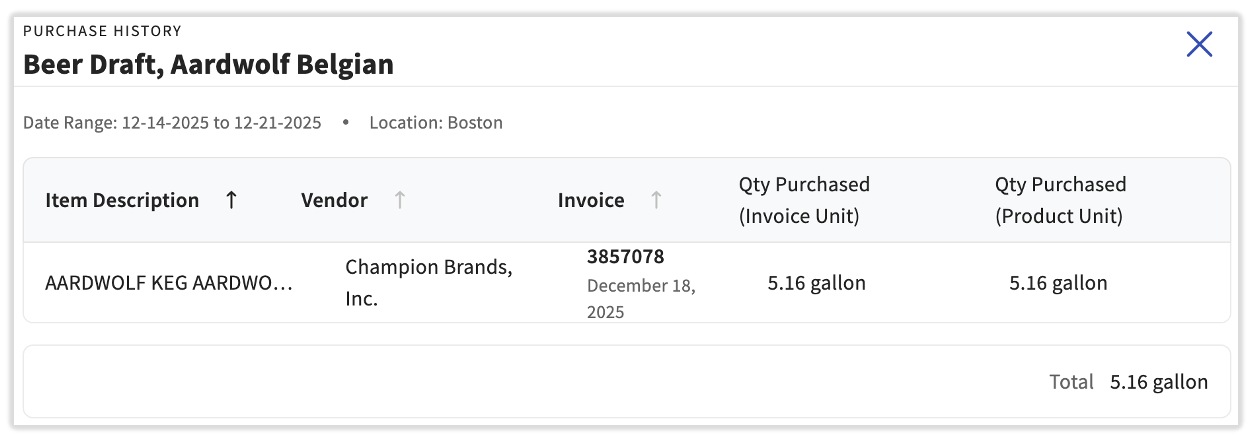
- Select the hyperlinked value under Purchase to open a sidebar detailing the vendor, invoice number, and quantity purchased by invoice unit and product unit.
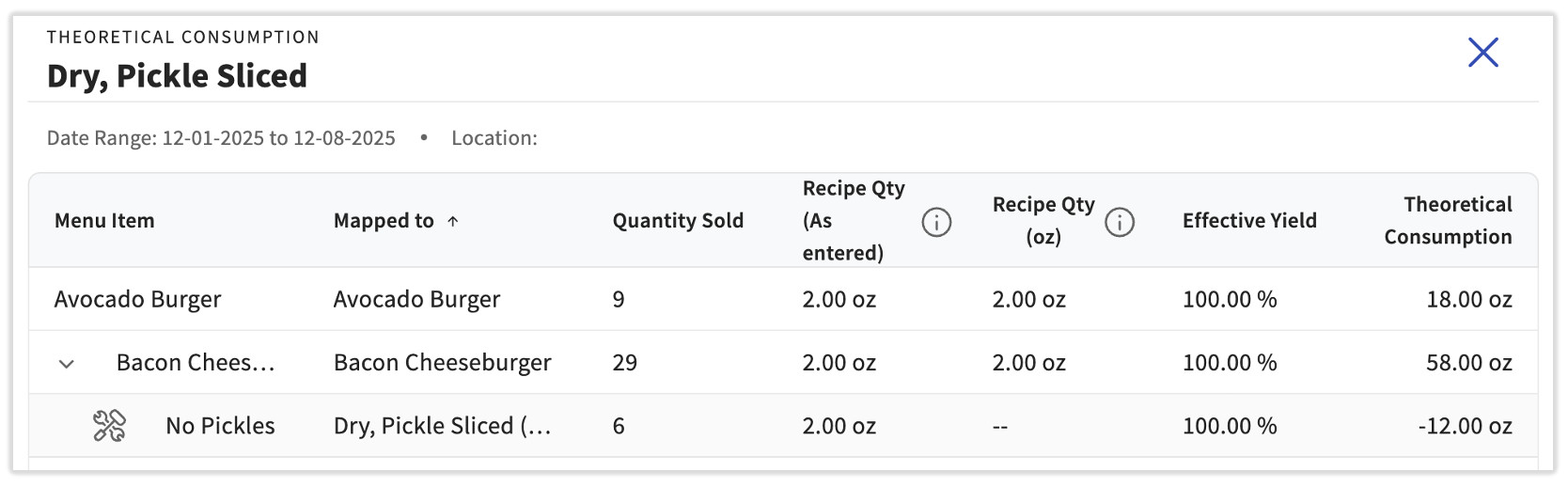
- Select the hyperlinked value under Theoretical Consumption to view a breakdown of what menu items your products are mapped to and the product's quantity sold, based on your recipes, to offer the theoretical consumption value. You may have to scroll right to see this column.
- Some modifiers attached to menu items may indicate a removal of this item (e.g. no pickles on a bacon cheeseburger). This will cause a negative theoretical consumption on the modifier to counter the positive theoretical consumption of the menu item, indicating that pickles were not used for this item. This is expected behavior.
- Some modifiers attached to menu items may indicate a removal of this item (e.g. no pickles on a bacon cheeseburger). This will cause a negative theoretical consumption on the modifier to counter the positive theoretical consumption of the menu item, indicating that pickles were not used for this item. This is expected behavior.
- Select the hyperlinked value under Purchase to open a sidebar detailing the vendor, invoice number, and quantity purchased by invoice unit and product unit.
Product Unit Price
xtraCHEF added a column to view the unit price of each product quickly. This unit price is used to calculate costs for opening inventory, purchases, closing inventory, waste, actual consumption, theoretical consumption, and variance value.
The Product Unit Price is calculated using the last purchase price recorded for that product at the selected location. If a product hasn't been purchased recently at that location, its unit price may not reflect current market cost until a new invoice is entered.
Actual Consumption
Actual Consumption = opening inventory + purchases made during the period - closing inventory
Your consumption is defined by your chosen date range's Opening and Closing Inventory dates. Purchases between that date range will also be factored in to create this value by cost or quantity.
-
-
- If you select the dates January 1st- January 7th, your opening inventory will be the inventory submitted on January 1st and your closing inventory will be the inventory submitted on January 7th.
- For example, your opening inventory on January 1st is 50 avocados. On January 5th, you purchased 100 avocados. Your closing inventory on January 7th is 60 avocados.
- 50 + 100 - 60 = 90 avocados of actual consumption
-
Theoretical Consumption
Theoretical Consumption = ingredient amount used in a recipe x number of menu items sold for that recipe
-
-
- Repeat this calculation for each menu item containing the ingredient.
-
Your theoretical consumption is the cost or value consumed theoretically based on your recipes. A recipe will indicate which and how much of an ingredient is used per menu item transaction. xtraCHEF records these details in the background as it captures sales.
-
-
- For example, the cost of an avocado is $1 and you use one avocado in the recipe called Avocado Toast. You sold 100 Avocado Toast menu items in the selected period, so 1 avocado x 100 sales = 100 avocados of theoretical consumption quantity. Your theoretical consumption cost is $1 cost per avocado x 100 avocados= $100.
-
Understand Food Costs
To best utilize your AVT Analysis, it’s essential to consider how this report affects your food costs. Your theoretical food cost is an anticipated cost for selling a menu item. It’s based on the costs of your current ingredients and assumes your kitchen or bar is serving perfect portions with no wastage, breakage, theft, or shrinkage.
On the other hand, your actual food cost is your true cost. This considers the true portions of the ingredient used and factors in any wastage, breakage, theft, and shrinkage. In almost all cases, your actual food cost will be higher than your theoretical food cost, as it includes additional factors. The difference between your actual and theoretical is termed variance. Variance usually occurs whenever there is a waste of resources, inaccurate portions of meals/drinks, theft, unrecorded sales entries, or error in stock take.
Leverage This Analysis
Using your AVT Analysis allows you to keep tabs on your variance and identify certain ingredients and inventory items where unintentional waste, breakage, and shrinkage may be playing a factor.
In xtraCHEF, a high variance would indicate a significant gap between what you expect to pay per menu item and what you are paying. The same logic also applies to a slight variance, which indicates your theoretical food costs are or are close to spot on. To keep tabs on how variances fluctuate from inventory count to inventory count, check in on this report frequently.
The difference between your actual and theoretical is termed variance. Variance usually occurs whenever there is a waste of resources, inaccurate portions of meals/drinks, theft, unrecorded sales entries, or errors in stock take.
Variance = actual consumption - theoretical consumption
In the avocado example above, your actual consumption is 90 avocados and your theoretical consumption is 100 avocados, so your variance is 10.
Troubleshoot AVT Analysis
Does something with your inventory appear incorrect or off? Consider the following to identify the root cause of your issue.
Theoretical Consumption
Theoretical Consumption is solely based on your menu item sales and their corresponding Recipe in xtraCHEF (assigned during Product Mix Mapping). Because of that, any instances where theoretical consumption appears incorrect or skewed are typically the result of an incorrectly configured Recipe or Product. Theoretical usage data will only become available in the AvT Report 2-3 business days after the selected date range.
To investigate your Theoretical Consumption:
- Check your Recipe.
- Do your Products have the correct Unit of Measure and Measurements? If not, make corrections to the recipe.
- Do the prices for each Product and Measurement appear correctly? If not, a product may contain invoice items that have been set up incorrectly in Item Review. Invoice item information can always be corrected via your Item Library.
- Consider Prep Recipes.
- Did you use prep recipes within your Recipe? If so, review the Product considerations above for the Prep Recipe(s) in question.
- Review your Modifier selections in Product Mix Mapping.
- Did you assign the correct Products, Measurements, and Units of Measure?
Verify that prep recipes are correctly mapped to associated recipes and that batch/serving sizes are accurately updated under the Recipe/Menu item.
Actual Consumption
Actual Consumption is based solely on physical inventory counts. Instances where your actual consumption appears incorrect or skewed, are typically the result of your inventory's opening and closing quantities. To investigate, review your Opening and Closing Inventory Quantities in Inventory for any discrepancies. Incorrectly entered item quantities or missed Products would disrupt your actual consumption.
Additional Resources
- xtraCHEF: Inventory - Waste
- xtraCHEF: Recipe - Get Started (Product Mix Mapping)
- xtraCHEF: Item Library