xtraCHEF: Reassign Product Unit for Products and Associated Items
Last updated: Apr 22, 2026, 6:35 PM
Question
How can I change or update the product unit of a specific product and the items that point to it?
Answer
- Log into xtraCHEF and navigate to Item library > View products.
- Select the product you would like to edit.
- In the lower-right corner, select Edit product.
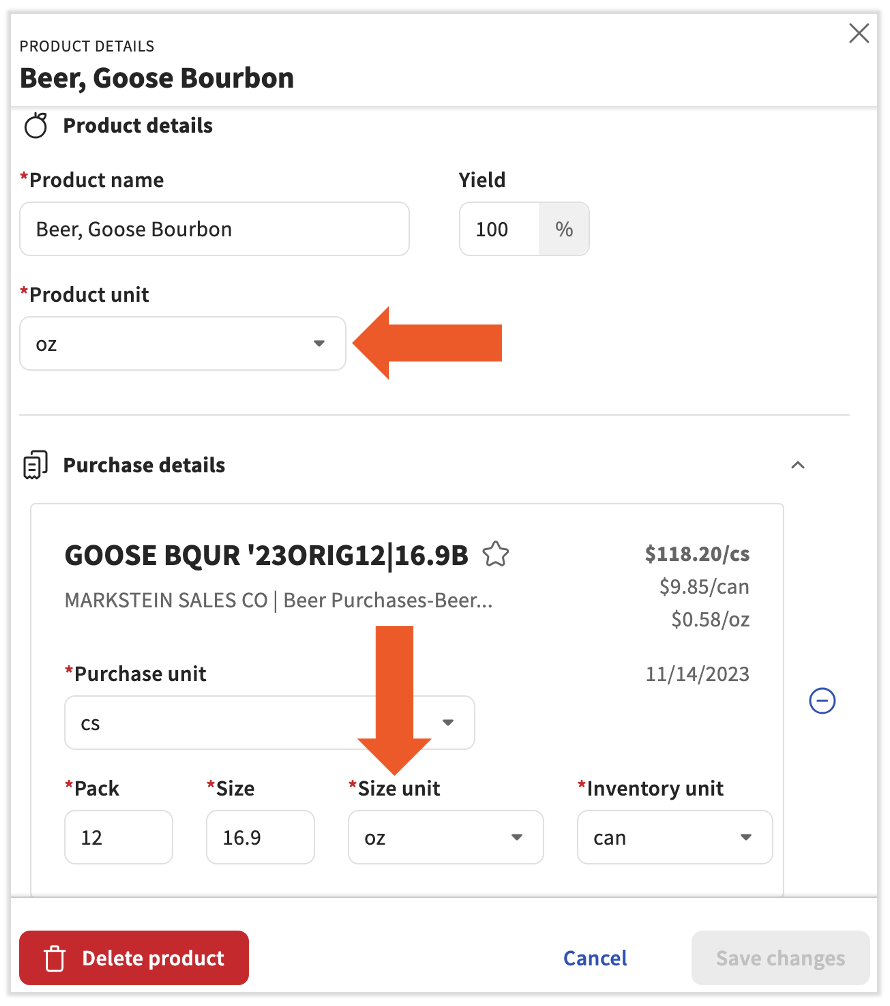
- On this side bar, you can edit the details of the product and its invoice items. Begin by updating the Product unit field to your new categorization.
- Next, scroll down and change the Size unit for every associated item.
- The Size unit needs to match the type of Product unit you just set. There are three types of Product units in xtraCHEF and each has several corresponding Size units: weight, volume, and each/count. For instance, if the Product unit is set to gram or lb, the Size unit must be a weighted measure as well.
- Once the Size unit for all associated items has been set and coordinated with the Product unit type, the Save changes button will turn blue. Select it to finish your work.