xtraCHEF: Get Started With Products
Last updated: Feb 1, 2026, 2:12 PM
What Are Products?
Products Introduction
In xtraCHEF, products refer to your ingredients and inventory items. As you're getting started, your list of products will form the foundation for your restaurant to begin using Recipe and Inventory functions. After creating your products, you can immediately begin building your recipes and inventory counts.
Products also allow you to group line items from your invoices together that are substitutes for the same invoice item. This will ensure your plate costs and inventory values are calculated correctly, regardless of any substitutions or replacements.
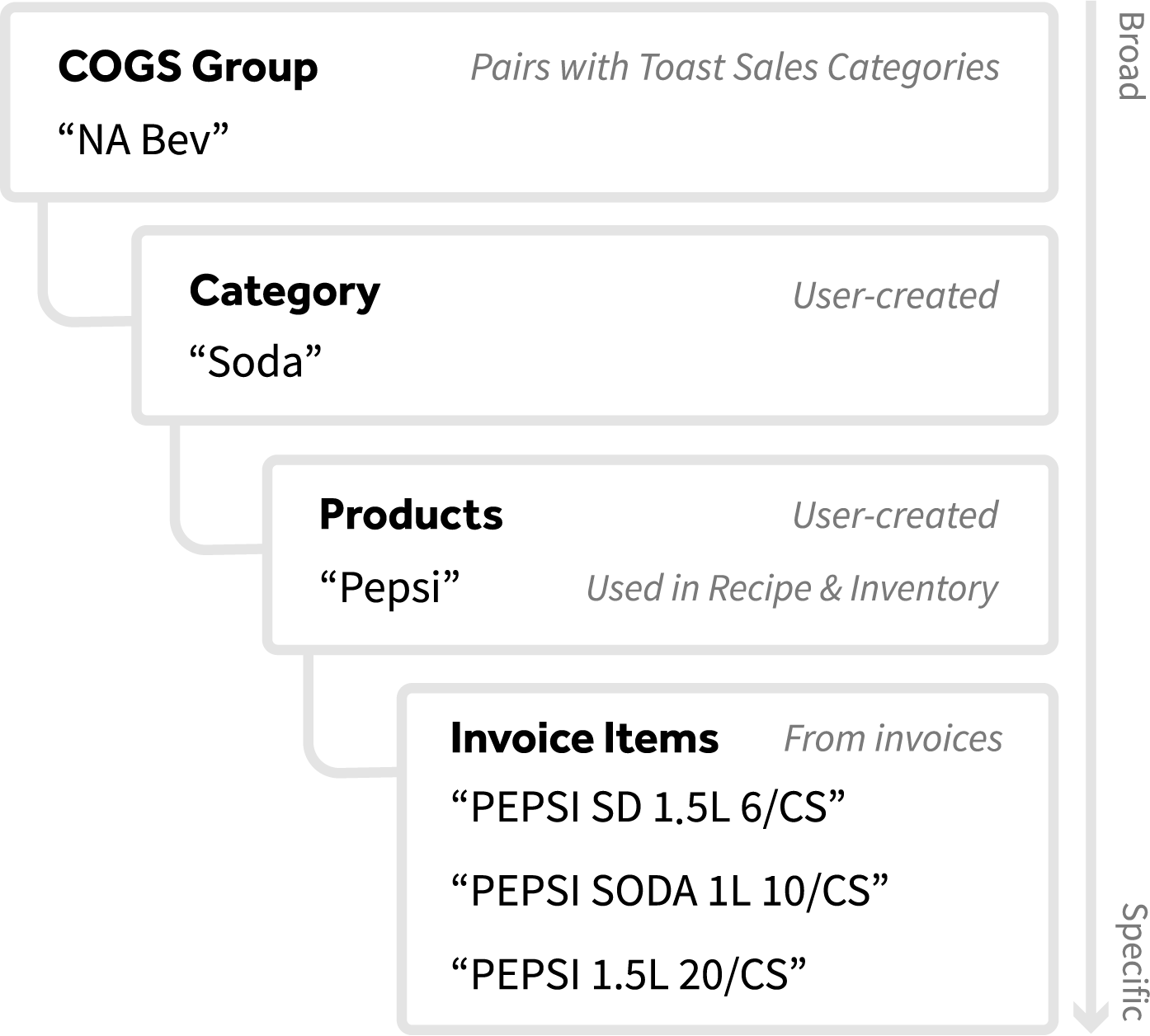
The diagram below breaks down where products fit within the xtraCHEF hierarchy.
Food Products Examples
- Onion, Red
- Onion, White
- Cilantro
- Avocado
- Cheese, Cheddar
- Cheese, Cotija
- Chicken, Breast
- Chicken, Wing
- Steak, Flank
- Steak, Skirt
Beverage Products Examples
- Vodka, Tito's
- Tequila, Herradura Reposado
- Beer, Heineken
- Beer, Bud Light
- Draught Beer, Guinness
- Soda, Pepsi
- Soda, Coke
- Juice, Orange
- Fountain Soda, Root Beer
Add Line Items to Products
Products allow you to group individual line items together as a single ingredient or inventory item. Over time, your products may grow to include several line items.
This is particularly beneficial in instances where your vendor substitutes a similar item or you order the same item from a new vendor. That change will result in a new item number and description on your invoice, which xtraCHEF may not yet recognize or associate with other invoice items. In those instances, adding any new line items to your existing products will keep these items together, automatically adjust prime costs, and update future inventory values.
Products Best Practices
- Products should be specific: You will notice in our examples that items such as Onion, White, and Onion, Red are separate. If your products are too broad, you will not be able to distinguish the different types of ingredients or products in your recipes and inventory counts.
- Alphabetize your products: When naming your products, we recommend using an invoice item's primary type first before the differentiator. For example, Milk, 2% and Milk, Whole. Later on, this will allow you to quickly search for and identify the product alphabetically.
- Alcoholic beverages should include the brand name: Your cost for alcoholic beverages range drastically from brand to brand or brewery to brewery. You're also likely inventorying these items according to those variables. To accurately cost out your beverage recipes, you will likely need products that capture your specific liquors, beers, and wines.
- For those reasons, your products should include the brand name. Products such as "Beer, Bud Light", "Beer, Heineken", and "Vodka, Tito's" will allow you to more accurately discover prime costs and inventory values.
- Avoid creating duplicate products: To ensure reporting lines up correctly later on, you should avoid creating more than one product that defines an ingredient or inventory item.
Next Steps
When you want to create products in your xtraCHEF account, check out xtraCHEF: Create Products.
Ready to begin breaking out your invoice items into corresponding products to maximize your Recipe and Inventory reporting? Join an expert-led training session on the Item library or get a head start by reviewing xtraCHEF: Get Started With the Item Library.
If you'd like to review where your products lie across the xtraCHEF database, navigate to the Item library > View products. To the right of a product, select the three dots > Product details. This pulls up the associated invoice items, recipes, and inventory count lists of this product in xtraCHEF.