Configurar preferencias de embalaje de Comida para llevar y Envío
Última actualización: 16 sept 2026, 12:35 p.m.
- Resumen de preferencias de embalaje
- Configuración de preferencias de embalaje
- Configuraciones de preferencias de embalaje sugeridas
- Qué verán los clientes y el personal
Preferencias de embalaje para Comida para llevar y Envío
Todos los restaurantes tienen que empaquetar su comida para Comida para llevar y Envío. Tradicionalmente, los artículos de embalaje, como condimentos y utensilios o plásticos, se incluyen en todos los pedidos, independientemente de si el cliente realmente los necesita. La configuración de preferencias de embalaje en Toast Web te permite preguntarles a tus clientes cómo les gustaría que se empaquetaran sus pedidos, lo que genera menos desperdicio.
¡Mira este video para escuchar directamente al cliente de Toast, Cutty's, sobre cómo desperdiciar menos con las preferencias de embalaje!
Algunas cosas importantes a tener en cuenta:
- En este momento, las preferencias de embalaje solo se aplicarán a los pedidos digitales (no a los pedidos En el local).
- Para grupos con ubicaciones múltiples: Para configurar estos ajustes en Toast Web, debes tener el permiso 6.6 Configuración de operaciones de restaurantes para cada ubicación a fin de acceder a todas las ubicaciones dentro del grupo.
- Las integraciones de pedidos digitales de terceros deberán configurar su pago para coincidir con las preferencias de embalaje que configuraste en Toast Web. Consulta más información en nuestra guía para desarrolladores: Preferencias de embalaje.
Información importante para restaurantes del condado de Los Ángeles y la ciudad de Nueva York
Ten en cuenta que las regulaciones en el condado de Los Ángeles (áreas no incorporadas) y en la ciudad de Nueva York requieren que Toast configure nuestra plataforma de manera que ayude a evitar que los restaurantes proporcionen accesorios de alimentos de un solo uso a tus clientes sin que se lo pidan. Toast hará esto mediante la aplicación de la configuración de preferencias de embalaje que requiere que los clientes acepten.
Con el fin de promover una transición fluida y darte tiempo suficiente para prepararte, implementamos un período inicial de suscripción voluntaria para comerciantes, con efecto a partir del 6 de marzo 2024. Este período inicial de suscripción voluntaria está diseñado para darle a tu restaurante la flexibilidad de elegir cuándo implementar la función en función de tus necesidades operativas. Sin embargo, para garantizar el cumplimiento de las regulaciones locales por parte de Toast, la configuración que exige a los clientes suscribirse a accesorios de vajilla de un solo uso se aplicará automáticamente a las ubicaciones ubicadas en las jurisdicciones aplicables el 1 de julio de 2024.
Volver arriba
Configuración de preferencias de embalaje
Puedes acceder a la página de configuración de preferencias de embalaje en Toast Web si vas a Comida para llevar y Envío > Preferencias de embalaje > Preferencias de embalaje.
En esta página, verás cuatro configuraciones de nivel superior que te permiten configurar tus ofertas de embalaje para los clientes:
- ¿Activar preferencias de embalaje? Activar esta opción te permite empezar a preguntar a tus clientes sobre sus preferencias de embalaje.
- Mensaje para clientes: un mensaje opcional y personalizable para mostrar a los clientes cuando realizan un pedido digital.
- Artículos de embalaje: los artículos de embalaje que tu restaurante puede incluir en los pedidos. A tus clientes se les preguntará si quieren cada uno de estos con su pedido.
- Mostrar selección de clientes en dispositivos Toast: elige cómo quieres mostrar las selecciones de embalaje de los clientes al personal.
- Mostrar: las selecciones de tus clientes siempre se mostrarán en los dispositivos de Toast.
- Ocultar: las selecciones de tus clientes solo se mostrarán si son diferentes de la configuración predeterminada (por ejemplo, las pajillas están incluidas de forma predeterminada, pero tu cliente desmarca la casilla de pajillas en su pedido digital).
Algunos aspectos a considerar a medida que te acercas a la configuración de preferencias de embalaje de tu restaurante:
- Oportunidades de ahorro de costos al reducir artículos de un solo uso
- Cómo podrían querer los clientes diferentes artículos de embalaje
- Las ambiciones ambientales de tu restaurante
- Regulaciones locales que rigen los embalajes
Configuraciones de preferencias de embalaje sugeridas
Restaurante ecológico de una sola ubicación
Situación: Es posible que los clientes que coman tu comida necesiten utensilios, servilletas, pajillas y condimentos. A menos que se te solicite, no proporcionas ninguno de estos artículos. Una situación común es que un cliente que coma fuera de casa necesite utensilios, servilletas y pajillas. Es posible que se necesiten condimentos en casa o fuera de casa, su uso solo depende de las preferencias alimentarias de un cliente.
Pasos recomendados:
- En la página de preferencias de embalaje (Comida para llevar y Envío > Preferencias de embalaje > Preferencias de embalaje), activa la opción Activar preferencias de embalaje en la posición Activada.
- En el campo Mensaje del cliente, crea un mensaje que explique cómo los clientes pueden marcar la diferencia al no solicitar artículos que no necesitan.
- Crea un artículo de embalajepara la vajilla.
- Selecciona + Agregar artículo.
- Asegúrate de que ¿Incluido de forma predeterminada? esté configurado en No.
- Selecciona las casillas de verificación Categoría de Utensilios, Servilletas y Pajas. (Nota: Si ya agregaste un artículo y seleccionaste una de estas casillas de verificación de categoría, no podrás volver a seleccionarlas. Deberás eliminar cualquier otro artículo de embalaje que tenga seleccionadas estas casillas de categoría).
- Para el nombre visible para clientes, escribe “Utensilios de alimentos de un solo uso”.
- Para descripción adicional de los clientes, escribe "Utensilios, servilletas y sorbetes"
- Si lo deseas, agrega un nombre personalizado en los dispositivos de POS para que el personal pueda verlo. Si no agregas un nombre personalizado, Toast usará los nombres de las categorías que seleccionaste (utensilios, servilletas, pajillas).
- Selecciona Agregar.
- Crea un artículo de embalajepara condimentos.
- Selecciona + Agregar artículo.
- ¿Incluido de forma predeterminada? = No.
- Selecciona la casilla de verificación Categoría para Condimentos.
- Nombre para clientes = “Condimentos”.
- Descripción adicional para clientes = "Solo se proporciona bajo petición"
- Selecciona Agregar.
- En la parte superior de la página de preferencias de embalaje, selecciona Obtener vista previa para ver cómo verán los clientes.
- Guarda los cambios y, luego, selecciona Ir al Centro de publicación en el banner verde para publicar los cambios.
Grupo de ubicaciones múltiples: todas las ubicaciones son iguales
Situación: Gestionas más de una ubicación, pero todas las ubicaciones tienen alimentos similares y siguen los mismos procedimientos de embalaje. Una situación común es que un cliente que pida en tu restaurante solo jugos no siempre necesite un vaso para disfrutar de su bebida. Algunos clientes pueden tener sus propias gotas reutilizables o pueden preferir no usar ninguna.
Pasos recomendados:
- En la página de preferencias de embalaje (Comida para llevar y Envío > Preferencias de embalaje > Preferencias de embalaje), activa la opción Activar preferencias de embalaje en la posición Activada.
- En el campo Mensaje del cliente, crea un mensaje que explique cómo los clientes pueden marcar la diferencia al no solicitar artículos que no necesitan.
- Crea un artículo de embalajepara la vajilla.
- Selecciona + Agregar artículo.
- Asegúrate de que ¿Incluido de forma predeterminada esté configurado en No.
- Selecciona la casilla de Categoría de Pajas.
- Para el nombre visible para clientes, escribe "Pajas".
- Para descripción adicional para clientes, escribe "Fresas proporcionadas a pedido"
- Si lo deseas, agrega un nombre personalizado en los dispositivos de POS para que el personal lo vea. Si no agregas un nombre personalizado, Toast usará los nombres de la categoría que seleccionaste (pajas).
- Selecciona Agregar.
- En la parte superior de la página de preferencias de embalaje, selecciona Obtener vista previa para ver cómo verán los clientes.
- Guarda los cambios y, luego, selecciona Ir al centro de publicación en el banner verde para publicar los cambios.
Grupo de ubicaciones múltiples - Se requieren varias configuraciones
Situación: Gestionas más de una ubicación y diferentes regiones siguen procedimientos de embalaje diferentes (o tienen que seguir regulaciones de embalaje diferentes).
En este caso, recomendamos crear una configuración predeterminada que se aplique a la mayor cantidad de ubicaciones de tu grupo. Luego, puedes agregar anulaciones para cambiar las configuraciones de las ubicaciones que necesitan una configuración diferente.
Algunos ejemplos:
- La mayoría de tus ubicaciones no necesitan preferencias de embalaje activadas, pero algunos restaurantes están en un estado con regulaciones locales que las exigen.
- La mayoría de tus ubicaciones están en una región donde los clientes prefieren tener utensilios incluidos en sus pedidos, pero algunos restaurantes están ubicados en un área donde suelen optar por no incluirlos.
Para ser lo más eficiente posible, organiza tus grupos de ubicaciones adecuadamente (más información en Crear, ver y editar grupos de ubicaciones).
- Ve a la página de preferencias de embalaje (Comida para llevar y Envío>Preferencias de embalaje>Preferencias de embalaje) y configura la configuración que se aplica a la mayoría de tus ubicaciones.
- Si la mayoría de tus ubicaciones no necesitan implementar preferencias de embalaje, activa Activar preferencias de embalaje a la posición Desactivada.
- Si deseas activar las preferencias de embalaje para la mayoría de tus ubicaciones, puede resultarte útil consultar la sección Restaurante ecológico de un solo local de este artículo para ver un ejemplo de configuración.
- En la sección Anulaciones en la parte inferior de la página de preferencias de embalaje, selecciona Agregar anulación + para crear tu primera anulación.
- Usa el menú desplegable Grupo objetivo/ubicación para seleccionar un grupo de ubicaciones o una ubicación individual.
- Si es necesario, usa el menú desplegable Propietario grupo/ubicación para seleccionar una ubicación o grupo diferente que pueda editar esta anulación.
- Usa el menú desplegable Configuración para seleccionar qué configuración te gustaría cambiar para el grupo o la ubicación seleccionados. Por ejemplo, si la mayoría de tus ubicaciones tienen activadas las preferencias de embalaje, pero estás agregando una anulación para una ubicación que no necesita preferencias de embalaje, seleccionarías ¿Activar preferencias de embalaje? en este menú desplegable.
- La configuración que selecciones aparecerá en la página. Realiza el cambio que deseas aplicar a esta anulación.
- Selecciona Listo.
- Repite los pasos 2-7 para anular otras configuraciones, o si necesitas una anulación diferente para otro grupo o ubicación.
- Guarda los cambios y selecciona Ir al Centro de publicación para publicarlos.
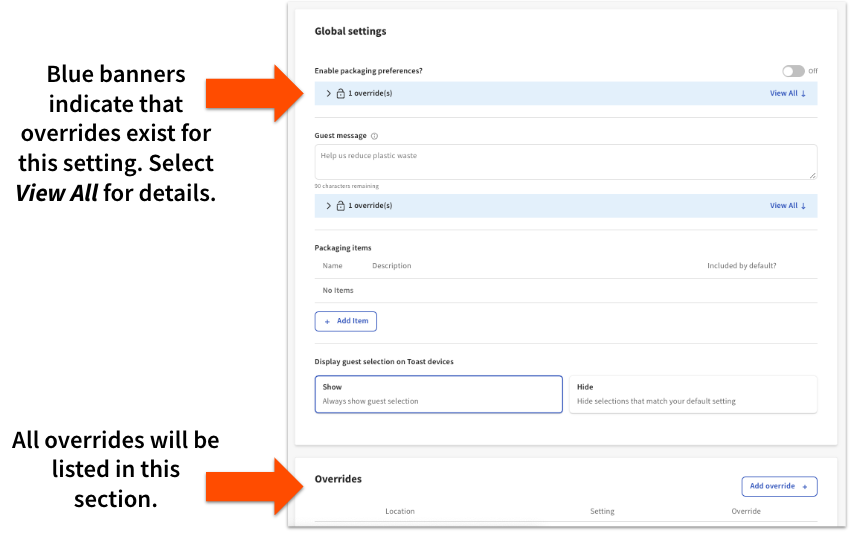
Si tienes configuradas anulaciones, las verás listadas en la página de preferencias de embalaje para cada configuración individual, así como la lista completa en la sección Anulaciones en la parte inferior de la página.
Qué verán los clientes y el personal
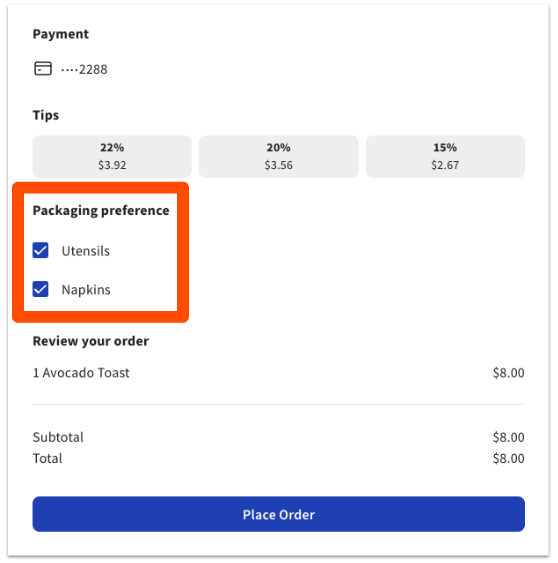
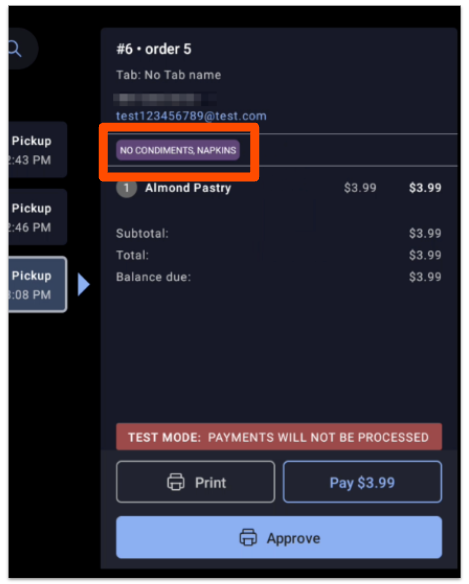
Puedes seleccionar el botón Vista previa azul en la parte superior de la página de preferencias de embalaje para ver cómo aparecerá tu configuración predeterminada en los pedidos digitales, el centro de pedidos y en el KDS. Mira los siguientes ejemplos:
Las preferencias de embalaje no se pueden elegir en una cuenta en el POS. Los clientes seleccionan sus propios artículos de embalaje cuando hacen un pedido digital, y tu personal solo puede ver esa selección: no hay lugar en una cuenta del POS para agregar o cambiar preferencias de embalaje, y no aparece ninguna instrucción de embalaje en un pedido registrado en una terminal o un dispositivo portátil. Dónde aparece la selección del cliente también depende de la configuración Mostrar selección del cliente en los dispositivos Toast: las selecciones se muestran en la Pantalla de visualización de la cocina del Expedidor y en los tickets impresos solo desde la Impresora Expedidor. No aparecen en las pantallas de visualización de las Estación de preparación ni en los tickets de Impresora de las Estación de preparación.
Pedidos digitales Toast:
Centro de pedidos:
Pantalla del sistema de pantallas de cocina (KDS):
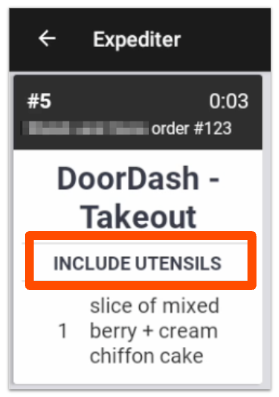
KDS Ticket:
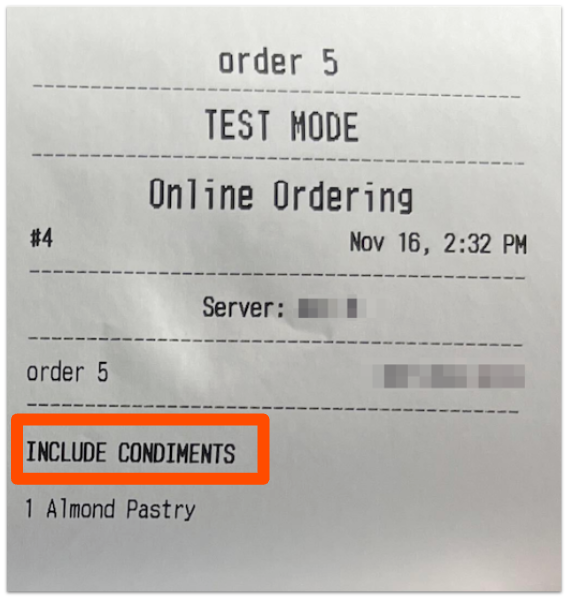
 | Las preferencias de embalaje solo se mostrarán en la Pantalla de visualización de la cocina del Expedidor o en los tickets impresos desde la Impresora Expedidor. No se mostrarán en las pantallas de visualización de la Estación de preparación ni se Imprimir en tickets de una Impresora de Estación de preparación. |