Comience con el inicio de sesión único (SSO) con Toast
Última actualización: 17 sept 2026, 8:04 a.m.
| El acceso mediante inicio de sesión único está limitado a usuarios seleccionados en este momento. |
- Inicio de sesión único con Toast
- Iniciar sesión con inicio de sesión único
- Errores de inicio de sesión único
- Preguntas frecuentes
- ¿Puede alguien sin credenciales de inicio de sesión para su organización usar SSO?
- ¿Qué debo hacer si las credenciales de inicio de sesión de una persona aparecen como incorrectas?
- ¿Qué sucede si alguien crea credenciales para Toast primero y luego quiere iniciar sesión con SSO?
- ¿Eliminar las credenciales/inicio de sesión de alguien de mi organización eliminará su perfil de usuario de Toast o viceversa?
- ¿Está habilitado el SSO en mis dispositivos Toast?
Inicio de sesión único con Toast
El inicio de sesión único (SSO) es un proceso que permite a los usuarios de grandes organizaciones iniciar sesión en múltiples aplicaciones con un solo conjunto de credenciales de cuenta. En este momento, el SSO está en lanzamiento limitado con usuarios seleccionados. La mayoría de los usuarios no usarán SSO y deberán iniciar sesión con sus credenciales de cuenta de Toast Web (consulte Iniciar sesión en un producto o dispositivo Toast).
Para las organizaciones que usan SSO con Toast, los primeros usuarios de una cuenta nueva recibirán un correo electrónico invitándolos a iniciar sesión una vez que se cree su panel de Toast Web. Si no recibe un correo electrónico para iniciar sesión en Toast, comuníquese con su Consultor de incorporación.
SSO está disponible para el inicio de sesión en Toast Web y para las aplicaciones móviles de Toast compatibles (Toast Now, Toast Tables y MyToast). Si su organización utiliza SSO, puede iniciar sesión en estas aplicaciones móviles con las credenciales de su organización en lugar de un correo electrónico y una contraseña de Toast por separado.
Iniciar sesión con inicio de sesión único
Para iniciar sesión mediante SSO, siga estos pasos:
- Navegue aToast Webo a la pantalla de inicio de sesión de la aplicación correspondiente.
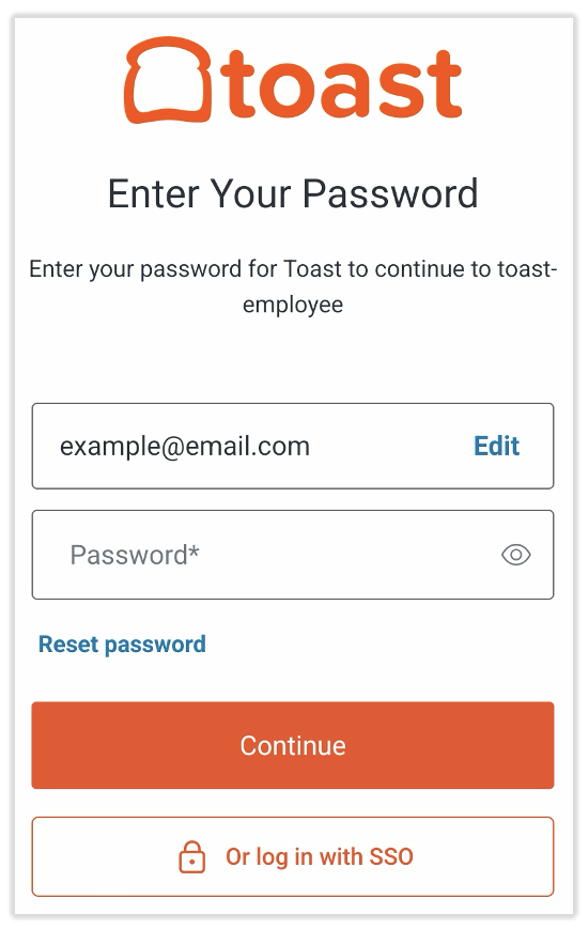
- En la aplicación MyToast, deberá seleccionar Log in y luego ingresar su dirección de correo electrónico antes de poder ver la siguiente pantalla.
- SeleccioneOr log in with SSO.Nota:Las imágenes aquí pueden diferir ligeramente de su experiencia, dependiendo del producto en el que esté iniciando sesión. El punto de entrada (toast-employee, web-toastweb, etc.) puede cambiar y es posible que no necesite ingresar su dirección de correo electrónico primero, como se muestra a continuación.
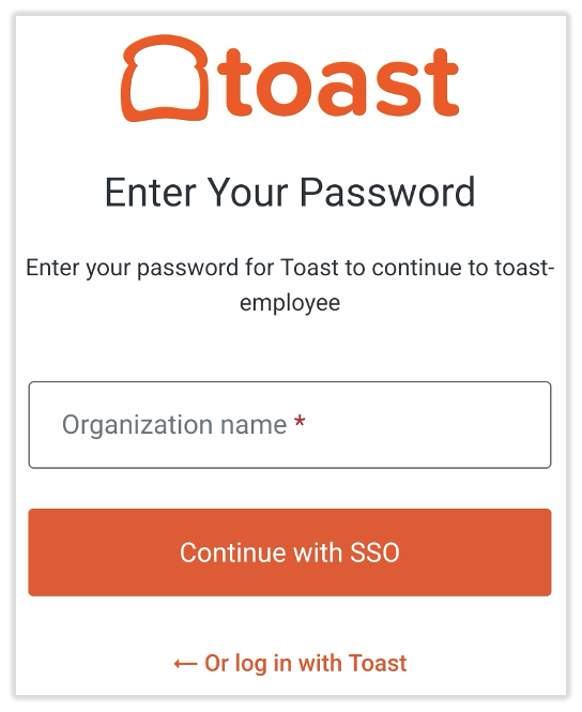
- Luego verá elselector de organización:
- Escriba la organización a la que pertenece y seleccione Continue with SSO. Se le dirigirá a la página de inicio de sesión de su propia organización. Si inicia sesión correctamente en la página de su organización, se le dirigirá de nuevo a la página de inicio de Toast y podrá comenzar a trabajar con Toast.
Errores de inicio de sesión único
Organización no reconocida por Toast
Si escribe una organización que no es reconocida por Toast, verá un mensaje de error que indica: "No organizations found under this name."
Si seleccionó la opción Log in with SSO <1>por accidente, seleccione Cancel o Back to login en la parte inferior de la página para volver al portal de inicio de sesión Regular de Toast Web.
Usuario invitado a SSO usando un correo electrónico diferente
Con SSO, cuando invite a personal a Toast, debe usar el correo electrónico asociado con su ID de empleado (EID). Si se utiliza un correo electrónico diferente, el miembro del personal invitado recibirá un mensaje de error al intentar iniciar sesión que dice: "Error de inicio de sesión. Ocurrió un error al intentar iniciar sesión; por favor, inténtelo de nuevo."
Puede resolver este error de cualquiera de las siguientes maneras:
- Archivar al empleado invitado y volver a invitarlo usando el correo electrónico correcto adjunto a los requisitos de inicio de sesión de su grupo (EID).
- Comuníquese con su equipo corporativo para actualizar el correo electrónico preferido para que coincida con el que el miembro del personal desea tener en Toast.
Preguntas frecuentes sobre SSO
¿Puede alguien sin credenciales de inicio de sesión para su organización usar SSO?
No, los usuarios necesitarán credenciales de inicio de sesión de su organización para iniciar sesión a través de SSO.
¿Qué debo hacer si las credenciales de inicio de sesión de una persona aparecen como incorrectas?
Comuníquese con el equipo de soporte corporativo o de la sede central de su organización. Toast no tiene control sobre las credenciales de inicio de sesión que pertenecen a otras empresas.
¿Qué sucede si alguien crea credenciales para Toast primero y luego quiere iniciar sesión con SSO?
Si utiliza la ruta de inicio de sesión de SSO, solo tendrá acceso a los restaurantes a los que se le haya otorgado acceso al usuario de SSO. Cuando se le invita a un restaurante que pertenece a un cliente con SSO (invitación enviada desde Toast durante la incorporación de su ubicación), se le dirigirá a través de SSO como parte del proceso de invitación/activación.
¿Eliminar las credenciales/inicio de sesión de alguien de mi organización eliminará su perfil de usuario de Toast o viceversa?
No, son dos grupos separados de usuarios para la configuración de SSO. Eliminar un inicio de sesión de la organización no elimina automáticamente al usuario de Toast; la organización deberá eliminarlo de ambos lugares según sea necesario.
- Si los usuarios tienen acceso a varias ubicaciones dentro de Toast Web que deben eliminarse por cualquier motivo:
- Vaya a Empleados > Gestión de empleados > Empleados y seleccione el lápiz de edición del empleado específico.
- Desplácese hacia abajo hasta el mosaico Permisos y acceso y seleccione el menú desplegable Ver permisos de restaurante/grupo.
- Elimine cualquier acceso a grupos de restaurantes o ubicaciones que tenga esta persona desmarcando todas las casillas de verificación en ambas pestañas. SeleccioneEliminar seleccionados y guardar.
- Esto garantiza que ya no tengan acceso a nada en Toast Web.
- Seleccione la pestañaPerfil. Desplácese hacia abajo hasta Restaurantes accesibles y elimine cualquier acceso a grupos de restaurantes o ubicaciones que tenga esta persona desmarcando todas las casillas de verificación en ambas pestañas. SeleccioneEliminar seleccionados y guardar.
- Esto garantizará que ya no tengan acceso para iniciar sesión en el POS de ninguna ubicación con su PIN, ni en las cuentas de Toast Web en el futuro.
- Regrese a Empleados > Gestión de empleados > Empleados y seleccione el cuadro con una flecha hacia abajo para archivar al empleado.
¿Está habilitado el SSO en mis dispositivos Toast?
En este momento, el SSO solo está habilitado para el inicio de sesión en Toast Web. Manténgase al tanto de futuras actualizaciones.