Configurar tu interruptor de Toast
Última actualización: 16 sept 2026, 4:56 p.m.
Un conmutador es un equipo de red que se conecta a tu enrutador para aumentar el número de puertos disponibles.
- Resumen del interruptor de Toast
- Asignación de puertos a tu conmutador Toast
- Asignación de puertos del dispositivo para conmutador no PoE
- Instalar tu conmutador PoE
- Capacidades técnicas de PoE Switch
Resumen del interruptor Toast
Un conmutador es un equipo de red que se conecta a tu enrutador para aumentar el número de puertos disponibles. Esto te permite conectar tus dispositivos Toast y puntos de acceso inalámbricos a través de un cable Ethernet para proporcionar una conexión por cable a internet. Nos referimos a esto como un jonrón de cable. Toast ofertas dos tipos diferentes de conmutadores: uno con capacidades de alimentación a través de Ethernet (PoE) y otro no PoE. Obtén más información sobre las capacidades PoE en nuestro artículo Instalar puntos de acceso.
Asignación de puertos a tu conmutador Toast
La mayor consideración al configurar tu dispositivo Toast es que es un interruptor "inteligente". Para facilitar eso, los puertos específicos del conmutador se designan como puertos troncales, híbridos o de acceso. Esto significa que dispositivos específicos deben estar conectados a puertos específicos para alinearse con su función configurada.
Estos puertos son los siguientes:
- Puertos de enlace ascendente (troncal): Se conectan a enrutadores o a un conmutador aguas arriba si es necesario
- Puertos del dispositivo Toast (híbrido): Están designados para dispositivos Toast, como impresoras y terminales. No hay un orden o secuencia específicos en los que debas instalar los dispositivos de uso final en ese rango de puertos
- Puertos del punto de acceso inalámbrico (acceso): Estos son los únicos puertos que deben conectarse a los puntos de acceso inalámbricos.
- Puertos de enlace descendente (troncal): Si necesitas conectar otro conmutador, puedes usar este puerto para conectar en cadena un conmutador adicional
Consulta la siguiente tabla para obtener instrucciones sobre dónde conectar cada dispositivo al conmutador PoE:
| Cambiar tamaño | Número de modelo | Puerto de enlace ascendente | Puertos del dispositivo Toast | Puertos del punto de acceso inalámbrico | Puerto de enlace descendente |
|---|---|---|---|---|---|
| Conmutador de 8 puertos | SC-08P | 1 | 2 - 5 | 6 - 7 | 8 |
| Conmutador de 24 puertos | SC-24P | 1 | 2 - 17 | 18 - 23 | 24 |
| Conmutador de 48 puertos | SC-48P | 1 | 2 - 41 | 42 - 47 | 48 |
Nota: Algunos conmutadores Toast (incluido el modelo de 48 puertos) incluyen puertos de fibra SFP adicionales además de los puertos numerados mencionados anteriormente. Estos puertos SFP no están configurados ni son compatibles con Toast. No conectes nada a ellos y usa solo los puertos numerados de la tabla anterior.
Asignación de puertos del dispositivo para conmutadores que no son PoE
Consulta el cuadro a continuación para mapeo de puertos del dispositivo para dispositivos de conmutación no PoE.
| Cambiar tamaño | Número de modelo | Puerto de enlace ascendente | Puertos del dispositivo Toast | Puertos del punto de acceso inalámbrico con inyector PoE | Puerto de enlace descendente |
|---|---|---|---|---|---|
| Conmutador de 8 puertos | SC-08 | 1 | 2 - 5 | 6 - 7 | 8 |
Instalar el conmutador PoE
Una vez completada la configuración del enrutador, puedes configurar el interruptor.
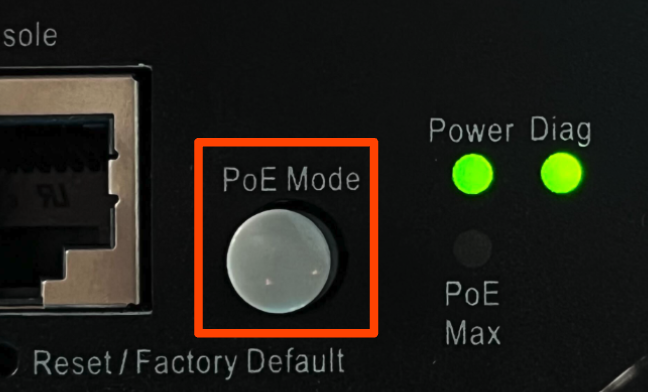
- Primero, asegúrate de no presionar el botón “Modo PoE”. Esta luz indicadora, cuando se presiona, indica qué puertos están recibiendo energía en lugar de confirmar la conexión del interruptor a dispositivos aguas abajo. Queremos asegurarnos de que cada dispositivo esté conectado para confirmar la instalación correcta.
- Confirma que el interruptor esté encendido a través de la luz verde indicadora de encendido, así como las luces verdes sobre cada puerto. Una vez que las luces estén encendidas, comienza a conectar dispositivos al interruptor.
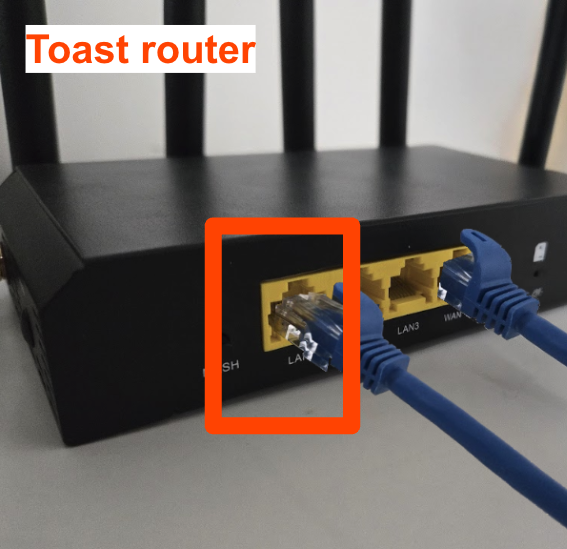
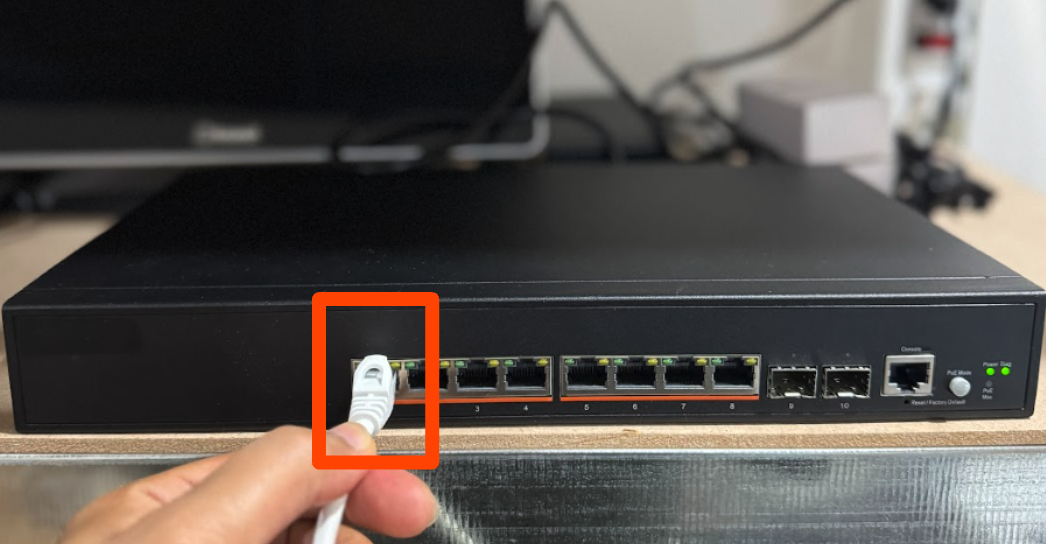
- Independientemente del tamaño del conmutador, conecta el cable Ethernet que viene con el enrutador entre el puerto LAN1 del enrutador y el puerto 1 del conmutador de red.
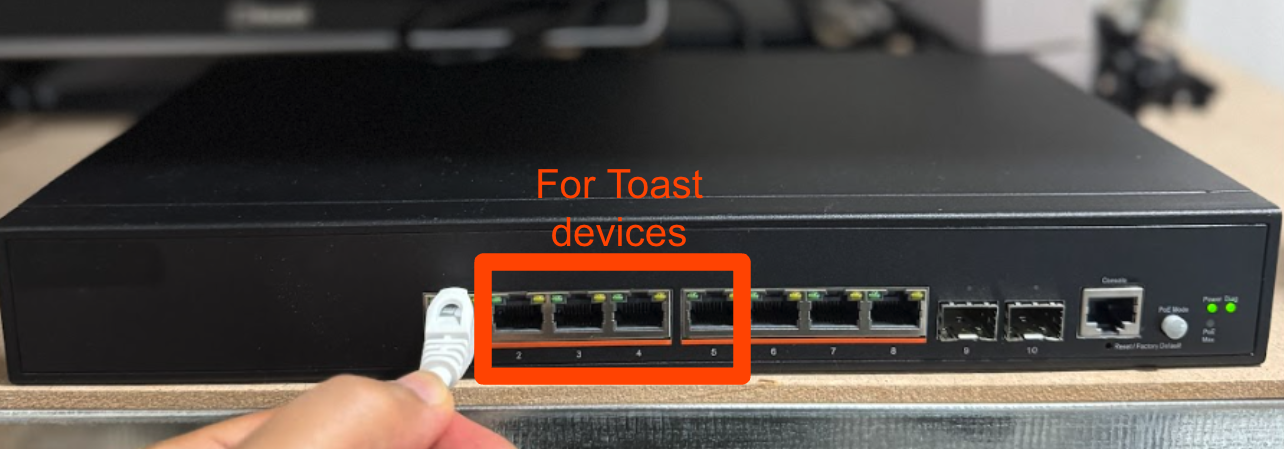
- Luego, consulta la tabla anterior para obtener las instrucciones de instalación correctas según el tamaño de tu interruptor. A continuación, se describe la instalación de un conmutador de 8 puertos: conecta las terminales Toast, el Sistema de pantallas de cocina (KDS) y los puestos de pedidos a los puertos 2 a 5 del conmutador mediante cables Ethernet que vienen con tus dispositivos Toast.
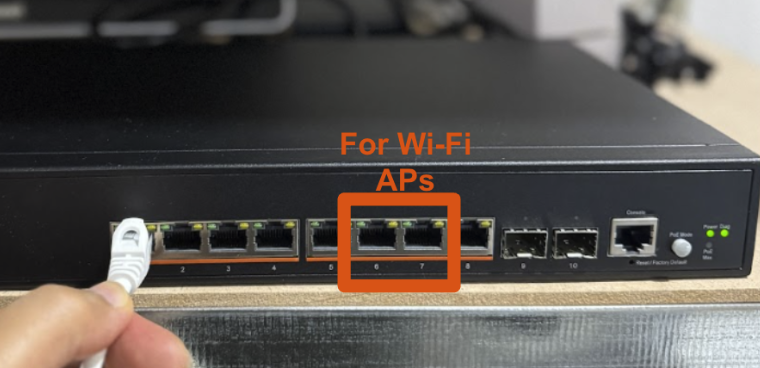
- A continuación, conecta los puntos de acceso Wi-Fi a los puertos 6 a 7 mediante alimentación a través de Ethernet (PoE).
- Confirma que el interruptor se instaló correctamente. Confirma que tus dispositivos estén conectados y en línea:
- Imprimir un Ticket de prueba desde tu terminal
- Confirma que tus puntos de acceso estén conectados
Capacidades técnicas de conmutadores PoE
| Cambiar tamaño | Número de modelo | Fuente de alimentación | Consumo de energía (máx.) | Presupuesto de energía PoE |
|---|---|---|---|---|
| Conmutador de 8 puertos | SC-08P | 100-240 VAC, 50-60 Hz | 80 W | 65 W |
| Conmutador de 24 puertos | SC-24P | 100-240 VAC, 50-60 Hz | 160 W | 200 W |
| Conmutador de 48 puertos | SC-48P | 100-240 VAC, 50-60 Hz | 490 W | 370 W |