Nómina Toast: Mensajería de documentos
Última actualización: 14 jul 2026, 1:50 p.m.
El mensajero de documentos te permite enviar archivos al personal y ver los archivos que te envía Toast o tu personal.
Localizar el mensajero de documentos
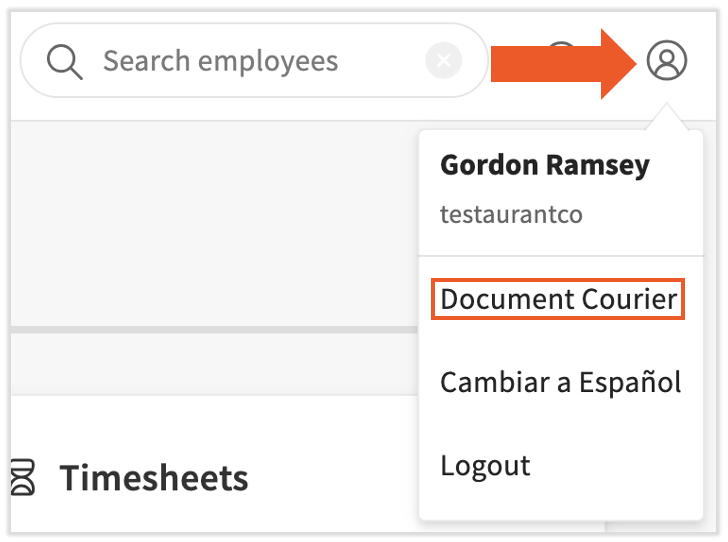
Una vez que hayas iniciado sesión en Nómina Toast, selecciona el ícono de avatar en la esquina superior derecha y elige Mensajería documental.
La página tiene dos pestañas en la parte superior. La pestaña Mensajería de documentos te permite enviar archivos y documentos a otros miembros de tu personal. También verás los archivos que tu personal te ha enviado. La pestaña Mis informes contiene todos los informes de nómina que ejecutaste recientemente.
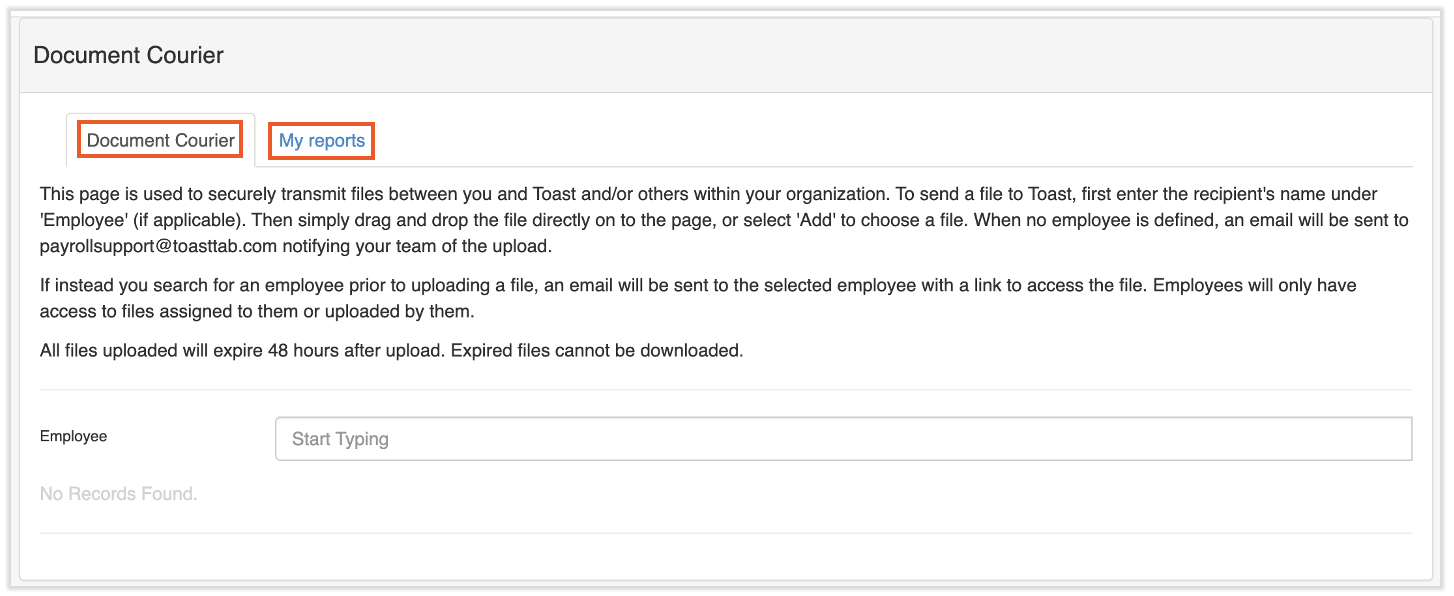
Document Courier Tab
Todos los roles de seguridad tienen acceso al mensajero de documentos. Los empleados pueden enviar archivos a su gerente o a cualquier persona a la que tengan acceso en el sistema. Si no se selecciona ningún empleado para recibir el archivo, Nómina Toast recibirá una notificación sobre la carga y solo nuestro equipo interno tendrá acceso para abrir el archivo.
Nota: Todos los archivos cargados en Mensajería digital vencerán 48 horas después de su carga inicial. Por esta razón, no sugerimos cargar archivos para que los representantes de Toast puedan acceder a ellos. En su lugar, inicia un chat con Nómina Toast seleccionando el punto azul en la esquina inferior derecha de cualquier página. Luego, selecciona el ícono de clip de papel para cargar tu archivo para un representante de Toast.
- Para enviar un archivo, escribe el nombre de un empleado en el campo Empleado. Nómina Toast intentará autocompletar este campo por ti.
- A continuación, selecciona el nuevo botón Agregar+ en la esquina superior derecha. Este botón solo está disponible para usuarios de RR. HH.+.
- Ahora verás el botón Elegir archivo en la esquina inferior izquierda de este módulo. Selecciona este botón para abrir el explorador y elige un archivo para enviar. Después de estos tres pasos, tu pantalla debería verse similar a esta:
- En este punto, el archivo se cargó correctamente. Opcionalmente, puedes seleccionar el botón Agregar en la columna Notas para adjuntar notas al archivo.
- Al empleado que especificaste se le envía una notificación por correo electrónico indicando que tiene un documento en su Mensajería de documentos. Para verlo, selecciona el enlace del correo electrónico.
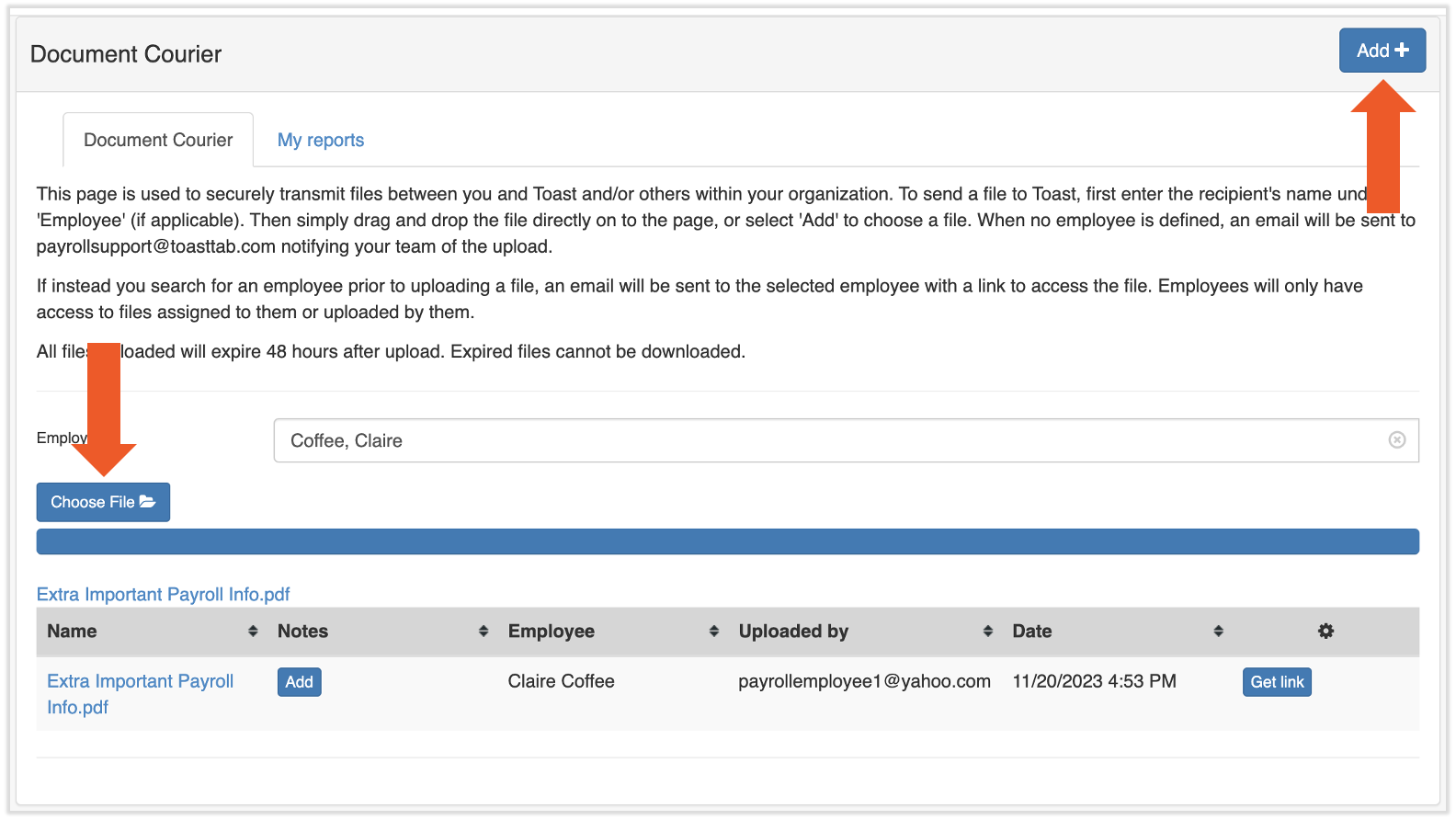
Nota: Los usuarios de RR. HH.+ podrán ver el historial de Mensajería documental de toda la empresa.
Mensajería documental: Pestaña Mis informes
Después de que ciertos informes cargados de datos estén en cola en la Biblioteca de informes, se te redirigirá a la pestaña Mis informes de esta página. Esta página se actualiza automáticamente cada 30 segundos, pero también puedes usar el botón Actualizar.
Los informes aquí pueden aparecer en uno de tres estados: En cola, procesando y descargando.
- Los informes en cola están en la fila esperando ser ejecutados. Esto ocurre comúnmente cuando el sistema está experimentando un gran volumen, pero los informes rara vez duran más de un minuto en este estado.
- En este momento, los informes de procesamiento están recopilando todos los datos y asimilándolos a tu informe. Tu informe estará listo en los próximos segundos.
- La descarga indica que se completó un informe. Selecciona este enlace para descargar y ver tu informe.
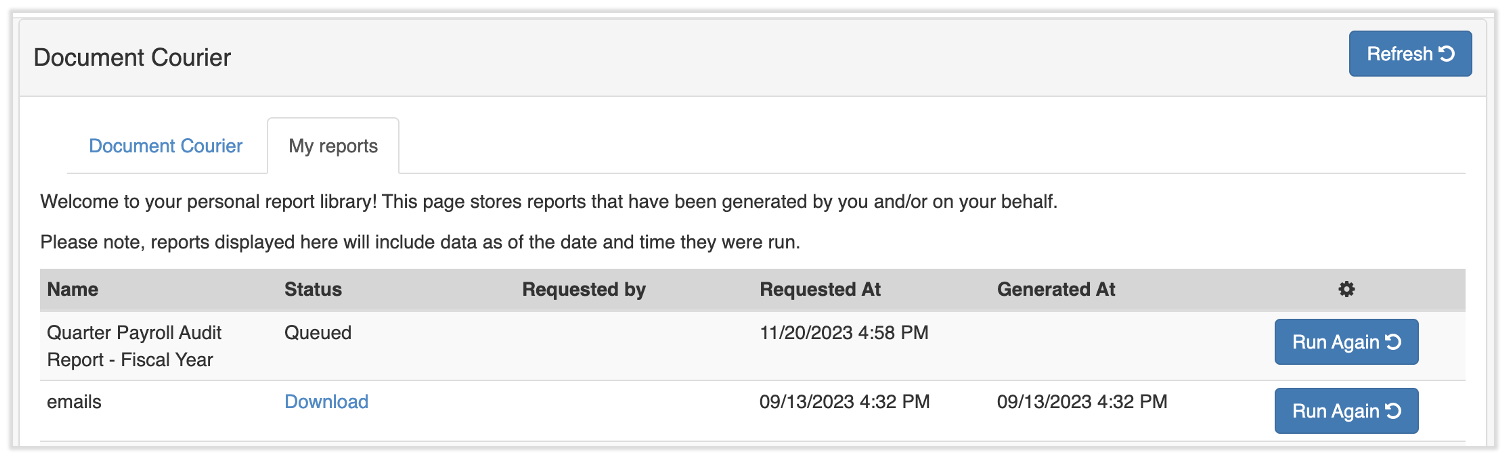
También puedes volver a ejecutar tus informes si seleccionas el botón Ejecutar nuevamente. Ten en cuenta que, con esta función, se ejecutará el informe con los mismos parámetros de datos que habías especificado originalmente.
Este contenido se publica con fines informativos y no tiene como propósito brindar asesoramiento legal, fiscal, de recursos humanos ni ningún otro tipo de recomendación profesional. Ponte en contacto con un abogado u otro profesional para recibir asesoramiento.