Toast Payroll: Optimice la biblioteca de informes
Última actualización: 9 oct 2026, 3:04 p.m.
Aprenda a acceder y utilizar la biblioteca de informes de Toast Payroll, incluidos los informes de gestión, estándar, personalizados, favoritos y de presentación de impuestos.
- Acerca de la biblioteca de informes de Toast Payroll
- Quién puede usar la biblioteca de informes
- Vistazo a las pestañas de la biblioteca de informes
- Informes de gestión
- Informes estándar
- Informes personalizados
- Informes de presentación de impuestos
- Artículos relacionados
Acerca de la biblioteca de informes de Toast Payroll
La biblioteca de informes de Toast Payroll es el centro principal para todos los informes de nómina. En Toast Payroll, navegue a Informes para acceder a cinco pestañas: Gestión (informes populares seleccionados manualmente), Estándar (biblioteca completa de informes en tiempo real), Personalizado (informes que usted crea campo por campo), Favorito (informes que ha marcado para uso Regular), y Presentación de impuestos (paquetes de impuestos trimestrales, archivos del formulario W-2 y documentos de fin de año). Los informes en cola —incluidos los informes personalizados— se entregan a través del Document Courier una vez procesados.
Cuando seleccione Informes en Toast Payroll, debería ver una URL que comienza con payroll.toasttab.com. Visite Navegar por Toast Payroll dentro de Toast Web para aprender cómo funciona la nueva navegación de Toast Payroll.
Quién puede usar la Biblioteca de informes
- Los usuarios de HR+ tienen acceso completo a las cinco pestañas y pueden ver los datos de todos los empleados.
- Los usuarios Gerente navegan directamente a la lista de informes estándar cuando seleccionan Informes. Los gerentes solo pueden extraer datos de los empleados que les reportan.
- Los usuarios Empleado no pueden acceder a la Biblioteca de informes.
Vistazo a las pestañas de la Biblioteca de informes
En Toast Payroll, navegue a Informes para ver las siguientes pestañas:
| Pestaña | Qué contiene | Cuándo usarla |
|---|---|---|
| Management | Informes populares seleccionados manualmente que cubren TAFW, preparación de nómina y datos demográficos de los empleados | Comience aquí para las tareas de gestión diarias |
| Estándar | Biblioteca completa de informes en tiempo real que cubren el ciclo de vida del empleado, RR. HH., historial de nómina, impuestos y finanzas | Úsela cuando necesite un informe específico que no se muestra en Gestión |
| Personalizado | Informes que usted crea seleccionando campos de datos y filtros específicos | Úselo cuando ningún informe estándar cubra su necesidad exacta de datos (p. ej., desglose de ganancias por empleado, censo de 401(k)) |
| Favorito | Informes que ha marcado desde las pestañas Gestión, Personalizado y Estándar | Úselo para volver a ejecutar rápidamente los informes que usa regularmente |
| Presentación de impuestos | Paquetes de impuestos trimestrales, archivos del Formulario W-2, informe de auditoría W2, informe W3 y documentos de fin de año | Úselo para acceder a documentos fiscales y administrar las preferencias de Envío de W-2 de los empleados |
Informes de gestión
La pestaña Gestión es la vista predeterminada cuando navega a Informes en Toast Payroll. Muestra informes seleccionados manualmente para la gestión diaria del restaurante, incluyendo:
- Informes de tiempo fuera del trabajo (TAFW)
- Datos de preparación de nómina
- Información demográfica y de contacto de emergencia de los empleados
Cada informe en Gestión también se encuentra en la pestaña Estándar; la pestaña Gestión es un acceso directo seleccionado. Si no encuentra lo que necesita aquí, consulte la pestaña Estándar o cree un informe personalizado.
Informes estándar
Los informes Estándar de Toast Payroll cubren todos los aspectos del ciclo de vida del empleado: Temas de RR. HH., datos históricos de nómina, impuestos, finanzas de nómina y registro de horas. Los informes estándar extraen datos en tiempo real.
Para buscar y ejecutar un informe estándar:
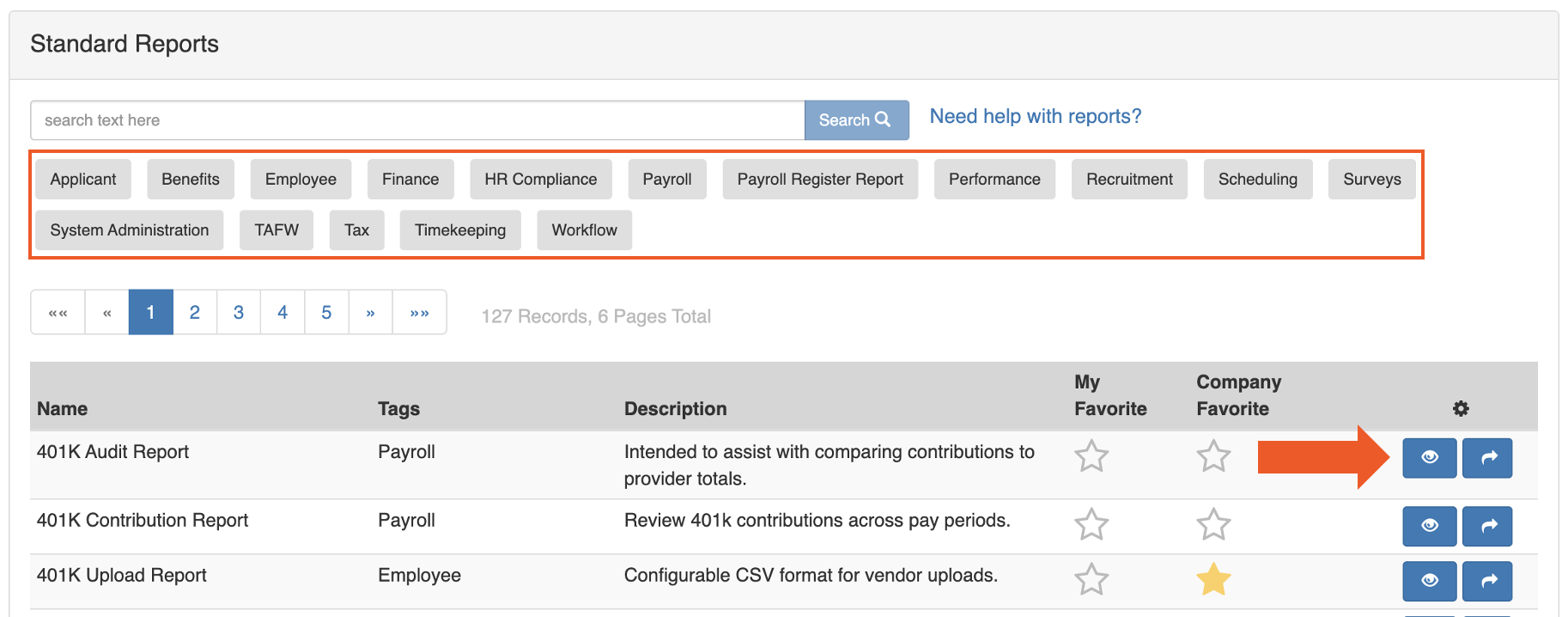
- Inicie sesión en Toast Payroll y navegue a Informes>Estándar.
- Cuando seleccione Informes en Toast Payroll, debería ver una URL que comienza con payroll.toasttab.com. Visite Navegar por Toast Payroll dentro de Toast Web para aprender cómo funciona la nueva navegación de Toast Payroll.
- Busque palabras clave en el cuadro de búsqueda en la parte superior, o seleccione una de las pestañas de filtro de categoría grises para limitar la lista por tipo de informe.
- Seleccione el icono de flecha para poner el informe en cola para su descarga, o seleccione el icono de vista o de ojo para leer una descripción del informe antes de ejecutarlo.
Resultado esperado: El informe se descarga inmediatamente o se envía al Document Courier en la pestaña Mis informes. La página se actualiza cada 30 segundos. Una vez que el estado muestre Descargar, selecciónelo para recibir su informe.
Nota: Para obtener descripciones y casos de uso de los informes estándar que se ejecutan con mayor frecuencia, incluidos el Informe de auditoría de nómina de empleados trimestral (QEPAR), el Informe de auditoría de nómina de empleados (PEPAR) y el Informe de horas/ganancias por rango de fechas, consulte Toast Payroll: Revise los informes de nómina comunes.
Informes personalizados
Los informes personalizados le permiten seleccionar campos de datos específicos y aplicar filtros para crear un informe adaptado a las necesidades de su negocio. Los casos de uso comunes incluyen:
- Gestión de deducciones de beneficios
- Análisis de horas extras
- Validación de direcciones de correo electrónico de los empleados
- Informes de censo 401(k)
- Informes de salario bruto acumulado (YTD)
- Desglose de ingresos por empleado o categoría de ingresos
Para ejecutar o editar un informe personalizado existente: Seleccione el nombre del informe para editar su configuración, o seleccione el icono de flecha para ejecutarlo inmediatamente.
Crear un informe personalizado
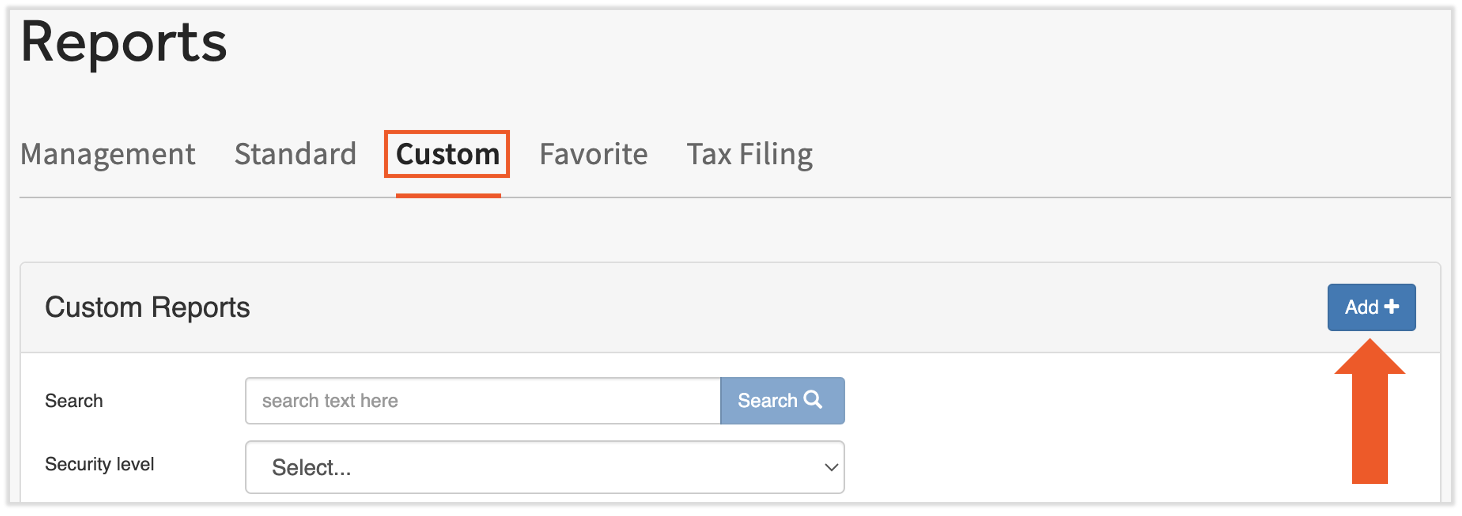
- Inicie sesión en Toast Payroll y navegue a Informes > Personalizado.
- Cuando seleccione Informes en Toast Payroll, debería ver una URL que comienza con payroll.toasttab.com. Visite Navegar por Toast Payroll dentro de Toast Web para aprender cómo funciona la nueva navegación de Toast Payroll.
- Seleccione el botón Agregar+ para comenzar.
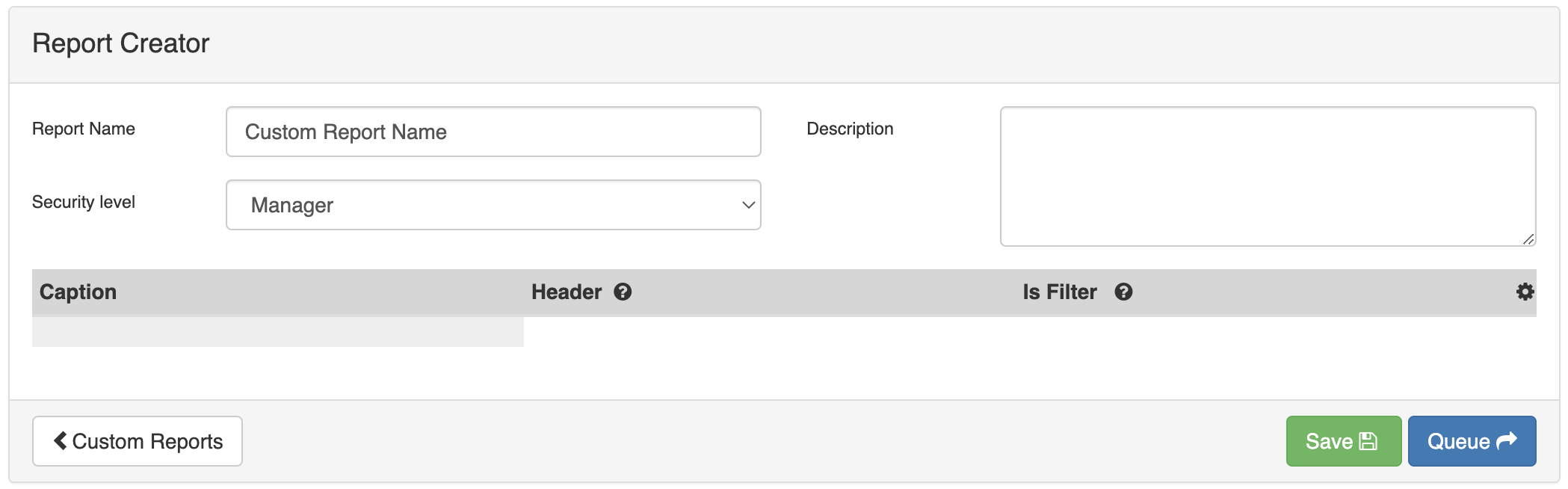
- Ingrese un Nombre para su informe, agregue una Descripción (opcional) y elija una de las siguientes Plantillas antes de seleccionar Guardar:
- Atributos del empleado — toda la información del empleado, incluidos datos personales, fecha de contratación, estado laboral, tarifa por hora, fecha de terminación y más
- Deducciones del empleado — resumen de las deducciones del empleado
- Ingresos del empleado — resumen de los ingresos del empleado
- Nómina — extrae datos de las nóminas enviadas dentro del año calendario; consulte Plantilla de informe de nómina para saber cómo funciona esta plantilla
- En el Creador de informes, revise y configure los cuadros de datos en la parte superior de la página:
- Nombre del informe — edite el nombre del informe
- Nivel de seguridad — configúrelo en HR+ para restringir el acceso; no es posible hacer que un informe sea accesible para usuarios con un nivel de seguridad de Empleado
- Descripción — agregue o edite una descripción para que el propósito del informe sea fácil de identificar en el futuro
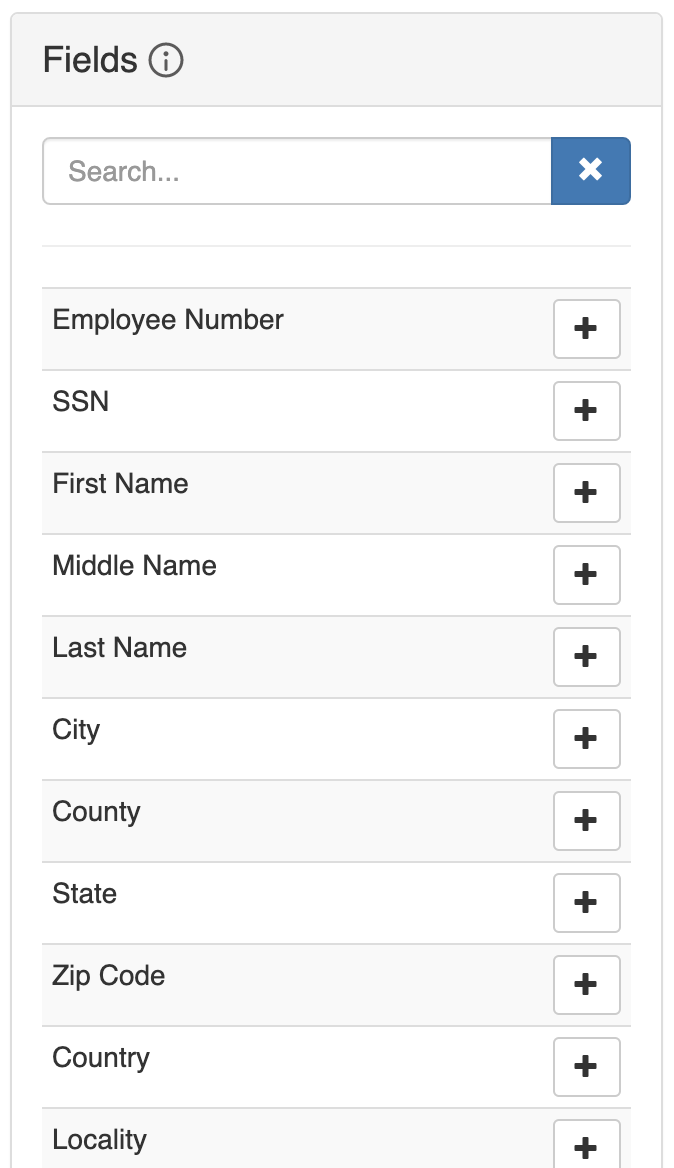
- Seleccione el icono + junto a cualquier nombre de campo para agregar ese campo a su informe.
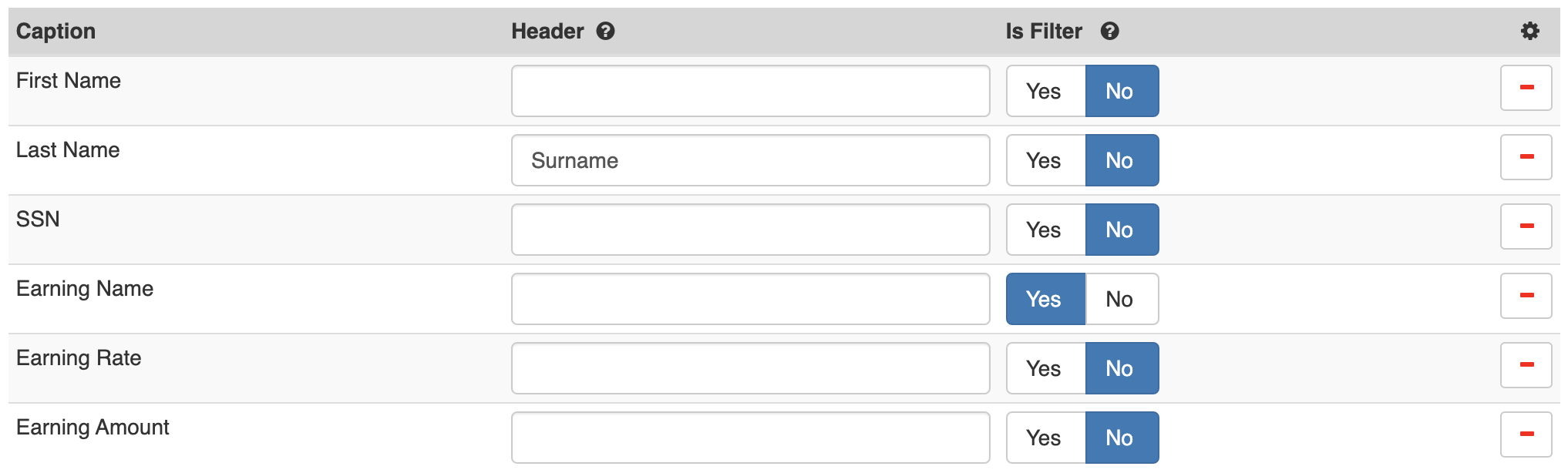
- Los campos aparecen en el informe en el orden en que se agregan. Seleccione y Omitir un campo para arrastrarlo hacia arriba o hacia abajo. Para cada campo, puede:
- Asignar un encabezado: la etiqueta que aparece en la fila 1 del informe generado. Si no se asigna ningún encabezado, se utiliza el título del campo.
- Aplicar un filtro: ordena los datos del informe según los criterios que defina en el paso 8 a continuación.
- Eliminar el campo: seleccione el icono – para eliminarlo.
- Cuando el informe esté configurado, seleccione Guardar para guardarlo en su lista de Informes personalizados, o seleccione En cola para guardar y ejecutar el informe inmediatamente.
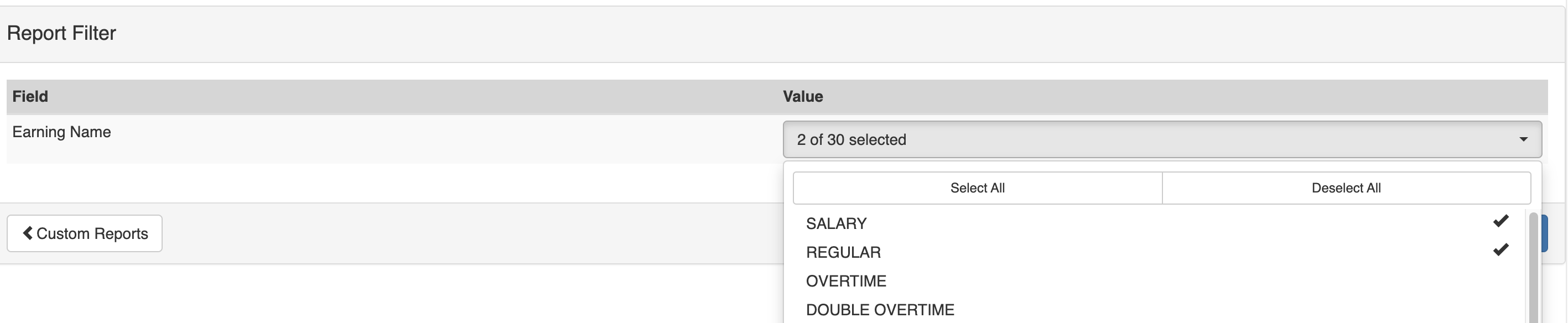
- Si seleccionó En cola y tiene un filtro aplicado a uno o más campos: seleccione los valores de datos que desea incluir en el informe y, luego, seleccione Poner en cola para generarlo. Por ejemplo, si aplicó un filtro al campo Nombre de ingresos y selecciona SALARIO y Regular, el informe incluirá solo esos códigos de ingresos.
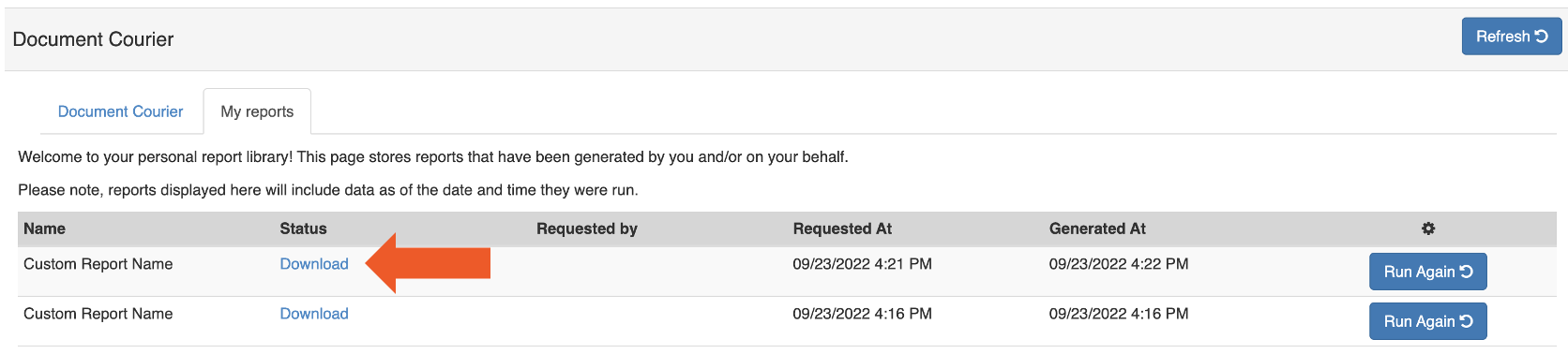
- Se le dirigirá al Document Courier, donde su informe estará disponible para descargar una vez procesado. La página se actualiza automáticamente cada 30 segundos. Una vez que el estado muestre Descargar, selecciónelo para recibir su informe.
Resultado esperado: Su informe personalizado se guarda y está disponible en Toast Payroll en Informes > Personalizado. Si seleccionó En cola, el informe se descarga desde el Document Courier una vez que se completa el procesamiento.
Plantilla de informe de nómina
La plantilla de Nómina es más compleja que las otras plantillas de informes personalizados. Detalles clave:
- Fuente de datos: Proviene de los periodos de pago enviados, no es una instantánea de un momento específico. Los números, empleados y totales mostrados coinciden con lo que aparece en el Informe de resumen de nómina y en el Informe de auditoría de nómina de empleados por periodo de pago (PEPAR).
- Encabezados y pies de página: Puede crear una fila de encabezado (primera fila de su hoja de cálculo) y una fila de pie de página (última fila) en el formato del informe. Esto puede ser necesario si carga el informe a un proveedor externo. Para agregar un encabezado o pie de página, seleccione los campos apropiados de la sección Encabezados y pies de página en Campos.
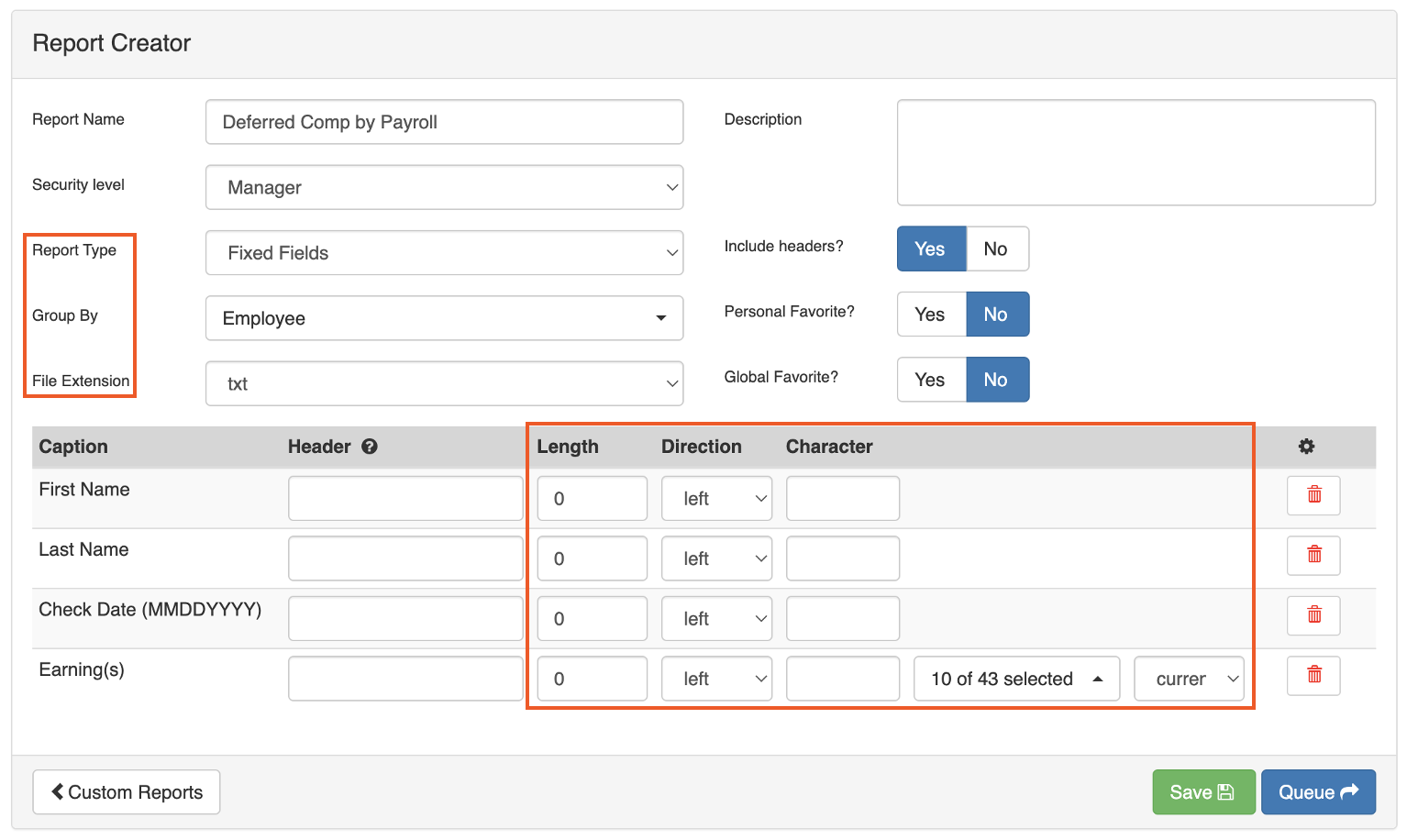
- Opciones de agrupación:Agrupe los resultados del informe utilizando una de las siguientes configuraciones:
- Empleado — una línea por empleado, sumando todos los totales de todos los periodos de pago en el rango de fechas del informe
- Nómina — una línea que suma todos los totales de todos los periodos de pago, sin información específica del empleado
- Campos fijos: Ejecute el informe como Campos fijos si es necesario para una carga a terceros. Campos fijos le permite editar la longitud, la dirección y el carácter de cada campo. Si utiliza Campos fijos, cambie el tipo de Extensión de archivo a txt.
Informes de presentación de impuestos
Para ver los informes de presentación de impuestos, inicie sesión en Toast Payroll y navegue a Informes > Presentación de impuestos. (Cuando seleccione Informes en Toast Payroll, debería ver una URL que comienza con payroll.toasttab.com.) Visite Navegar por Toast Payroll dentro de Toast Web para aprender cómo funciona la nueva navegación de Toast Payroll.) Seleccione el Año y el FEIN (Número de identificación federal del empleador) correctos para localizar sus documentos, luego seleccione el icono de flecha para ejecutar o descargar un informe.
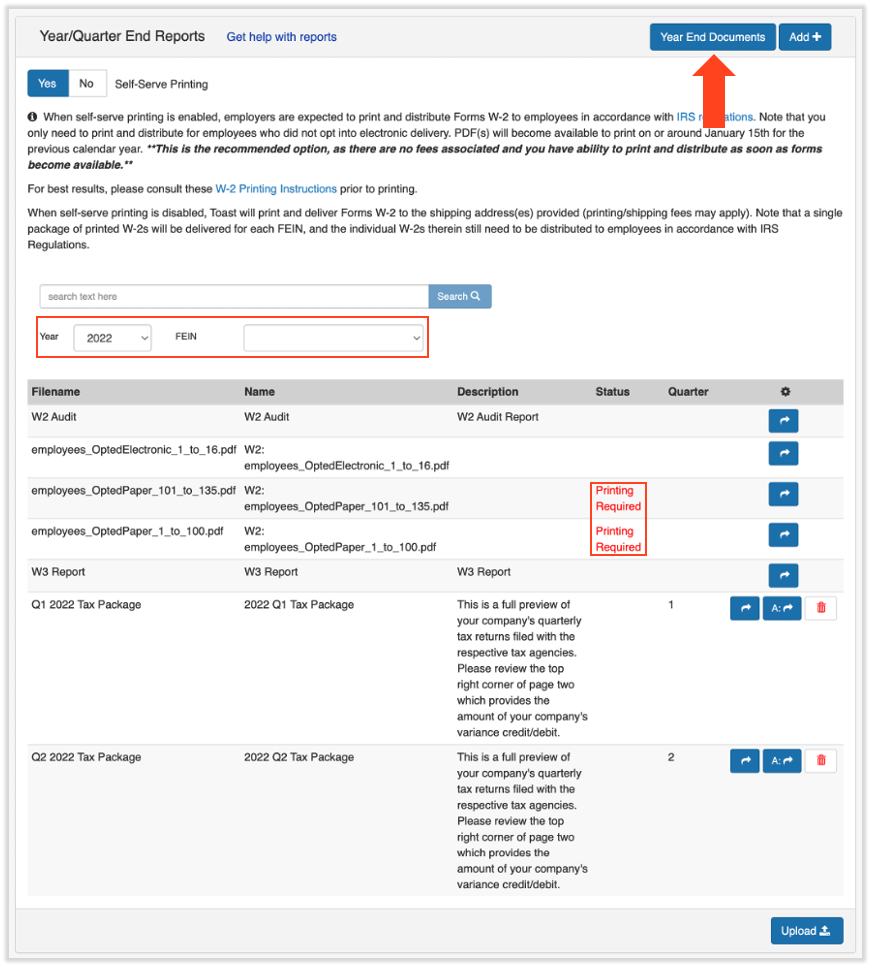
Dos informes siempre están disponibles en Presentación de impuestos, independientemente del año:
| Informe | Descripción |
|---|---|
| Informe de auditoría W2 | Resumen de todos los formularios W-2 para todos los empleados para el año seleccionado |
| Informe W3 | Suma de todos los formularios W-2 dentro de un FEIN |
Paquetes de impuestos trimestrales
Aproximadamente de tres a cuatro semanas después de cada trimestre en el que procesó nóminas con Toast, su paquete de impuestos trimestral aparece en Informes > Presentación de impuestos. (Cuando seleccione Informes en Toast Payroll, debería ver una URL que comienza con payroll.toasttab.com. Visite Navegar por Toast Payroll dentro de Toast Web para aprender cómo funciona la nueva navegación de Toast Payroll.) Los paquetes de impuestos trimestrales contienen información sobre impuestos de nómina, incluidas las variaciones fiscales específicas de su FEIN.
Nota: Para obtener una guía sobre cómo leer su paquete de impuestos trimestral, incluida la sección de Resumen de conciliación y variaciones, consulte Toast Payroll: Lea su paquete de impuestos trimestral.
Archivos del formulario W-2 y documentos de fin de año
Una vez disponibles, los archivos del formulario W-2 para sus empleados para el año y FEIN seleccionados aparecen en Toast Payroll en Informes > Presentación de impuestos. (Cuando seleccione Informes en Toast Payroll, debería ver una URL que comienza con payroll.toasttab.com. Visite Navegar por Toast Payroll en Toast Web para aprender cómo funciona la nueva navegación de Toast Payroll.
Los archivos están etiquetados:
- employees_OptedElectronic — empleados que optaron por el Envío electrónico del Formulario W-2
- employees_OptedPaper — empleados que eligieron recibir un Formulario W-2 en papel
Los empleados que soliciten un Formulario W-2 en papel deben tenerlos impresos y distribuidos antes de la fecha límite de la SSA del 31 de enero de cada año. Para obtener instrucciones sobre cómo Imprimir, consulte Toast Payroll: Descargar e Imprimir Formularios W-2 (Para empleadores).
Para ver y administrar las preferencias de Envío de W-2 de los empleados:
- Seleccione el botón Documentos de fin de año para ver qué empleados han optado por el Envío electrónico y cuáles han elegido el Envío en papel. Revise la columna ¿Formularios electrónicos?.
- Para cambiar la configuración de Envío de W-2 de un empleado: seleccione la casilla de verificación junto a su nombre y elija Editar.
- Esto debe ocurrir antes de que se haya enviado la última nómina del año.
Resultado esperado: La preferencia de Envío de W-2 del empleado se actualiza. El cambio se aplica a los años fiscales actuales y futuros.
Artículos relacionados
- Toast Payroll: Revisar informes de nómina comunes
- Toast Payroll: Document Courier
- Toast Payroll: Revisar informes de nómina
- Toast Payroll: Informe de resumen de nómina
- Toast Payroll: Lea su paquete de impuestos trimestral
Este contenido es para fines informativos y no pretende ser asesoramiento legal, fiscal, de recursos humanos ni de ningún otro tipo profesional. Comuníquese con un abogado u otro profesional para obtener asesoramiento.