不要等待支付概述
上次更新时间:2026年9月16日 16:09
| Toast 不要等待支付目前在波士顿地区与部分客户进行有限发布。请持续关注最新动态。 |
开始使用Toast的“不要等待付款”
在测试阶段,Toast的“不要等待付款”将由Toast开启,无法在Toast Web中进行配置。
注意:如有任何问题,您可以联系toastpaysupport@toasttab.com,参与的餐厅可以选择在这里退出。
返回顶部
“不要等待付款”员工培训
以下是您员工在开始使用“不要等待付款”时的一些重要要点:
- 审查此客人体验:员工应熟悉“不要等待付款”的客人体验是如何运作的。请参见“不要等待付款”客人体验部分或下面的视频:
“不要等待付款”客人体验演示视频 。 - 介绍“不要等待付款”:服务员和员工可以在客人入座时或在接待台时提到“不要等待付款”。以下是一些示例对话:
- 介绍对话轨迹:“对于iPhone用户,我们提供一种新的“不要等待付款”应用体验,您可以连接到您的账单,跟踪您的消费,并在准备好时随时付款,无需收据或二维码。如果您有兴趣尝试,请告诉我。”
- 开始对话轨迹:“如果您还没有,首先您应该从Apple应用商店下载Toast Local应用并创建一个账户。一旦您打开应用并更新您的当前位置,您会在应用底部看到一个黑色的“付款”按钮。点击“付款”按钮并在列表中找到[您的餐厅名称]后,您可以通过输入您的桌号(即[客人的桌号])将自己链接到您的账单。”
- 跟踪账单和结账:“连接到账单后,您可以跟踪您的消费,并在准备好时使用Apple Pay等支付方式结账。如果您有任何问题,请告诉我!”.
- 客人故障排除:服务员应熟悉下面常见问题中的故障排除部分。
- 监控支付状态:服务员可以通过 Toast Don’t Wait to Pay 使用这两个工具跟踪客人是否已自行结账:
- POS 通知:当客人通过 Toast Pay 成功支付或未能支付并可能需要帮助时,服务员会收到 POS 通知——关于 POS 通知如何工作的快速视频在这个 移动餐饮解决方案 POS 通知 视频中。
- 桌面管理 POS 屏幕:在桌面管理屏幕上,客人的桌子在支付完成后会从黄色变为白色。
Don’t Wait to Pay 餐厅优惠
Don’t Wait to Pay 没有额外的月费,在促销期间 [2024年9月23日 - 2025年2月28日],参与的餐厅 Toast 将提供:
- 信用卡费率降低:在促销期间,Toast 将为 Don’t Wait to Pay 交易报销您餐厅的卡片在场和卡片不在场 (CNP) 信用卡处理费率之间的差额。
- 拒付和走人报销:Toast 将报销您在促销期间因 Don’t Wait to Pay 产生的拒付或走人费用。有关报告拒付和走人的信息可以在 这里 找到。
- 小费保证和交易激励:对 Don’t Wait to Pay 中任何低于 20% 的小费进行报销,以及每笔 Don’t Wait to Pay 交易 $1 的报销。
Toast Don’t Wait to Pay 功能常见问题
Don’t Wait to Pay 常见问题
为什么 Toast 要开发 Don’t Wait to Pay?
- 餐厅:Toast 在 Don’t Wait to Pay 功能中的目标是帮助:
- 增加客流量到您的餐厅:参与的“不要等待付款”餐厅将在Toast Local应用中突出显示。Toast将直接向剑桥地区的消费者推广“不要等待付款”。
- 简化操作:简化结账流程,以帮助更快地翻台。释放服务员的时间,专注于提升客人的体验和促进追加销售。
- 收集客人见解:在支付过程中直接从客人那里收集菜单项评论,以完善您的菜品。每笔交易的客人见解可以用来推动您的Toast电子邮件营销和忠诚度计划。
- 节省纸张:提供一种不依赖打印收据的无纸化支付选项。
- 客人:我们在“不要等待付款”功能中的目标是帮助他们:
- 跟踪他们的账单:允许客人在用餐过程中轻松跟踪他们的账单。
- 像VIP一样节省时间:为您的客人提供一种新颖的应用内支付体验,使他们能够在准备离开时立即付款,无需纸质收据或二维码。
如何开启“不要等待付款”?
如果您参与了封闭测试,Toast将为您开启此功能。如有任何问题,请联系toastpaysupport@toasttab.com。
- 下单:客人像往常一样向您的员工下订单。
- 连接以查看:客人向服务员询问他们的桌号,输入后可以在应用中连接到签到。或者,客人可以输入账单号码以连接到账单。
- 查看账单并付款:客人可以随时跟踪他们的账单并付款,无需打印收据。
不要等待付款的餐厅体验
餐厅体验是如何运作的?
- 教育客人:在接待处或就座时,告知客人关于“不要等待付款”功能及其在Toast Local应用中的位置。注意:“不要等待付款”仅支持iOS设备。
- 接受订单:接受客人的订单并遵循典型的服务步骤。
- 提供桌号或账单号码:当客人准备连接到账单时,他们会向您的员工询问他们的桌号。账单号码可以作为连接账单的替代方式,适用于快速订单和分账。
- 监控付款:您可以通过POS通知或POS上的桌面管理屏幕监控付款状态。
- 您的员工也可以通过在POS上刷客人的信用卡来传统地收款。
这与用于付款的收据二维码有什么不同?
“不要等待付款”是一个无纸化且无需二维码的体验,由客人发起,他们向服务员询问桌号或账单号码以连接到账单。连接到账单后,客人的支付体验与收据二维码支付体验非常相似。
小费在 Toast Don’t Wait to Pay 中是如何运作的?
使用 Don’t Wait to Pay 的客人将看到您在 Toast Web 中配置的 UI 选项 的小费选项。他们可以选择任何他们想要的小费。
快速订单和分账在 Toast Don’t Wait to Pay 中是如何运作的?
对于快速订单和服务员分账,建议客人获得账单号码,以帮助他们找到账单,该号码也可以在打印的收据上找到。
目前 Don’t Wait to Pay 不支持客人主导的分账。
如果我升级到 Toast Pay,是否可以在 Don’t Wait to Pay 中获得菜单项评论和报告?
是的。您将像使用 Toast Pay 一样,通过收据二维码在 Don’t Wait to Pay 中收集菜单项评论。有关更多信息,请参见 优化 Toast Pay 与菜单项评论。
Don’t Wait to Pay 是否支持 Android?
目前,Don’t Wait to Pay 仅支持 iOS。如果 Android 用户在其 Toast Pay 设置 中启用了此功能,他们仍然可以使用收据二维码进行数字支付。
Don’t Wait to Pay 客户体验
客户体验是如何运作的?
- 下载 Toast Local 应用程序:如果客人尚未下载,他们将下载 Toast Local 应用程序。注意:Don’t Wait to Pay 仅支持 iOS 设备。
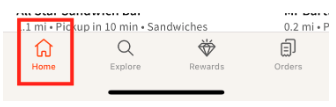
- 选择餐厅:客人选择主页底部的 支付 按钮,并选择他们用餐的餐厅。注意:客人必须将其位置设置为靠近餐厅的地址,以访问“不要等待付款”。
哪些客人支付方式支持“不要等待付款”?
“不要等待付款”支持Apple Pay、保存的卡片、手动输入的信用卡、忠诚奖励和Toast Cash。
如果客人未付款或提交了退款请求怎么办?
仅在促销期间,Toast将为您报销任何与“不要等待付款”相关的退款请求或未付款项的费用。有关报告退款请求和未付款项的信息可以在这里找到。
“不要等待付款”故障排除
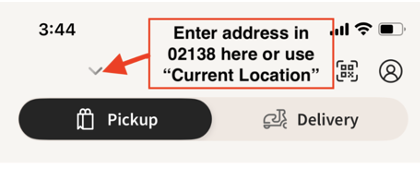
如果客人在Toast Local应用程序顶部未看到“不要等待付款”部分怎么办?
如果客人未看到使用“不要等待付款”的选项,请确保客人输入的地址是他们的“当前位置”或他们手动输入了附近的地址。
如果客人与“不要等待付款”连接到错误的桌子或订单,会发生什么?
在预览“不要等待付款”交易的账单和包含的项目时,如果客人注意到他们的账单错误,他们可以通过选择“这不是我的账单”返回。
多个客人可以通过“不要等待付款”连接到同一账单吗?
是的,他们可以通过“不要等待付款”连接到同一账单。但是,只有一位客人能够付款。更多详细信息可以在“不要等待付款”餐厅优惠部分找到,包括条款和条件 *。
返回顶部
还有其他问题吗?
如果您有任何问题,请联系Toast Pay团队 toastpaysupport@toasttab.com。
*条款和条件:促销期为[2024年9月23日 - 2025年2月28日](促销期)。 使用“不要等待付款”的交易将按照您餐厅的非面对面(CNP)信用卡处理费率收费。仅在促销期间,Toast将为您餐厅的“不要等待付款”交易补偿CNP与面对面信用卡处理费率之间的差额,具体由Toast自行决定(信用卡费率补偿)。仅在促销期间,Toast将为与“不要等待付款”交易相关的退款和未付款项进行补偿,这些退款和未付款项必须使用Toast自行决定的提供的表格进行报告(退款补偿)。您将在适用月份结束时通过ACH在您餐厅的每月信用卡处理报表中收到适用的信用卡费率补偿和退款补偿。本电子邮件中描述的优惠仅适用于本电子邮件的原始收件人,并且不可转让、不可分配,且可随时更改,恕不另行通知。Toast不对该试点项目的结果作出任何陈述、保证或担保。