翻译仅供参考。您与 Toast 签署的任何法律协议(包括但不限于《商户协议》和《终端用户许可协议》),其订立语言可能不同于以上页面所使用的语言,无论是否提供本页面其他语言的译文,均应以您所签署的协议条款为准
在您的菜单上设置一个桶押金
上次更新时间:2026年9月15日 16:20
了解收取和退还啤酒桶押金的所有细节。这一切都可以在Toast的菜单中完成!
通过 Toast 收集和退还桶押金非常简单,只需快速设置即可。使用以下步骤为您的 POS 菜单创建一个桶押金按钮。
本文内容:
为桶押金在您的菜单中创建一个押金按钮
创建一个桶押金按钮将使您能够轻松收集押金。此按钮可以在 Toast Web 中创建。
- 导航到菜单 > 批量管理> 高级属性。
- 您将看到在 Toast 中已设置的餐厅菜单。选择您希望桶押金按钮存在的菜单 - 这可以是像您的饮料菜单一样简单。
- 进入菜单后,导航到分组部分,并选择+ 添加按钮以创建新组。将此新组命名为桶押金、可押金或任何最适合您业务的名称。
- 保存您的工作。然后选择您刚刚创建的桶押金组。
- 在桶押金组内,导航到项目部分。在这里,您可以创建具体的押金项目及其费用或退款。
- 选择+ 添加按钮以创建菜单项。如果您计划提供现金退款,您还可以添加一个菜单项作为押金退款。例如,如果一个完整的桶的费用是70美元,请创建一个名为完整桶的项目,费用为70美元。如果您希望能够以现金退还押金,您需要创建一个名为完整桶退款的额外项目,退款金额为-70美元。请务必包含"-"以为您的退款按钮分配负余额。
- 保存并发布您的更改。
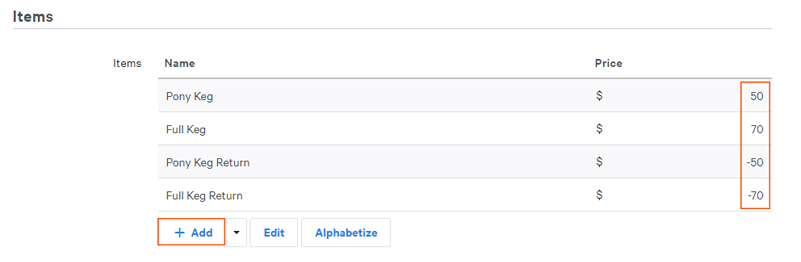
请注意,还有一个选项可以将其创建为开放项目。如果您有兴趣了解更多信息,请参见创建开放项目或开放定价菜单项。
对桶收取押金费用
当客人希望购买一个桶时,只需通过您的押金按钮向他们收费。在Toast POS上,选择您嵌套了桶押金按钮的菜单,然后选择相应的收费。
然后,选择支付按钮,像往常一样接受客人的付款。
返回顶部
向客人退还桶押金费用
当客人归还他们的桶并希望取回押金时,您需要采取几个步骤来给他们退款。这可以通过两种不同的方式完成:
- 在客人支付桶押金的POS上查找账单并发放退款,或者
- 使用您添加到菜单中的桶退款项目创建新账单,并以现金退还客人的桶押金(作为单独的交易)。
这两种选项将在下面描述。
查看带有桶押金的支票以发放退款
在Toast POS中查找您客人的原始支票对于保持您业务的准确报告非常重要。根据您的业务,您可能对桶的退货时间有限,只需在短时间内进行搜索。
- 在Toast POS的快速订单 屏幕上开始,并在屏幕顶部搜索支票。选择三点溢出菜单并选择查找支票。
- 屏幕上将出现一个数字键盘。输入或刷卡客人用于购买桶的卡。如果客人是用现金支付的,请选择高级搜索按钮。
- 如果您使用高级搜索,将会进入一个新屏幕。您可以选择按客户信息查找 客户信息或按支票号码查找 支票号码(如果他们手上有收据),同时搜索特定日期。
- 一旦找到已关闭的支票,选择支票上的桶押金项目,然后选择相应的退货按钮以退款给您的客人。该金额将以负数形式出现,这是您将退还给客人的金额。有关发放信用卡退款的逐步说明,请参见本支持中心文章的通过POS发放信用卡或现金退款部分,发放退款。
退款现金桶押金
您的业务也可能会退款现金押金,特别是对于小型物品,如生啤酒瓶。如果是这种情况,您可以通过在Toast POS中选择相应的押金退还项目按钮作为新交易来退款给您的客人。
重要的是要注意,这仅适用于现金退款 - 卡交易需要查找,如前一部分查看支票中所述。
- 打开支票并选择您创建的桶押金退还项目。这将有一个负余额。
- 例如,如果客人退还一个完整的桶,您将选择完整桶退还按钮。您将在屏幕上看到负余额,这笔款项将退还给您的客人。
- 选择支付按钮,以现金退还给您的客人。这是使用此方法退还给客人的唯一方式。
Keg押金退还项目也可以用于抵扣新桶(或其他物品)的押金,功能类似于折扣。例如,如果您有一位客人退还一个桶并购买两个新桶,押金退还将像折扣一样,客人只需支付第二个新桶的剩余余额。