Cash Discounting Overview

上次更新时间:2026年4月8日 10:13

Learn more about Toast's stance on cash discount and brand compliance requirements, and more.

This content is provided for informational purposes only and is not intended as legal, accounting, tax, HR, or other professional advice. You are responsible for your own compliance with laws and regulations, including card network rules. You should contact your attorney or other relevant advisors for advice specific to your circumstances. Note that this article applies to U.S. and U.S. territories only.
 

In this Article:


Cash Discounting

A cash discount is when only one price is presented to the consumer, and if the consumer pays in cash, they are offered a discount from the merchant’s advertised (including the menu) price.


Cash discounting provides pricing benefits to your guests who pay using cash while effectively making back your processing fees or other operating costs from guests who pay with debit or credit cards. It is important to note there are many ways to implement cash discounting; however, any program where a fee is added to posted/menu prices, whether characterized as a “cash discount” program or something else, may amount to a non-compliant credit card surcharge.  It is imperative to fully understand the rules and regulations to meet the legal requirements for a cash discounting program, or else you may risk compliance violations, fees, and penalties.
 

Back to top 


Cash Discounting Rules and Requirements 

The card networks (e.g., Visa and Mastercard) have rules and requirements that must be followed for a merchant to maintain compliance and avoid financial penalties. Below is some high-level information on these rules for your reference:


Menu and other advertised prices must reflect the price for credit card purchases.

Wherever prices are listed, a merchant must show the price applicable for payment by credit card for each item, whether on the menu or any other locations where prices are posted (menus, receipts, promotions, and elsewhere), not the discounted cash price. A merchant may display both card and cash prices side by side, but card prices must always be displayed.


Visible signage and receipt itemization

Clear and conspicuous signage must be displayed to guests — at the business entrance, on menus, and wherever the payment is being processed, such as the POS. The signage must include a statement that the cash discount only applies to cash transactions, along with the specific cash discount percentage. It is important that this is always presented only as a discount for a cash payment (and never suggested that it is a fee for the use of credit cards, for example). 


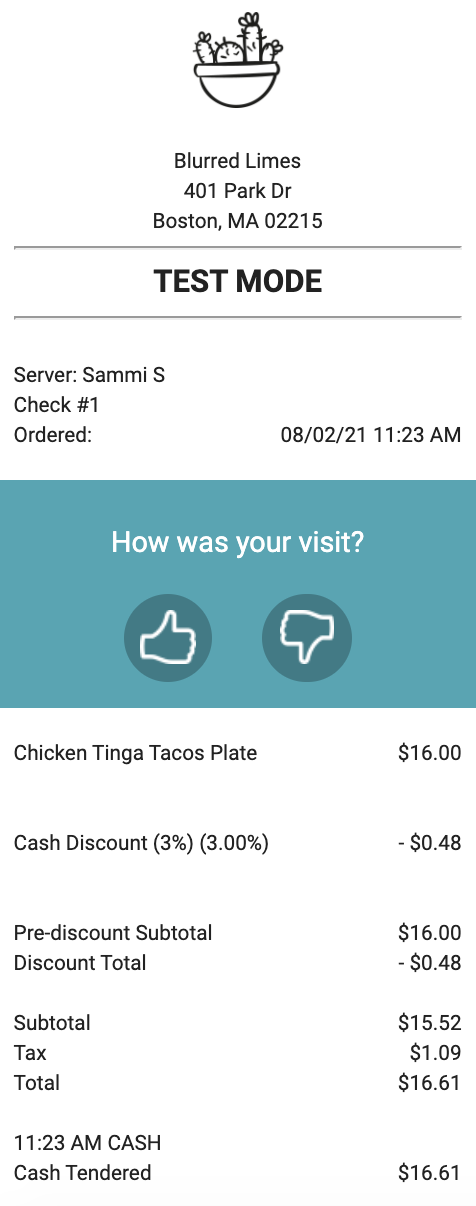
Beyond signage, merchants must have a clear, separate line item on the guests’ receipts (e.g., Cash Discount _%) that explicitly indicates that it is a discount applied for a cash payment as well as the cash discount percentage and the resulting dollar amount. The dollar amount of the discount must be shown as a negative number on the receipt to indicate that it is a discount from the advertised (menu) price. For example, a 2% cash discount on a guest’s $50 meal may have a line that reads Cash Discount (2%): -$1.00 as a line item.
 

Back to top


How to Implement a Compliant Cash Discounting Program

If you are interested in implementing a cash discounting program, please follow these steps:

  1. Consider adjusting your advertised menu prices: In running your business, you may decide to overhaul your menu prices with an overall increase from time to time if you find that your revenue is insufficient to cover your operating costs. Consider re-evaluating your pricing on a forward-looking basis to ensure profitability after considering any overhead. A discount for cash-paying customers may be a convenient way to help your guests offset any such pricing changes you decide on.  There are no rules specific to the percentages you may set for a cash discount, nor is there a requirement to re-evaluate your pricing model, but if you choose to do so as part of a cash discount program, you must ensure all advertised/menu prices reflect prices before any cash discount is applied. Remember that setting too high a menu price and/or too low of a cash discount may upset guests. You may use the Bulk price editor functionality in the Toast POS system to adjust your menu prices on a forward-looking basis to incorporate your card processing costs / effective rate or other overhead costs/amounts if you choose to do so. Please note that you will also need to capture these changes on any physical menus.
  2. Create the cash discount: Create the cash discount in the Toast POS system, and set the discount equal to the costs you are seeking to offset as a percentage of each purchase (please note that the card networks do not have any restrictions on how large the cash discount can be, so you are free to set it at your own discretion).
  3. Post clear signage in your restaurant: Post signage at the point of entry to your business, at the point of sale or point of interaction, and on your menus stating that you offer a discount from the listed prices if a guest uses cash.
  4. Apply the cash discount to any and all cash transactions: You will need to manually add the cash discount each time a guest uses cash and/or check. You will likely need to train your staff on how to do this, though Toast’s platform makes it extremely simple.
  5. Ensure the cash discount is reflected on the guest's receipt: You must break out the cash discount, along with the specific percentage and the dollar amount, as a separate line item on the guest’s receipt for a cash transaction. If you create the cash discount using Toast’s Discounting functionality, the discount will be accurately reflected on the receipt without requiring further action on your part.


Back to top


Detailed Step-by-Step Instructions

  1. Adjust your advertised menu prices if desired
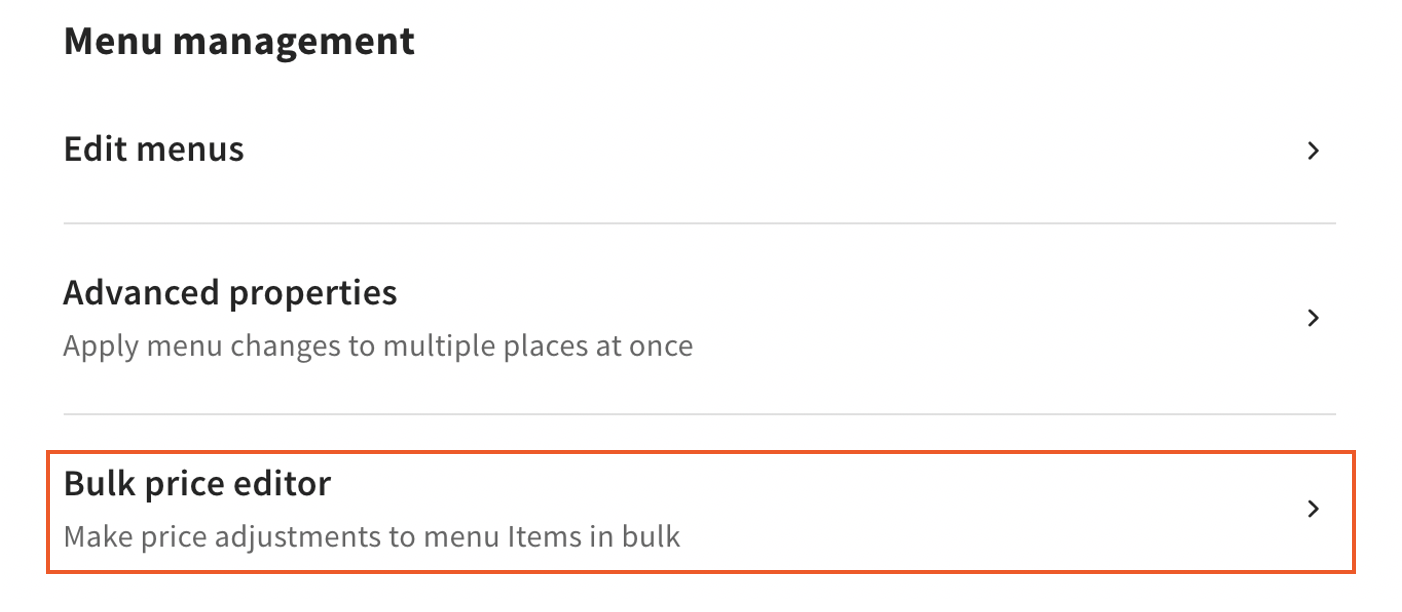
    1. If you wish, you may adjust your advertised menu prices in parallel with establishing a cash discount. Not to be confused with an adjustment made at the register, the Bulk price editor enables you to change your listed prices for any purpose on a forward-looking basis once the changes are published. In Toast's Web, navigate to Menus using the navigation on the left side of your screen and select Bulk price editor.

      Bulk Price Editor  

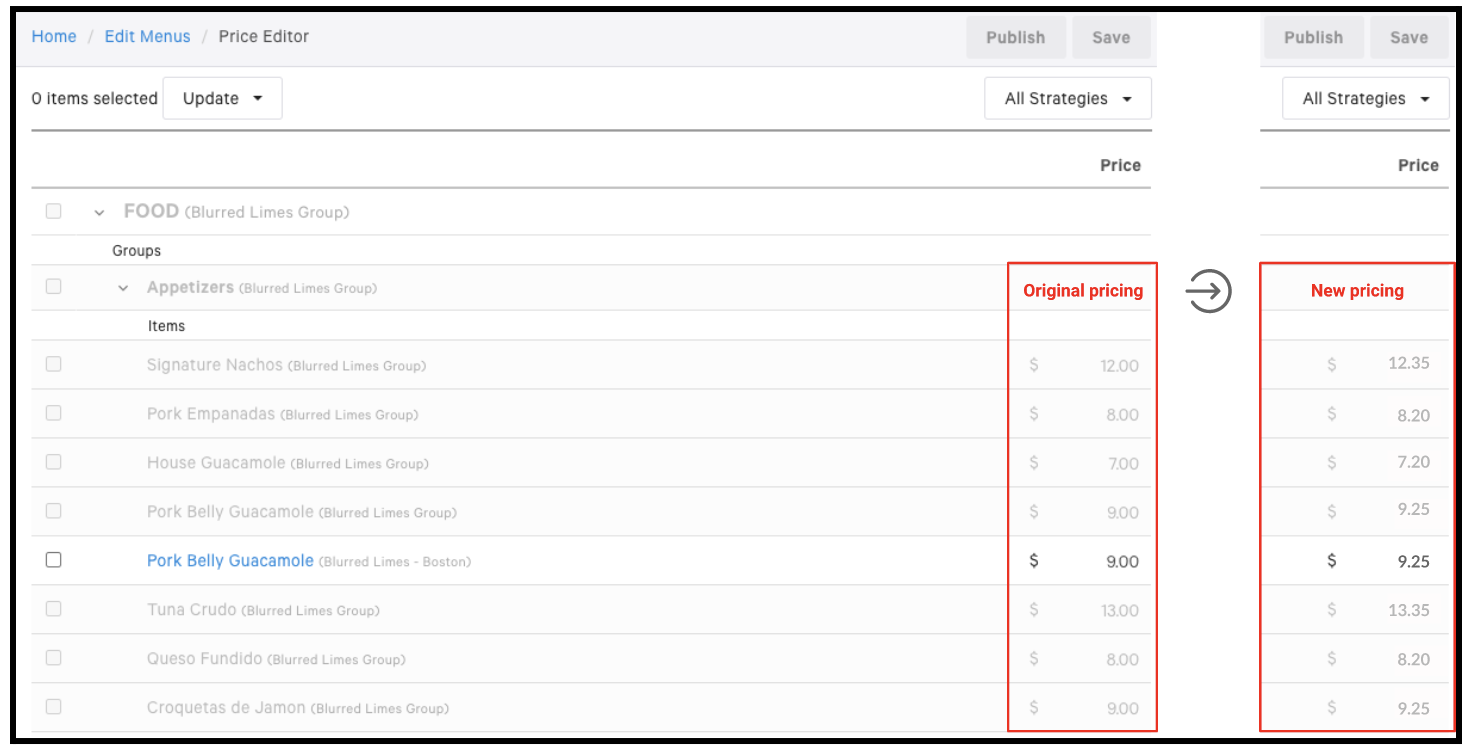
  2. Using the steps outlined here, adjust your menu prices.

    Adjusting menu prices
  3. Create a cash discount
    1. Navigate to the Payments section on the left side of your screen and select Discounts and promo codes to create a custom fixed discount named, e.g., Cash Discount (X%), and make it applicable to the guest’s Entire check. Then select Save and publish your changes!

      Comps and Promos

        Add discount tab

    2. For more guidance on creating discounts, check out ourConfiguring Discounts article
  4. Post clear signage 
    1. Before you begin offering your guests discounts for paying with cash, you must display proper signage at the point of entry to your business, at the point of sale or point of interaction, on your menus that explain the cash discounting program. For example, This restaurant offers an immediate cash discount of _% to all guests paying with cash. All prices advertised are non-cash prices.
  5. Apply the cash discount to any and all cash transactions 
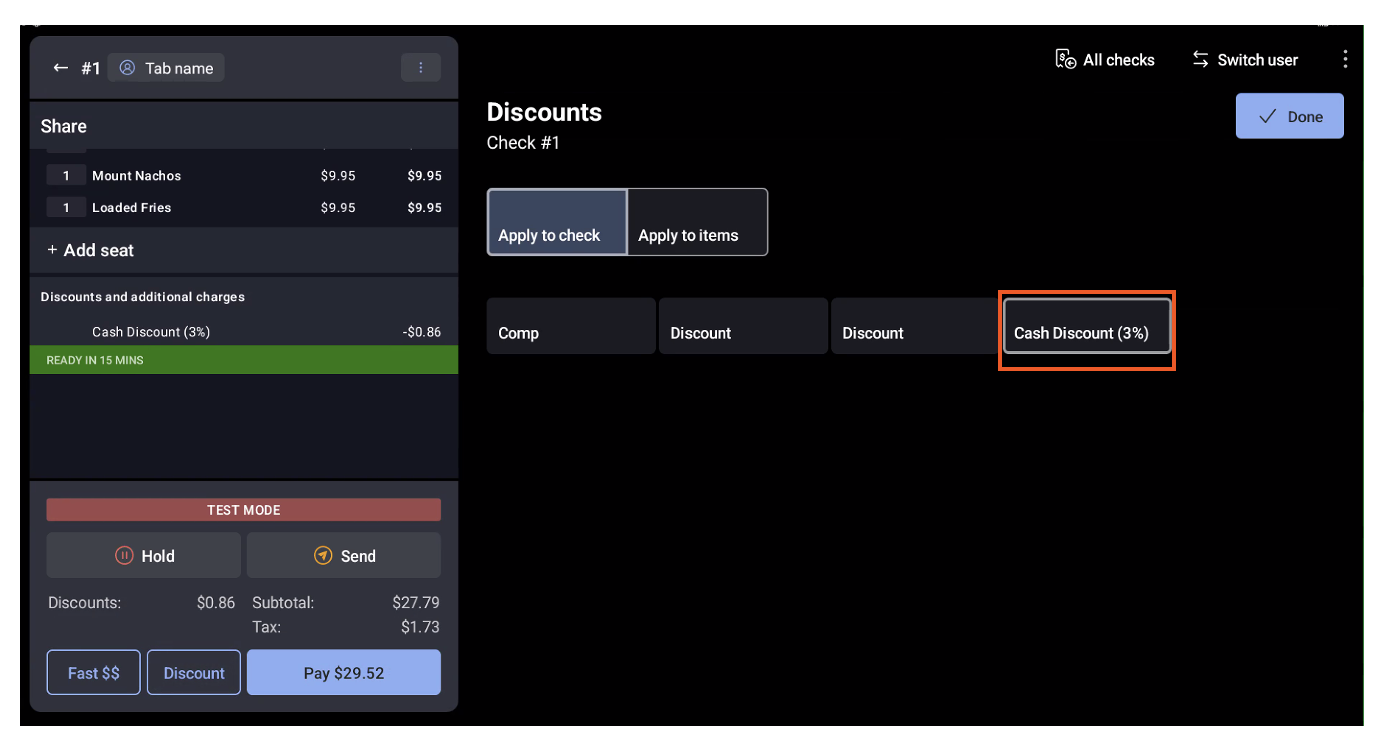
    1. Finally, you will need to apply the new cash discount through your terminal whenever guests elect to pay with cash (or another non-card payment method). Please note that digital wallet transactions, such as Apple Pay, Google Pay, and Samsung Pay, are considered credit or debit cards and are not eligible for the cash discount.

        cash discount highlighted.

  6. Ensure the cash discount is reflected on the guest's receipt.
    1. As shown in the example below, assuming you follow all of the previous steps correctly, Toast’s platform will automatically add a separate line item on a cash-paying guest’s receipt.

      Cash Paying Guest receipt


Back to top