自定义POS和KDS的菜单项及修饰符名称
上次更新时间:2026年8月20日 16:43
问题
菜单项和修饰符的“名称”、“POS名称”和“厨房名称”之间有什么区别?
回答
您可能会发现更改店内POS设备或厨房小票上显示的菜单项和修饰符名称有助于提高员工的工作清晰度和效率。所有这些更改都将在您的项目详情页面上进行。要了解更多信息,请参阅创建和管理菜单项。以下是不同名称字段的功能说明及其在Toast中的显示位置:
名称:<2>菜单组件的“正式”名称,将用于整个后台报告。如果未填写其他名称字段,这也将是显示在POS、厨房小票和顾客收据上的名称。然而,即使设置了POS别名,此名称也始终会显示在您的在线点餐菜单、Toast自助点餐机以及Toast移动点餐和支付与二维码点餐中。
POS别名:<2>在使用前台POS设备时显示的缩写名称,可作为视觉辅助工具,以提高下单速度。例如,如果实际菜单项名称为“加州鸡肉三明治”,则可以输入“鸡肉三明治”作为POS名称,以尽量减少POS菜单按钮上显示的文本量。POS别名仅适用于前台POS设备,例如终端和手持设备。自助点餐界面(包括Toast自助点餐机、Toast移动点餐和支付以及二维码点餐)则显示“名称”。
厨房别名:<2>显示给厨房员工的打印厨房小票和/或厨房显示屏上的名称。与POS名称类似,此字段可用于缩写或更改显示给厨房员工的名称,以提高清晰度/效率。
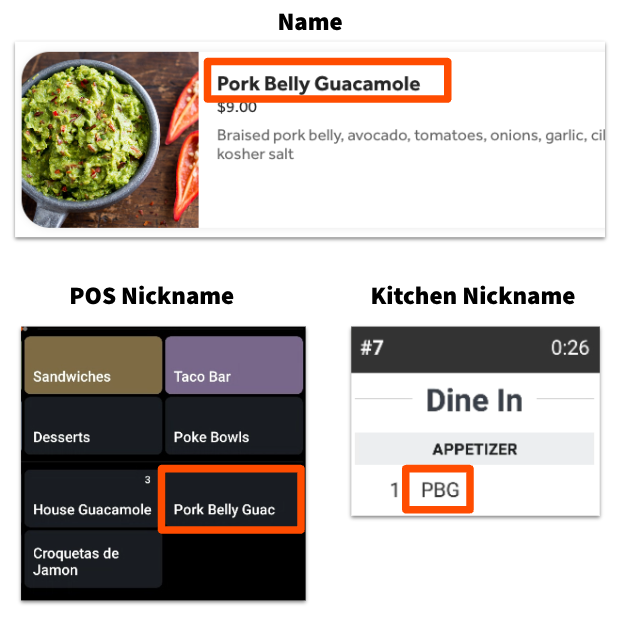
菜单项名称显示在哪里
您的顾客和员工看到的名称取决于订单的下单位置。此表适用于菜单项。
| 名称显示位置 | 使用的名称字段 |
| 前厅 POS 终端和手持设备 | POS 昵称 |
| Toast 自助点餐机 | 名称 |
| Toast 移动点餐与支付及二维码点餐 | 名称 |
| Toast 线上点餐 | 名称 |
| 厨房显示屏和打印的厨房票据 | 厨房昵称 |
| 顾客收据 | 名称 |
注意:您为菜单项设置的 POS 昵称不会显示在 Toast 自助点餐机、Toast 移动点餐与支付或二维码点餐上。如果您希望前厅使用缩短后的名称,而顾客端显示全称,这是预期行为。
注意:如果菜单项或修饰符在票据上打印出的显示方式与 POS 上显示的不同,可能是因为它引用了另一个名称不同的菜单项。打开菜单项或修饰符详情页面。如果您看到名称不同的项目引用,您需要更改项目引用的名称以使其匹配,或者创建一个没有项目引用的新项目/修饰符。
ArticlePage.additional-information
包含罗马字母和中文字符(繁体或简体)的菜单项将自动在KDS屏幕和打印小票上分开显示,以便罗马字母显示在一行,中文字符显示在另一行。为获得最佳效果,请将罗马字母和中文字符组合在一起,且不要添加任何特殊字符。
好的示例:
- Shrimp Dumplings 水晶虾饺
- 水晶虾饺 Shrimp Dumplings
坏的示例:
- 水晶虾饺 Shrimp Dumplings 水晶虾饺
- Shrimp Dumplings / 水晶虾饺
- Shrimp Dumplings (水晶虾饺)