Toast Payroll: Set Up and Configure Off-Cycle Payrolls
Last updated: Jun 18, 2026, 4:14 PM
Request an off-cycle payroll from Toast Customer Care, run it in Toast Payroll, and pay employees on your chosen check date within four business days.
- Before you begin
- Off-cycle basics
- Off-cycle policy and processing timeline
- Request an off-cycle payroll
- Run the off-cycle payroll
- Cancel an off-cycle payroll
- If you need to pay an employee sooner than four business days
- Frequently asked questions
- Related Articles
Before you begin
Applies to: Toast Payroll
What you'll accomplish: You will request an off-cycle payroll from Toast Customer Care, run it in Toast Payroll once it has been set up, and have funds delivered on the check date you choose, as long as you follow the four-business-day processing window.
Note: There are currently no additional fees for processing an off-cycle payroll, but this is subject to change.
Off-cycle basics
When you need to pay employees outside of your regular pay cycle timing, Toast Payroll can set up an additional payroll calendar. This is referred to as an off-cycle payroll. You might run an off-cycle for reasons including, but not limited to:
- Paying one or more employees who were missed on a previous payroll.
- Paying out a bonus separately from your regular payroll, particularly if you want to tax it at a different check frequency.
- Paying out items you want to have a different check date than your regular check date.
- Creating a second payroll to make a correction or addition to a previous payroll.
- Paying out a severance or final pay.
You can include 1099 contractors in an off-cycle payroll.
Off-cycle policy and processing timeline
Toast requires a four-business-day processing window after the off-cycle is posted. For example, an off-cycle submitted before the sweep on Monday will be paid on Friday, because Monday through Thursday is the processing time. Make sure the check date is at least four business days from the day you submit the request form.
Payroll submissions for direct deposits must be posted no later than 4:20 p.m. CST on the designated day to meet the four-business-day processing timeline. For example, a payroll submitted on Tuesday by 4:20 p.m. CST will have a check date on the following Monday at the earliest. Submissions made after 4:20 p.m. CST are treated as submissions for the next business day.
If you need to pay an employee sooner than the four-business-day window, see If you need to pay an employee sooner than four business days below.
Request an off-cycle payroll
You request an off-cycle by submitting a completed request form to Toast Customer Care through the chat in Toast Payroll. Customer Care sets up the off-cycle payroll, then you run it yourself.
- Download and fill out the Off-Cycle Request Form.
- Log in to Toast Payroll.
- Select the blue chat dot in the lower-right corner of any Toast Payroll page to open the Toast Support module, then select Send us a message.
- Select the paperclip in the lower-left corner of the chat to upload the completed form. Chat with the agent to process the form and ask any questions you have. The agent will confirm when your off-cycle payroll is ready.
Run the off-cycle payroll
After Customer Care confirms your off-cycle has been created, you run it in Toast Payroll much like a regular payroll.
- Log in to Toast Payroll and navigate to Payroll.
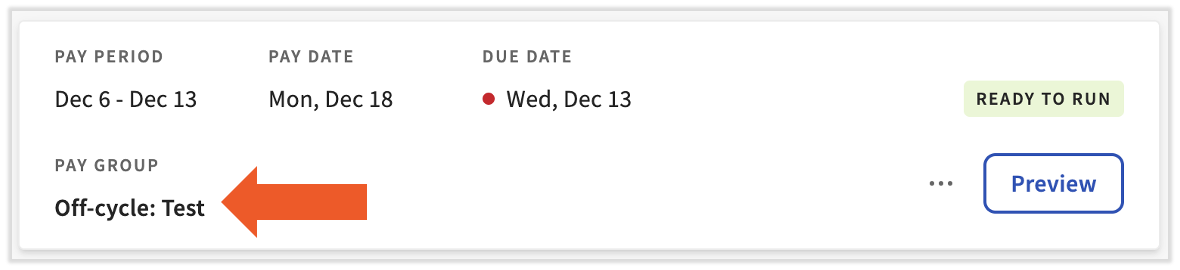
- Locate the off-cycle on your Pay Cycle Dashboard. Confirm you are running the correct payroll by noting its name, then select Preview for that payroll specifically.
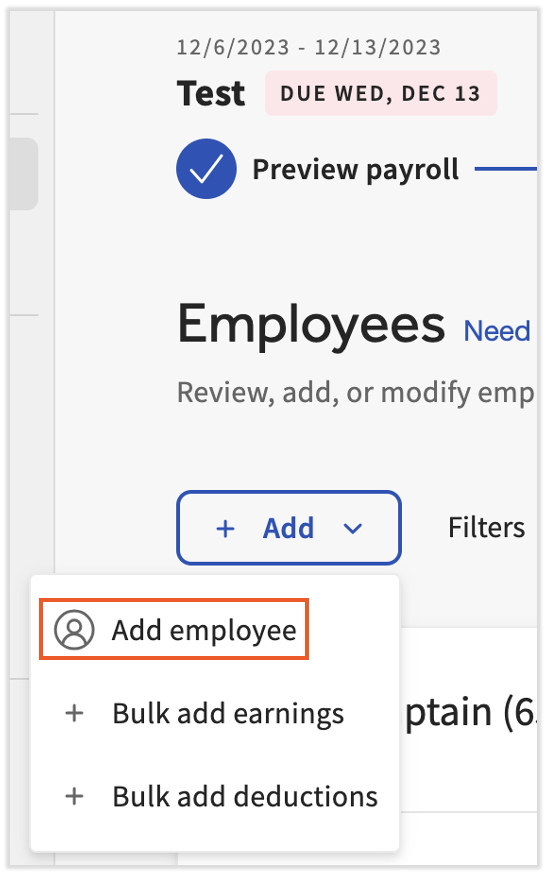
- Complete the Preview Payroll step, then continue to the Employee Earnings step. Depending on the options you chose on the request form, you may need to add the specific employees to this payroll run. To add an employee, select the + Add button, then choose Add Employee. Only employees from this pay group appear in the list.
- Choose an employee from the list and select Add Employee. Repeat for any additional employees you need to add.
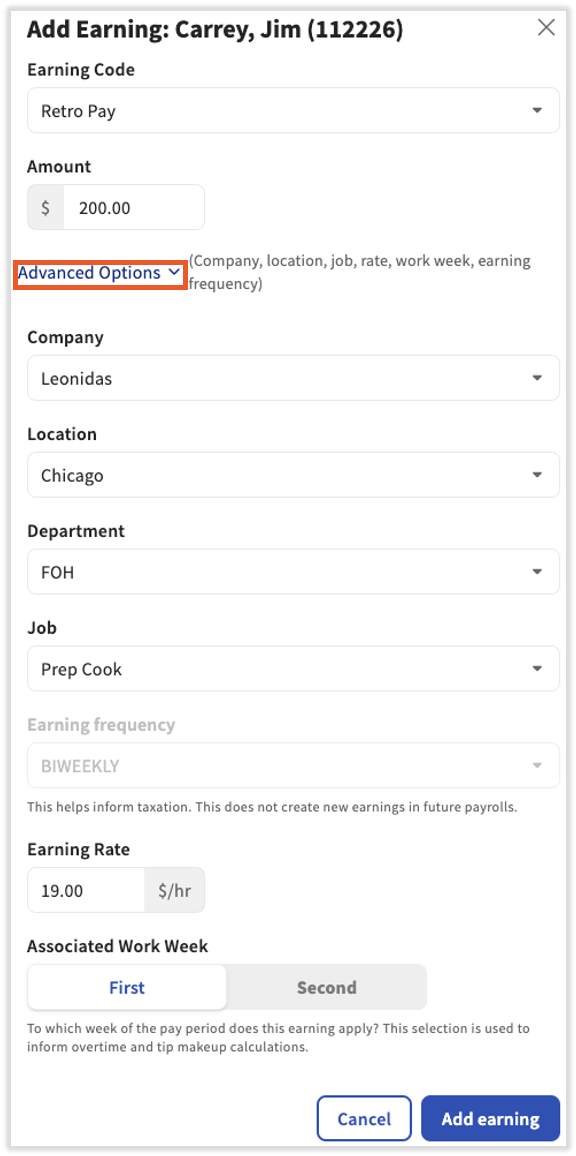
- For each employee, select + Add Earning or + Add Deduction and enter each earning or deduction. Be sure to select the correct earning or deduction code. For earnings, you can open the Advanced Options drop-down menu for further options, such as Earning Rate.
- Once all employees, earnings, and deductions have been added and reviewed for accuracy, continue through the payroll like a normal run. Submit the off-cycle. Funds are delivered on the check date as long as you followed standard payroll protocol, meaning the payroll was submitted before 4:20 p.m. CST four business days before the check date.
Note: This is also where you add any tips that should be paid on this off-cycle. You might use the Tips Owed and Tips Paid earning codes, but Toast Payroll cannot advise on which to use in your specific situation.
Cancel an off-cycle payroll
You can archive an off-cycle payroll the same way you archive a regular payroll. Navigate to Payroll, select the three dots for your off-cycle, then select Archive. The off-cycle will disappear from your Pay Cycle Dashboard.
If you need to pay an employee sooner than four business days
Because an off-cycle requires a four-business-day processing window, it is not the right option when an employee must be paid today or tomorrow. You have two faster alternatives:
- Force a live (paper) check. If you previously opted in to self-printing live checks, you can print a check immediately. Toast can also provide a live check that is overnighted to the business address on file (shipping fees apply). See Toast Payroll: Create One-Time Live (Paper) Checks.
- Pay the employee outside Toast Payroll, then record it. For an immediate payment, pay the employee by company check, cash, or a payment transfer app, then use a quick calc to determine the net amount to pay out (gross wages minus deductions and taxes) and to record the payment on a future payroll. See Toast Payroll: Issue Manual Checks (Quick Calcs).
For a full comparison of when to use a quick calc, an off-cycle, or a future payroll to pay missed wages, see Toast Payroll: Missed Employee or Missed Pay on Payroll.
Frequently asked questions
How long does an off-cycle payroll take to process?
An off-cycle payroll takes four business days to process, measured from when the request is posted to the check date. Submit your off-cycle before 4:20 p.m. CST so it posts that day; submissions after 4:20 p.m. CST count as the next business day. For example, an off-cycle posted before the sweep on Monday is paid on Friday.
Can I run an off-cycle payroll for just one employee?
You can run an off-cycle payroll for a single employee. Submit the off-cycle request form for one employee the same way you would for multiple employees. If the employee needs to be paid in less than four business days, force a live check or use a quick calc instead, since the off-cycle requires a four-business-day processing window.
Is there a fee for an off-cycle payroll?
There is currently no additional fee for processing an off-cycle payroll, though this is subject to change. If Toast provides a live (paper) check that is overnighted to your business address, shipping fees apply.
Can I include 1099 contractors in an off-cycle payroll?
You can include 1099 contractors in an off-cycle payroll, alongside or instead of W-2 employees.
How do I run an off-cycle to pay out bonuses?
To pay out bonuses on an off-cycle, request the off-cycle, then add each bonus as a one-time earning on the Employee Earnings step. If you want to hand employees a physical check, you can force live (paper) checks for the entire off-cycle on that step. For step-by-step bonus instructions, see Toast Payroll: Create One-Time Live (Paper) Checks.
Why isn't my off-cycle payroll showing on the Pay Cycle Dashboard?
Your off-cycle payroll appears on the Pay Cycle Dashboard only after Customer Care has set it up. If you submitted the request form but do not see the off-cycle yet, the agent has likely not finished creating it. The agent confirms in chat when it is ready. If you have that confirmation and still do not see it, contact Toast Customer Care via the blue chat dot in the lower-right corner of any Toast Payroll page.
Can I cancel an off-cycle after I submit it?
After you submit an off-cycle, you cannot recall it yourself. You can archive an off-cycle that has not been submitted using the three-dot menu on the Pay Cycle Dashboard. If an off-cycle has already been submitted and you need it stopped, contact Toast Customer Care right away via the blue chat dot, since timing depends on whether funds have already moved.
Related Articles
- Toast Payroll: Missed Employee or Missed Pay on Payroll
- Toast Payroll: Manage Payroll Calendars
- Toast Payroll: Create One-Time Live (Paper) Checks
- Toast Payroll: Issue Manual Checks (Quick Calcs)
- Toast Payroll: Request a Void
- Toast Payroll: Check Frequencies
This content is for informational purposes and is not intended as legal, tax, HR, or any other professional advice. Please contact an attorney or other professional for advice.