Toast Payroll: Manage Payroll Calendars
Last updated: Oct 9, 2026, 4:33 PM
Review your Toast Payroll calendar, learn what each date means, and find the right step to change a check date, pay frequency, or pay period.
- Before You Begin
- Quick Fix: Change a Check Date, Pay Frequency, or Pay Period
- What a Payroll Calendar Includes
- Review Your Payroll Calendars
- If You Need to Change a Check Date or Pay Date
- If You Need to Change Your Pay Frequency
- If You Need to Shift or Change a Pay Period
- If a Holiday Falls On or Near Your Check Date
- If You Need an Extra Payroll Outside Your Calendar
- Frequently Asked Questions
- Related Articles
Before You Begin
Applies to: Toast Payroll
Permissions needed:
- Access to the Toast Payroll account that runs payroll
- HR+ user role to view payroll reports in Reports > Standard
What you'll accomplish: Review your existing payroll calendar, understand what each date on it means, and identify the right next step when you need to change a check date, pay frequency, or pay period.
Quick Fix: Change a Check Date, Pay Frequency, or Pay Period
Find the row that matches what you are trying to do. Changes to a check date, pay frequency, or pay period affect how and when your employees are paid, so Toast Payroll reviews these changes with you before they take effect. If the quick fix suggests contacting Toast Customer Care, you can do so by selecting the blue chat button in the lower-right corner of any Toast Payroll page.
| Symptom | Most Common Cause | Quick Fix |
|---|---|---|
| I want to see all my upcoming pay periods and check dates | The schedule lives on your payroll calendar | Run the Payroll Calendar Report from Reports > Standard in Toast Payroll. Full steps: see Review Your Payroll Calendars below. |
| I need to change the check date (pay date) on an upcoming payroll | Check dates are set on the payroll calendar, not during a single payroll run | Contact Toast Customer Care to change a check date. Full steps: see If You Need to Change a Check Date or Pay Date below. |
| I need to change my pay frequency (for example, weekly to biweekly) | Check frequency is set per pay group and cannot be changed during a payroll run | Contact Toast Customer Care to change your frequency. Full steps: see If You Need to Change Your Pay Frequency below. |
| I need to shift my pay period dates or change the start day of the week | Pay period dates are tied to your calendar and your work week start | Contact Toast Customer Care to shift a pay period. Full steps: see If You Need to Shift or Change a Pay Period below. |
| My check date lands on a weekend or federal holiday | The debit date cannot fall on a weekend or banking holiday | Review how holidays shift your dates. Full steps: see If a Holiday Falls On or Near Your Check Date below. |
| I missed paying an employee or I need an extra check outside my normal cycle | This is an off-cycle payroll, separate from your calendar | Create and submit an off-cycle payroll. Full steps: see If You Need an Extra Payroll Outside Your Calendar below. |
What a Payroll Calendar Includes
A payroll calendar (also known as a pay cycle) is how Toast Payroll schedules and pays out your employees on the check frequency your company chose — weekly, biweekly, semimonthly, or monthly. When you join Toast Payroll, calendars are created two years into the future and must be set up before you process payroll. A pay cycle must be processed for your employees to get paid. For instructions on processing, see Toast Payroll: Run Your Payroll.
Each payroll calendar includes the following information:
- Federal Employer Identification Number (FEIN): The number the IRS assigns to identify your business as a unique entity.
- Check Date: Also known as the pay date, this is the date funds reach employee bank accounts and employees get paid.
- Debit Date: The date Toast Payroll debits your bank account. This date cannot fall on a Saturday, Sunday, or federal banking holiday, and it typically falls one day before your check date.
- Payroll Date: Also known as the process date, this is the date the payroll administrator runs payroll.
- Pay Period Start and End Date: The first and last days worked for the payroll. This is also called the timesheet period.
- Check Frequency: The pay frequency tied to the calendar. This is usually your default frequency — for example, a biweekly calendar uses a biweekly check frequency.
- Pay Group: The pay group tied to the calendar. Different pay groups may appear based on the FEIN you select.
- Bank Account Info: Auto-populates based on the pay group you select.
Note: Your check date, debit date, and due date are three different dates. The check date is when employees are paid. The debit date is when Toast withdraws funds from your bank account. The due date is when you need to submit payroll so it processes on time. For how submission timing affects pay, see Toast Payroll: Get Help With When Employees Are Paid.
Review Your Payroll Calendars
To see your upcoming pay periods, check dates, and due dates, run the Payroll Calendar Report.
- In Toast Payroll, navigate to Reports > Standard.
- When you select Reports in Toast Payroll, you should see a URL that begins with payroll.toasttab.com. Visit Navigate Toast Payroll Within Toast Web to learn how the new Toast Payroll navigation works.
- Use the search bar to locate the Payroll Calendar Report, then select the blue arrow icon.
- Select your Pay Group(s) and Check Date, then select Queue Up. Leaving the Check Date field blank includes all check dates.
- On the Document Courier page, wait for your report to generate. The page refreshes every 30 seconds. When the report is ready, select Download to export a CSV file you can open in Microsoft Excel or Google Sheets.
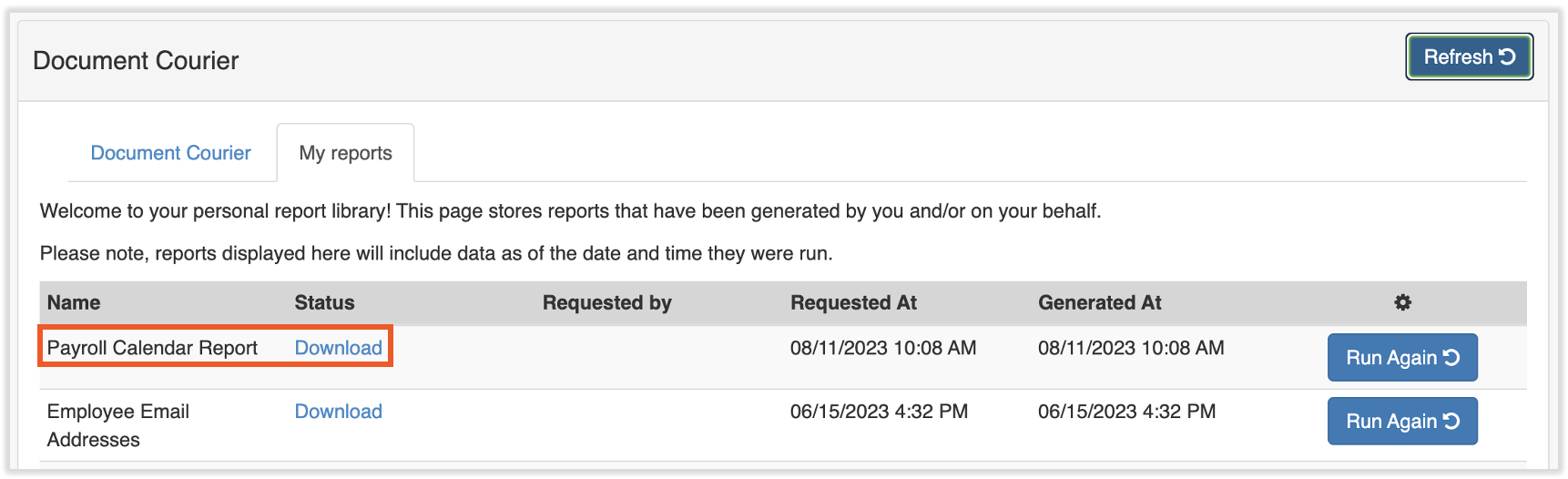
Expected outcome: You have a downloaded report listing each pay period, check date, debit date, and due date for the pay groups and check dates you selected.
For more on the Document Courier, see Toast Payroll: Document Courier.
If You Need to Change a Check Date or Pay Date
If you need to change the check date (pay date) on an upcoming payroll — for example, to move a pay date earlier or later — contact Toast Customer Care by selecting the blue chat button in the lower-right corner of any Toast Payroll page. A check date drives your due date and debit date, so this change is made on your payroll calendar rather than during a single payroll run.
Expected outcome: You have submitted your check date change request to Customer Care, who will confirm the updated date with you.
Note: A change to one check date can affect your due date and debit date for that pay period. After the change, run the Payroll Calendar Report to confirm the new dates.
If You Need to Change Your Pay Frequency
If you need to change your pay frequency — for example, from weekly to biweekly — contact Toast Customer Care by selecting the blue chat button in the lower-right corner of any Toast Payroll page. Check frequency (also called pay frequency) is set at the pay group level and cannot be set for an individual employee or changed during a payroll run. For a description of each frequency, see Toast Payroll: Review Check Frequencies.
Expected outcome: You have submitted your pay frequency change request to Customer Care, who will confirm the change and the next affected pay period with you.
Note: Changing your pay frequency also changes your pay period dates going forward. Employee positions must match the new check frequency, or hours may not pull into the correct payroll. After the change, run the Payroll Calendar Report to confirm your new schedule.
If You Need to Shift or Change a Pay Period
If you need to shift your pay period dates or change the day your work week starts — for example, moving to a Tuesday-to-Tuesday period — contact Toast Customer Care. Pay period start and end dates are tied to your payroll calendar and your work week start, so shifting them is handled on the calendar.
To reach Customer Care, select the blue chat dot in the lower-right corner of any Toast Payroll page.
Expected outcome: You have submitted your pay period change request to Customer Care, who will confirm the updated period dates with you.
If a Holiday Falls On or Near Your Check Date
If your check date or debit date lands on a weekend or federal banking holiday, your dates shift, because the debit date cannot fall on a Saturday, Sunday, or federal banking holiday. When a holiday falls near your check date, you may need to submit payroll earlier so employees are paid on time. To see which holidays affect your dates and how to plan around them, see Toast Payroll: Manage Federal Bank Holidays.
If you want to move a check date earlier so employees are paid before a holiday, contact Toast Customer Care using the blue chat dot in the lower-right corner of any Toast Payroll page.
Expected outcome: You understand how a holiday shifts your check and debit dates, and you know whether you need to submit earlier or request a check date change.
If You Need an Extra Payroll Outside Your Calendar
If you need an extra payroll separate from your normal pay cycle — for example, to pay a missed employee or issue a one-time check — this is an off-cycle payroll. An off-cycle runs outside your regular calendar and does not change your scheduled pay periods. For setup steps, see Toast Payroll: Set Up and Configure Off-Cycle Payrolls.
If an employee or their hours were missed on a payroll you already submitted, see Toast Payroll: Missed Employee or Missed Pay on Payroll.
Expected outcome: You know whether you need an off-cycle payroll and where to go to set one up.
Frequently Asked Questions
How do I change my check date or pay date?
To change your check date or pay date, contact Toast Customer Care using the blue chat dot in the lower-right corner of any Toast Payroll page. Check dates are set on your payroll calendar, not during an individual payroll run, because the check date also determines your due date and debit date. After the change, run the Payroll Calendar Report from Reports > Standard to confirm your new dates. (When you select Reports in Toast Payroll, you should see a URL that begins with payroll.toasttab.com. Visit Navigate Toast Payroll Within Toast Web to learn how the new Toast Payroll navigation works.)
Also asked as:
-
- How do I update my payroll calendar dates?
- Can I change the check date on this payroll?
- How do I move my pay date?
Can I change my pay frequency from weekly to biweekly?
You can change your pay frequency from weekly to biweekly by contacting Toast Customer Care via the blue chat dot in the lower-right corner of any Toast Payroll page. Check frequency is set at the pay group level and cannot be changed during a payroll run. Changing it also updates your pay period dates going forward, and your employee positions must match the new frequency. For a description of each frequency, see Toast Payroll: Review Check Frequencies.
Also asked as:
-
- Can I switch my pay cycle to biweekly?
- How do I change how often I run payroll?
- Can I change my pay schedule from weekly?
How do I see all my upcoming pay periods and check dates?
To see all your upcoming pay periods and check dates, run the Payroll Calendar Report from Reports > Standard in Toast Payroll. (When you select Reports in Toast Payroll, you should see a URL that begins with payroll.toasttab.com. Visit Navigate Toast Payroll Within Toast Web to learn how the new Toast Payroll navigation works.) Select your pay group, leave the Check Date field blank to include all dates, and select Queue Up. The report downloads as a CSV listing each pay period, check date, debit date, and due date.
Also asked as:
-
- How can I get a calendar of all upcoming payroll periods?
- Where do I see my pay schedule?
- How do I view my pay cycles?
Why is my check date different from my debit date?
Your check date is different from your debit date because they mark two different events. The check date is when funds reach your employees. The debit date is when Toast Payroll withdraws funds from your bank account, and it typically falls one day before your check date. The debit date cannot fall on a Saturday, Sunday, or federal banking holiday. For full debit timing, see Toast Payroll: Manage Debit and Withdrawal Schedules.
Also asked as:
-
- What is the difference between my check date and debit date?
- When does Toast take money out for payroll?
- Why does payroll debit before the pay date?
What happens to my pay dates around a federal holiday?
Around a federal holiday, your pay dates can shift because the debit date cannot fall on a weekend or federal banking holiday. You may need to submit payroll earlier than usual so employees are still paid on time. For which holidays affect payroll and how to plan around them, see Toast Payroll: Manage Federal Bank Holidays.
Also asked as:
-
- How do holidays affect my check date?
- Will my employees be paid before the holiday?
- Do I need to run payroll early for a holiday?
Related Articles
- Toast Payroll: Review Check Frequencies
- Toast Payroll: Get Help With When Employees Are Paid
- Toast Payroll: Manage Debit and Withdrawal Schedules
- Toast Payroll: Manage Federal Bank Holidays
- Toast Payroll: Set Up and Configure Off-Cycle Payrolls
This content is for informational purposes and is not intended as legal, tax, HR, or any other professional advice. Please contact an attorney or other professional for advice.