Toast Payroll: Set Up and Configure Off-Cycle Payrolls
Last updated: Sep 30, 2026, 10:50 AM
Request an off-cycle payroll from Toast Customer Care, run it in Toast Payroll, and pay employees on your chosen check date within four business days.
| Toast Payroll is currently unavailable in Quebec. A French version of the off-cycle form will be made available when the product launches in your region. |
- Before You Begin
- Off-Cycle Basics
- Off-Cycle Policy and Processing Timeline
- Create and Submit an Off-Cycle Payroll
- Schedule a Final Paycheck Off-Cycle
- Record a Payment
- Cancel an Off-Cycle Payroll
- Audit an Off-Cycle Payroll
- Pay an Employee Sooner Than Four Business Days
- Frequently Asked Questions
- Related Articles
Before You Begin
Applies to: Toast Payroll
What you'll accomplish: You can create your own off-cycle payroll. Once it's set up, you can edit, process, and submit it and have funds delivered on the check date you choose, as long as you follow the four-business-day processing window. However, you can still fill out the Off-Cycle Request form and submit it through the blue chat button.
Note: There are currently no additional fees for processing an off-cycle payroll, but this is subject to change.
Off-Cycle Basics
When you need to pay employees outside of your regular pay cycle timing, you can set up an additional payroll calendar in Toast Payroll. This is referred to as an off-cycle payroll. You might run an off-cycle for reasons including, but not limited to:
- Paying one or more employees who were missed on a previous payroll.
- Paying out a bonus separately from your regular payroll, particularly if you want to tax it at a different check frequency.
- Paying out items you want to have a different check date than your regular check date.
- Creating a second payroll to make a correction or addition to a previous payroll.
- Paying out a severance or final pay.
You can include 1099 contractors in an off-cycle payroll.
Off-Cycle Policy and Processing Timeline
Toast requires a four business day processing window after the off-cycle is submitted. For example, an off-cycle submitted before the sweep on Monday will be paid on Friday, because Monday through Thursday is the processing time. Make sure the check date is at least four business days from the day you submit the off-cycle.
Payroll submissions for direct deposits must be posted no later than 4:20 p.m. CST on the designated day to meet the four business day processing timeline. For example, a payroll submitted on Tuesday by 4:20 p.m. CST will have a check date on the following Monday at the earliest. Submissions made after 4:20 p.m. CST are treated as submissions for the next business day.
See If you need to pay an employee sooner than four business days below if this window doesn't fit the timeline you need.
Create and Submit an Off-Cycle Payroll
As of July 2026, you can create your own off-cycle payroll directly in Toast Payroll. You no longer need to submit a request form to Toast Customer Care and wait for our team to set it up on your behalf. Once it's been created, you can add your employees, earnings, and/or deductions and submit it as soon as you're ready.
- In Toast Payroll, navigate to Payroll.
- Select One time payment from the right side of the screen.
- Select Schedule a payment > Off-cycle > Next.
- On the next screen, begin by naming your off-cycle in the Name of payment field. Be specific so you can determine what the off-cycle was for at a later date.
- If you have more than one pay group, select the applicable Pay group. If you only have one, it will already be selected for you.
- If you need an off-cycle for more than one pay group (or for a set of employees who belong to different pay groups), you will need to create more than one off-cycle.
- Just below those two fields, choose if you want to include All employees or Select employees on your off-cycle. If you change your mind later, you can still add or remove employees during the Employee Earnings step. Read the applicable section in Toast Payroll: Employee Earnings Step to learn more.
- If you choose Select employees, a new drop-down menu will appear allowing you to checkmark each employee that should be included.
- Next, choose How you would like to pay employees.
- Selecting Pay through Toast will move funds through Toast Payroll. This can include payments through paper checks (unless you use the self-written paycheck delivery option), direct deposit, or the Toast Pay Card. This option comes with a four business day payment processing window, i.e. four business days from today is the soonest you can set a check date. You'll see this reflected in the next step.
- Selecting Record manual payments will not move any funds. The expectation is that the company is paying the employees outside of Toast Payroll, maybe using cash, a payment app like PayPal or Venmo, or via a different form of compensation like a gift card. You can process a manual payment immediately; it is not dependent on the four business day payment processing window.
- Both options will create paystubs and file taxes for each involved employee.
- You'll now see a couple new fields. First, select the Pay date. If you are creating the off-cycle after the sweep at 4:20 p.m. CST, you will need to set the pay date out five business days. The Pay period field will be automatically set based on your selected pay date.
- Note: Previous pay periods can not be used here. Only upcoming pay period dates.
- This is uncommon, but if the off-cycle should contain the recurring deductions that a regular payroll applies, select Advanced settings and enable the toggle for Pay like a regular payroll. This will import all standard recurring deductions for any employee on this off-cycle.
- Select Next. The page will reload with your created off-cycle payroll. You'll land on the Employee Earnings step where you can add or remove employees and add in any earnings or deductions you need to process.
- Pro tip: Consider the Bulk add earnings feature under the +Add drop-down menu. This allows you to add the same earning code and amount to all the employees you select in the side bar.
- Follow the typical payroll steps from here to calculate the payroll, review your work, and submit the off-cycle. If you selected Pay through Toast in step 7, funds are delivered on the check date as long as you followed standard payroll protocol, meaning the payroll was submitted before 4:20 p.m. CST four business days before the check date.
Schedule a Final Paycheck Off-Cycle
Toast often sets up off-cycles for customers who want to pay an employee their final paycheck once their employment ends. Previously, you could use a quick calc to calculate a gross-to-net amount for determining the employee's final wage amount and this quick calc can be attached to an off-cycle or future payroll, but you can instead use this wizard to create a simple off-cycle for a single employee's final payment.
- In Toast Payroll, navigate to Payroll.
- Select One time payment from the right side of the screen.
- Select Schedule a payment > Final paycheck > Next.
- If you have more than one pay group, select the applicable Pay group. If you only have one, it will already be selected for you.
- Now select the employee who should receive this payment.
- If you want to pay a final paycheck to more than one employee, you can add employees to the off-cycle on step 9, but their unpaid earnings will not be brought in automatically.
- After selecting an employee, many more fields will appear. First, select if you would like to Pay through Toast or Record manual payments.
- Selecting Pay through Toast will move funds through Toast Payroll. This can include payments through paper checks (unless you use the self-written paycheck delivery option), direct deposit, or the Toast Pay Card. This option comes with a four business day payment processing window, i.e. four business days from today is the soonest you can set a check date. You'll see this reflected in the next step. Note: Some state regulations require employers to pay terminated employees immediately, so check your state laws and regulations to ensure compliance. If the employee must be paid immediately, it may be best to select Record manual payments here and, based on the calculated net wages of this off-cycle, deliver their funds outside of Toast Payroll.
- Selecting Record manual payments will not move any funds. The expectation is that the company is paying the employees outside of Toast Payroll, maybe using cash or a payment app like PayPal or Venmo. You can process a manual payment immediately; it is not dependent on the four business day payment processing window. However, make sure to submit this payroll within the same quarter as their termination to keep quarterly tax filings intact.
- Next, select the Termination date and the Pay date. See the text directly underneath the drop-down menus for more detail on what dates should be selected here.
- If you previously selected Pay through Toast, the pay date must be at least four business days in the future to allow for processing.
- There's a couple extra options under Advanced settings:
- Include unpaid earnings is toggled on by default to bring any unpaid timesheets this employee has in Toast Payroll into the off-cycle.
- Pay like a regular payroll will incorporate any standard recurring deductions this employee has into their final paycheck. This is toggled on by default.
- After selecting Next, the page will reload with your created off-cycle payroll. You'll land on the Employee Earnings step where you can make adjustments to this employee's earnings and deductions.
- It is strongly recommended to review the hours that were automatically pulled into this off-cycle. Even unapproved hours can be added to this off-cycle, so verify the amount of hours before continuing.
- Follow the typical payroll steps from here to calculate the payroll, review your work, and submit the off-cycle.
- If you selected Pay through Toast in step 6, funds are delivered on the check date as long as you followed standard payroll protocol, meaning the payroll was submitted before 4:20 p.m. CST four business days before the check date.
- If you selected Record manual payments in step 6, you'll see a pop-up after the off-cycle has been submitted. Select View paycheck to open the Check Register report (Employee Detail report) and view the Check Amount you intend to pay the employee.
Record a Payment
Recording a payment is a special type of off-cycle. This feature is very similar to creating a quick calc, calculating gross to net, and attaching it to an off-cycle. However, this streamlined wizard can help you do this all at once. You should only use this "record a payment" off-cycle feature when you plan to manually issue payment (typically in the form of cash, a company check, or a payment app) so that the system correctly reflects the payment on Form W-2s and other tax documents. With this method, Toast will not issue funds to employees via paper check, direct deposits, or Toast Pay Card. Additionally, the only withdrawals we make for this type of recording are for applicable employer taxes.
This Quarter
- In Toast Payroll, navigate to Payroll.
- Select One time payment from the right side of the screen.
- Select Record a payment > This quarter.
- Before you can select Next, you must attest that this payment may result in receiving a tax notice. This tax notice informs you that payment has been made to an employee with a check date in the past within the current quarter.
- On the next screen, begin by filling out the Name of payment field. You might include why the payment was missed and/or who it's being paid to; be specific so you can determine what the off-cycle was for at a later date.
- If you have more than one pay group, select the applicable Pay group. If you only have one, it will already be selected for you.
- If you need to pay more than one pay group (or record a payment for a set of employees who belong to different pay groups), you will need to create more than one off-cycle.
- Just below those two fields, choose if you want to include All employees or Select employees on your off-cycle. If you change your mind later, you can still add or remove employees during the Employee Earnings step. Read the applicable section in Toast Payroll: Employee Earnings Step to learn more.
- If you choose Select employees, a new drop-down menu will appear allowing you to checkmark each employee that should be included.
- You'll now see a couple new fields. First, select the Paid date. Based on the functionality of this feature, you're only allowed to select a Paid date that is in the past, but still in the current quarter. The Pay period field will be automatically set based on your selected pay date.
- Select Next. The page will reload with your created off-cycle payroll. You'll land on the Employee Earnings step where you can add in any earnings or deductions you need to process.
- Follow the typical payroll steps from here to calculate the payroll, review your work, and submit the off-cycle.
- After it's been submitted, check the Employee Detail report for the net amounts you can base your payment(s) off of.
Past Quarter
- In Toast Payroll, navigate to Payroll.
- Select One time payment from the right side of the screen.
- Select Record a payment > Past quarter.
- You will be met with a disclaimer saying this needs to be processes with the help of a Care agent. This is because past quarters have already been closed and quarterly taxes have already been filed. In this case, an amendment will most likely need to be processed alongside this off-cycle.
- Select Start a chat to initiate a conversation with a Care agent and fulfill this past quarter recording. The agent may ask you to fill out the Off-Cycle Request form to help them process this request
Cancel an Off-Cycle Payroll
You can archive an off-cycle payroll (or a "record a payment" off-cycle) the same way you archive a regular payroll. Navigate to Payroll, select the three dots for your off-cycle, then select Archive. The off-cycle will disappear from your Pay Cycle Dashboard.
Audit an Off-Cycle Payroll
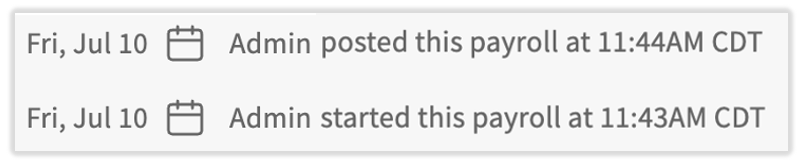
Any off-cycle payrolls (or regular payrolls) that have been submitted can be audited. HR+ users can view who created the off-cycle, who edited it, and who submitted it.
- In Toast Payroll, navigate to Payroll > Past Payrolls.
- Select View for the appropriate payroll.
- At the very bottom of the Confirmation step page, you'll see the names of anyone who created, edited, or submitted this off-cycle. Admin indicates that the off-cycle was created by a Toast representative (this is typical for recording past payments).
Pay an Employee Sooner Than Four Business Days
Because an off-cycle requires a four-business-day processing window, it is not the right option when an employee must be paid today or tomorrow. You have two faster alternatives:
- Force a live (paper) check. If you previously opted in to self-printing live checks, you can print a check immediately. Toast can also provide a live check that is overnighted to the business address on file (shipping fees apply). See Toast Payroll: Create One-Time Live (Paper) Checks.
- Pay the employee outside Toast Payroll, then record it. For an immediate payment, use the "record a payment" off-cycle feature to determine the net amount to pay out (gross wages minus deductions and taxes) and to record the payment on a future payroll, then pay the employee by company check, cash, or a payment transfer app. See Record a Payment above.
For a full comparison of when to use the "record a payment" feature, an off-cycle, or a future payroll to pay missed wages, see Toast Payroll: Missed Employee or Missed Pay on Payroll.
Frequently Asked Questions
How long does an off-cycle payroll take to process?
An off-cycle payroll takes four business days to process, measured from when the request is posted to the check date. Submit your off-cycle before 4:20 p.m. CST so it posts that day; submissions after 4:20 p.m. CST count as the next business day. For example, if no federal holidays are involved, an off-cycle posted before the sweep on Monday has a check date of that Friday. An off-cycle posted after the sweep on Monday will have a check date of the following Monday.
Can I run an off-cycle payroll for just one employee?
You can run an off-cycle payroll for a single employee. Create the off-cycle for one employee the same way you would for multiple employees. If the employee needs to be paid in less than four business days, force a live check (if you use self-printed paycheck delivery) or record a payment made outside of Toast since the off-cycle requires a four-business-day processing window.
Is there a fee for an off-cycle payroll?
There is currently no additional fee for processing an off-cycle payroll, though this is subject to change. If Toast provides a live (paper) check that is overnighted to your business address, shipping fees apply.
Can I include 1099 contractors in an off-cycle payroll?
You can include 1099 contractors in an off-cycle payroll, alongside or instead of W-2 employees.
How do I run an off-cycle to pay out bonuses?
To pay out bonuses on an off-cycle, create the off-cycle, then add each bonus as a one-time earning on the Employee Earnings step. If you want to hand employees a physical check, you can force live (paper) checks for the entire off-cycle on that step. For step-by-step bonus instructions, see Toast Payroll: Create One-Time Live (Paper) Checks.
Can I cancel an off-cycle after I submit it?
After you submit an off-cycle, you cannot recall it yourself. You can archive an off-cycle that has not been submitted using the three-dot menu on the Pay Cycle Dashboard, but if an off-cycle has already been submitted and you need it stopped, contact Toast Customer Care right away via the blue chat dot, since timing depends on whether funds have already moved.
Related Articles
- Toast Payroll: Missed Employee or Missed Pay on Payroll
- Toast Payroll: Manage Payroll Calendars
- Toast Payroll: Create One-Time Live (Paper) Checks
- Toast Payroll: Issue Manual Checks (Quick Calcs)
- Toast Payroll: Request a Void
- Toast Payroll: Check Frequencies
This content is for informational purposes and is not intended as legal, tax, HR, or any other professional advice. Please contact an attorney or other professional for advice.