Toast Payroll: Manage Debit and Withdrawal Schedules
Last updated: Oct 20, 2026, 11:18 AM
Every Toast Payroll submission triggers two bank withdrawals — a Payroll Debit and a Tax Debit. Learn submission deadlines, timing, descriptors, and fees.
- What Happens to Your Bank Account After Payroll
- Payroll Submission Deadlines
- When Your Bank Account Is Debited
- Debit Timing Scenarios
- Estimated Withdrawal vs. Final Withdrawal
- What Debits Look Like on Your Bank Statement
- Locate Your Debit Amounts
- Banking Fees
- Frequently Asked Questions
- Related Articles
What Happens to Your Bank Account After Payroll
Every payroll submission triggers two separate withdrawals (debits) from your bank account:
- Payroll Debit — covers employee net pay, SaaS fees, and applicable additional fees. This withdrawal typically occurs the next business day after you submit payroll.
- Tax Debit — covers payroll taxes withheld from and calculated on employee wages. This withdrawal typically occurs two business days after you submit payroll.
Both debits are initiated after Toast Payroll processes your submission. Ensure your bank account has sufficient funds before submitting payroll to avoid delayed employee payments, delayed tax payments, and associated fees.
Note: A "business day" is Monday through Friday, excluding federal banking holidays. Weekends are not business days.
Payroll Submission Deadlines
Important: If your restaurant is not yet live on Toast POS devices and handhelds, you must submit payroll four business days before the check date. This requirement is enforced for security reasons. Once you are live on Toast POS, the timing rules below apply.
To guarantee direct deposits are funded on time, submit payroll by 4:20 p.m. CT three business days before the check date.
Submitting after this time is possible but increases the risk that direct deposits will not arrive on the expected check date.
To stop a payroll after submission, the deadline is 3:30 p.m. CST on the day of submission. Stopping a payroll cancels all employee payments on that payroll — Toast Payroll cannot stop individual employee payments. Work with Toast Payroll to void the stopped payroll and then either reprocess payments on an off-cycle OR record a payment(s) and pay employees manually. See Toast Payroll: Set Up and Configure Off-Cycle Payrolls.
When Your Bank Account Is Debited
Payroll Debit (Withdrawal)
The payroll debit covers employee net pay amounts, SaaS fees, and any additional applicable fees.
Timing:
- If you submit payroll by 4:20 p.m. CT: the payroll debit date is one business day after submission, capped at four business days before the check date.
- If you submit payroll after 4:20 p.m. CT: the payroll debit date is two business days after submission.
Note: SaaS fees are calculated and included on the first check date of each month only. Not every payroll will include SaaS fees.
Tax Debit (Withdrawal)
The tax debit (also called a payroll tax withdrawal) covers payroll taxes withheld from and calculated on employee wages.
Timing: The tax debit date is two business days after payroll submission, capped at one day before the check date.
Debit Timing Scenarios
The following scenarios use a check date of Thursday the 4th as the example. Business days exclude weekends and federal banking holidays.
| Scenario | When Payroll Is Submitted | Payroll Debit Date | Tax Debit Date | Direct Deposits Available |
|---|---|---|---|---|
| Early (4+ business days before check date) | Friday the 28th | Monday the 1st (1 business day after submission, 4 days before check date) | Wednesday the 3rd (1 day before check date) | Thursday the 4th (check date) |
| On time (3 business days before check date) | Monday the 1st, morning | Tuesday the 2nd (1 business day after submission) | Wednesday the 3rd (1 day before check date) | Thursday the 4th (check date) |
| "On time" (same day as check date, before sweep) | Thursday the 4th at 3:00 p.m. CT | Thursday the 4th | Friday the 5th | Friday the 5th (next business day after submission) |
| Late (same day as check date, after sweep) | Thursday the 4th at 5:00 p.m. CT | Friday the 5th | Monday the 8th | Monday the 8th (next business day after the Friday sweep it took part in) |
| Federal bank holiday on Monday | Monday the 1st (holiday — not counted until next business day) | Wednesday the 3rd (1 business day after Tuesday the 2nd — the effective submission date) | Thursday the 4th | Thursday the 4th |
For a full list of federal banking holidays and how they affect payroll due dates, see Toast Payroll: Manage Federal Bank Holidays.
Estimated Withdrawal vs. Final Withdrawal
After submitting payroll, you will immediately see an Estimated Payroll Withdrawal on the confirmation page. This is an early estimate of the funds Toast Payroll will collect and may not match the final amount that clears your bank.
The Estimated Payroll Withdrawal becomes the Toast Payroll Withdrawal Receipt once your payroll is processed by Toast Payroll at 4:20 p.m. CT. The Withdrawal Receipt contains finalized debit dates and amounts.
Common reasons the final withdrawal differs from the estimate:
- SaaS fees are calculated at processing time and may not be reflected in the estimate (SaaS fees only appear on the first payroll of each month)
- Adjustments made after the estimate was generated
- The estimate is calculated before the ACH sweep finalizes the exact amounts
If the amount cleared in your bank does not match either the Estimated Withdrawal or the Withdrawal Receipt, contact Customer Care. Verifying specific transaction amounts requires access to your account records.
What Debits Look Like on Your Bank Statement
Toast Payroll debits appear on your bank statement with specific descriptors. These verbatim strings help you identify Toast Payroll charges in your banking records.
| Debit type | Bank statement descriptor | What it covers |
|---|---|---|
| Payroll Debit | Toast Payroll TOAST PAYR | Employee net pay, SaaS fees, and applicable additional fees |
| Tax Debit | Toast Payroll Tax Collect (your bank may abbreviate this to fit its character limit) | Payroll taxes withheld from and calculated on employee wages |
| Amendment or access fee | Toast, Inc | Wage or tax amendments, or access to a closed account |
| Legacy transactions (older debits only) | Strategy Executive Tax | Older payroll tax liability debits; may also result from manual transactions by the Toast Payroll Banking team |
Toast Payroll uses two Bank IDs that may appear alongside these descriptors: 1161630473 and 6161630473. You can notify your financial institution of these IDs to allow-list Toast Payroll's bank transactions.
Locate Your Debit Amounts
Your cash responsibilities and debit dates appear in three places in Toast Payroll.
Review and Submit Step
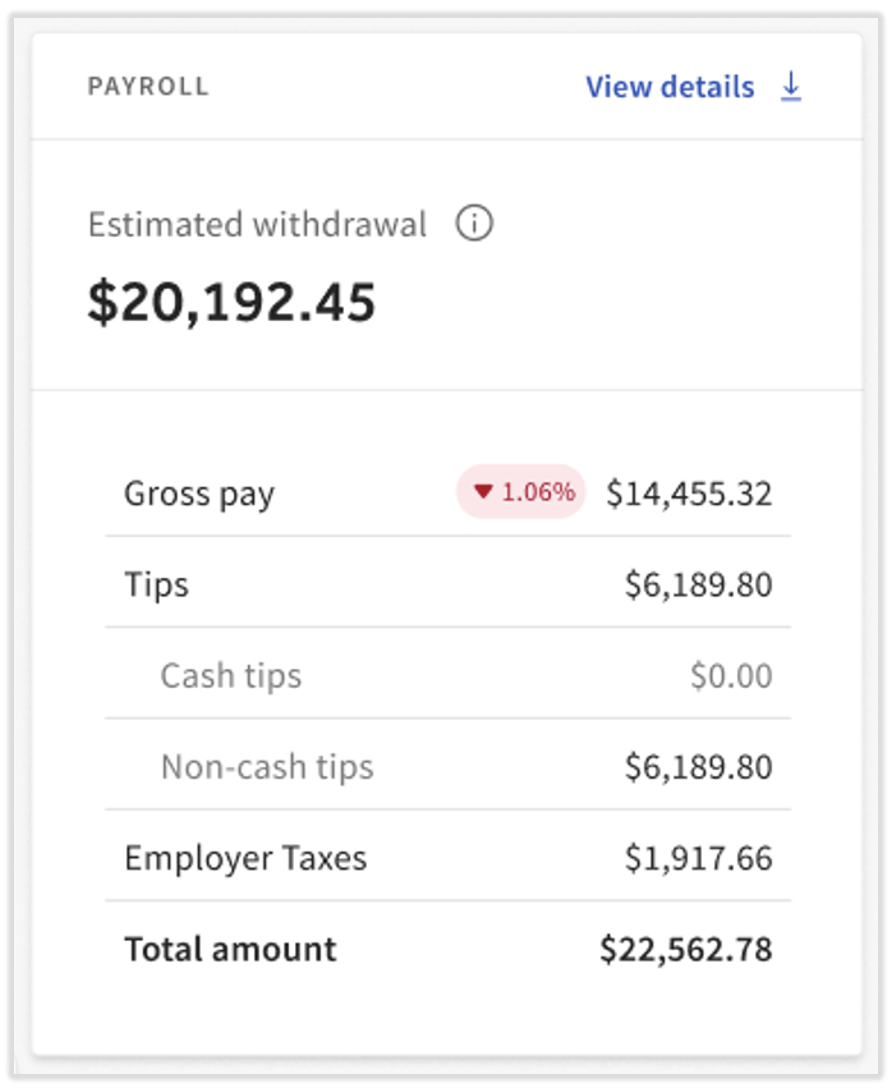
The Review and Submit step is the final screen of a payroll run before you select Submit Payroll. On this page, select the Accounting Summary tile to view the Estimated Withdrawal. Note that the numbers in this tile are not finalized until the Toast Payroll Withdrawal Receipt is available — they may change between the estimate and the final sweep.
Payroll Summary Report
The Payroll Summary Report shows totals for net pay and payroll taxes, including the Cash Requirements needed to fund payroll. Access it two ways:
- During payroll: Navigate to the Review and Submit step and select the report from the Reports tile.
- After submitting: In Toast Payroll, navigate to Payroll > Past Payrolls > View.
- When the Toast Web and Toast Payroll navigation menus are both visible, select Payroll from the Toast Payroll navigation sub-menu. If you don't see the Toast Payroll sub-menu, selecting Payroll from the Toast Web navigation menu will expand it.
For a full breakdown of every line item on the Payroll Summary Report, see Toast Payroll: Payroll Summary Report.
Toast Payroll Withdrawal Receipt
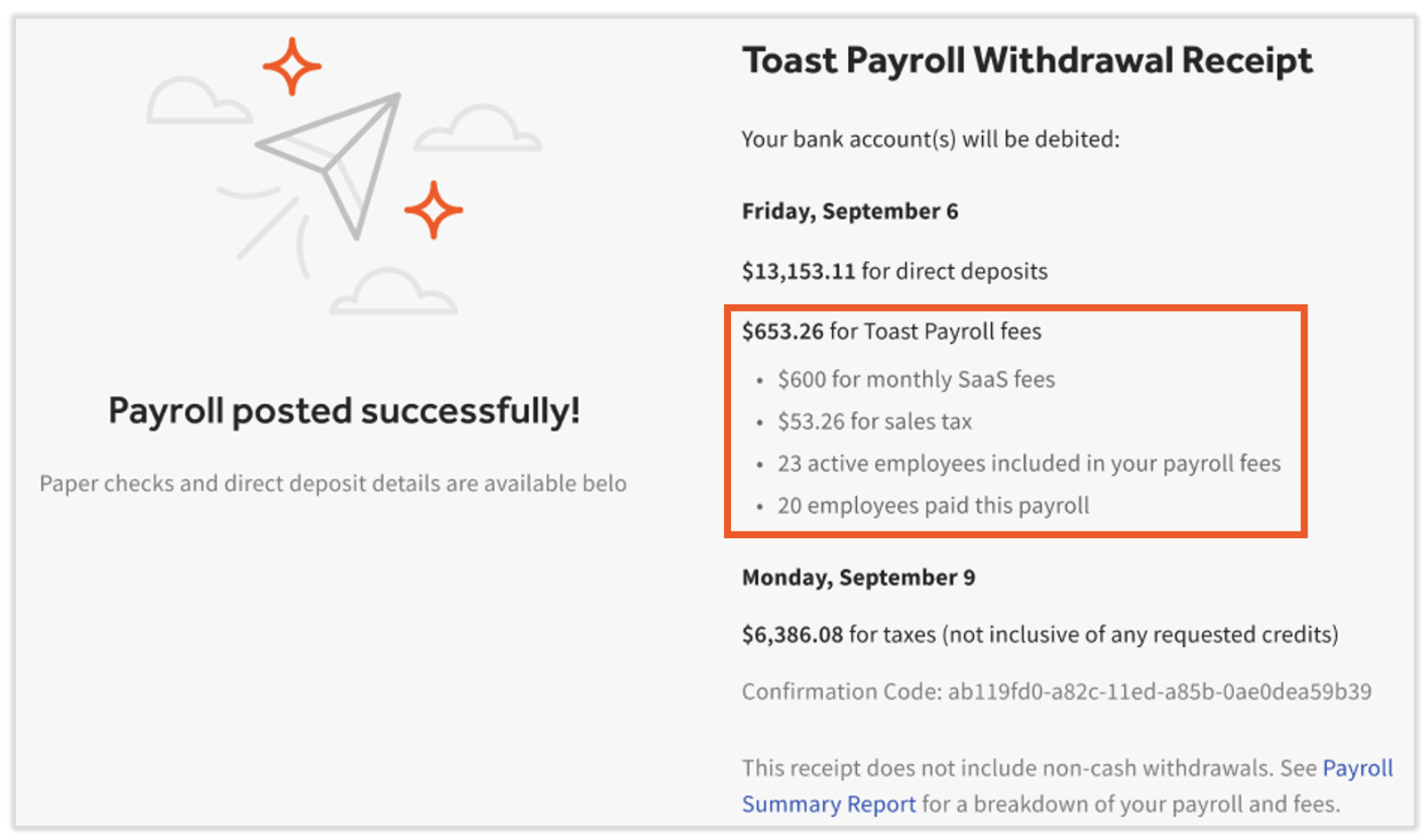
The Toast Payroll Withdrawal Receipt is the finalized record of what was sent to the bank and when your debits will occur. It replaces the Estimated Payroll Withdrawal after Toast Payroll processes your submission at 4:20 p.m. CT.
If you submit after 4:20 p.m. CT, the Withdrawal Receipt will be available the next day.
To access the Withdrawal Receipt:
- In Toast Payroll, navigate to Payroll > Past Payrolls tab > View. (When the Toast Web and Toast Payroll navigation menus are both visible, select Payroll from the Toast Payroll navigation sub-menu. If you don't see the Toast Payroll sub-menu, selecting Payroll from the Toast Web navigation menu will expand it.)
The Withdrawal Receipt also includes the number of active employees and employees paid on this payroll. If you are on a per employee per month (PEPM) billing structure, this helps you manage your Toast Payroll invoicing. For billing details, see Toast Payroll: Invoice and Billing Information.
Banking Fees
Some banking actions incur fees. The table below summarizes common fees. For the complete, current fee schedule, see Toast Payroll: Invoice and Billing Information.
| Fee type | Amount | Notes |
|---|---|---|
| Direct deposit reversal (ACH reversal) | $25 per direct deposit account | Toast Payroll submits a reversal request. Allow ten business days to determine if the reversal is successful. Funds are not returned until the reversal is confirmed. |
| Off-cycle payroll | No additional fee currently (subject to change) | Standard shipping fees apply. See Toast Payroll: Set Up and Configure Off-Cycle Payrolls. |
| Stop payment | $25 per check; $15 for reprint and mail | Stop payments are generally requested directly from your bank. |
| Failed collection (insufficient funds) | The greater of 2% of the insufficient funds amount or $300 | If a wire is required by Toast Payroll for your payroll amount, this fee applies. Include this amount when wiring funds. |
Frequently Asked Questions
Why are there two separate withdrawals from my bank account after payroll?
Also asked as:
-
- Why are there two bank accounts for the payroll withdrawal?
- Why did Toast take money twice?
- I see two debits from Toast Payroll — is that normal?
Two separate withdrawals from your bank account after submitting payroll is expected and normal. Every payroll submission creates a Payroll Debit (for employee net pay and fees) and a Tax Debit (for payroll taxes). These are always separate transactions — the payroll debit typically occurs one business day after submission, and the tax debit typically occurs two business days after submission. See When Your Bank Account Is Debited for exact timing.
Why doesn't my actual bank withdrawal match the estimated withdrawal amount?
Also asked as:
-
- Why is my estimated withdrawal for payroll different from what comes out of my bank account?
- The amount that cleared doesn't match the estimate — what's the difference?
The Estimated Payroll Withdrawal shown immediately after submitting payroll is a preliminary estimate that may change before the debit is finalized. Common reasons for a difference include:
-
- SaaS fees — calculated at processing time and included on the first payroll of each month only. If the estimate did not include SaaS fees but the final debit does (or vice versa), the amounts will differ.
- Submission timing — submitting after 4:20 p.m. CT shifts the debit schedule and can affect which amounts are swept together.
- Estimate vs. finalized figures — the estimate is generated before the ACH sweep completes. The Toast Payroll Withdrawal Receipt (available after 4:20 p.m. CT on the day of submission) contains finalized amounts.
If the amount in your bank does not match the Withdrawal Receipt, contact Customer Care — a specific transaction discrepancy requires account-level review.
What is the deadline to submit payroll to guarantee direct deposits are funded on time?
Also asked as:
-
- What is the cut-off time for payroll submission?
- Payroll submission cut-off time for next-day pay
- Is there a time cutoff for payroll submission to be paid the next day?
To guarantee direct deposits are funded by the check date, submit payroll by 4:20 p.m. CT at least three business days before the check date. If you are not yet live on Toast POS, submit at least four business days before the check date.
Submitting after 4:20 p.m. CT still processes your payroll but shifts all debit dates by one additional business day, which may delay when employees receive their pay. See Debit Timing Scenarios for specific examples.
What happens if my payroll debit fails?
Also asked as:
-
- Payroll failed debit
- My payroll was locked from running due to a failed debit
- Payroll debit didn't work — can I resubmit?
If a payroll debit fails due to insufficient funds, Toast Payroll will attempt to collect the amount via wire transfer and a failed collection fee of the greater of 2% of the insufficient funds amount or $300 will apply.
To resolve a failed payroll debit, contact Customer Care. This scenario requires account-level access and cannot be resolved through self-service.
What does the Toast Payroll TOAST PAYR charge on my bank statement mean?
Also asked as:
-
- What is the TOAST PAYR debit on my bank account?
- I see a charge called TOAST PAYR — what is it?
- What does "Toast Payroll Tax Collect" mean on my bank statement?
The Toast Payroll TOAST PAYR descriptor on your bank statement is the payroll debit for employee net pay and SaaS fees. The Toast Payroll Tax Collect descriptor (which your bank may shorten to fit its character limit) is the tax debit for payroll taxes. Both are legitimate Toast Payroll charges. See What Debits Look Like on Your Bank Statement for the full list of descriptors and what each covers.
If you see a charge with one of these descriptors and cannot match it to a payroll run, locate your Toast Payroll Withdrawal Receipt in Toast Payroll by navigating to Payroll > Past Payrolls tab > View to see the finalized debit details. (When the Toast Web and Toast Payroll navigation menus are both visible, select Payroll from the Toast Payroll navigation sub-menu. If you don't see the Toast Payroll sub-menu, selecting Payroll from the Toast Web navigation menu will expand it.) If you cannot reconcile the charge after reviewing the Withdrawal Receipt, contact Customer Care for account-level assistance.
Related Articles
- Toast Payroll: Run Your Payroll
- Toast Payroll: Manage Federal Bank Holidays
- Toast Payroll: Invoice and Billing Information
- Toast Payroll: Payroll Summary Report
- Toast Payroll: Set Up and Configure Off-Cycle Payrolls
This content is for informational purposes and is not intended as legal, tax, HR, or any other professional advice. Please contact an attorney or other professional for advice.