Toast Websites FAQ
Last updated: Apr 28, 2026, 4:22 PM
Get answers to frequently asked questions about Toast Websites.
- Toast Websites FAQ
- What's the difference between Toast Websites and Online Ordering Pro?
- Why is my website not showing up higher on search engines?
- We published the changes made to our website, but they are not displaying on the website itself.
- I cannot edit menu items on my website.
- A third-party company owns/manages/hosts my domain.
- I recently published my live website and it's not showing up or the title and description are incorrect in Google or other search engines.
- My hours are incorrect on my website
Toast Websites FAQ
What is the difference between Toast Websites and Online Ordering Pro?
- Toast Websites offers you a complete, mobile-friendly website that's professionally designed with customizable branding elements. A website is a set of related web pages located under a single domain name. One of these pages can be for Online Ordering, but Online Ordering is not included in a Toast Website.
- Toast Online Ordering or Online Ordering Pro allows customers to place food orders through the internet via a website, mobile app, or other digital platforms.
Why is my website not showing up higher on search engines?
There are several factors that Google looks at when deciding which pages to rank for different queries, and the amount of time it takes for a given website to rank and rise in search results can vary. Check out this article for an overview of the key elements of on-page SEO. Toast Websites come equipped with all of the backend technical best practices in place, but some of the most important elements are directly within your control such as:
-
- Optimizing the content of your site- You want to make sure the content of your website is unique, valuable, and engaging so that visitors to your site find what they are looking for when they arrive there from search.
- Optimizing the title and description tags- Tools for customizing these are available on your Website Dashboard.
- Making sure your page is discoverable- Link to your website from your social media profiles and any existing web properties you own.
We published the changes made to our website, but they are not displaying on the website itself.
- If you can see the said changes displayed on their website could be that the customer did not refresh the website page or that they need to reset their cache
- If the said changes are made and still showing in the editor but not the live website or the preview link, try making a small change (adding a space after a word, etc) and then re-publishing.
- If this does not correct the issue, reach out to the Product Team via Slack #new-ventures-websites
I cannot edit menu items on my Website.
To change the actual menu items appearing on your website as well as their categories, images, pricing, or description, you will need to navigate to the menu editor to make your changes. Toast Website pulls your menu directly from the online ordering menu.
A third-party company owns/manages/hosts my domain.
If a website builder or other company owns your domain, you will need to see if the domain can be transferred to you.
To transfer your domain from your current website service, you may need to create an account at a domain registrar (e.g., GoDaddy) and then have them transfer the domain to that account. Once you can do that, you can easily connect your domain from within the Toast Websites Admin.
Here are a few helpful links from GoDaddy on the process: https://www.godaddy.com/domains/domain-transfer and https://www.godaddy.com/help/transfer-my-domain-to-godaddy-1592
If the domain cannot be transferred, then it may be necessary for you to purchase a new domain.
I recently published my live website and it's not showing up, or the title and description are incorrect in Google or other search engines.
Once a website is live on a domain, it takes Google a little while to reindex. Once they have recrawled the website, this issue will be corrected.
Crawling can take anywhere from a few days to a few weeks, however you can request that your site be indexed (or recrawled) sooner. To learn more, see Ask Google to recrawl your URLs. This is not something Toast Customer Care can complete on your behalf.
My Hours Are Incorrect On My Website.
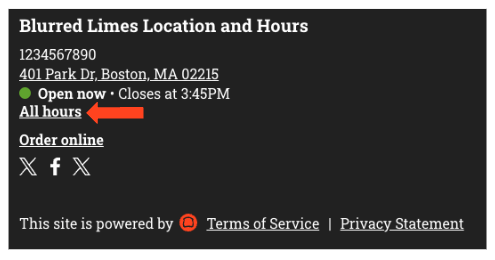
The hours editing sidebar doesn’t appear on the Online Ordering or Menu pages. To update your hours, navigate to a different page (for example, the About Us page) and select All hours from the footer (bottom of the web page). Make the necessary changes and ensure that you save and publish them.
Back to top