Adjust Tips on a Closed Check
Last updated: Oct 8, 2026, 12:09 PM
Learn how to adjust tips on a closed check.
Update tip amounts on closed checks. Use the Toast POS for same-day adjustments or Toast Web for checks up to 45 days old.
- Before You Begin
- Quick Fix: Find the Path That Fits Your Check
- Adjust a Tip on a Closed Check From Today (POS)
- Increase a Tip on a Check From a Prior Day (Toast Web)
- Decrease a Tip on a Check From a Prior Day (Partial Refund)
- Before You Contact Customer Care
- Frequently Asked Questions
- Related Articles
Before You Begin
Applies to: Toast POS, Toast Web
Permissions needed:
- 3.8 Void/Refund Payment
- 3.18 Cash Drawers (Full)
What you'll accomplish: Update a tip amount on a check that has already been closed — whether the check closed today, or up to 45 days ago.
Note: If your location uses FreedomPay (Enterprise), follow "Tip Adjustments with FreedomPay" instead. The POS workflow is different.
Quick Fix: Find the Path That Fits Your Check
Match your situation to the right workflow before you start.
| Scenario | Quick Fix | Self-Service? |
|---|---|---|
| Check closed today (same business day) | Reopen the closed check on the Toast POS and re-enter the tip. See Adjust a Tip on a Closed Check From Today (POS). | Yes |
| Increase a tip on a check from 1–45 days ago | Run a Tip Adjustment in Toast Web. See Increase a Tip on a Check From a Prior Day (Toast Web). | Yes |
| Decrease a tip on a check from 1–45 days ago | Issue a partial refund for the difference. See Decrease a Tip on a Check From a Prior Day (Partial Refund). | Yes |
| Tip over $250 on any check | Customer Care must process the adjustment. See Before You Contact Customer Care. | No |
| Check is more than 45 days old | Submit a ticket with the original receipts. See Before You Contact Customer Care. | No |
| You see "Unsupported payment adjustment" or "the final tip cannot be negative" | The system blocked the change. See the Frequently Asked Questions. | Yes |
Adjust a Tip on a Closed Check From Today (POS)
Use this path when the check closed during the same business day as the original transaction — before the overnight credit card batch runs.
- On your Toast POS, navigate to the payment terminal and select Closed Checks.
- Select the check you need to adjust. If a prompt appears that the check is still being served by a server, accept it to continue.
- Select the Pay ($) button.
- Re-enter the correct amount in the Tip field, then select Update.
- Select Done.
Expected outcome: The payment adjusts to the new total. The updated tip flows to shift review and to Toast Payroll the same way the original tip would.
Increase a Tip on a Check From a Prior Day (Toast Web)
Use this path when the check closed up to 45 days ago and you need to add to the tip — for example, a guest filled in the tip later, or the tip was missed during the batch.
- In Toast Web, navigate to Finance > Payments > Find checks & issue refund.
- Locate the specific check.
- Select Actions > Tip Adjustment.
- Enter the full amount of the tip in the Total Tip Amount field.
- Select Process Tip Adjustment.
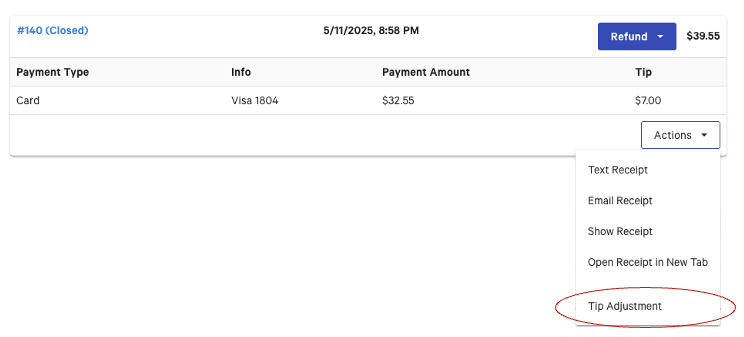
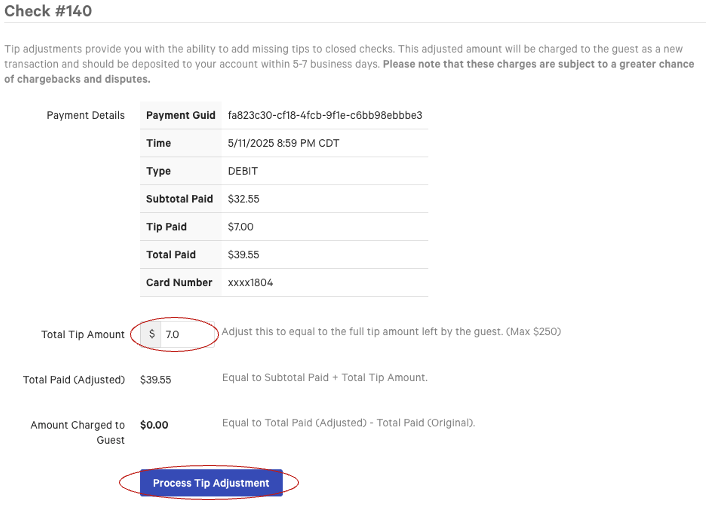
Expected outcome: A confirmation message displays. The adjustment aligns with the date of the original transaction — not the date the adjustment was run. The new amount is charged to the guest as a separate transaction and deposits to your account within five to seven business days.
Note: The maximum tip adjustment allowed is $250. For amounts over $250, see Before You Contact Customer Care.
Decrease a Tip on a Check From a Prior Day (Partial Refund)
Use this path when the check closed up to 45 days ago and you need to reduce the tip — for example, a tip was overcharged, was added to the wrong check, or should be removed entirely.
- In Toast Web, navigate to Finance > Payments > Find checks & issue refund.
- Locate the specific check.
- Issue a partial refund equal to the amount you want to remove from the tip.
Expected outcome: The partial refund credits the guest's card and reduces the recorded tip on the original transaction. The refund posts to the original transaction date in sales reporting. For how this flows through reports, see "Impact of Refunds and Adjustments on Toast Sales Reporting".
Before You Contact Customer Care
Customer Care must handle adjustments that the Toast POS and Toast Web workflows above cannot process. Bring this information to your case so the team can act quickly:
- The check number and original transaction date
- The original tip amount and the corrected tip amount
- Which employee should receive the corrected credit
- A picture or signed copy of the receipt (required for any claim that the tip was not entered during the batch)
You will need Customer Care for any of these scenarios:
- Tip adjustments over $250. The system caps the automated tip adjustment at $250.
- Checks more than 45 days old. Automated adjustments are blocked after 45 days. Instead, submit copies of the original tickets so the unadjusted tip can be credited to the location and paid to the server. See "How do I submit copies of tickets for unadjusted tips on checks?".
- A value entered as a tip that should have been a different earning code. For example, a mileage reimbursement or expense entered into the tip field. Customer Care must correct it in Toast Payroll.
- Adjustments on a check from a previous month that has already been included on a paid-out payroll. These have multi-system impact and need coordinated correction.
Frequently Asked Questions
Why does the system say my tip cannot be negative?
The system says your tip cannot be negative because tip values must be entered as positive numbers. To remove a tip entirely on a same-day check, enter zero in the Tip field. To remove or reduce a tip on a check from a prior day, issue a partial refund instead — see Decrease a Tip on a Check From a Prior Day (Partial Refund).
Also asked as:
-
- "tip manager will not let me enter a - tip adjustment"
- "the final tip can not be negative"
What does "Unsupported payment adjustment" mean?
"Unsupported payment adjustment" means the system cannot process the requested change on this specific payment. The two most common reasons are:
-
- The payment has already been captured in the overnight credit card batch. For prior-day batched payments, use the Toast Web Tip Adjustment workflow — see Increase a Tip on a Check From a Prior Day (Toast Web).
- The check is more than 45 days old. See Before You Contact Customer Care.
Can I move a tip from one server to another?
You can move a tip from one server to another, but the steps depend on your tipping setup. If you use Toast Tips Manager (pooled tips), retract the original tip and re-pool it. If you use direct sync with no pool, edit the declared tip amounts in Toast Web on the affected shifts. For full guidance, see "Toast Payroll: Manage and Integrate Tips".
Also asked as:
-
- "subtract some of a tip from a server and add it to another server"
- "move gratuity from a non-tip eligible employee"
How long does a tip adjustment take to deposit?
A tip adjustment processed through Toast Web deposits to your account within five to seven business days. The adjustment aligns with the date of the original transaction, not the date the adjustment was processed.
Does a tip adjustment update my sales report?
A tip adjustment does update your sales report — the adjustment posts to the original transaction date, not the date the adjustment was run. If the original transaction was in a month that has already closed, the adjustment may affect that closed month's totals. For details on how refunds and adjustments flow through reporting, see "Impact of Refunds and Adjustments on Toast Sales Reporting".
Also asked as:
-
- "what report does the adjustment show up on"
- "previous month gets reopened and closed with an adjustment"
Where do I see tip adjustments after I run them?
You can see tip adjustments after you run them in Toast Web. Navigate to Finance > Payments > Find checks & issue refund, then locate the original check — the adjustment appears on the check's payment detail. The amount also appears on tip and labor reports keyed to the original transaction date.
Also asked as:
-
- "where is tip adjustment"
What if my location uses FreedomPay?
If your location uses FreedomPay (Enterprise), please contact Customer Care.
Related Articles
- Adjust Credit Card Payments
- How do I submit copies of tickets for unadjusted tips on checks?
- Toast Payroll: Manage and Integrate Tips
- Impact of Refunds and Adjustments on Toast Sales Reporting