Best Practices for Toast Email Marketing
Last updated: Sep 17, 2026, 5:34 PM
Interested in adding Toast Email Marketing to your Toast Suite? Add it here in Toast Partner Integrations.
Customer Spotlight -- Best practices for Toast Email Marketing.
- Toast Email Marketing Best Practices
- Craft Captivating Subject Lines
- Email Body
- Leverage Guest Information
Toast Email Marketing Best Practices
As a restaurant owner, you know what it's like to be inundated with hundreds of monthly emails. Like the rest, you archive in batches or quickly delete uninteresting or unwanted emails. You know you'll only open emails if they catch your attention and click on links if they add value. So why not send emails to your diners with that philosophy in mind?
Your diners don't want to read another spammy email urging them to return to your restaurant without a clear reason. They won't even open that email unless that "reason why" is in the subject line. To ensure you build the most effective emails for your diners, see the following tips before creating an email of your own.
Craft Captivating Subject Lines
It all starts with that subject line. Make your guests want to learn more! Arguably, it's the most important part of your email; it determines whether your customer will be excited to open it. Here are some statistics about email subject lines that should help you when drafting them:
- 33% of email recipients open emails based on the subject line alone. (Source: Convince & Convert)
- 40% of emails are opened on mobile first - where the average mobile screen can only fit 4-7 words max. (Source: Contact Monkey)
- Emails with "Free" in the subject line were opened 10% more than those without. (Source: Sidekick)
- The click-through rate (CTR) is higher when using the recipient's first name in the subject line over no use of the first name. (Source: HubSpot)
- Subject lines that create a sense of urgency and exclusivity can give a 22% higher open rate. (Source: Email Institute)
Subject line examples:
- We miss you, have a drink on us!
- Don’t miss out, dinner packages are going fast!
- Enjoy a free appetizer on us!
- Just in time for the holidays, a gift for you and yours!
- Book your Restaurant Week reservation before it’s too late!
Need to send a quick email? Leverage Recommended Campaigns from your Marketing Dashboard. See the Recommended Campaigns section of Launch Your Toast Email Marketing Campaign.
Preview Text
Log into your inbox, especially if you're a Gmail user. Do you see that gray text next to your email's subject line? That's the preheader text. Preheader text mostly goes unused, so you'll see the email's first sentence or a URL. However, sometimes email senders are clever about their preview text.
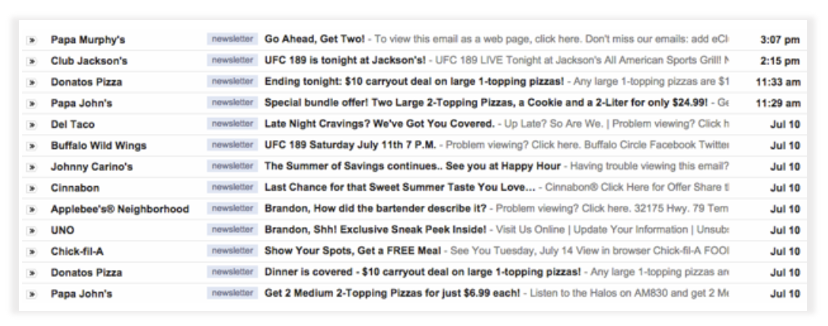
The preview text is your clever opportunity to tease what's inside even more, to add a joke, or to add a few more details about your offer that will interest customers. Don't ignore it; using preview text to your advantage will set you apart from your competitors. And "Problem Viewing" or "Having trouble viewing this email" doesn't cut it!
See Launch Your Toast Email Marketing Campaign to learn how to add preview text to your email.
Email Body
- Use images and pictures - a great backdrop to capture your guest's attention.
- Highlight key components, e.g., incentive, call to action (bold, underline, larger font, colors, buttons, etc.).
- Use language that drives urgency.
- Make it feel personal/exclusive.
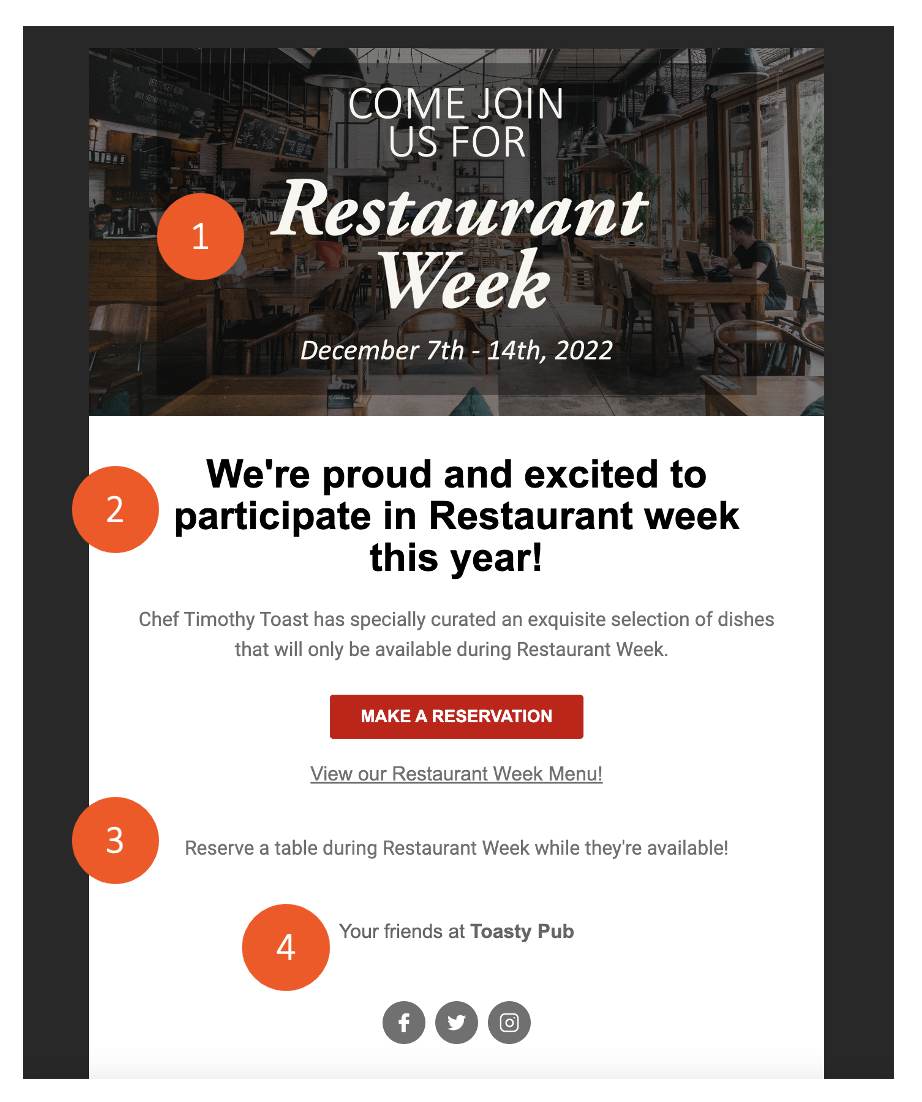
When writing your emails, use the preview tool to see what your email will look like on smartphones or tablets. Limit the amount of buttons within the email, increase the amount of food pictures and keep the body of the email light.
Create a High-Converting Call-to-Action
- The action should be driven by your campaign objective.
- Make it easy to take action by including a button.
- Bright colors & bold text draw attention.
- Order online
- Book a reservation
- Purchase a gift card
- Sign up for an event
- Sign up for rewards
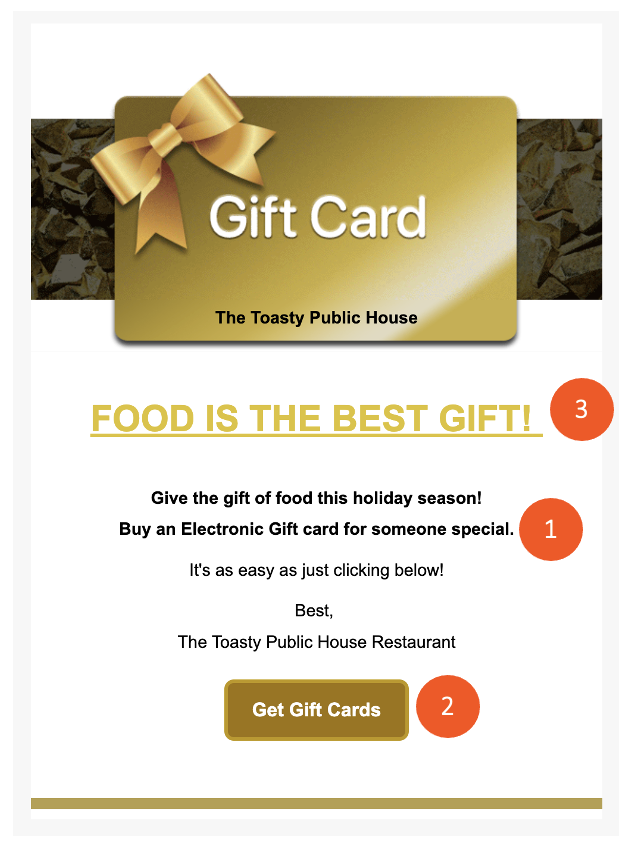
See Launch Your Toast Email Marketing Campaign to learn more about creating a call-to-action in your email.
Create Incentives With Promotions
Consider the discount or value of the offer:
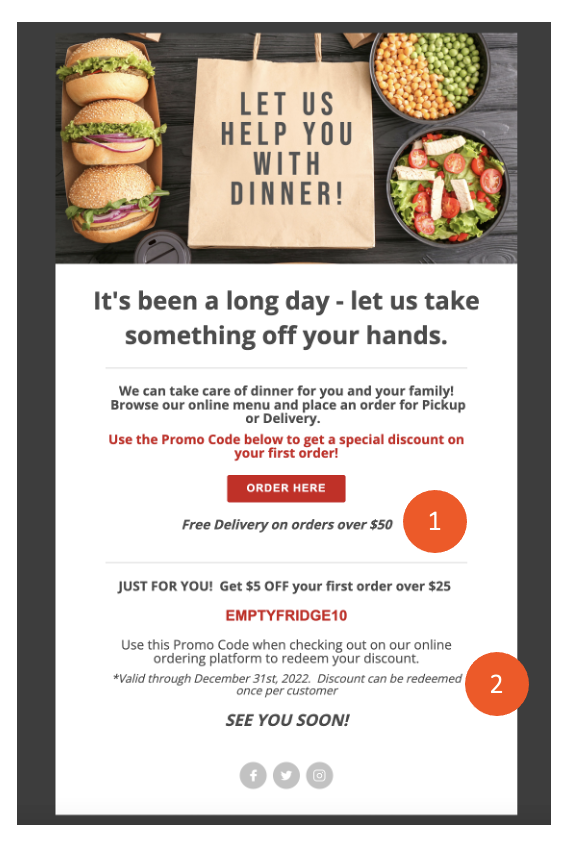
- Free delivery - Set Up Free Delivery Offers on Digital Ordering.
- Discount on items or groups of items - Get Started With Discounts.
- Leverage single-use promo codes to offer discounts that can only be used once. Use Single-Use Promo Codes
- Use expiration dates to create urgency and drive immediate results.
Message Tone
This is a small change in your writing that can make a big difference: Make emails come from one person, instead of from a company. When targeting offers, write in second person. When talking about your restaurant, write in first person.
- First person: After much consideration, I've worked alongside the chefs to debut a new menu, full of locally-sourced food.
- Second person: You'll have to cheese it to believe it! 50% off quesadillas!
Even if the owner isn't writing the emails, ghostwrite them to sound like they are. This allows for a more personal touch. Your emails aren't coming from a "brand." They're coming from an actual person who cares. This will also encourage email replies, which can act as comments.
Share Exclusive Information
Many restaurant owners call their email list a "VIP club." But it's only a VIP club if you're actually sharing VIP information.
Boloco calls its email subscribers "Boloco insiders," whereas Buffalo Wild Wings calls its email list "the inner circle." It's important that you live up to whatever title you choose for your list of loyal diners.
Send your diners cliffhangers about your restaurant. New menu? Tease it to the email list. New location? Let your loyal diners know before everyone else. Are your diners closing in on their loyalty rewards? Inform them in a jam-packed email. Hiring new employees? Tell your email list to share with friends and family, and give them a referral bonus. That's when they'll feel like VIPs at your restaurant.
Decide Email Frequency
If, like a lot of independent restaurant owners, you don't have time to send emails every couple weeks, it's important that you at least stick to some sort of schedule.
We recommend sending monthly at first, and then increasing or decreasing frequency depending on your diners' activity and your personal bandwidth. Make sure that you are reaching out to your diners with meaningful messaging. Sending emails every day will flood your diner's inbox and decrease the value of what you have to say.
Optimize Email Styling
You can optimize your emails to ensure they're not marked as spam or blocked so that guests will receive them in their inbox properly!
Follow these best practices:
- Trim down the number of images and links in your campaign to trigger fewer spam warnings.
- Use websites like Mail Tester (external link) to test the “spamminess” of the email. Mail Tester will analyze your message, your mail server, and your sending IP, and then show you a detailed report of what's configured properly and what's not.
- Have your recipients whitelist the sending domain. Send to engaged guests first and/or recipients who will mark your messages as “not spam”—this will teach algorithms not to send emails to the spam folder to begin with.
Leverage Guest Information
All of your guests' information is at your fingertips! Use the information to send out email campaigns on your own, through a third-party vendor, or email marketing.
See the Toast Email Marketing FAQ for more information.
Note: Use one of our auto-generated segments or create custom segments to target guests based on their previous orders at your restaurant please reference the following article: Manage Your Email Marketing Audience.
- Log in to Toast Web and navigate to Guests > Guestbook.
- Select the Download list. This will download customer information into a usable file.
Ready to build your first email campaign? If so, watch the following video for best practices to follow or check out Launch Your Toast Email Marketing Campaign.
Best Practices for Toast Email Marketing.
-
Targeted and Personalized Content: Utilize targeted and personalized marketing content to resonate with your audience. Use automated campaign types that send ongoing messages tailored to individual guest behaviors. Segment your audience based on specific criteria such as ordering history, preferences, or behaviors.
-
Attention-Grabbing Subject Lines: Craft engaging, personal, or fun subject lines that stand out in crowded inboxes and incentivize recipients to open the email.
-
Use a Mobile-Friendly Layout: Keep the email body concise and avoid large blocks of text, especially considering many recipients view emails on mobile devices. Incorporate images of menu items to break up text and enhance visual appeal.
-
Have a Clear Call to Action: Include a clear and compelling call to action directing recipients to take desired actions, such as visiting your website, making reservations, or ordering online.
-
Analyze Your Campaign Performance: Monitor campaign performance metrics such as opens, clicks, and orders. Use Toast's reporting tools to compare campaign effectiveness and identify trends in Marketing. Adjust your campaign strategies based on insights gained from performance analysis.
-
Use Strategic Campaign Scheduling: Plan and schedule email campaigns strategically throughout the month to maintain top-of-mind awareness with guests. Consider upcoming holidays and special occasions when scheduling campaigns.
-
Customize Your Templates and Content: Customize email templates and content to align with specific campaign objectives and audience preferences. Utilize existing templates associated with holidays or opportunities for inspiration.
-
Management Group Considerations: If operating multiple locations, ensure restaurants are set up within the same management group for consolidated reporting and management. Separate restaurants from the management group if necessary for individual marketing strategies or operations.