Manage Break Adherence on Mobile
Last updated: Apr 8, 2026, 10:12 AM
Question
How can I track and stay on top of staff breaks throughout the work day?
Answer
- Configure your restaurant's breaks in Toast Web. To learn more, see Build Employee Breaks in Toast .
- On your mobile device, log in to Toast Web and navigate to Reports > Labor > Break adherence. Here you can view each type of break distinguished by color and pattern.
- This report can be viewed via a computer, but it's best used as a management tool, checked throughout the day, on your mobile device.
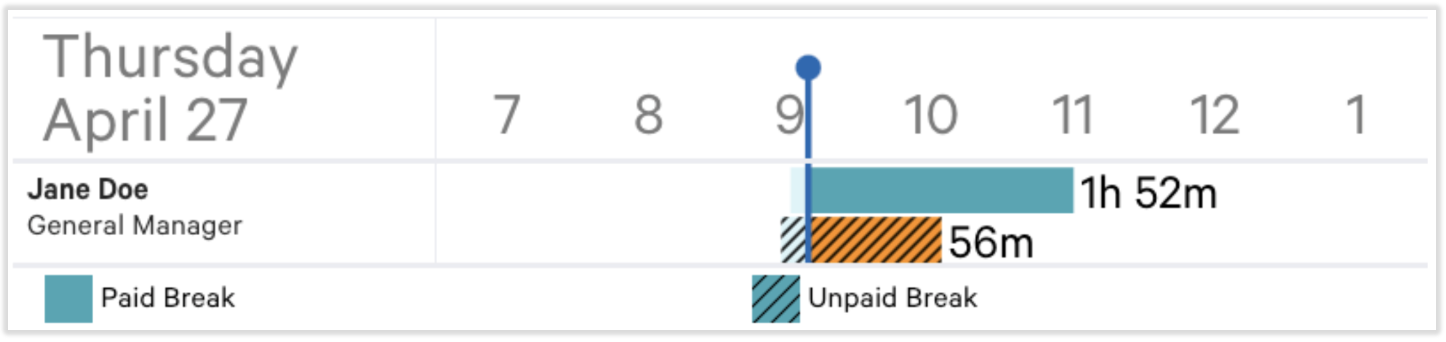
- The system's defaulted Paid Break will appear in a teal color.
- The system's defaulted Unpaid Break will be teal with diagonal shading.
- Yellow with diagonal shading indicates the employee should take a break within the yellow time limit.
- A missed break will appear on this report under one or more of the following circumstances:
- The break must have the Tracked missed breaks option enabled.
- The break was ended before the full Duration of the break was taken.
- To prevent this, set the Enforce minimum time setting to Enabled.
- If the break is eligible to be waived, but the break is neither waived nor taken.
- If there is more than one of the same type of break in a shift (it uses the Advanced interval rule), only one is eligible to be waived and an employee cannot waive another break and miss that break.
- Employers can override or adjust missed breaks when an employee took a break, but did not record it. Learn more about missed breaks and waiving breaks in Build Employee Breaks in Toast.
This content is for informational purposes and is not intended as legal, tax, HR, or any other professional advice. Please contact an attorney or other professional for advice.
Additional Information
Each staff member will have a bar next to their name per the type of break actively being tracked. When the bar next to the employee's name turns yellow, that employee should take that designated type of break within the hour shown.
In the below example, Jane Doe should clock out for her unpaid break sometime within the upcoming 56 minutes:
If an employee misses a break, a notification will appear at the top of the report. Select the Missed Break hyperlink to see which employee missed their break.
