Toast Payroll: Change the Payroll A Timesheet Is Tied To
Last updated: Oct 20, 2026, 12:03 PM
Question
Can I change which payroll an employee timesheet is tied to?
Answer
| If the automatically approve timesheets feature is turned on, you can skip step 2 in this article. With the auto-approve feature enabled, timesheets will not be "approved" until the Start payroll button is selected on the Preview Payroll step. |
Yes. The timesheet needs to be open (not approved) to tie it to another payroll or to attach it to none.
If the timesheet has been approved already, it will first need to be reopened.
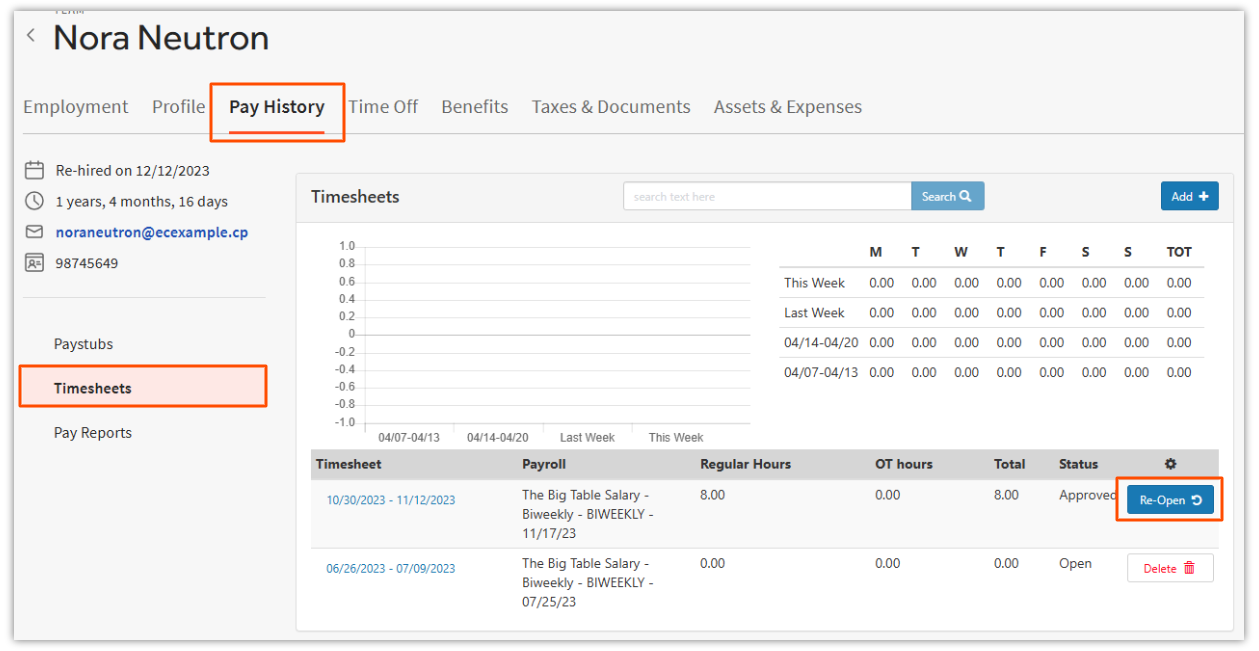
- In Toast Payroll, navigate to an employee's profile > Pay History > Timesheets.
- Learn how the new Toast Payroll navigation works by visiting Navigate Toast Payroll Within Toast Web.
- Select Re-Open for the approved timesheet, if necessary. Doing this allows you to make changes to time entries that will sync to this timesheet.
- Select the hyperlink in the Timesheet column.
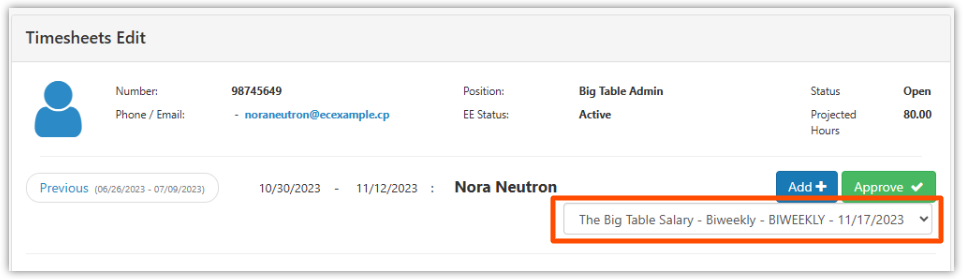
- At the top right, it will list the current payroll it is attached to. If you select the payroll drop-down, you will see an option to tie it to a different payroll, but you can only select from the pay groups the employee has a position in.
- If you are unable to select this payroll drop-down menu, the timesheets are set to read-only. However, an HR+ user can navigate to Settings > Timekeeping. Select the Settings tab, then toggle the Make Timesheets Read Only switch to No and select Save. Then return to these steps to reattempt your action.
- If you are unable to select this payroll drop-down menu, the timesheets are set to read-only. However, an HR+ user can navigate to Settings > Timekeeping. Select the Settings tab, then toggle the Make Timesheets Read Only switch to No and select Save. Then return to these steps to reattempt your action.
This content is for informational purposes and is not intended as legal, tax, HR, or any other professional advice. Please contact an attorney or other professional for advice.