Configure and Report on Deferred Amounts and Sales
Last updated: Aug 20, 2026, 1:49 PM
- Deferred Amount Overview
- Configure Deferred Sales
- Deferred Sales in Reporting
- Additional Resources for Deferred Sales
Deferred Amount Overview
| A common point of confusion is how deferred revenue relates to cash flow and deposits. When a gift card is sold through Toast, the funds from the sale are treated like any other transaction: the proceeds are sent to the restaurant's bank account on the normal schedule. Toast does not hold the money. Please review this article for more information about your deposits and sales reporting.
The term "deferred revenue" refers to the accounting treatment of the sale, not the timing of your bank deposits from Toast. According to generally accepted accounting principles, this revenue should be considered “deferred” (recorded as a liability) because your restaurant is obligated to deliver the good or service at a later date. This accounting distinction does not affect when the funds are deposited. |
A deferred amount is a sale that is excluded from your net sales calculation. In most cases, this figure would indicate that a gift certificate was sold or the value was added, as it's merely store credit being extended to a customer to be redeemed later -- it's not actual revenue. The revenue for the store is realized when the gift certificate is later redeemed/spent in the store. Another example of deferred amounts is adding value to a house account that has not yet been paid by your guest (see Get Started With House Accounts to learn more).
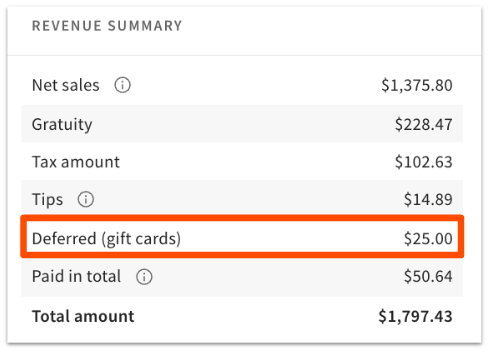
Deferred sales shows the net amount of sales (like gift cards or house accounts) that were sold on a given day and that are excluded from net sales (since it's a sale for a future date without payment).
Paid in total shows payments received in your chosen date range for orders that are not within that same date range. For example, a prepaid future order, or a prepaid invoice for catering or a private event.
Any menu item can be configured to be a deferred amount in overview and financial reporting. Examples include gift certificates, vouchers, charitable items, and more.
Note: Online orders and orders placed through a delivery integration partner will not automatically be counted as deferred sales in Toast reporting.
Configure Deferred Sales
To configure deferred sales, follow these steps:
- In Toast Web, navigate to Menus > Bulk management > Advanced properties.
- Expand your menu by using the > icons on the left until you find the desired item. Select the name of the item.
- Scroll down the item details page until you reach the Reporting section. Select Yes for the Defer Revenue setting. Note that if you select Yes, you can't add a sales category to this item, since deferred items don't get categorized with the rest of the revenue items.
- Save and publish your changes.
Deferred Sales in Reporting
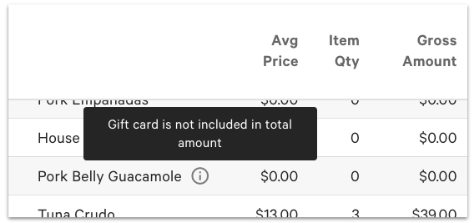
Navigate to Menus > Reports > Product mix. Select your desired date and location filter, and then select Update to run the PMIX report. On the table of items, an icon will appear next to the name of deferred revenue items. You can mouse over them to reveal a description. While the description says, "Gift card is not included in the total amount" - this is a general message that the item listed is deferred and, therefore, not contributing to net sales for that period of time.
Note: Accepting payment for a balance to pay off house accounts is Deferred in overview and financial reporting. Any kind of payment can pay these balances.
On the Sales Summary report, you'll see the Revenue Summary section that will show Deferred (gift cards), Deferred (house accounts), and Deferred (Other) when applicable. These values will also be shown on the Accounting Overview report:
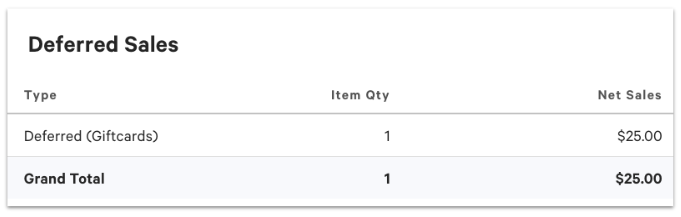
Any menu item configured with Defer Revenue set to Yes that is not a gift card or a house account is reported under Deferred (Other).
To see which items make up a deferred amount you see on a report — including Deferred (Other) — use the Item details report:
- In Toast Web, navigate to Reports > Menus > Item details.
- Set your date range and location filter, and then select Update.
- Select Show/hide columns and make sure Deferred is checked so that the column appears on your report.
- Select the Deferred column header to sort the report by that column.
Expected outcome: Items with a Deferred value of True are the deferred items that make up the deferred amount on your report.
Additional Resources for Deferred Sales