Create Modifiers From Items
Last updated: Sep 17, 2026, 5:39 PM
Modifiers From Items Overview
By creating a modifier from an item, you can easily tie your inventory counts together and manage changes to items and modifiers throughout the menu. Additionally, when having to 86 an item, the system will automatically 86 the modifier as well.
Note: A modifier created from an existing item stays linked to that source item. Removing the source item from its original menu has been reported to make the modifier unusable in some ordering channels, including Catering & Events. Before removing a source item entirely, confirm the modifier still works everywhere it's used — including Catering & Events — or turn off the item's channel visibility instead of deleting it.
Some restaurants might have menus with items that also act as options, as modifiers, for a dish. In the example described in this article, a diner has individual items for pancakes, waffles, and two eggs, any style. But there's also a "Diner Classic" item that allows guests to combine these items into one dish and select their preferences.
This type of modifier build also works great for liquors and cocktails, with liquors set up as items (so guests can order a Jack and Coke, for example) and also built as modifiers for cocktails in case the guest would like to change the liquor in the cocktail.
Back to top
Create Modifiers From Items
To create modifiers from existing menu items, follow these steps:
- Create all of your menu items first.
- Then, select the item you'd like to create modifiers for.
- In the Modifier Groups section, select + Add to create a modifier group. This will open up the modifier group details page.
- Set the modifier behavior as needed. For more information, check out Configure Modifier Behavior and Set Up and Use Modifier Multi-Select.
- In the Modifiers section, select the down arrow next to the Add button and select Add Existing Modifiers - you'll need to add any existing modifier temporarily, as a placeholder, so you can proceed to the next step.
- Select Save on the modifier group details page.
- Now, you can go back to the down arrow next to the Add button on the Modifiers list and select New Modifier from Existing Item.
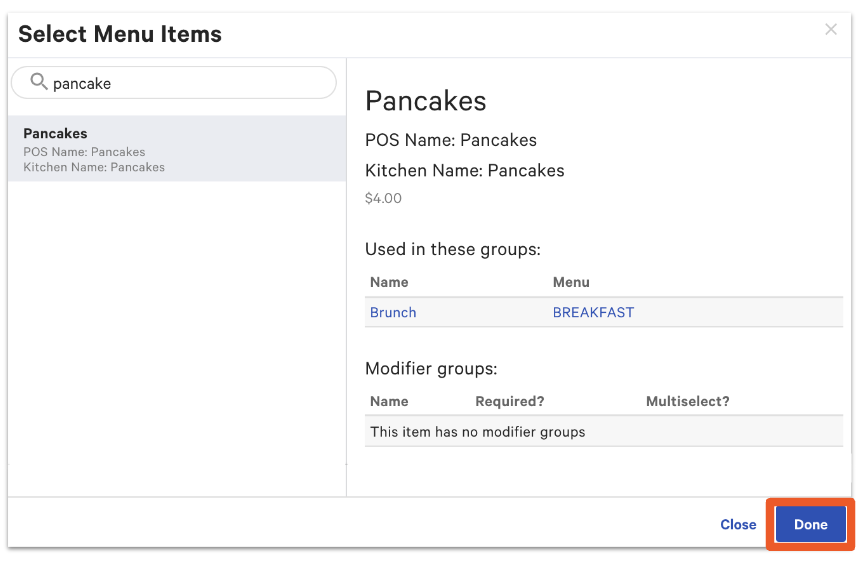
- A pop-up will appear, allowing you to search for and select the item you'd like to create a modifier from. Select Done when you're ready. Any modifiers and size pricing that were attached to the item that is being sourced will also come along with that item now being used as a modifier.
Note: Menu-specific pricing will not work for modifiers that are created referencing an item. If you want to use menu-specific pricing, you'll need to create those modifiers without referencing an item. To learn more, see Build Happy Hour Menus with Menu-Specific Pricing.
- A new page will allow you to change the settings for the new modifier. Any modifiers that were already attached to the item will carry over as nested modifiers. If you'd like to edit those, select Edit Item. You can also change the pricing here as well. If desired, under the Pricing section, select Yes for Override item price?. This can be used if your modifier doesn't have an additional charge to it, or if instead of $6.50 for a "Classic Waffle", this diner has an upcharge of $2 if the "Classic Waffle" is selected as part of the "Diner Classic" item.
- Select Save. Do the same for every modifier you need to create, and make sure to save your changes for every modifier created for the modifier group.
- Make sure to select Edit, and then select the X to remove the placeholder modifier that you added earlier.
- Publish all changes.
Source Menu Groups Into Modifier Groups
Here are some examples of when it may be helpful to source menu groups into modifier groups:
- Rotating menu groups
- Farm-to-table dining: A farm-to-table concept offers different sides depending on the ingredients they bring in. Those sides can be ordered a la carte (as menu items) or as a side choice for an entree. Changing the items in the menu group will reflect in the modifier group as well.
- Breweries: Breweries change taps frequently. They offer full pours and a menu group for samples. They also offer a flight option, where customers can choose up to 4 of the samples available on tap at the time.
- When the inventory count needs to be tied across menu items and modifier sales
- Donut shop: A donut shop offers single donut sales and box donut sales. When a donut is ordered, the inventory needs to decrease, no matter if it's ordered as a single item or as a modifier to the box item.