DoorDash Marketplace Facilitator Tax
Last updated: Sep 17, 2026, 10:12 AM
Question
How do I locate the Marketplace Facilitator Tax for DoorDash orders?
Answer
Customers will now see DoorDash orders within the Toast POS in the below format, where the price and subtotal reflect the item's price configured on DoorDash if you are using Menu Hub to inflate/deflate prices. Tax will also be populated with the tax amount calculated by DoorDash.
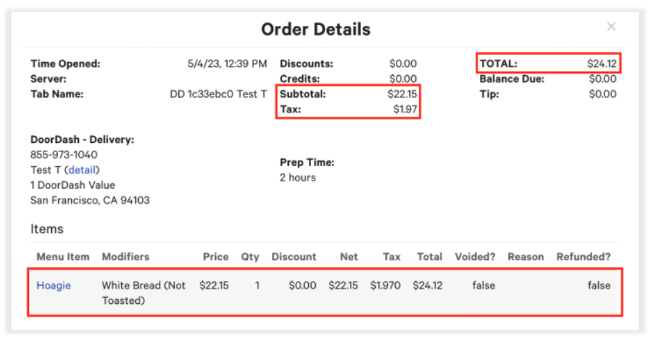
Note: This will only affect the restaurants located in Non-Marketplace Facilitator Tax states. This logic already exists for restaurant locations in Marketplace Facilitator Tax states. Please refer to this external article U.S. Merchant Marketplace Facilitator FAQ, for more information.
Additionally, with the update, the values calculated within Sales Summary in Toast Web for Net Sales for the relevant DoorDash revenue centers and dining option will reflect the price of the item configured on DoorDash. Since DoorDash is now transmitting tax amount for the order, the Tax Rate section shows a new field named Marketplace Facilitators Taxes Not Paid, which displays the tax amount calculated by DoorDash:
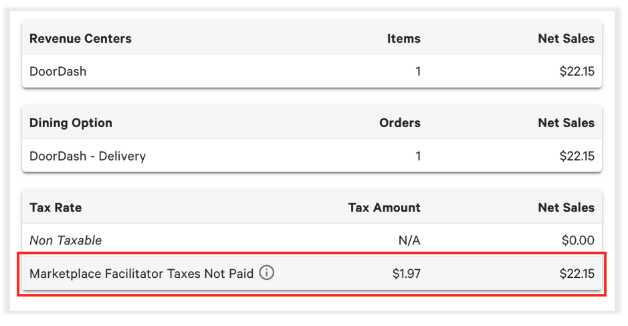
Note: If you hover over the information bubble icon above that section, you can see the following text explaining the field.
Additional Information
"Marketplace Facilitator Taxes Paid" are tax amounts for which the marketplace facilitator has remitted tax payments on behalf of the customer.
"Toast Marketplace Facilitator Taxes Paid" are tax amounts for which Toast has remitted tax payments for the customer. For Toast Local app and Toast Local orders only.