Manage DoorDash Third-Party Ordering Configuration
Last updated: Sep 17, 2026, 1:37 PM
Learn how to configure menus and more directly in Toast Web via the DoorDash configuration page.
In this Article:
- Access the DoorDash Configuration Page
- Configure Your DoorDash Integration
- Review DoorDash Menu Incompatibilities
- Frequently Asked Questions
Access the DoorDash Configuration Page
If you're setting up the DoorDash integration for the first time, see Get Started With the DoorDash Integration.
After your integration is up and running, you may need to occasionally make changes to your configuration to update your menu availability or DoorDash ordering hours. To access the DoorDash configuration page and make updates to your available menus and settings, follow these steps:
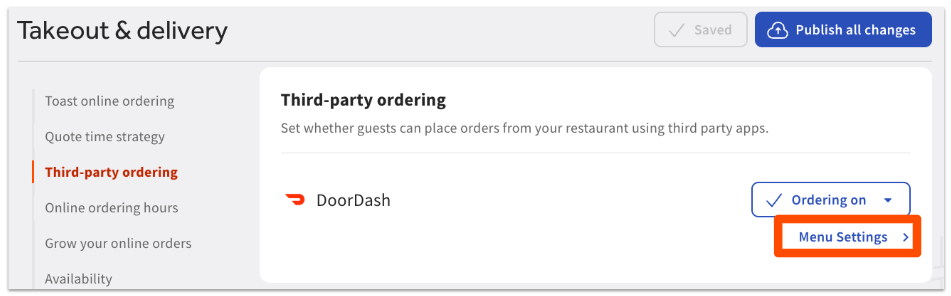
- In Toast Web, navigate to Takeout & delivery > Third-party ordering.
- Select Menu Settings next to the DoorDash integration.
Note: Above the Menu Settings button, you'll see the availability toggle for DoorDash, which allows you to turn this channel on, off, or snooze temporarily. For more information on the toggles, see Manage Third-Party Availability Through the Snooze Feature and the On/Off Function. - This will take you to the Third-party ordering configuration page for DoorDash, where you can save and publish changes as needed.
Configure Your DoorDash Integration
To configure DoorDash for your selected location, follow these steps:
- On the Third party ordering configuration page, select Edit next to DoorDash to display all available settings.
- The page will expand to show the following:
- Name and Location of the restaurant being accessed.
- Menus - The list of currently selected menus that guests can see and order from on the DoorDash platform. You can have different menus shown on each partner by selecting them on each partner’s individual configuration page.
- Add menu - A drop-down list where you can add/select additional menus to surface to guests on DoorDash. Note: Only menus with visibility set to Online ordering partners will be selectable in this drop-down.
- Increase menu price - Adjust your DoorDash menus by increasing prices, either by a fixed amount or percentage, to offset fees. You will see the regular price when editing your menu, but DoorDash will show the increased price. This will apply an increase to all menu item prices except modifiers on your DoorDash menus.
- Hours - The hours when guests can order with DoorDash. For more information on setting online ordering hours, see this video.
- Save and publish any changes you make to apply them to your DoorDash integration.
Review DoorDash Menu Incompatibilities
Menu incompatibilities can interfere with proper display and functionality for your menus on your location’s DoorDash site. If you have any menu incompatibilities with the DoorDash integration, they'll be shown on the Third party ordering configuration page below the Add menu drop-down:
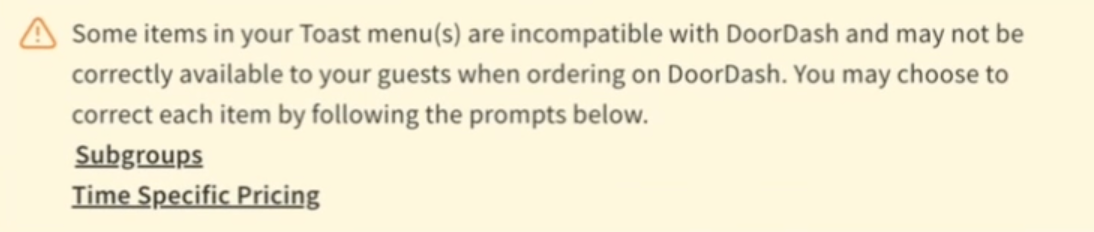
When you navigate into the relevant links, you'll see a pop-up with links that will take you to the item incompatibilities in question if you’d like to see them yourself.
Note: If you're still onboarding, no action is required of you — these incompatibility notices are simply informational, and your Onboarding Consultant will fix these for you.
Frequently Asked Questions About the DoorDash Configuration Page
How do I remove a menu from DoorDash?
To remove a menu from DoorDash, follow these steps:
-
- In Toast Web, navigate to Takeout & delivery > Third-party ordering.
- Select Menu Settings next to the DoorDash integration.
- Select Edit next to DoorDash to display all available settings.
- Select the (-) button to the right of the menu you want to remove from DoorDash.
- Select Remove on the pop-up to confirm your choice.
- Save and publish your changes.
Note: This will only remove the menu from guest ordering on DoorDash. The menu visibility on the menu itself will still be set to Online ordering partners, which means the menu will still be available on the other third-party ordering partners where it has been selected.