Get Started With SmartQuote
Last updated: May 4, 2026, 4:20 PM
Learn about how to activate and enable SmartQuote.
In this Article:
- Quote Time Strategies Overview
- SmartQuote Overview
- Activate SmartQuote
- SmartQuote comparison chart
- Enable SmartQuote
- Frequently Asked Questions
- Can I add my own data inputs or values into the SmartQuote model?
- How do I determine what minimum and maximum values to set for SmartQuote?
- Does SmartQuote prioritize or weigh certain data inputs differently than others?
- Can SmartQuote generate prep times that are outside of the set minimum and maximum range?
- What order sources does SmartQuote generate prep times for?
- Do SmartQuote prep times get more accurate over time?
- What happens if SmartQuote stops working or cannot provide prep times?
Toast’s SmartQuote AI-driven tool helps you take the guesswork out of calculating quote times for your takeout and delivery orders. The use of AI for predicting quote times is complex and dependent on various factors. SmartQuote uses a variety of inputs to predict quote times, including historical order data, recent prep times, kitchen performance, and more. The accuracy of SmartQuote predictions relies heavily on the quality and quantity of the data used for training the AI model. Insufficient or biased data could lead to inaccurate predictions. Please consider these limitations when interpreting results.
Quote Time Strategies Overview
SmartQuote joins the other quote time strategies: Manual, Kitchen Capacity, and Order Price, which are available in Toast Web. Quote time is the amount of time it takes to prepare a guest's online order for takeout or delivery. It is calculated as prep time plus applicable delivery time, and is displayed on your restaurant's Toast Online Ordering website, the Toast Local app, Orders Hub, and on the Online Ordering dashboard.
The Quote time strategy section on the Takeout & delivery page in Toast Web is where you can configure and manage your restaurant’s quote times for takeout and delivery. To view and configure your restaurant's quote time strategy, you must have the 6.6 Restaurant Operations Setup permission. For more information on quote time strategies, see Manage Your Quote Time Strategy.
| You can choose to switch from SmartQuote to any of the other manual quote time strategies at any time in Toast Web. |
SmartQuote Overview
SmartQuote is a new quote time strategy that leverages Artificial Intelligence (AI) to automatically calculate and estimate the most accurate prep times based on your restaurant’s historical data. SmartQuote can help to optimize your order operations, improve your kitchen’s efficiency, and increase guest loyalty. Benefits to using SmartQuote include:
- Reduce the guest and delivery driver wait time
- Reduce occurrences of cold food and increase guest happiness
- Improve quote time accuracy
- Increase kitchen productivity and efficiency
SmartQuote's data model uses the following data inputs to calculate prep times:
- The prep times for the last hour of orders
- The number of unfulfilled orders and items in your kitchen over the course of an hour
- The time and day the order was placed
- The order source (in-store, kiosk, Toast Online Ordering, Toast Local app, Order with Google, or third-party online ordering channels)
- Unique item-level prep times and the number of items in an order
- Kitchen performance and capacity trends over the past three months
SmartQuote does not consider the following data inputs:
- Events or catering orders
- The number of clocked-in employees
- Holidays or days when the restaurant was not open or taking orders
- Prioritization of third-party online ordering channels. All third-party online orders are treated the same
The use of AI for predicting quote times is complex and dependent on various factors. The accuracy of SmartQuote predictions relies heavily on the quality and quantity of the data used for training the AI model. Insufficient or biased data could lead to inaccurate predictions. Please consider these limitations when interpreting results.
| At this time, SmartQuote determines quote times using all order sources, including in-store, kiosk, and third-party. SmartQuote prep times cannot be provided for in-store and kiosk orders and orders placed via third-party online ordering channels, such as DoorDash, Grubhub, and Uber Eats. |
SmartQuote comparison chart
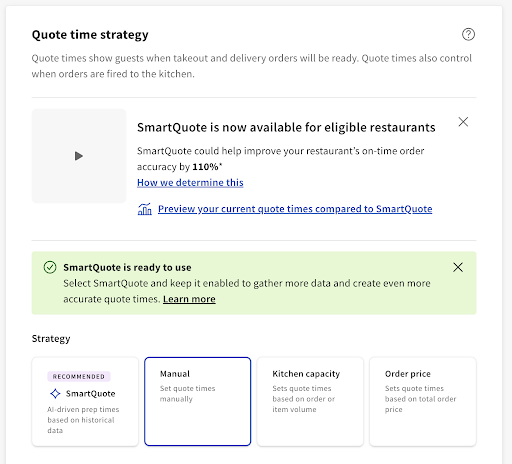
If you are new to SmartQuote or have not enabled yet, you can preview your current quote time strategy's performance compared to SmartQuote. On the Quote time strategy section, a banner appears letting you know that SmartQuote is now available for eligible restaurants. From the banner, you can choose to:
- View a video about SmartQuote
- Learn how SmartQuote's performance is determined
- Preview your current quote time strategy's performance compared to if SmartQuote was enabled
This view is available if SmartQuote has not been activated yet. The banner is removed once SmartQuote has been activated.
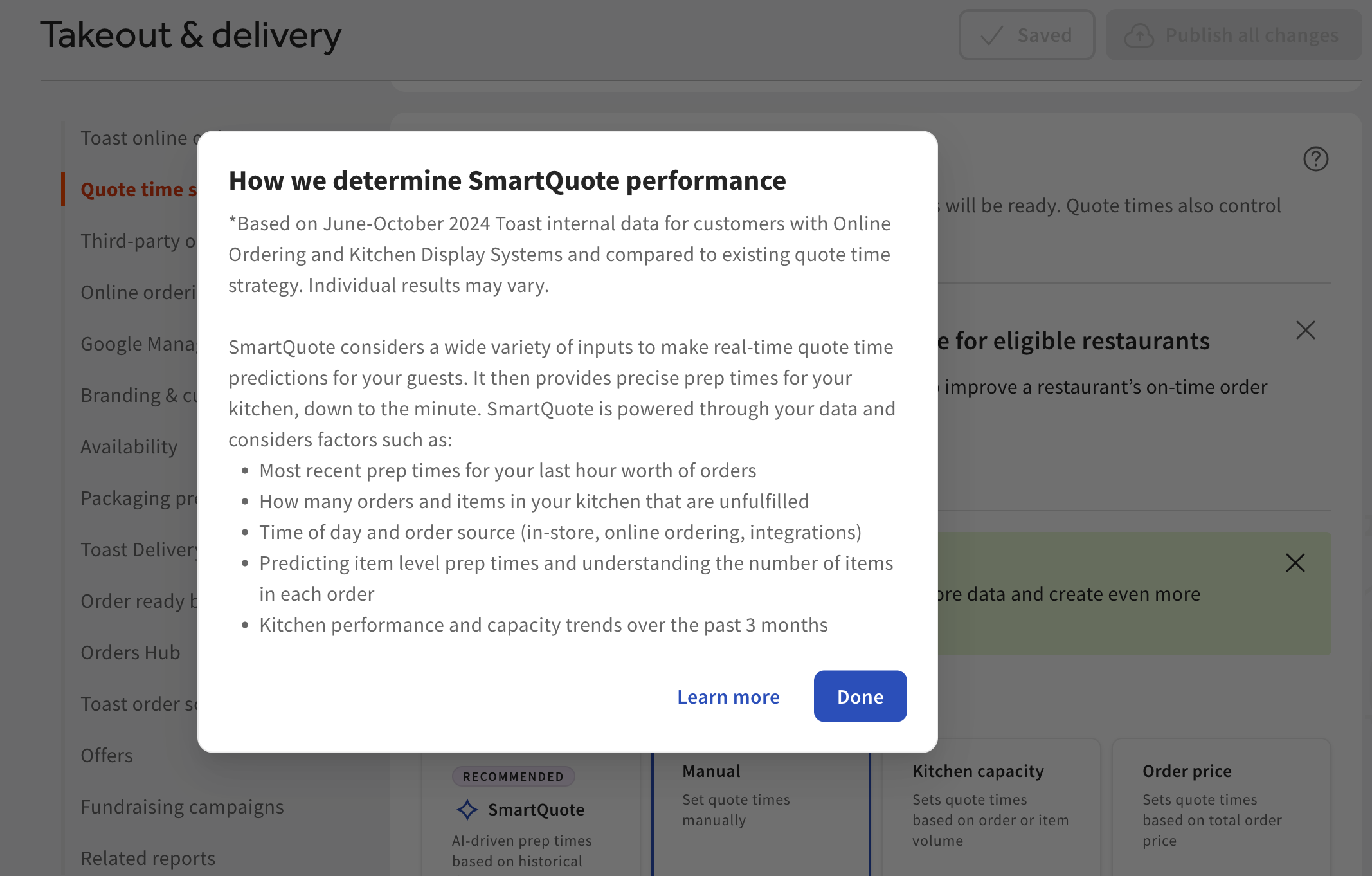
For more information on how the SmartQuote calculates performance, select the How we determine this link. This opens a pop-up provides a list of factors and inputs that are used to calculate SmartQuote performance. Performance is based on a comparison of SmartQuote to your restaurant's existing quote time strategy for the previous 31 days. Individual results may vary.
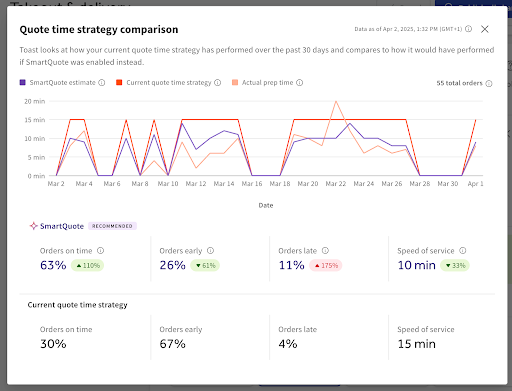
In the preview, you can view the following comparisons and information:
- SmartQuote vs your current quote time strategy vs the actual prep time
- The number of orders over the past 31 days
- Orders on time
- Orders early
- Orders late
- Speed of service
| The metrics in the preview are for the last 31 days. |
To use SmartQuote, you must have a subscription to the Digital Storefront Suite and at least one Kitchen Display System (KDS). For more information, see Toast Suites Overview.
In order to successfully activate SmartQuote, you must meet the following requirements:
- Your restaurant must be online and operational for at least 30 days
- Your restaurant is not operating in Test Mode. For more information, see Test Mode Overview
- You must have at least 30 days of fulfilled order data
- You must have fulfilled at least 500 orders in the last 120 days
- Orders must be marked as fulfilled on a Toast KDS device. For more information, see Item and Order Fulfillment on KDS
Navigate to the Takeout & delivery page in Toast Web and select the SmartQuote button in the Quote time strategy section to activate SmartQuote. Activating SmartQuote generally occurs within a few minutes, but can take up to 72 hours. After 72 hours, SmartQuote is either successfully activated and is available for use or cannot be activated and is not available for use. Below is a list of the various SmartQuote activation scenarios that you may encounter.
- SmartQuote is ready to use: SmartQuote is active and can be enabled for use.
- SmartQuote is now live: SmartQuote is active and is enabled. You have chosen SmartQuote as your quote time strategy.
- SmartQuote is gathering data: SmartQuote is collecting and analyzing your historical order data. Toast will let you know via email when SmartQuote is available for use. Continue using your current quote time strategy until SmartQuote is available.
- SmartQuote cannot be activated at this time: SmartQuote is unavailable for use. Your order fulfillment rates may need to improve before you can use SmartQuote.
- Note: Keep marking orders as fulfilled on your Toast KDS device to gather data to train the SmartQuote AI model.
- SmartQuote is learning about your restaurant operations: SmartQuote needs to gather more historical order data to provide you with automated quote times. Toast will let you know via email when SmartQuote is available for use.
- Note: Keep marking orders as fulfilled on your Toast KDS device to gather data to train the SmartQuote AI model.
- SmartQuote is available for use: SmartQuote is available for use, but you may not see significant improvements in your quote times.
- Note: Keep marking orders as fulfilled on your Toast KDS device to gather data to train the SmartQuote AI model.
If SmartQuote has been successfully activated and is available for use, you will receive an email from Toast notifying you that SmartQuote is now live, and you can continue to the next section to enable it for your restaurant.
Enable SmartQuote
Once SmartQuote is activated, you can enabled it for your restaurant. Watch this how-to video or follow the steps below:
Video overview of how to enable SmartQuote in Toast Web.
Note: If you choose to enable SmartQuote, you cannot add takeout or delivery delays. To configure online ordering delays, see Manage Online Order Volume (Delaying/Snoozing Orders).
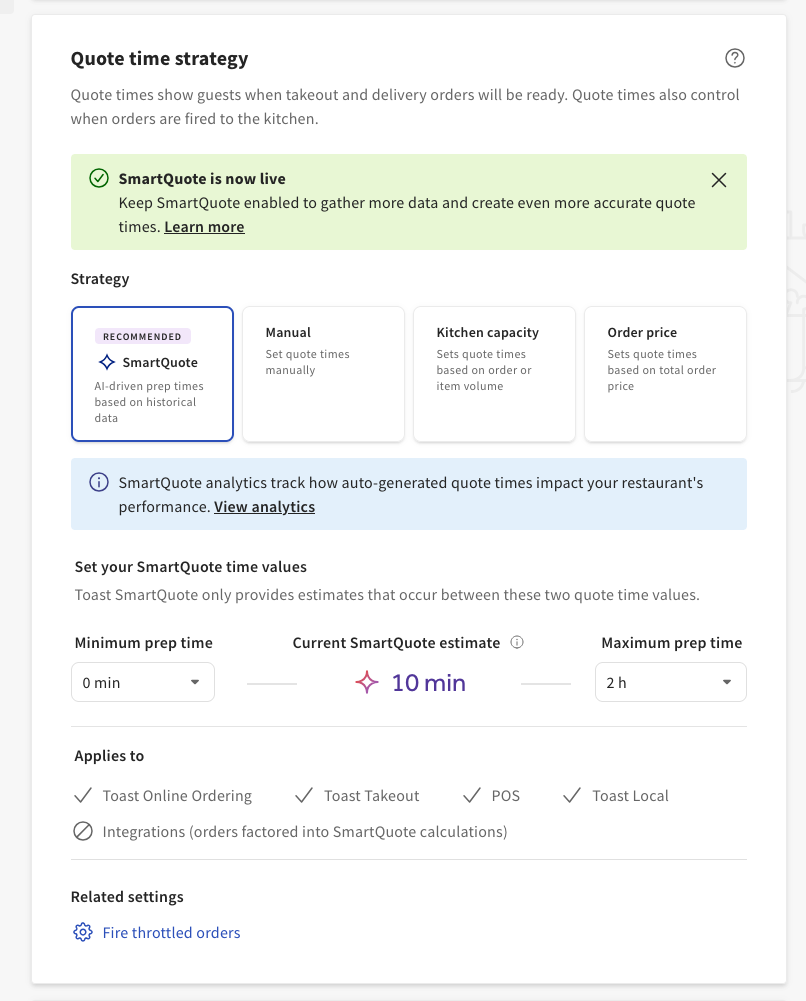
- In Toast Web, navigate to the Takeout & delivery > Quote time strategy to open the Quote time strategy section.
- Select the SmartQuote button.
- Select a minimum and maximum prep time from the drop-downs. The minimum quote time is 0 minutes and the maximum quote time is 120 minutes (2 hours). SmartQuote will provide an estimated prep time that falls within the minimum and maximum values set.
- Select the Save button. SmartQuote provides an estimated prep time based on the values set.
Note: If you choose to use SmartQuote and first-party delivery, make sure you choose and set a delivery time using the hour and minutes Delivery drop-downs underneath the Current SmartQuote estimate heading. The guest’s quote time for their delivery order is the SmartQuote estimate plus the delivery time. - Select the Publish all changes button to save your changes. The Confirm Publish dialog box appears.
- Select the Publish button to publish your changes or the Cancel button to cancel the dialog box.
New and or updated SmartQuote prep times will appear in the Online Ordering dashboard, and colored labels will appear to indicate the current SmartQuote prep time.
SmartQuote Frequently Asked Questions
Can I add my own data inputs or values into the SmartQuote model?
At this time, you cannot add your own data inputs or values into the SmartQuote data model.
How do I determine what minimum and maximum values to set for SmartQuote?
To determine minimum and maximum SmartQuote prep times, Toast recommends you navigate to Toast Web and choose Reports > Kitchen Operations > Ticket Details and review the trends in your fulfillment times over the past weeks. Use this data as a starting point to determine your minimum and maximum SmartQuote prep times.
Does SmartQuote prioritize or weigh certain data inputs differently than others?
The SmartQuote data model prioritizes the number of items in an order, however the data model determines this on a per restaurant location basis.
Can SmartQuote generate prep times that are outside of the set minimum and maximum range?
Yes, SmartQuote may generate prep times that are outside of the set minimum and maximum range when your Toast device has gone offline. When your Toast device does go offline, SmartQuote defaults to the last enabled manual quote time strategy.
What order sources does SmartQuote generate prep times for?
SmartQuote generates prep times for orders from the following order sources:
-
Toast Online Ordering
-
Toast Local app
-
Order with Google
SmartQuote will not generate prep times for in-store orders, or orders from third-party online ordering channels or orders placed via kiosk. Orders placed from these sources will be factored into SmartQuote prep times, but prep times will not be provided for these orders.
Do SmartQuote prep times get more accurate over time?
Yes, when SmartQuote is provided more data to analyze, it will generally provide more accurate and improved prep times. The accuracy of SmartQuote predictions relies heavily on the quality and quantity of the data used for training the AI model. Insufficient or biased data could lead to inaccurate predictions. Please consider these limitations when interpreting results.
What happens if SmartQuote stops working or cannot provide prep times?
If SmartQuote stops working or cannot provide prep times, SmartQuote defaults to the last enabled manual quote time strategy and the SmartQuote button is grayed out in Toast Web.