Get Started With the Cloudbeds Integration
Last updated: Oct 8, 2026, 12:11 PM
You must have a Cloudbeds account set up for your hotel before setting up the integration with your Toast account. If you are new to Cloudbeds, speak to their sales team first to set up your account before completing any steps outlined in this article.
| This integration requires a Hotel PMS Integration subscription, which can be purchased by navigating to the Toast Shop. |
- Enable the Cloudbeds Integration With Toast
- Toast Web Configurations
- Troubleshooting and Support
- Additional Resources
Enable the Cloudbeds Integration With Toast
- To enable the Cloudbeds integration with Toast, log in to Toast Web and navigate to the Integrations section using the left-hand navigation menu. Then, select Integrations management > Browse & purchase integrations.
- Enter Cloudbeds in the Search field and then select Add Now. If you have multiple locations, you’ll be prompted to select which location(s) you’d like to connect to your Cloudbeds account. Select your desired location(s).
- Review the data scope visibility terms and conditions and select Confirm. See the Data Scope Visibility article for more information.
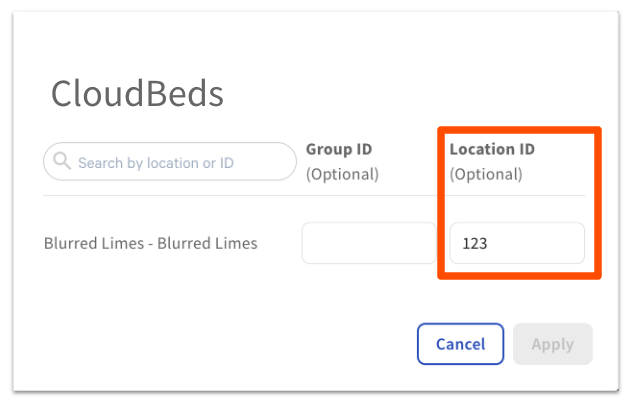
- Next, you’ll need to add your Cloudbeds Account ID to the Location ID field of your Toast integration. For help finding your Cloudbeds Account ID, check out their help article. Select the gear icon for the Cloudbeds integration.
- Note: If you’re adding your Location ID at a later time, you can find your active integrations in Toast Web by navigating to Integrations > Configure integrations.
- Enter your Cloudbeds Account ID in the Location ID field.
- Select Apply.
- Note: It’s important to ensure that the correct Cloudbeds Account (property) ID is entered as the Location ID in Toast Web. Without it, the integration will not work. Removing the Location ID will break the connection.
- If you have the appropriate Toast Web permissions, you can create the Room Charge payment option yourself — no need to submit a ticket to Toast Customer Care. In Toast Web, navigate to Finance > Related > Settings > Other payment options and add a new payment option for Room Charge. If you don't have access to make this change, submit a ticket to Customer Support to request it. This is required to process room charges and guest payments properly.
- Once the support ticket is processed, you can check that the Room Charge payment option is linked to Cloudbeds by navigating to Finance > Related > Settings > Other payment options in Toast Web. Until this is set up correctly, the status of the connection in your Cloudbeds account will say “Not completed. Set up on the Toast side.”
- Go to your Cloudbeds account and connect to Toast. For screenshots of this process, check out the Cloudbeds help content here.
- In Cloudbeds, navigate to the Account page.
- Select Apps & Marketplace.
- Search for the Toast app, select Learn more, and then select Connect app.
- Select the properties you’d like to connect to Toast.
- Select Continue.
- Once you’ve successfully connected Toast to Cloudbeds, you can configure your preferred options (in Cloudbeds) by selecting Settings for the Toast POS app.
Toast Web Configurations for Cloudbeds
Before you can finalize your Cloudbeds integration, there are a few settings that need to be configured in Toast Web:
- Sales Categories must be assigned to every menu item in order to be accounted for with the integration.
- Receipts can be edited to allow guests to provide their hotel room information directly on their receipt, so servers and restaurant administrators can bill them at checkout.
To learn more about editing these configurations, check out this Support Center article: Hotel Property Management Systems (PMS) Integrations with Toast.
Back to top
Troubleshooting and Support for Cloudbeds
For any questions or technical issues with your Cloudbeds integration unrelated to Toast products (hardware or software) or network/connection issues, email integrations@cloudbeds.com or contact Cloudbeds support via this form. You can also find more information about using Cloudbeds through their help articles, including: