Get Started With the WebRezPro Integration
Last updated: Sep 18, 2026, 10:58 AM
WebRezPro is a PMS (Property Management System) Hotel integration that allows guests to charge meals from a Toast restaurant within a hotel, directly to their room. WebRezPro is powered by Omniboost.
| This integration requires a Hotel PMS Integration subscription, which can be purchased by navigating to Toast Shop. |
- Enable WebRezPro With Toast
- Toast Web Configuration
- WebRezPro Credit Limit
- Troubleshooting and Support
- Additional Resources
Enable WebRezPro With Toast
Note: To begin the process with the WebRezPro x Toast integration, you will need to first contact your WebRezPro account executive to add the Toast integration to your account. Once the contract with WebRezPro has been signed, you can move forward with the following steps.
- To enable WebRezPro with Toast, navigate to the Integrations section of Toast Web using the left-hand navigation menu. Then, select Integrations management > Browse & purchase integrations.
- Enter WebRezPro in the Search field and then select Add Now. If you have multiple locations, select which restaurant(s) you would like to connect to your WebRezPro account, and select Apply.
- Note: Your restaurant must have access to Toast Partner Integrations to add this integration. To learn more, see Set Up Toast Partner Integrations.
- Review the data scope visibility terms and conditions and select Confirm to accept. See the Data Scope Visibility article for more information.
- After adding the integration in Toast Web, you will receive an email confirming the activation of the integration.
- Once the email is received, contact Omniboost support via email at integrations@omniboost.io to finalize the integration and connect Toast to WebRezPro.
- Note: Omniboost’s team also receives an email alerting them that a new integration has been added for Toast. The Omniboost team will reach out directly in three business days. Full onboarding and setup time varies depending on the provision of the necessary WebRezPro information, you needs and responsiveness.
- After the WebRezPro tile in Toast Partner Integrations has been added, Omniboost and Toast will continue setup of your integration.
Toast Web Configuration for WebRezPro
As with all PMS/hotel integrations, WebRezPro requires the following configuration items to be setup in Toast Web:
Back to top
Sales Categories
In order for revenue generated from Toast POS to be accounted for accurately within the WebRezPro Hotel/Property Management System integration, Toast sales categories must be assigned to every menu item, before the PMS integration can be fully set up and configured.
Whether the sales categories are inherited from the menu or menu group-level, or individually applied to a specific sales category, this can be configured in either advanced properties or the menu builder tool.
Within the WebRezPro hotel system, sales categories are mapped to WebRezPro revenue categories which enables the integration to accurately account for revenue generated by the sale of each menu item posted to a guest’s folio. If no sales categories are applied, no sales are accounted for with the integration.
Note: Sales categories must be configured and mapped to menus, menu groups, and/or menu items in Toast Web for every location leveraging any Hotel/PMS integration before the PMS integration can be fully configured.
Other Payment Options
As a part of the integration setup, Toast will be creating the following necessary WebRezPro Other Payment Options for you:
- Room Charge: for Room Charge transactions when fully online.
- Room Charge - Offline: when in offline mode/during an outage, provides a way for customers to continue transactions for later processing and closing.
Receipt Setup
Changes to your location’s receipt setup allow your hotel guests to provide their hotel room information directly on their receipt, so servers and restaurant administrators can update the related hotel information. This information will most likely include the guest’s name, hotel room, and signature.
To set up receipts for hotel PMS integrations:
- Log into Toast Web, and navigate to Finance > Related > Settings > Guest receipt setup.
- Select the receipt name.
- Scroll down to the Advanced section.
- Next to Display room charge prompt on receipts, select Yes to add lines for a hotel guest's room number and name to printed receipts.
- Once finished, select Save, then Publish Now.
Once the setting has been saved and published, receipts will print like the image below:
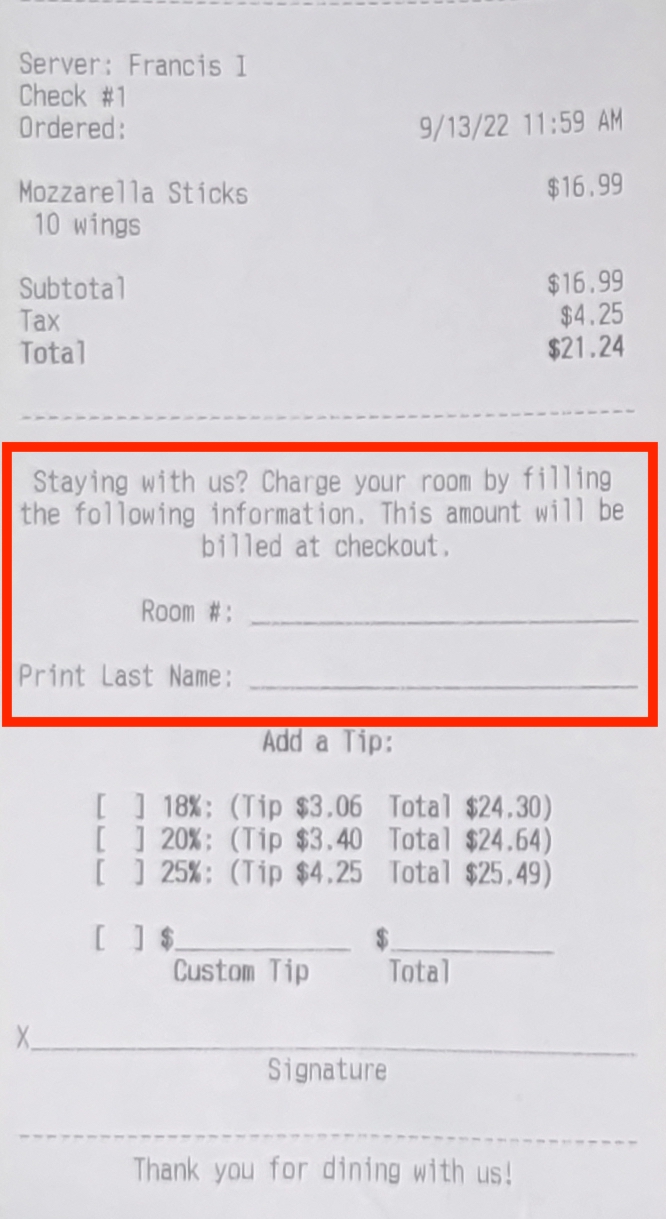
If you wish to remove the room charge lines from their receipts, follow the steps above, then select No next to Display room charge prompt on receipts. Then select Save and Publish Now.
WebRezPro Credit Limit
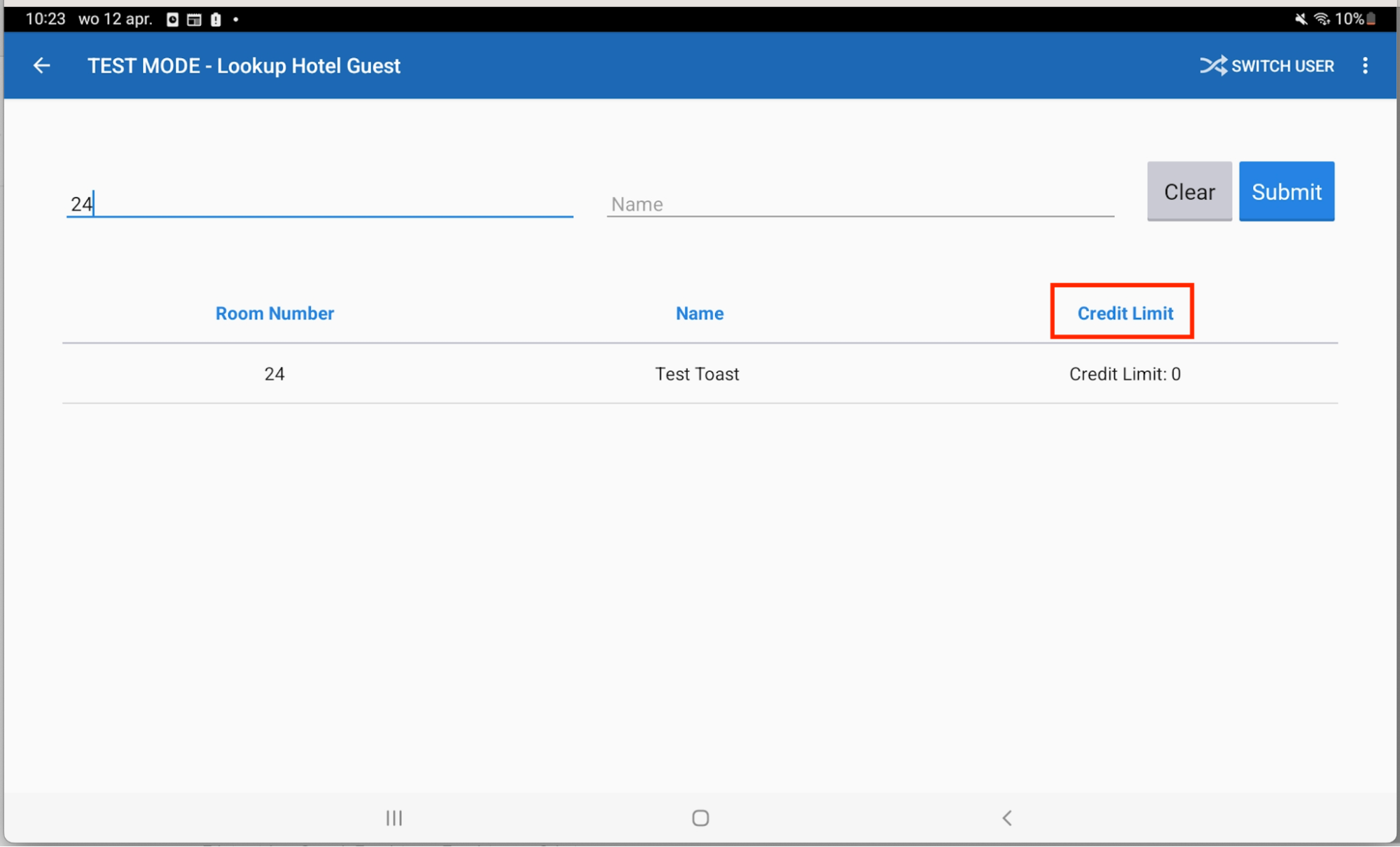
Note: Credits and credit limit functionality is configured directly in WebRezPro, not via Toast.
Troubleshooting and Support for WebRezPro
Contact Omniboost directly for any issues with your WebRezPro integration, which are unrelated to Toast products (software or hardware) or network/connection issues. For any WebRezPro integration questions or support issues
General Support:
- Email: pos-support@omniboost.io
- Phone Number: EU: +31 85 130 2519 or US: 1 (929) 244-8660.