Import Customer Information for Toast Invoicing
Last updated: Sep 17, 2026, 10:41 AM
Prepare to Import Customer Information
Transitioning to using Toast invoicing from another system? With this feature you can save time by preloading customer information into the Toast invoicing platform.
Toast invoicing can only support a specific type of file format to upload. You can download this format using this link <DOWNLOAD TEMPLATE HERE >
The file you upload must be in CSV format including the following information in this specific order.
- First Name
- Last Name
- Company Name
- Address Line 1
- Address Line 2 (optional)
- City
- State
- Zip Code
- Phone Number
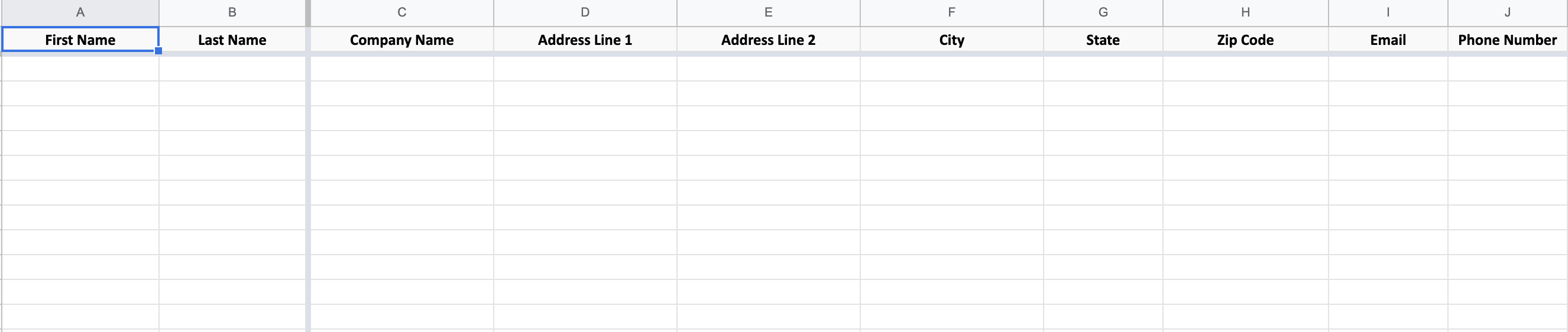
Once the information has been inputted, download your file in CSV format before uploading it into Toast.
Back to top
Import Customer Information
- After logging in to Toast Web, navigate to the Payments section from the home screen.
- Under the Payment methods header, select Customer invoices.
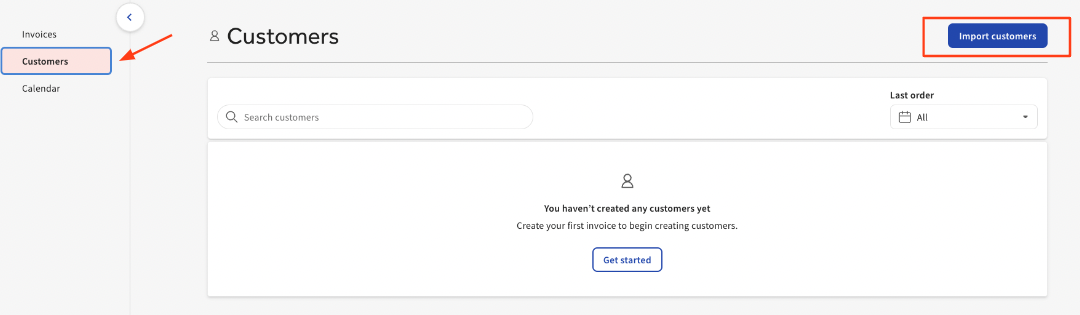
- Select Customers, then Import Customers.
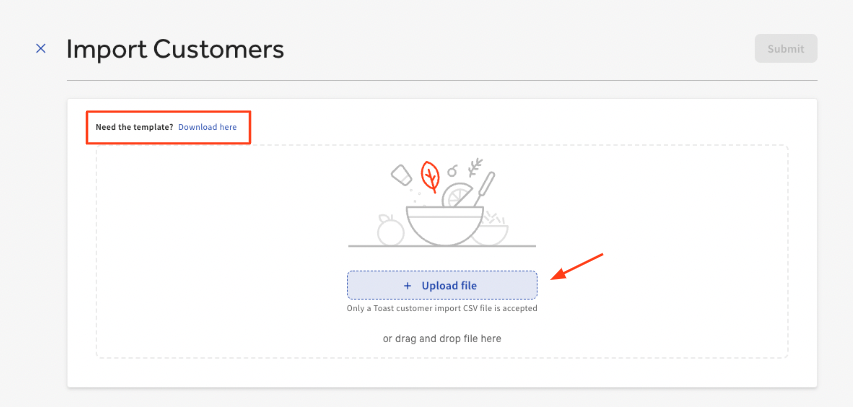
- Select Upload file.
Note: If you have not already completed this template, follow the steps in Preparing to Import Customer Information . You can also download the preferred template right from this page. Once the information has been inputted, download your file in CSV format before uploading into Toast.
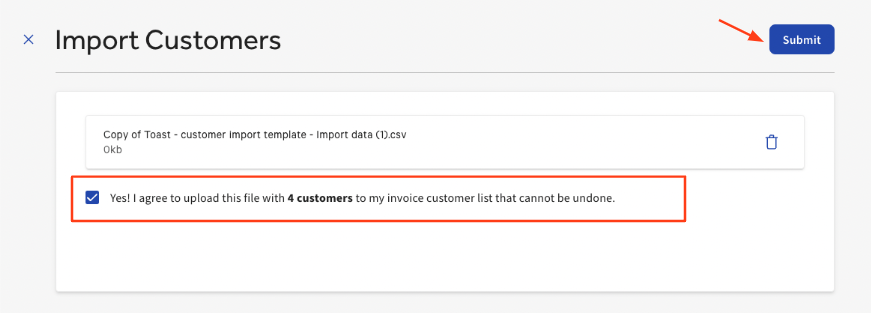
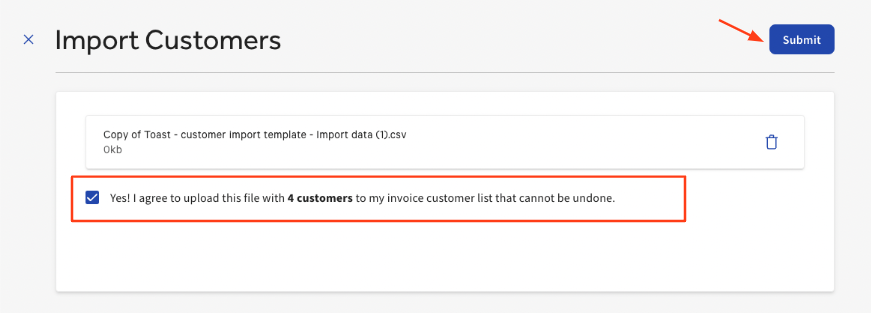
- Once you have selected the required file type for upload, select Yes! I agree to upload this file with X customers to my invoice customer list that cannot be undone.
The number here indicates how many customers are being uploaded. In this example, we are uploading (4) customers.
- Select Submit.
- After your upload is complete, a list of all customers will populate. A green badge will appear on the bottom of this page alerting you This upload was completed successfully.
Your imported customers will now appear in your customer list when sending an invoice.
FAQ
What customer information can be imported into Toast for invoices?
The file you upload must be in CSV format including the following information in this specific order.
- First Name
- Last Name
- Company Name
- Address Line 1
- Address Line 2 (optional)
- City
- State
- Zip Code
- Phone Number
Toast has created a template including this information in the correct order. Once the information has been inputted, download your file in CSV format before uploading into Toast. <DOWNLOAD TEMPLATE HERE >
Can I use my own file, or do I have to use the template provided by Toast?
It is not mandatory to use the Toast template for this upload. However, the information, and order in which this information is organized, must be the same for a successful upload.
Why did my upload fail?
There are a few reasons an upload could fail.
- incorrect format
- invalid entry
- missing information
- duplicate customers
Can this customer information be shared with my Toast Loyalty program?
No. Once customer information has been uploaded onto the Toast invoicing platform, this data is not shared with your Toast loyalty program. However, these same customers can be uploaded to your loyalty program by following these instructions.
Note: These are two separate uploads.
Additional Resources
Want to know more about Toast invoicing? Check out these resources below.
- How to Send an Invoice to Your Guests
- Charge Guests for Event Deposits by Using Toast Invoicing
- Reporting for Toast Invoices