Configure Items Priced by Weight
Last updated: Sep 17, 2026, 1:02 PM
- Weighed Items Overview
- Configure Price-per-Pound Items Individually
- Configure Price-per-Pound Items in Bulk
Weighed Items Overview
For items that are sold by weight, like deli meat by the pound, a fixed price per unit of measurement can be configured in Toast Web.
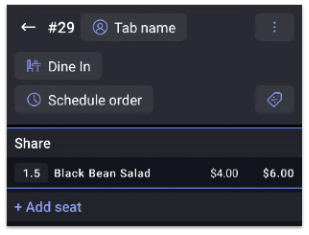
When the item is selected on the POS, a keypad will appear to enter a desired quantity. The check will show the quantity to the left of the menu item name. To the right of the name, the price per unit will be shown first, followed by the cost for the selected quantity. In this example, the check is showing 1.5 units (pounds) of Black Bean Salad was ordered. The base price was $4.00 per pound, so the total cost for 1.5 lbs is $6.00.
You can weigh and sell items even if the measured weight excceeds the available inventory recorded in Toast. This ensures that sales aren't blocked when your guests physically present an item that weighs more than the stock quantity listed. For example, if a cut of meat or bulk item is slightly heavier than the inventory balance, the sale can still be completed without disruption.
- For businesses using Toast Retail, see this Support Center article: Toast Retail: Set Up Weighed Items.
- To learn more about setting up your scale, see Use a Scale With Toast.
Configure Price-per-Pound Items Individually in Toast Web
You can configure price-per-pound on an item details page.
- In Toast Web, navigate to Menus > Bulk management > Advanced properties.
- Use the caret (arrow) icons to expand your menus, groups, and subgroups as needed to open the item details page for the item you wish to edit.
- Scroll down to the Pricing section, and select Base Price for the Pricing Strategy setting.
- Enter the cost per unit in the Base Price field. For example, if a "Black Bean Salad" is $4.00 per pound, enter "4.00" in the Base Price field.
- Scroll down to the Properties section, and select Yes for the Prompt for Quantity setting.
- If desired, scroll to the Weighing section and select the appropriate Unit of Measure. You can choose between pounds, ounces, kilograms, or grams. If nothing is selected, the default setting is None (item isn't weighed).
Note: Unit of Measure must be enabled by Customer Care to appear on your advanced properties page. If you don't see Unit of Measure as an option, please contact Customer Care to have weighed item configuration turned on in your restaurant setup.
- Save and publish your changes.
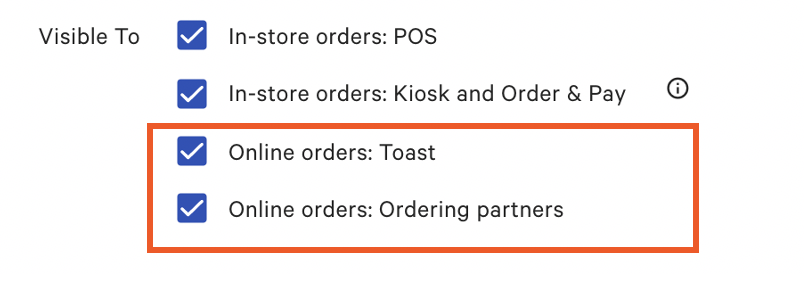
To ensure online visibility for guests, select Online orders: Toast and if applicable Online orders: Ordering partners under the Properties subcategory.
Configure Price-per-Pound Items in Bulk
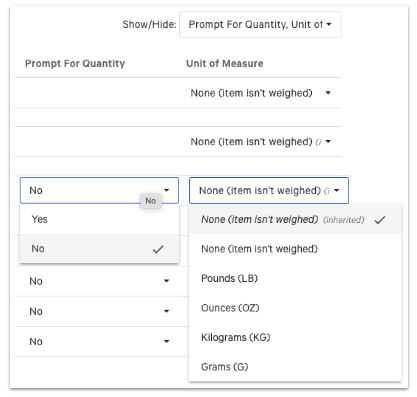
You can enable prompt for quantity and add a unit of measure to multiple items at once using the Advanced properties page.
- Navigate to Menus > Bulk management > Advanced properties.
- Open the Show/Hide drop-down.
- Make sure that Prompt for Quantity and Unit of Measure are both selected.
- Use the caret (arrow) icons to expand your menus, groups, and subgroups as needed to show any items that need to be sold by weight.
- Use the drop-down arrows to ensure that Yes is selected for Prompt for Quantity, and the Unit of Measure is selected for any items that need it.
Note: Unit of Measure must be enabled by Customer Care to appear on your advanced properties page. If you don't see Unit of Measure as an option, please contact Customer Care to have the weighed item configuration turned on in your restaurant setup.
- When finished, select save and publish to finalize your changes.