Toast Flex and Elo: Stand Options and Mount
Last updated: Sep 17, 2026, 5:23 PM
Learn how to change Toast Tablets from wall mount to counter stands.
| For installation information on the Flex 22" Counterstand, see Flex 22” Counter Stand Installation Guide. |
Toast Flex, Toast Flex 3, and Elo Devices Overview
Whether you're setting up a new device or changing your current configuration, this article will help you understand your options for Toast Flex and Elo terminals.
Toast Flex and Toast Flex 3 Terminal Mount
Toast Flex and Toast Flex 3 devices are designed with VESA mounting patterns to support a variety of installation options:
- 14" devices (Flex and Flex 3): 75 × 75 mm VESA
- 22" devices (Flex): 100 × 100 mm VESA
The 22" counter stand supports both 75 × 75 mm and 100 × 100 mm VESA patterns.
Your device will ship with mounting hardware based on the product and configuration ordered:
- Counter-mounted configurations:
- Include a Toast-designed counter stand specific to the device model (including HW0155 for 22" devices).
- Flex 3 (14") counter configurations ship pre-assembled and do not include a VESA conversion plate. If converting a Flex 3 Terminal from counter to wall-mounted, a Flex 3 conversion kit (not yet available) is required. Stay tuned for conversion kit availability.
- Flex 22" devices are not pre-attached and use a 100 × 100 mm VESA pattern, allowing them to attach directly to compatible stands or mounts without a conversion kit.
- Include a Toast-designed counter stand specific to the device model (including HW0155 for 22" devices).
- Wall-mounted configurations (Flex 3 14" Display, including KDS and Kiosk bundles):
- Include the Universal 3-in-1 Mount Kit (Toast Flex Mount Kit, SKU TM100V).
- Both configuration types ship with a VESA conversion plate attached to the display, and the mount kit is packaged separately.
- 22" Flex devices:
- Ship with either the counter stand (HW0155) or the Universal 3-in-1 Mount Kit (TM100V), depending on configuration.
Note: Non-Toast Flex 3 devices are not available pre-configured as wall-mounted or KDS, and do not include wall mount hardware.
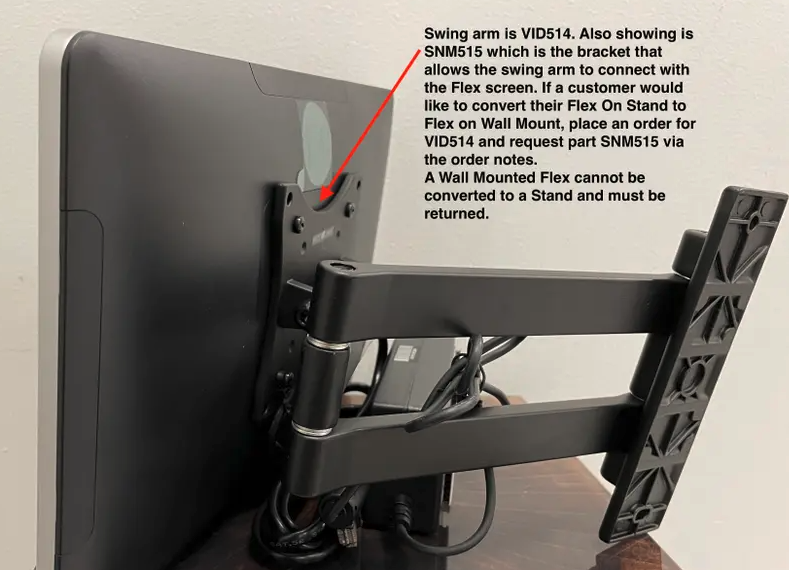
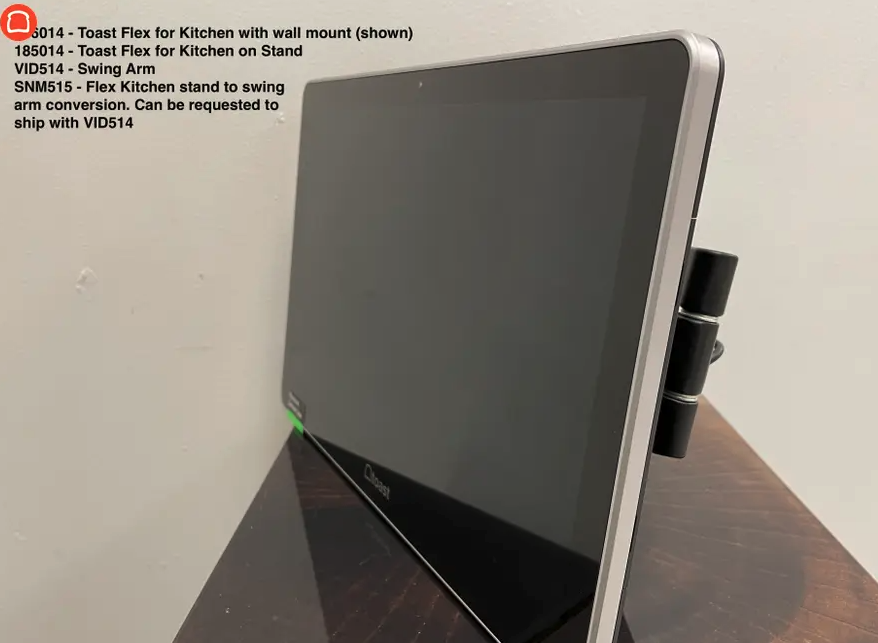
Change From a Toast Flex Counter Stand to a Swing Arm
If you have a 14" Toast Flex, you can use:
- A KDS Conversion Attachment (part number: SNM515new). This attachment is not compatible with the Toast Flex 3.
- The Toast Flex Mount Kit (Universal Counter-Wall-Pole Terminal Mount Kit, part number TM100V), or any third-party mounting equipment that matches the VESA pattern of your device (75mm x 75mm).
If you have a 22" Toast Flex, you'll just need the Toast Flex Mount Kit described above (or third-party equivalent with a 100mm x 100mm VESA pattern).
If you have a Flex 3 (14") that shipped in a counter configuration, this cannot be converted to a swing arm.
Change From a Swing Arm to the Toast Flex Counter Stand
If your Toast Flex was delivered with a swing arm and you now want to use the Toast Flex counter stand, you can order the counter stand separately (part number HW0155). This counter stand works with both the Toast Flex 22" and 14" (which comes pre-configured with a compatible conversion plate).
Please contact Customer Care Support to order the counter stand.
Elo Terminal Mount
Stands for Elo terminals are generally sold separately, offering you the flexibility to choose the best fit for your setup. Most Elo-compatible stands are designed for easy interchangeability, typically using just four Phillips head screws.
- For 15" and 22" Elo Terminals:
- Our 15-inch and 22-inch Elo terminals are quite versatile, featuring dual VESA hole patterns (including 75x75mm and 100x100mm). This allows them to be compatible with several types of stands:
- Swing Arm
- Flip Stand (allows the screen to flip to face the customer)
- Non-Flip Stand (a fixed stand, such as our ELT515 model, which uses the 100x100mm VESA pattern)
- Our 15-inch and 22-inch Elo terminals are quite versatile, featuring dual VESA hole patterns (including 75x75mm and 100x100mm). This allows them to be compatible with several types of stands:
- For 10" Elo Terminals:
- The 10-inch Elo terminal is specifically compatible with the following options:
- Flip Stand
- Swing Arm
- The 10-inch Elo terminal is specifically compatible with the following options:
If you have further questions or need assistance with parts or exchanges, please don't hesitate to contact Customer Care Support.