Local Menu Edit Permissions for MLM
Last updated: Sep 17, 2026, 1:06 PM
Local Menu Edit Overview for Toast Multilocation Management
For restaurants with Toast Multilocation Management (MLM), it's common for individual locations to offer menu items that other locations may not carry. Such items might be carried for a limited time only or maybe they get rotated in and out of a menu on a seasonal basis.
When this is the case, the corporate level of a franchise concept creates the entire "items database" for all locations, then gives store-level managers the ability to add/remove those existing items to their location's menu. To utilize local menu editing, assign the employee (or job role) the 4.14 Local Menu Edit permission (to assign or adjust permissions, see Manage User Jobs & Permissions With MLM).
A user with the 4.14 Local Menu Edit permission will be able to do the following to corporate-level menu items or item modifiers:
- Change item price only if the item has location-specific pricing turned on (see Location-Specific Pricing for Multi-Location Management for more information).
- Note: Location-specific pricing can be turned on by a user with 4.5 Edit Full Menu permission.
A user with 4.14 Local Menu Edit permission will be able to do the following to local objects, including items in local menu groups and local modifier groups:
- Add or remove existing menu items and existing modifier options
- Change the name
- Change the price or pricing strategy
- Edit price levels for local objects (to learn more about price levels and how to use them, check out the article Set Price Levels for Items With the Same Price)
4.14 Local Menu Edit is a subset of the 4.5 Edit Full Menu permission that allows restaurant admin to simplify menu editing access when dealing with numerous locations. A user with the 4.5 Edit Full Menu permission does not also need 4.14 Local Menu Edit, since they'll already have access to the same functionality. A user with both permissions will be able to edit the full menu.
For example, take the Beverages menu below:
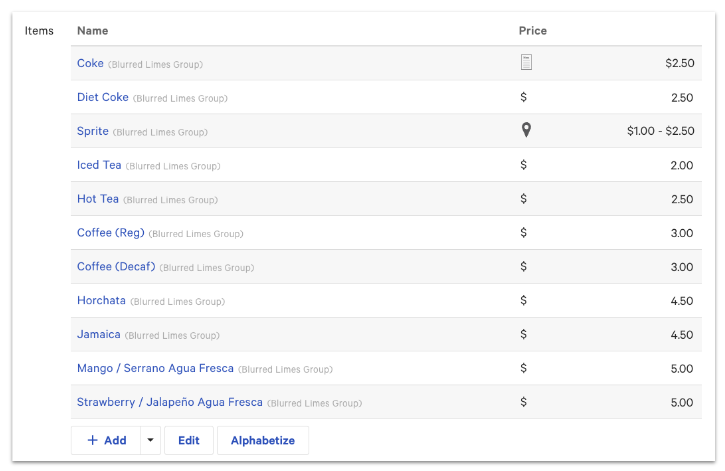
- A user with 4.14 Local Menu Edit permissions will only have the option to add items that exist in the corporate-level items database
- A user with 4.5 Edit Full Menu permissions will be able to select + Add to add new items to the same Beverages menu
In some cases, the corporate level of a franchise concept controls the pricing structure and which menu items can be added or removed from individual locations. In order to maintain synchronicity in one single above-store reporting structure, it's important that menu items aren't created on an individual store level and are instead pulled from an existing database of items. This prevents local managers from creating menu items that could potentially inflate above-store reporting data.
Back to top