Look Up a Toast Loyalty Rewards Balance
Last updated: Sep 11, 2026, 2:17 PM
Your guests can look up their Toast Loyalty rewards balance by selecting your reward card lookup link. The URL for your restaurant's rewards link is location-specific; however, because Toast Loyalty accounts work across all locations in a restaurant group, your guests can use any location-specific links to check their Toast Loyalty rewards balance.
If you are a guest checking your own rewards balance: ask the restaurant for its Rewards Lookup link, or - if you are in the U.S. - use the Toast Local app, which shows every restaurant you have a rewards account with. On the Rewards Lookup page, enter the email address or telephone number associated with your rewards account, complete the reCAPTCHA checkbox, and select Find now. Your balance is then sent to the email address on your rewards account. Toast Loyalty accounts work across all locations in a restaurant group, so any location's link will work for that group.
Look Up a Toast Loyalty Rewards Balance
You can access your rewards lookup link by following the steps below.
- In Toast Web navigate to Takeout & delivery > Toast order sources > Restaurant info.
- Copy and paste the Rewards Lookup link from the Share Your Public Links section to the right column. Note: Be sure to feature this link prominently on your website and social media to give your guests a quick way to check their balance while visiting your site. Once your guest enters the site, they must enter the email address or telephone number associated with their Loyalty/Rewards account. If the page doesn't accept your email or phone number, enter your Toast Loyalty rewards card number instead — some Rewards Lookup pages require the card number. You can find this number on your physical or digital Loyalty card, or by asking the restaurant where you earned the rewards.
- Guests will be asked to complete the reCAPTCHA by selecting the checkbox, confirming they're really your guest--not a robot. Finally, they can select Find now.
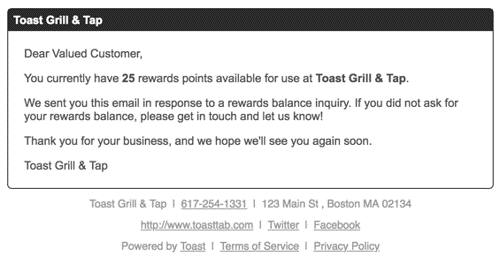
- An email will be sent to them with their Loyalty / Rewards balance.
To learn more about guests enrolling in your Toast Loyalty program and how to redeem points, see Get Started with Toast Loyalty.
Note: To merge two Toast Loyalty rewards accounts into one, see Merge Reward Balances. Merging requires the accounts to share the same email address or phone number and be in the same rewards/bonus group; if they don't match, contact the restaurant to request a manual balance transfer. If a guest has multiple Loyalty accounts with different restaurants, they can manage their accounts through the following methods:
- Rewards Lookup Page: Guests can contact the restaurant managing their Loyalty account to ask for their Rewards Lookup page link. From the Rewards lookup page, they can enter the email address or telephone number associated with their account to look up their rewards balance.
- Toast Local app: U.S. based guests can use the Toast Local app to see which restaurants they have a rewards account with and which local restaurants offer rewards. To make this option available for U.S. based guests, restaurants must first configure their Toast Local app settings. Learn more here, Get Started With Toast Local.