Fix Server Name or Job Title Not Showing on POS
Last updated: Sep 8, 2026, 12:21 PM
- Before You Begin
- Quick Fix
- If the Change Was Just Made in Toast Web
- If the Terminal Is Out of Sync
- If Only One Job Title Shows or the Wrong Job Appears at Clock-In
- If the Wrong Employee Name Appears at Clock-In
- If the Issue Keeps Coming Back
- Before You Contact Customer Care
- Frequently Asked Questions
- Related Articles
Before You Begin
Applies to: Toast Web, Toast POS
Permissions needed:
- 4.9 Employee Info in Toast Web (to view or edit employee profiles and job titles)
What you'll accomplish: Get a newly added server name or job title to appear correctly on your POS device so the employee can clock in and ring in orders.
Employee changes you make in Toast Web are designed to publish automatically when you save them. This is called a soft publish, and it differs from most other back-end changes, which require you to select Publish to push them to your devices. You will not see a Publish button after saving an employee profile, and that is expected.
When a soft publish does not reach a device, the new name or job title can be missing on that device while it appears correctly in Toast Web. In most cases you can fix this yourself by refreshing the affected device.
Quick Fix
Match the symptom to the most likely cause and go to the matching section below.
| Symptom | Most Common Cause | Quick Fix |
|---|---|---|
| A new employee's name doesn't print on tickets or show on the Kitchen Display System (KDS) | The change saved in Toast Web but hasn't synced to the device | Confirm the change saved, then resync the device |
| A newly assigned job title isn't available when the employee tries to clock in | The device is holding stale data | Log out and back in on the device, then resync |
| The employee has more than one job but only one job appears at clock-in | The job assignment didn't sync, or the jobs need to be reapplied | Remove and re-add the job titles in Toast Web, then resync |
| A different employee's name appears when the employee enters their POS access code | Duplicate POS access code or duplicate employee profile | |
| The name or job title appears after a resync but reverts back later | An underlying account record may need to be corrected | Contact Toast Customer Care |
If the Change Was Just Made in Toast Web
If you just added the employee or assigned the job title, the change may simply not have reached the device yet.
- In Toast Web, navigate to Employees > Employee management > Employees.
- Select the employee's hyperlinked last name.
- On the Profile tab, confirm the name spelling and the assigned job titles are correct, and that the profile is Active.
- If you made any edits, select Save Changes.
Expected outcome: The employee's name and job titles are correct and saved in Toast Web. If the device still doesn't show them, continue to the next section.
If the Terminal Is Out of Sync
If the change is correct in Toast Web but still missing on the device, the device is most likely out of sync. Start with a quick log cycle, which resolves many sync issues on its own.
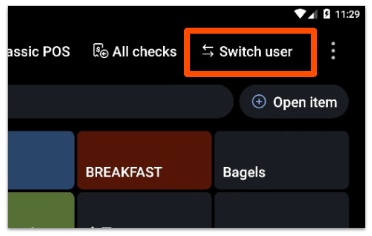
- On the affected POS device, go to the passcode screen. If you are not already there, select Switch user at the top of the screen.
- Select the three-dot menu in the top right corner.
- Select Logout.
- Log back in with your email address and password.
If the name or job title still doesn't appear after logging back in, resync the device:
- From the passcode screen, select Switch user if needed to return to it.
- Select the three-dot menu in the top right corner, then select Device status to confirm the device is online. Select Okay to close the Device status box.
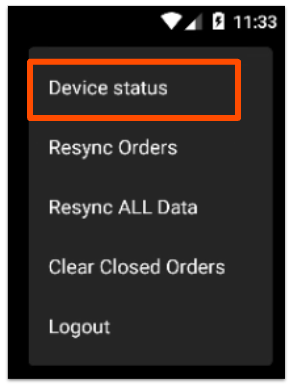
| Critical disclaimer: Before resyncing, confirm the device has no pending card payments, red checks, or other unsynced data. Resyncing while data is still pending or unsynced can cause permanent data loss. If you're not sure it's safe to proceed, contact Toast Customer Care before resyncing. |
- Select the three-dot menu again and select Resync All Data. Confirm when prompted.
- Wait for the device to reload.
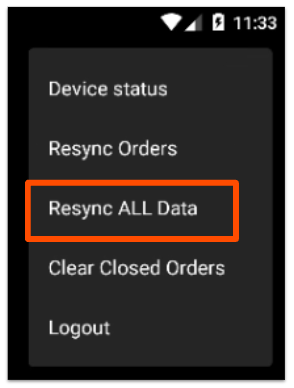
Note: Never resync a device that is offline or that has pending credit card payments or red checks. Resyncing in that state can cause those payments to be lost permanently. For the full safety check and detailed steps, see Resync All Data on Your Devices.
Expected outcome: After the device reloads, the missing server name or job title appears as expected.
If Only One Job Title Shows or the Wrong Job Appears at Clock-In
If an employee has more than one job assigned but only one job, or the wrong job, appears when they clock in, the job assignment may not have synced correctly.
- In Toast Web, navigate to Employees > Employee management > Employees.
- Select the employee's hyperlinked last name and open the Jobs section of their profile.
- Confirm every job the employee should have is assigned.
- Remove the affected job titles, select Save Changes, then add them back and select Save Changes again.
- Resync the affected POS device using the steps in the section above.
Expected outcome: All of the employee's assigned jobs appear at clock-in on the device.
If the Wrong Employee Name Appears at Clock-In
If an employee enters their POS access code and a different employee's name appears, the cause is usually a duplicate POS access code or a duplicate employee profile rather than a sync problem.
For step-by-step instructions to check for a shared POS access code, find a duplicate profile, and resync the terminal, see Resolve Time Clock and POS Access Issues.
Expected outcome: Each employee clocks in under their own name.
If the Issue Keeps Coming Back
If the correct name or job title appears right after a resync but then reverts back to the missing or incorrect version, the device-side fixes have done their job and the cause is likely an underlying account record that you cannot change yourself.
- Confirm the change is still correct and saved in Toast Web.
- Confirm you have logged out and back in and resynced the affected device at least once.
- If the issue still returns, contact Toast Customer Care.
Expected outcome: The name or job title stays correct after Customer Care resolves the underlying record.
Before You Contact Customer Care
If the steps above don't resolve the issue, gather the following before reaching out so Customer Care can help faster:
- The employee's name and the job title or name that isn't showing
- Whether the change appears correctly in Toast Web
- The specific device or devices where the issue occurs
- Whether the issue reverts back after a resync
- The steps you have already tried from this article
Frequently Asked Questions
Why isn't there a Publish button after I edit an employee?
There isn't a Publish button after you edit an employee because employee updates use a soft publish that pushes automatically when you select Save Changes. This is different from most other back-end changes, which require you to select Publish manually. If a soft publish doesn't reach a device, resync that device to pull the change through.
Also asked as:
-
- "Why can't I publish my employee changes?"
- "Where is the Publish button on the employee page?"
- "Do I need to publish after adding an employee?"
Why don't I see the Resync All Data option on the POS?
You don't see the Resync All Data option because it only appears when you are on the passcode screen. Select Switch user to return to the passcode screen, then select the three-dot menu again. If it still doesn't appear, log out and back in, then try again. For more detail, see Resync All Data on Your Devices.
Also asked as:
-
- "Resync All Data is missing from the menu"
- "I can't find the resync button on my terminal"
Is it safe to resync during service?
Resyncing all data is safe to do during service as long as you've checked that there are no pending credit card payments or red checks on the device, because resyncing with pending payments can cause permanent data loss. See Resync All Data on Your Devices for the full safety check.
Also asked as:
-
- "Can I resync while we're open?"
- "Will I lose payments if I resync?"
Related Articles
- Resync All Data on Your Devices
- Toast Web Updates Not Appearing on POS
- Resolve Time Clock and POS Access Issues
- Publish Changes in Toast Web