Optimize Toast Catering & Events
Last updated: Sep 15, 2026, 12:18 PM
In this article, learn how to leverage key features within the Toast Catering & Events module.
Looking for a live training experience with a Toast Training Expert? Sign up for a live Toast Classroom session to help you set-up and get started with Toast Catering & Events! Select the button below to sign up.
Toast Classroom - Getting Started With Toast Catering & Events
- Toast Catering & Events Overview
- Invoice Reminders
- Best Practices for Taking Payments
- Calendar View
- Sync With Google Calendar
- Catering and Events Reporting
- Enable Third-Party Ordering Partners to Handle Catering Orders Delivery
- Additional Resources
Toast Catering & Events Overview
Now that you have Toast Catering & Events leads, boost your catering and events business: from planning to execution, you can manage every step of your order with greater efficiency while keeping your guests satisfied by removing the friction of event planning. If you need guidance on your Toast Catering & Events leads see Create & Manage Toast Catering & Events Leads .
With Toast Catering & Events, Toast customers have access to:
- Banquet Event Orders - Create BEOs that work for every occasion
- Estimates - Create estimates that your guests can approve and confirm
- Calendar View - Keep track of upcoming events and their status in a shared calendar
- Sync with Google - Allow access for Toast to add events to your calendar
- Menu Integration - Integrated with Toast menus, open items, and discounts
Selecting Catering & events from the left-hand navigation menu in Toast Web will bring you to your Toast Catering & Events homepage. Here, you'll see a list of today's orders, tomorrow's orders, new leads, past due invoices, and sales data from the past 30 days.
The navigation options on the left side of the screen within the Catering & Events module will allow you to manage leads, invoices, calendars, settings, and more.
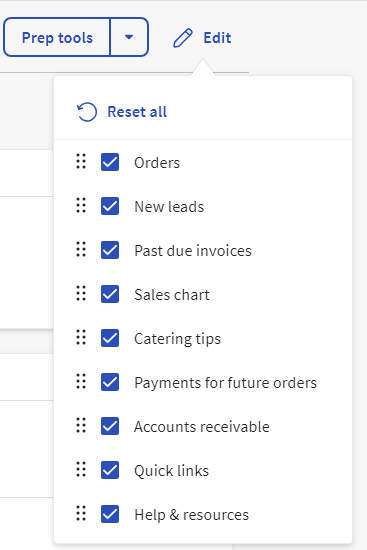
You can also customize the Homepage view to your liking by Selecting the Edit Icon and rearranging or removing any of the available options.
Toast Catering & Events Invoice Reminders
Once an invoice is sent to your guest, you'll see the option to Send reminder at the top of the invoice details page. This can be done at any time to send another email to your guest with their invoice details.

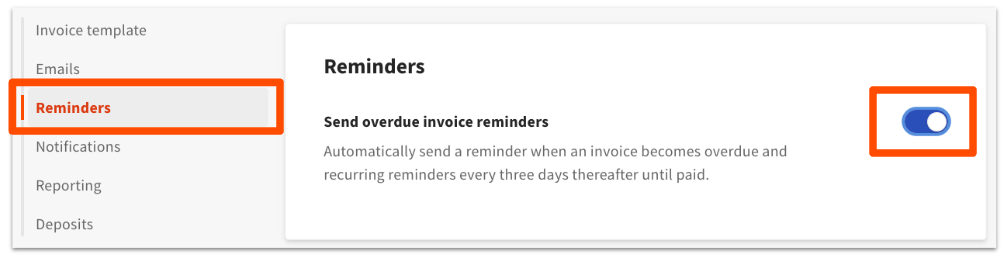
If you'd like for this to happen automatically, follow the steps below:
- Navigate to the Settings page from the Catering & events left-hand navigation.
- Scroll down to the Notifications section and toggle Send overdue invoice reminders to on.
- Save your changes.
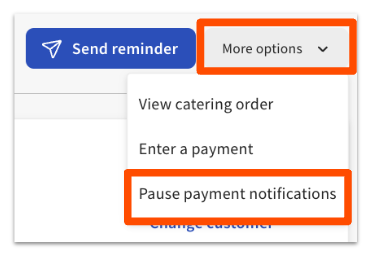
Now, when you're on the invoice details page, you'll see the option to Pause payment notifications (or unpause them) on the More options drop-down on the top of the page.
Best Practices for Taking Toast Catering & Events Payments
Catering and event transactions often happen over the phone. Toast provides strong encryption and meets PCI compliance standards to protect stored data from breaches, but review this list of considerations and best practices to minimize fraud risks:
- When manually keying in credit card information on your Toast device, enter the credit card number, expiration date, CVV, and billing ZIP code.
- Toast utilizes an Address Verification Service (AVS) to compare the ZIP code entered with the one on file for the credit card. AVS verification is not immediate, but it will provide useful documentation in case of a later dispute.
- If no ZIP code is entered, the transaction could be placed into a more expensive fee category.
- Avoid storing your guest's payment data outside of Toast in case of a breach.
- Be cautious with transaction that have multiple card denials. They are more likely to result in chargebacks if a card is eventually authorized.
- If you suspect fraud, considers asking for a photo ID that matches the name on the credit card.
- Toast cannot block or identify any specific credit card for fraud, so if you have concerns about a particular card, contact the card issuer directly.
Toast Catering & Events Calendar View
In Toast’s Catering & Events module, the calendar view allows you to view all of your upcoming and past events, as well as your leads, so you can keep track of your catering schedule and know which events your staff needs to plan for.
- In Toast Web, select Catering & Events from the left navigation menu. This will bring you to your Toast Catering and Events homepage.
- Note: Catering & Events will only display in your Toast Web navigation bar if you have already purchased this product.
- Select Calendar from the navigation options on the left side of the Toast Catering & Events homepage.
- Adjust your calendar view as desired. There are a variety of filters you can select to customize your calendar view.
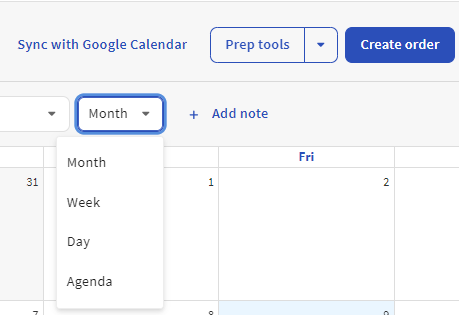
- Using this drop-down on the top right, you can view a monthly, weekly, daily, or agenda-style calendar.
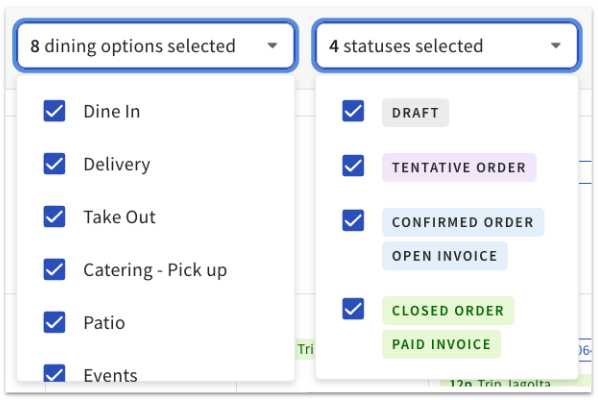
- You can filter this calendar by dining option or order status if you’d like to, for example, remove all events that are in draft.
- The dining options listed here are added when creating orders. These can be named whatever you’d like and could be a way to filter by specific event type. For example, if you create a Wedding dining option, you’d be able to filter by weddings here.
- You can filter this calendar by dining option or order status if you’d like to, for example, remove all events that are in draft.
- The dining options listed here are added when creating orders. These can be named whatever you’d like and could be a way to filter by specific event type. For example, if you create a Wedding dining option, you’d be able to filter by weddings here.
- Using this drop-down on the top right, you can view a monthly, weekly, daily, or agenda-style calendar.
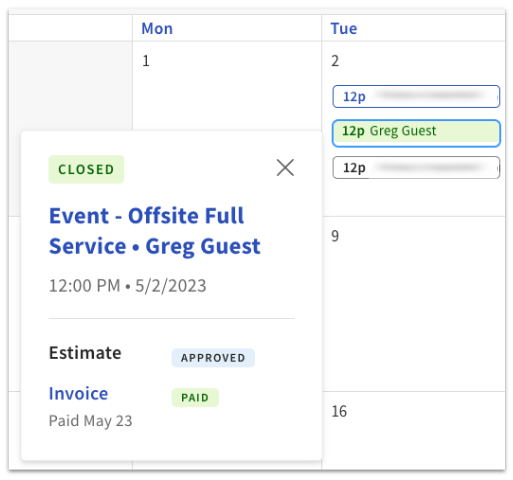
- Selecting an event will display more info, such as the order status, the start time, and the invoice and deposit statuses.
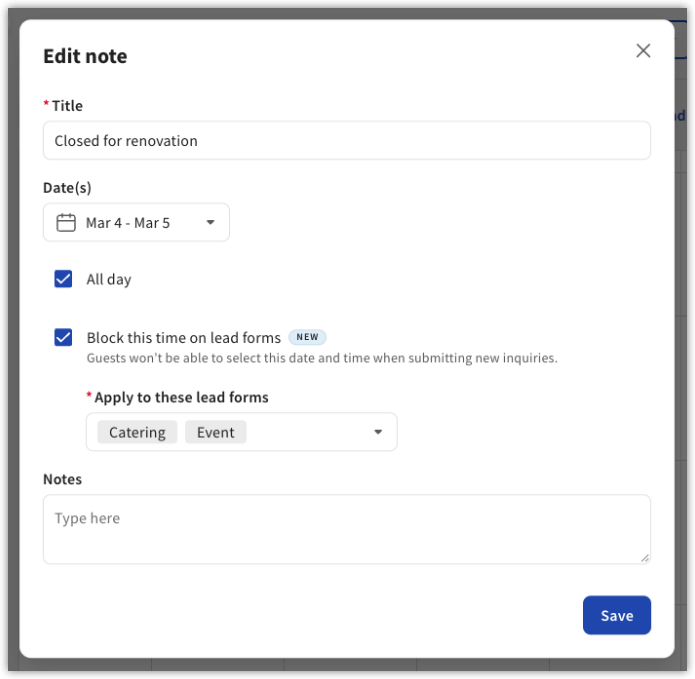
- To block a date or time range from your lead forms — for example, for a holiday or renovation — select + Add in the top right of the calendar to create a note.
- Enter a Title for the note (for example, "Closed for renovation") and select the Date(s) to block.
- Check All day if it applies to the whole day.
- Check Block this time on lead forms. Guests won't be able to select this date and time when submitting new inquiries.
- Under Apply to these lead forms, select which order types (for example, Catering, Event) the block applies to.
- Add any internal Notes, then select Save.
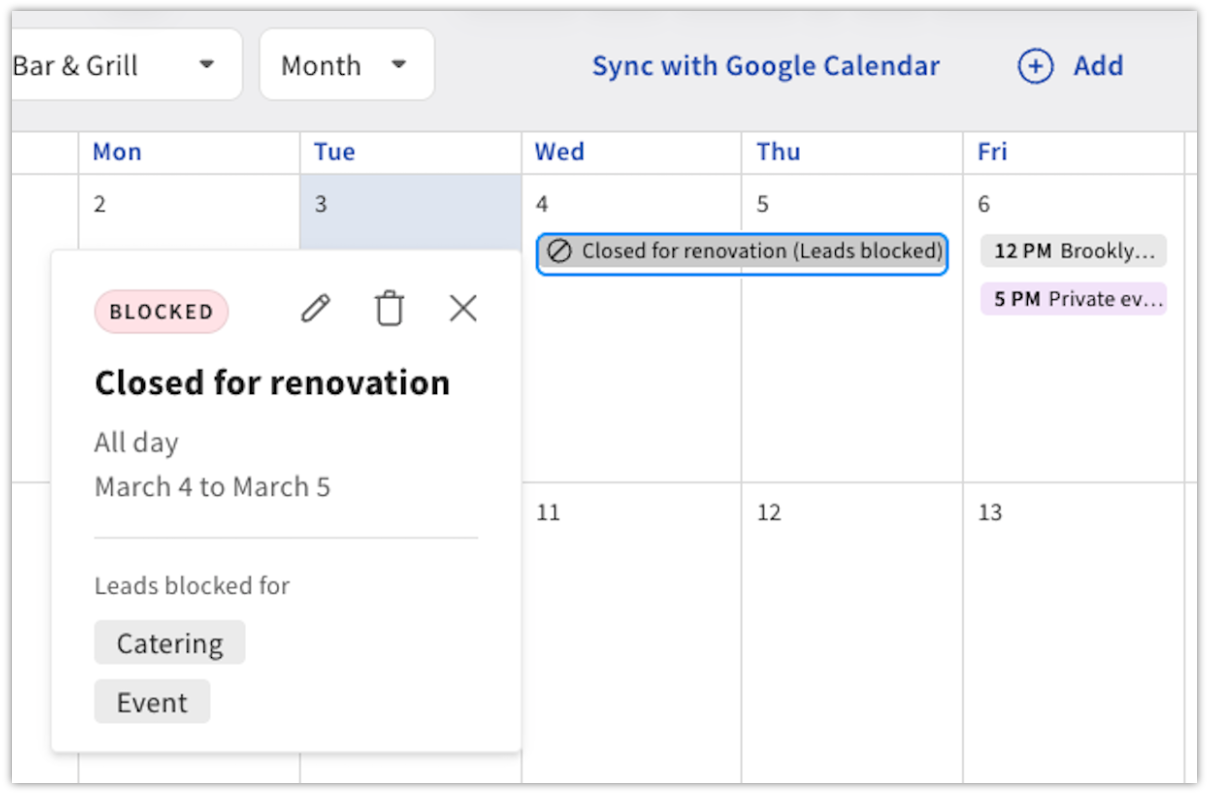
- The blocked date shows a BLOCKED badge on the calendar, and the note displays with a no-entry icon (for example, "Closed for renovation (Leads blocked)").
Sync With Google Calendar With Toast Catering & Events
Allow access for Toast to add events to your calendar. To set this up:
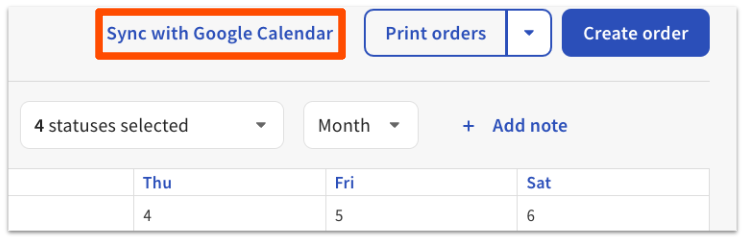
- Select Sync with Google Calendar.
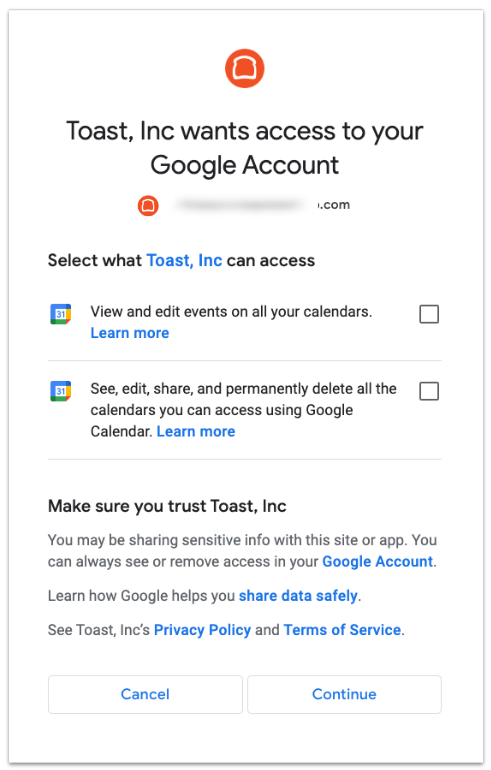
- In the pop-up window, select the Google account you’d like to sync to.
- Allow Toast access to write events on your calendar.
- Success! It may take up to 30 minutes for all of your events to be added to Google Calendar.
Note: Notes added to the Toast Catering & Events calendar will sync to Google Calendar. This sync is NOT bidirectional. Changes made to Toast will sync to Google Calendar, but changes made to Google Calendar will not sync to Toast.
You can disconnect your Google Calendar at any time by selecting the Settings button on the Calendar page in the Toast Catering & Events module.
Catering and Events Reporting
The Toast Catering & Events module offers printable reports that include specific information about your upcoming and past orders. To learn more, see this Support Center article: Catering & Events Reporting.
Enable Third-Party Ordering Partners to Handle Catering Orders Delivery
We added a new delivery option for orders that don’t require setup or white-glove service. Now you can enable seamless delivery via DoorDash Drive or Uber Direct for drop-off-friendly catering like sandwich or bagel orders. Toast Delivery Services® (TDS) Delivery Drivers can be dispatched manually on Catering Online Orders, or on manually created catering orders in Toast Web.
| To use this feature, you need Toast Catering & Events and Toast Delivery Services®. This functionality applies to catering orders only. Invoices are not supported. You must also configure your online ordering settings to enable TDS for third-party ordering partners such as DoorDash Drive and Uber Direct. To start using this feature, follow the steps indicated below. To learn more about TDS, check out this Support Center article: Get Started With Toast Delivery Services® |
Enable Toast Delivery Services® for Third-Party Ordering Partners for Catering & Events
To enable TDS for third-party ordering partners, follow these steps:
- Navigate to Catering & events > Online Ordering > Delivery setup.
- Under the How will your orders be delivered? section, select Toast Delivery Services (DoorDash or Uber Eats only).
- From the pop-up window, select Next.
- Review and acknowledge the Toast Delivery Services Terms & Conditions.
- Once reviewed, select the Finish setup button.
- Save and publish your changes.
Once TDS is enabled, you can choose to have TDS on for all catering online orders, and then manually dispatch any manually created orders as desired, or have TDS OFF for all catering online orders, and manually dispatch both catering online ordering and manually created orders as desired. To turn on the ability to manually dispatch catering orders:
- Navigate to Catering & events > Settings > Toast Delivery Services.
- Toggle the Catering Orders setting to the on position.
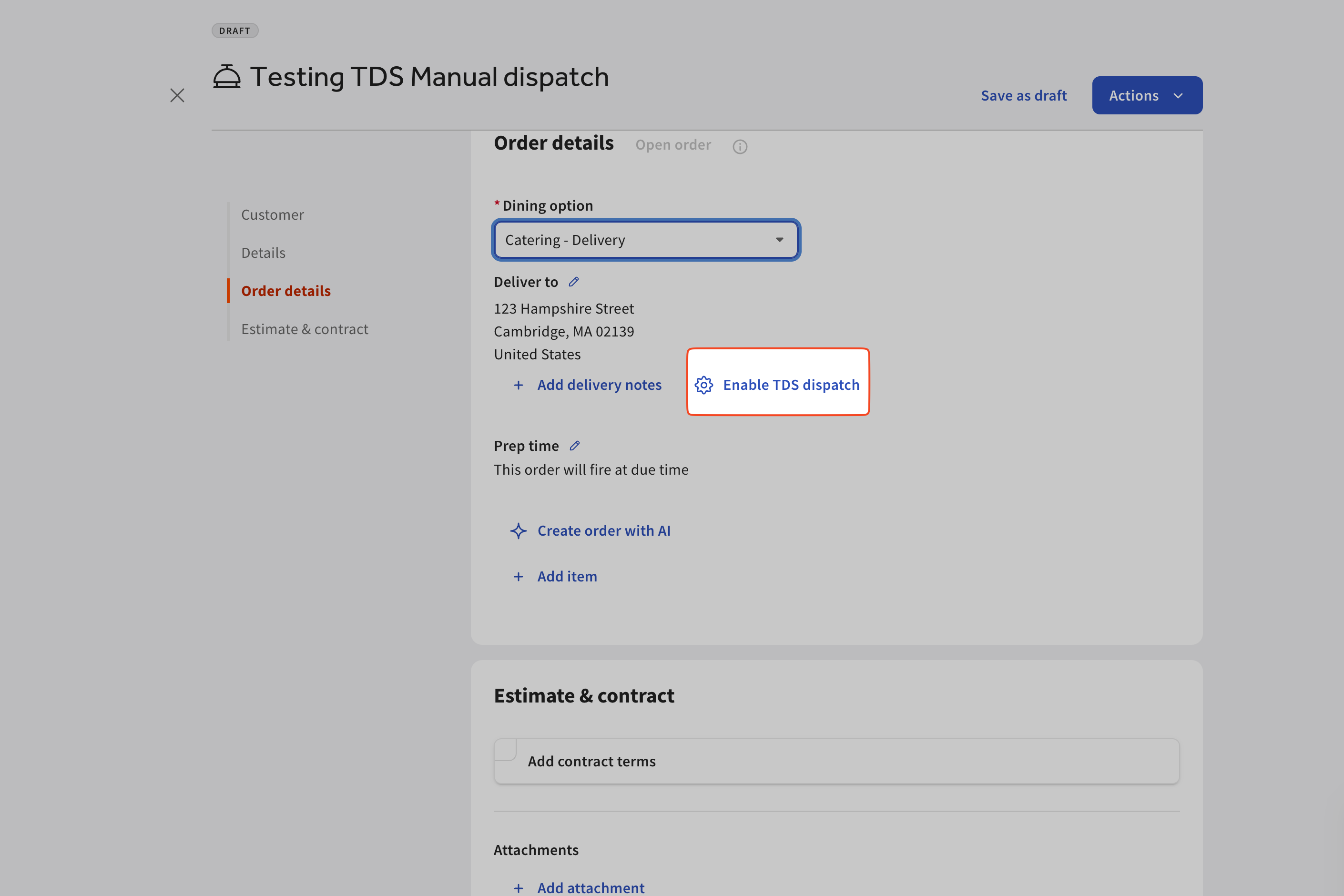
- The ability to manually dispatch will be in Toast Web on the order itself, as seen in the picture below.
- The ability to manually dispatch will be in Toast Web on the order itself, as seen in the picture below.
Additional Resources for Toast Catering & Events
- Get Started With Toast Catering & Events
- Get Help With Toast Catering & Events
- Catering & Events Reporting